
HP 15-ac123TX
HP 15-ac123TX Laptop User Manual
Model: 15-ac123TX
Zavedení
This manual provides essential information for setting up, operating, maintaining, and troubleshooting your HP 15-ac123TX laptop. Please read this manual thoroughly before using your device to ensure optimal performance and longevity.
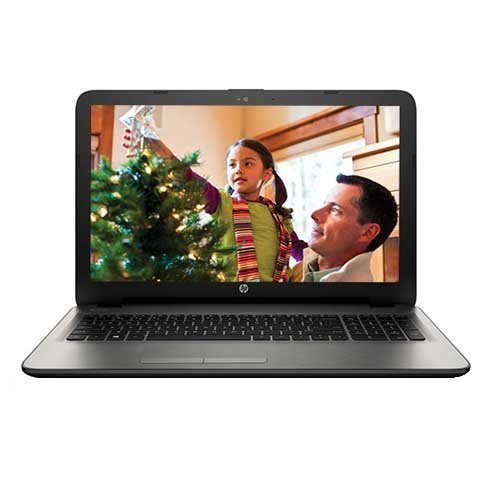
Obrázek 1: HP 15-ac123TX Laptop. This image displays the laptop in an open position, showcasing its 15.6-inch screen, keyboard, and touchpad. The screen shows a family scene, indicating its display capabilities.
Průvodce nastavením
- Rozbalení: Carefully remove the laptop and all accessories from the packaging. Verify that all components are present: laptop, power adapter, and documentation.
- Připojte napájení: Zapojte napájecí adaptér do napájecího portu notebooku a poté do zásuvky ve zdi. Před prvním použitím doporučujeme baterii plně nabít.
- Počáteční spuštění: Open the laptop lid and press the power button. The laptop will guide you through the initial Windows 10 setup process, including language selection, network connection, and user account creation.
- Instalace softwaru: Follow on-screen prompts to complete the operating system setup. Install any necessary updates or additional software as required.
Návod k obsluze
Základní operace
- Zapnutí/vypnutí: Stisknutím tlačítka napájení zapněte počítač. Chcete-li počítač vypnout, klikněte na tlačítko Start, poté na Napájení a vyberte možnost „Vypnout“.
- Režim spánku: Close the lid or select "Sleep" from the Power menu to enter sleep mode.
- Klávesnice a touchpad: Utilize the full-size textured island style keyboard and the touchpad with Windows 10 Multi-touch gesture support for navigation and input.
Konektivita
- Wi-Fi: Connect to wireless networks via the built-in 802.11bgn Wi-Fi. Access network settings through the Windows 10 taskbar.
- Bluetooth: Pair Bluetooth devices such as headphones or mice through Windows 10 Bluetooth settings.
- USB porty: The laptop features 2 USB 2.0 ports and 1 USB 3.0 port for connecting peripherals.
- HDMI: Connect to external displays using the HDMI port.
- Ethernet: Use the Ethernet port for wired network connections.
- Optická mechanika: The integrated DVD-RW drive supports reading and writing CDs and DVDs.
- Čtečka paměťových karet: Insert Secure Digital (SD) cards into the card reader slot for data transfer.
Údržba
- Čištění: K čištění obrazovky a vnějšího povrchu používejte měkký hadřík, který nepouští vlákna. Vyhněte se agresivním chemikáliím.
- Aktualizace softwaru: Pravidelně kontrolujte a instalujte aktualizace systému Windows a ovladačů, abyste zajistili stabilitu a zabezpečení systému.
- Péče o baterie: To prolong battery life, avoid extreme temperatures and allow the battery to discharge periodically before recharging.
- Skladování: Pokud notebook nepoužíváte, uchovávejte jej na chladném a suchém místě.
Odstraňování problémů
| Problém | Možné řešení |
|---|---|
| Notebook se nezapne. | Ensure the power adapter is securely connected and the outlet is functional. Check battery charge level. |
| Žádné připojení Wi-Fi. | Verify Wi-Fi is enabled in Windows settings. Restart the router and the laptop. |
| Pomalý výkon. | Close unnecessary applications. Check for background processes. Ensure sufficient free disk space. Consider upgrading RAM if frequently running demanding applications. |
| Screen issues (e.g., no display). | Connect to an external monitor to check if the issue is with the laptop screen. Restart the laptop. |
Další pomoc získáte na stránkách podpory HP. webnebo kontaktujte zákaznický servis.
Specifikace
- Model: HP 15-ac123TX
- Procesor: Intel Core i5-5200U (2.2 GHz)
- BERAN: 4 GB DDR3L (Expandable to 8 GB)
- Skladování: 1 TB 5400 RPM Serial ATA HDD
- Grafika: AMD Radeon R5 Series M330 (2GB Dedicated)
- Zobrazit: 15.6-inch, 1366 x 768 resolution (HD)
- Operační systém: Windows 10 (64bitový)
- Webvačka: HP TrueVision HD Webcam (1280 x 720 @ 30 fps)
- Zvuk: DTS Studio Sound, Dual Speakers
- Konektivita: Wi-Fi (802.11bgn), Bluetooth, 2x USB 2.0, 1x USB 3.0, 1x HDMI, 1x Ethernet, 1x Audio-out
- Optická mechanika: DVD-RW
- Čtečka paměťových karet: Secure Digital karty
- Životnost baterie: Approximately 5 hours (average)
- Rozměry: 10 x 15.1 x 1 cm (Product), 2.19 kg (Item Weight)
Záruka a podpora
Tento produkt je dodáván s a 1letá záruka výrobce from the date of purchase. For warranty claims or technical support, please contact HP customer service or visit the official HP support webwebu. Uschovejte si účtenku jako doklad o koupi.
Důležité: Any unauthorized modifications or repairs may void your warranty.
Pro více informací navštivte: Podpora HP
Ask a question about this manual
Ask about setup, troubleshooting, compatibility, parts, safety, or missing instructions. Manuals+ will review the question and use this page’s manual context to help answer it.