
AUO M170ETN01.1
Uživatelská příručka k LCD panelu AUO M170ETN01.1
Model: M170ETN01.1 | Brand: AUO
Zavedení
This manual provides essential information for the proper installation, operation, and maintenance of your AUO M170ETN01.1 LCD Panel. Please read this manual thoroughly before use to ensure optimal performance and longevity of the product.
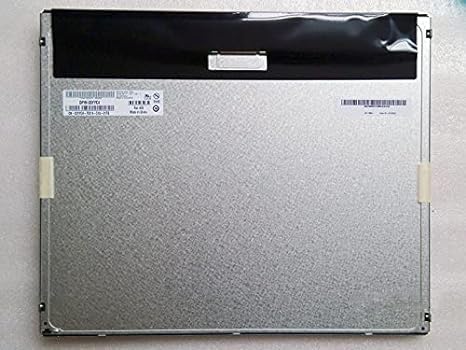
Obrázek 1: Zadní view of the AUO M170ETN01.1 LCD Panel. This image displays the metallic back panel, which houses the internal components and connection interfaces. The top section is covered by a black protective material, and a label with product information is visible on the left side.
Vlastnosti produktu
- Velikost displeje: 17 palců
- Rezoluce: High resolution 1280x1024 (SXGA)
- Jas: 250 nitů
- Viewúhel: Široký viewing angle 85/85/80/80 (Typ.)(CR≥10)
- Kontrastní poměr: High contrast 1000:1
- Barevná hloubka: 16.7 milionu barev
- Povrch: Anti-glare, Glossy screen surface
- Rozhraní: rozhraní LVDS
- Includes LED driver
- Top Grade A+, brand new, 100% original panel
Nastavení a instalace
This section outlines the steps for safely setting up and installing the AUO M170ETN01.1 LCD Panel into a compatible desktop monitor system.
- Příprava: Ensure the power to the host system (e.g., desktop monitor housing) is disconnected. Work on a clean, static-free surface.
- Zacházejte opatrně: The LCD panel is a delicate component. Avoid touching the display surface directly. Hold the panel by its edges.
- Montáž: Carefully align the AUO M170ETN01.1 panel with the mounting points within the monitor casing. Secure it using the appropriate screws, ensuring not to overtighten.
- Připojení kabelu LVDS: Locate the LVDS (Low-Voltage Differential Signaling) connector on the back of the LCD panel. Gently connect the LVDS cable from the monitor's main board to this connector, ensuring it is fully seated and latched if applicable.
- Connect LED Driver/Backlight Cable: Connect the backlight cable from the monitor's power supply or inverter board to the LED driver input on the LCD panel. Verify the correct polarity if not keyed.
- Zabezpečená připojení: Double-check all cable connections to ensure they are firm and properly aligned.
- Opětovná montáž: Carefully reassemble the monitor casing, ensuring no cables are pinched.
Poznámka: Professional installation is recommended for users unfamiliar with monitor component replacement.
Návod k obsluze
Once installed, the AUO M170ETN01.1 LCD Panel operates as part of your desktop monitor system. Its functionality is primarily controlled by the monitor's internal electronics and the connected computer's display settings.
- Zapnutí: Connect the monitor's power cable and turn on the monitor using its power button.
- Výstup displeje: Ensure your computer is connected to the monitor via a compatible video cable (e.g., VGA, DVI, HDMI, DisplayPort, depending on your monitor's inputs).
- Nastavení rozlišení: For optimal display quality, set your computer's display resolution to 1280 x 1024 pixelů. This is the native resolution of the M170ETN01.1 panel.
- Brightness/Contrast Adjustment: Use the monitor's on-screen display (OSD) menu to adjust brightness, contrast, and other image settings to your preference.
- Viewúhel: The panel offers wide viewing angles. Adjust your seating position for the best visual experience.
Údržba
Proper maintenance helps extend the lifespan and maintain the performance of your LCD panel.
- Čištění obrazovky:
- Před čištěním monitor vypněte a odpojte ze sítě.
- Použijte měkký hadřík bez žmolků (např. hadřík z mikrovlákna) lehce navlhčenýampened with water or a specialized LCD screen cleaner.
- Jemně otřete povrch obrazovky. Netlačte příliš silně.
- Do not use harsh chemicals, alcohol, ammonia-based cleaners, or abrasive materials, as these can damage the anti-glare coating.
- Odstranění prachu: Pravidelně otírejte prach z monitoruasing and vents to prevent dust buildup, which can affect cooling.
- Vyhněte se přímému slunečnímu záření: Do not expose the monitor to direct sunlight or excessive heat, as this can degrade the LCD panel over time.
- Řízení spotřeby: Utilize your computer's power management settings to put the monitor into sleep mode when not in use, conserving energy and extending backlight life.
Odstraňování problémů
This section addresses common issues you might encounter with the AUO M170ETN01.1 LCD Panel.
| Problém | Možná příčina | Řešení |
|---|---|---|
| Na obrazovce není žádný obraz |
|
|
| Obraz je rozmazaný nebo zkreslený |
|
|
| Mrtvé pixely nebo zaseknuté pixely |
|
|
If the problem persists after attempting these solutions, please refer to the Support section or consult a qualified technician.
Specifikace
| Číslo modelu | M170ETN01.1 |
| Značka | AUO |
| Velikost obrazovky | 17 palce |
| Rezoluce | 1280 x 1024 Pixels (SXGA) |
| Poměr stran | 5:4 |
| Jas obrázku | 250 lm (nitů) |
| Kontrastní poměr | 1000:1 |
| Barevná hloubka | 16.7 milionu |
| Viewúhel | 85/85/80/80 (Typ.)(CR≥10) |
| Povrch obrazovky | Anti-glare, Glossy |
| Rozhraní | LVDS |
| Rozměry produktu | 14.11 x 11.67 x 0.41 palce |
| Hmotnost položky | 2.79 libry |
Záruka a podpora
The AUO M170ETN01.1 LCD Panel is provided as a component. Warranty coverage typically depends on the seller or the final product (e.g., desktop monitor) into which it is integrated.
- Informace o záruce: Please refer to the warranty policy provided by your point of purchase or the manufacturer of the complete monitor system. The product is described as "Top Grade A+, brand new, 100% original."
- Technická podpora: For technical assistance regarding the integration or performance of this LCD panel, it is recommended to contact the manufacturer of the device it is installed in, or a qualified computer hardware technician.
- Produkt ASIN: B014IUWX7K (for reference when contacting seller/support)
Ask a question about this manual
Ask about setup, troubleshooting, compatibility, parts, safety, or missing instructions. Manuals+ will review the question and use this page’s manual context to help answer it.