
Zavedení
This manual provides detailed instructions for the Inateck Bluetooth 4.1 Sport Headset, Model P20 (BH1001). Please read this guide thoroughly before using the product to ensure proper operation and to maximize your listening experience. This headset is designed for active lifestyles, offering wireless audio with a secure fit and integrated microphone.
1. Nastavení
1.1 Obsah balení
Ověřte, zda jsou v balení přítomny všechny položky:
- Inateck Bluetooth Sport Headset (P20 / BH1001)
- USB nabíjecí kabel
- Multiple pairs of silicone ear tips (various sizes)
- Pouzdro na přenášení
- Uživatelská příručka (tento dokument)
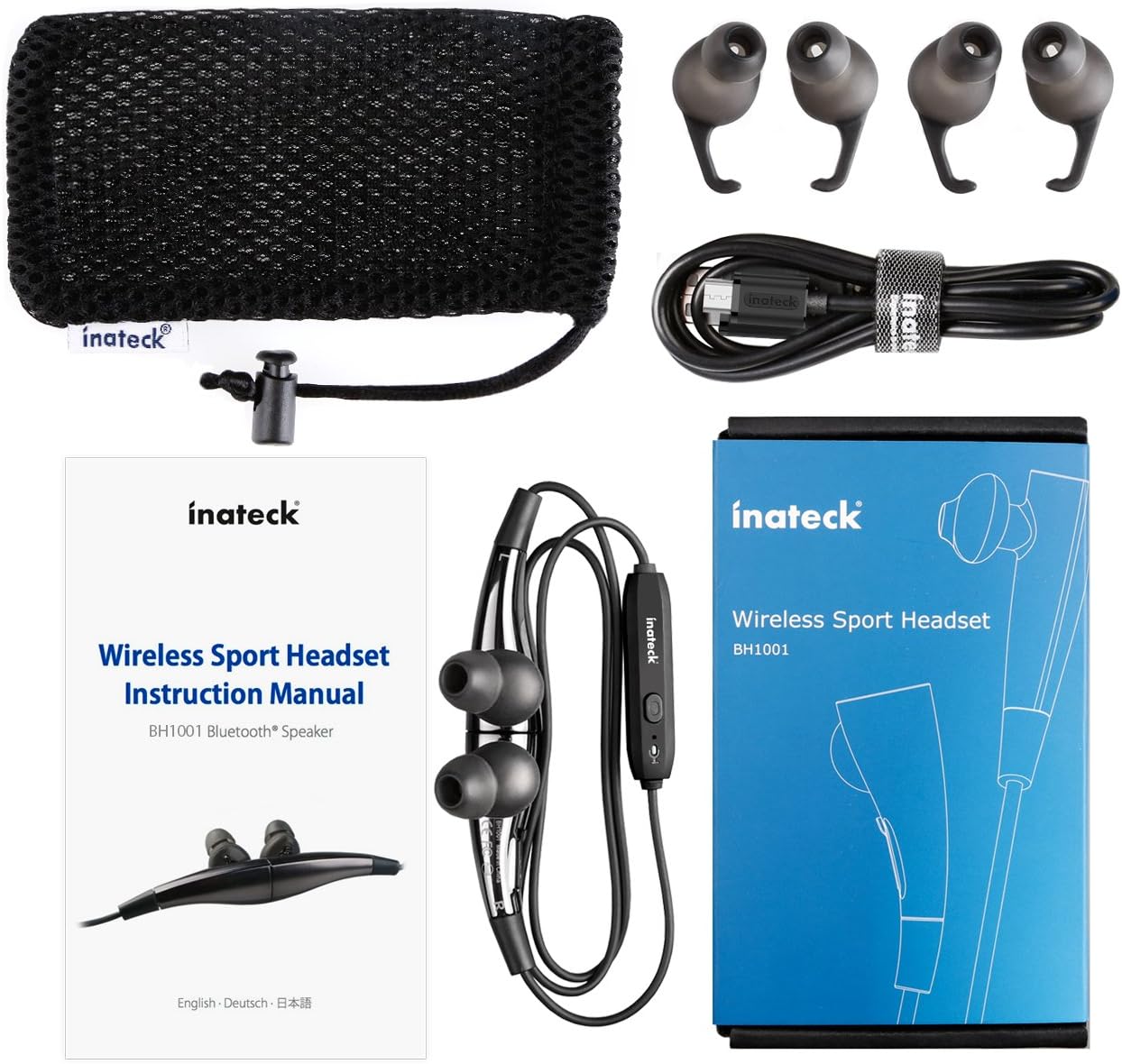
Obrázek 1.1: Contents of the Inateck Bluetooth Sport Headset package.
1.2 Nabíjení headsetu
Before first use, fully charge the headset. A full charge takes approximately 3 hours and provides at least 8 hours of music playback.
- Locate the Micro USB charging port on the headset.
- Connect the small end of the provided USB charging cable to the headset's Micro USB port.
- Připojte větší konec kabelu USB ke zdroji napájení USB (např. k portu USB počítače, adaptéru USB do zásuvky).
- The status indicator light will illuminate during charging. It will change color or turn off once charging is complete.

Obrázek 1.2: Charging the Inateck Bluetooth Sport Headset via Micro USB.
1.3 Párování se zařízením Bluetooth
To connect your headset to a smartphone or other Bluetooth-enabled device:
- Zkontrolujte, zda je náhlavní souprava vypnutá.
- Press and hold the Multifunction Key (MFB) on the inline control unit for approximately 5-7 seconds until the status indicator light flashes red and blue alternately. This indicates pairing mode.
- Na zařízení Bluetooth povolte Bluetooth a vyhledejte nová zařízení.
- Select "Inateck BH1001" or "Inateck P20" from the list of available devices.
- Once paired, the status indicator light on the headset will flash blue slowly, and you may hear an audible confirmation.
- The headset will automatically attempt to reconnect to the last paired device when turned on.

Obrázek 1.3: Inateck Headset paired with a mobile device for music playback.
2. Návod k obsluze
2.1 Ovládání náhlavní soupravy
The inline control unit provides easy access to various functions:

Obrázek 2.1: Nadview of the Inateck Headset control unit.
- Multifunction Key (MFB):
- Stisknutí a podržení (5–7 s): Zapnutí/vypnutí, vstup do režimu párování
- Krátké stisknutí: Přehrávání/Pozastavení hudby, Přijetí/Ukončení hovoru
- Long press (during incoming call): Reject call
- Zvýšení hlasitosti (+) / Další skladba:
- Krátké stisknutí: Zvýšení hlasitosti
- Dlouhé stisknutí: Přechod na další skladbu
- Snížení hlasitosti (-) / Předchozí skladba:
- Krátké stisknutí: Snížení hlasitosti
- Long press: Go to previous track
- Micro USB port: Pro nabíjení náhlavní soupravy.
- Indikátor stavu: Zobrazuje stav napájení, párování a nabíjení.
- Mikrofon: Pro hands-free hovory.
2.2 Nošení headsetu
Select the ear tips that provide the most comfortable and secure fit for your ears. The headset is designed to be worn with the cable behind your neck, ensuring stability during physical activity.

Obrázek 2.2: Proper wearing of the Inateck Sport Headset for active use.
2.3 Magnetic Earbuds Feature
The earbuds feature integrated magnets. When not in use, you can connect the two earbuds together, forming a necklace around your neck. This action automatically pauses music playback and prevents the headset from falling off.

Obrázek 2.3: Magnetic earbuds feature for secure wearing around the neck.

Obrázek 2.4: Headset worn as a necklace using the magnetic feature.
3. Údržba
- Čištění: Otřete sluchátka s mikrofonem měkkým, suchým hadříkem. Nepoužívejte abrazivní čisticí prostředky ani rozpouštědla.
- Tipy do uší: Regularly remove and clean the silicone ear tips with mild soap and water. Ensure they are completely dry before reattaching.
- Skladování: When not in use, store the headset in the provided carrying pouch to protect it from dust and damage. Avoid extreme temperatures.
- Voděodolnost: The headset is designed to be water-resistant for sports and exercise (e.g., sweat, light rain). Do not submerge it in water or expose it to heavy rain.
4. Řešení problémů
4.1 Nelze zapnout
Ensure the headset is fully charged. Connect it to a power source using the USB cable and allow it to charge for at least 30 minutes before attempting to power on again.
4.2 Nelze spárovat se zařízením
- Ensure the headset is in pairing mode (status indicator flashing red and blue alternately).
- Ujistěte se, že je na vašem zařízení povoleno rozhraní Bluetooth a že je v dosahu (obvykle 10 metrů nebo 33 stop).
- Vypněte a zapněte funkci Bluetooth na vašem zařízení.
- If previously paired, try "forgetting" or "unpairing" the headset from your device's Bluetooth settings and then re-pair.
- Ujistěte se, že žádná jiná zařízení Bluetooth neruší připojení.
4.3 Žádný zvuk nebo špatná kvalita zvuku
- Zkontrolujte úroveň hlasitosti na sluchátkách i na připojeném zařízení.
- Ensure the headset is properly paired and connected to your device.
- Move closer to your device to reduce potential interference or range issues.
- Ensure the ear tips are correctly seated in your ears for optimal sound delivery.
- Reboot both the headset and your connected device.
4.4 Přerušované připojení
- Ensure there are no physical obstructions between the headset and your device.
- Avoid placing your device in areas where the signal might be blocked (e.g., deep pockets, behind thick walls).
- Minimalizujte rušení od jiných bezdrátových zařízení (Wi-Fi routerů, dalších zařízení Bluetooth).
- Keep the headset and your device within the recommended Bluetooth range.
5. Specifikace
| Značka | Inateck |
| Název modelu | P20 |
| Číslo modelu | BH1001 |
| Technologie připojení | Bluetooth 4.1 |
| Form Factor | In-Ear |
| Umístění uší | Intra-aural |
| Jack pro sluchátka | USB (pro nabíjení) |
| Úroveň odolnosti proti vodě | Waterproof (suitable for sweat/light rain) |
| Speciální funkce | Sports and exercise, integrated microphone, magnetic earbuds |
| Hmotnost položky | 78 gramů |
| Typ ovládání | Volume Control, Multifunction Button |
| Materiál | Plast |
6. Informace o záruce
Inateck products typically come with a limited warranty. For specific warranty terms and conditions applicable to your Inateck Bluetooth Sport Headset, please refer to the warranty card included in your product packaging or visit the official Inateck webUschovejte si doklad o koupi pro případ reklamace.
7. Zákaznická podpora
If you encounter any issues not covered in this manual or require further assistance, please contact Inateck customer support. You can usually find contact information, FAQs, and additional resources on the official Inateck webmísto:
Webmísto: www.inateck.com
Please have your product model (P20 / BH1001) and purchase details ready when contacting support.