
Alpine IVA-W520E
Alpine IVA-W520E User Manual
Model: IVA-W520E
1. Úvod
The Alpine IVA-W520E is a full-featured 2DIN DVD player solution designed for in-car entertainment and media. It integrates advanced video and audio technologies, including a 7-inch LED touchscreen and a Burr-Brown 24-bit DAC, to deliver high-quality sound and clear images. This manual provides essential information for the proper installation, operation, and maintenance of your IVA-W520E unit.
2. Bezpečnostní informace
Please read all safety instructions carefully before installing or operating the unit. Failure to follow these instructions may result in injury or damage to the unit or vehicle.
- Doporučená profesionální instalace: Due to the complexity of car audio-visual systems, professional installation is highly recommended to ensure proper wiring and functionality.
- Zdroj napájení: Connect the unit only to a 12V DC negative ground power supply.
- Vyhněte se rozptylování: Do not operate the unit's controls or view video content while driving, as this can lead to accidents. Always pull over to a safe location before making adjustments.
- Větrání: Zajistěte dostatečné větrání kolem jednotky, abyste zabránili přehřátí. Neblokujte větrací otvory.
- Vlhkost a kapaliny: Keep the unit away from moisture and liquids. Do not expose it to rain or water.
- Čištění: K čištění používejte měkký, suchý hadřík. Nepoužívejte abrazivní čisticí prostředky ani rozpouštědla.
3. Obsah balení
Před zahájením instalace ověřte, zda jsou v balení přítomny všechny položky:
- Alpine IVA-W520E Head Unit
- Napájecí / reproduktorový svazek
- Montážní materiál (šrouby, konzoly)
- Oříznout kroužek
- Uživatelská příručka (tento dokument)
- Informace o záruce
4. Nastavení a instalace
4.1. Pokyny pro instalaci
Proper installation is crucial for optimal performance and safety. It is highly recommended to have the unit installed by a qualified professional.
- Odpojit baterii: Před zahájením jakýchkoli elektrických prací odpojte záporný pól baterie vozidla, abyste zabránili zkratu.
- Montáž: Securely mount the unit in the vehicle's double-DIN opening using the provided mounting brackets and screws. Ensure it is stable and does not obstruct any vehicle controls.
- Zapojení: Connect the power harness, speaker wires, and other input/output cables according to the wiring diagram provided in the separate installation guide. Pay close attention to ground connections.
- Antenna and External Devices: Connect the radio antenna and any external devices such as a reverse camera or external ampzáchranáři.
4.2. Počáteční nastavení
After installation, reconnect the battery and power on the unit for the first time.
- Výběr jazyka: Postupujte podle pokynů na obrazovce a vyberte preferovaný jazyk.
- Čas a datum: Set the correct time and date for accurate display.
- Nastavení zvuku: Adjust basic audio settings such as volume, balance, and fader.
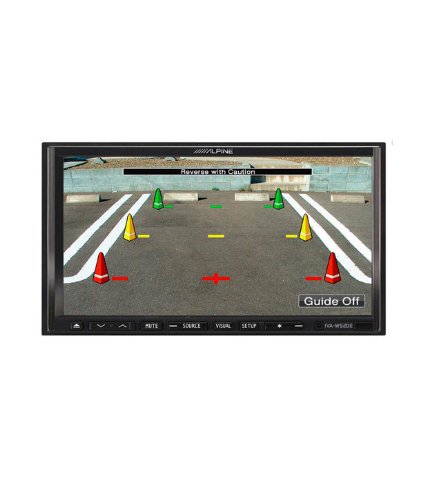
Obrázek 4.1: Přample of the IVA-W520E displaying a reverse camera feed, showing parking guidelines. This feature aids in safe vehicle maneuvering.
5. Obsluha jednotky
5.1. Touchscreen and Button Controls
The IVA-W520E features a responsive 7-inch LED touchscreen for primary control, supplemented by physical buttons for quick access to common functions.
- Dotyková obrazovka: Navigate menus, select sources, and control playback by touching the screen.
- Ovládání hlasitosti: Use the dedicated volume buttons or on-screen controls to adjust audio levels.
- Tlačítko zdroje: Press to cycle through available audio/video sources (Radio, DVD, USB, iPod, AUX, Bluetooth).
- Tlačítko ztlumení: Temporarily mutes the audio output.
- Tlačítko nastavení: Vstupte do nabídky nastavení systému.
5.2. Přehrávání zvuku
The unit supports various audio formats and sources, enhanced by its Burr-Brown 24-bit DAC for superior sound quality.
- USB audio: Připojte zařízení USB obsahující audio files. The unit will display track information and allow navigation through folders.
- iPod/iPhone Connectivity: Connect your iPod or iPhone for direct audio playback and control.
- Přehrávání DVD/CD: Insert a DVD or CD into the disc slot for audio or video playback.
- Rádiový tuner: Přístup k rozhlasovým stanicím AM/FM.
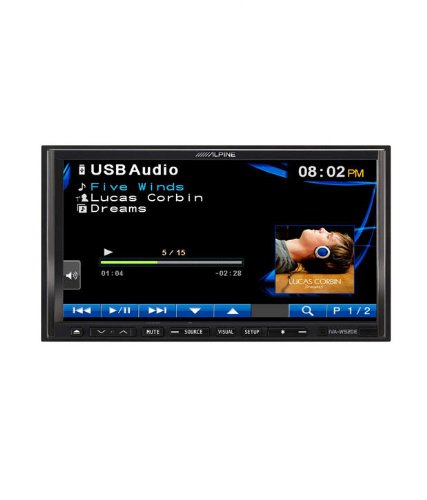
Figure 5.1: The IVA-W520E displaying the USB Audio interface, showing current track, artist, and playback controls. This allows for easy navigation of digital music files.
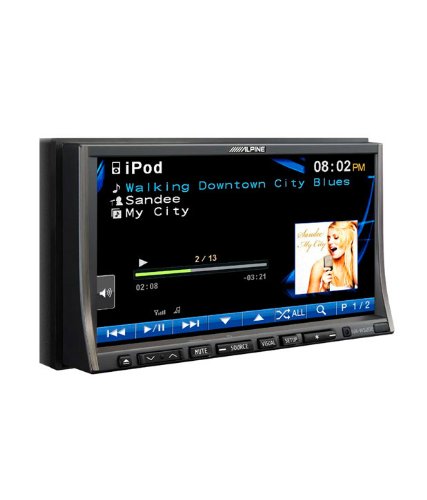
Figure 5.2: The IVA-W520E displaying the iPod interface, showing a list of songs and album art. This demonstrates seamless integration with Apple devices for music playback.
5.3. Přehrávání videa
The 7-inch LED screen provides enhanced image quality with higher resolution, better contrast, and improved color reproduction compared to standard LCD screens.
- DVD Video: Insert a video DVD for playback. Ensure the parking brake safety wire is correctly connected for video to display while the vehicle is stationary.
- External Video Input: The unit supports external video sources, such as a reverse camera or other video devices.
5.4. Připojení Bluetooth
The IVA-W520E is upgradable for Bluetooth hands-free system functionality, allowing for safe and convenient communication while driving.
- Párování: Refer to the separate Bluetooth module manual (if applicable) for pairing instructions with your mobile phone.
- Hands-free volání: Make and receive calls directly through the unit.
- Streamování zvuku: Streamujte zvuk ze zařízení s podporou Bluetooth.
5.5. Navigation System (Upgradable)
The unit is designed to be upgradable with a navigation system. Consult your Alpine dealer for compatible navigation modules and installation.
6. Údržba
Regular maintenance helps ensure the longevity and optimal performance of your Alpine IVA-W520E.
- Čištění obrazovky: Gently wipe the touchscreen with a soft, lint-free cloth. For stubborn smudges, slightly dampen the cloth with water or a screen-specific cleaner. Do not spray cleaner directly onto the screen.
- Slot pro disk: Keep the disc slot free of dust and debris. Avoid inserting bent, scratched, or irregular discs.
- Generální úklid: Use a soft, dry cloth to wipe the unit's exterior. Avoid harsh chemicals or abrasive materials.
7. Řešení problémů
If you encounter issues with your IVA-W520E, refer to the following common problems and solutions:
| Problém | Možná příčina | Řešení |
|---|---|---|
| Žádná síla | Blown fuse, incorrect wiring, loose connection. | Check vehicle fuses and unit's fuse. Verify power and ground wiring connections. Ensure battery is connected. |
| Žádný zvuk | Volume too low, mute activated, speaker wiring issue, incorrect source selected. | Zvyšte hlasitost. Vypněte ztlumení. Zkontrolujte připojení reproduktorů. Vyberte správný zdroj zvuku. |
| Chyba disku | Znečištěný, poškrábaný nebo nekompatibilní disk. | Clean the disc. Try a different, known-good disc. Ensure disc format is supported. |
| Video Not Displaying (while driving) | Parking brake safety wire not connected or incorrectly connected. | This is a safety feature. Video playback is disabled while the vehicle is in motion. Ensure the parking brake wire is correctly connected to the vehicle's parking brake circuit. |
| Problémy s párováním Bluetooth | Bluetooth module not connected, phone not in pairing mode, interference. | Ensure optional Bluetooth module is correctly installed. Put phone in pairing mode. Move closer to the unit. |
If the problem persists after trying these solutions, please contact your authorized Alpine dealer or customer support.
8. Specifikace
Key technical specifications for the Alpine IVA-W520E:
- Model: IVA-W520E
- Velikost displeje: 7 palce (18 cm)
- Typ displeje: LED LCD Touchscreen
- Rezoluce: 480 x 272 pixelů
- Audio DAC: Burr-Brown 24-bit
- Kompatibilní zařízení: Smartphone (via USB/iPod, Bluetooth upgradable)
- Speciální vlastnosti: Touchscreen, Bluetooth (upgradable)
- Režim výstupu zvuku: Reproduktor
- Výrobce: Vysokohorský
- První k dispozici: 20. srpna 2015
9. Záruka a podpora
For detailed warranty information, please refer to the warranty card included with your product package or visit the official Alpine webwebu. Uschovejte si účtenku jako doklad o koupi.
For technical support, service, or inquiries about compatible accessories and upgrades (such as navigation modules or Bluetooth kits), please contact your authorized Alpine dealer or visit the Alpine customer support portal online.
Alpský úředník Webmísto: www.alpine.com
Ask a question about this manual
Ask about setup, troubleshooting, compatibility, parts, safety, or missing instructions. Manuals+ will review the question and use this page’s manual context to help answer it.