
Zavedení
This manual provides essential instructions for the safe and efficient operation of your PowerWalker AVR 3000 SIV FR Automatic Voltage Regulator. This device is designed to protect your electronic equipment from voltage fluctuations, ensuring a stable power supply. Please read this manual thoroughly before installation and use.
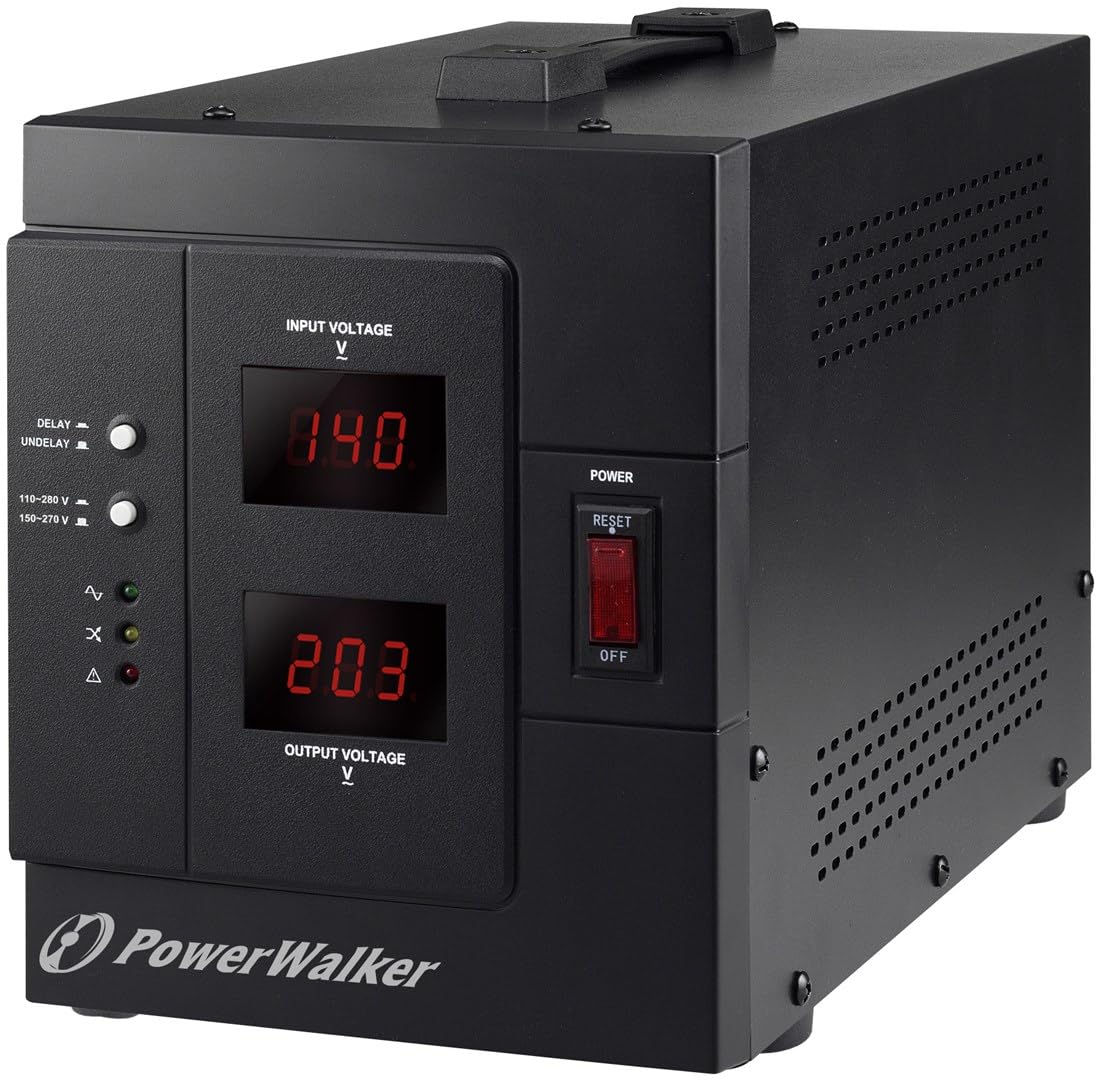
Obrázek: Přední strana view of the PowerWalker AVR 3000 SIV FR Automatic Voltage Regulator, showing the display and control panel.
Bezpečnostní pokyny
Dodržujte následující bezpečnostní opatření, abyste předešli zranění nebo poškození zařízení a připojeného vybavení:
- Pouze pro vnitřní použití: This device is intended for indoor use in a controlled environment. Do not expose it to rain, moisture, or direct sunlight.
- Správné uzemnění: Ensure the power outlet used is properly grounded. Do not remove the grounding prong from the power cord.
- Větrání: Do not block ventilation openings. Allow adequate space around the device for proper airflow to prevent overheating.
- Vyvarujte se přetížení: Do not connect equipment that exceeds the device's maximum output capacity (2400 Watts / 3000 VA).
- Žádné díly opravitelné uživatelem: Nepokoušejte se zařízení otevírat ani opravovat. Veškerý servis svěřte kvalifikovanému servisnímu personálu.
- Kapaliny a cizí předměty: Keep liquids and foreign objects away from the device.
- Nouzové odpojení: In an emergency, disconnect the device from the main power supply immediately.
Vlastnosti a komponenty produktu
Přední panel

Obrázek: Podrobný view of the front panel, highlighting the display, switches, and indicator LEDs.
- Vstupní objemtage Displej: Shows the current incoming AC voltage.
- Výstupní objemtage Displej: Shows the regulated AC voltage dodávané do připojených zařízení.
- Delay/Undelay Switch: Controls the output delay function. "DELAY" provides a time delay before output power is supplied, protecting equipment during power fluctuations. "UNDELAY" bypasses this delay.
- svtage Range Switch: Selects the operating input voltage range (e.g., 110-280 V or 150-270 V). Ensure this matches your local power supply.
- Stavové LED diody:
- Normální (zelená): Indicates stable output voltage.
- Overload (Yellow): Indicates connected load exceeds capacity.
- Fault (Red): Indicates an internal error or severe voltage problém.
- Vypínač: Zapíná nebo vypíná zařízení.
- Resetovací tlačítko: Used to reset the device after an overload or fault condition.
Zadní panel

Obrázek: Zadní view of the device, showing the power input and output sockets.
- Vstupní zásuvka: Connects the device to the main AC power supply using the provided power cord.
- Výstupní zásuvky: Connect your electronic equipment to these sockets for regulated power.
Nastavení
- Vybalte a zkontrolujte: Carefully remove the AVR from its packaging. Inspect for any shipping damage. If damage is found, do not use the device and contact your supplier.
- Umístění: Place the AVR on a flat, stable surface in a well-ventilated area, away from direct sunlight, heat sources, and moisture. Ensure at least 10 cm (4 inches) of clear space around all ventilation openings.
- Připojte vstupní napájení: Connect the supplied power cord to the AVR's Input Socket on the rear panel, then plug the other end into a properly grounded wall outlet.
- Vyberte Voltage Rozsah: On the front panel, set the Voltage Range Switch to match your local input voltage (e.g., 110-280 V or 150-270 V). Refer to your local power utility for exact specifications.
- Připojení zařízení: Plug your electronic devices into the Output Sockets on the rear panel of the AVR. Ensure the total power consumption of all connected devices does not exceed 2400 Watts.
- Počáteční zapnutí: Ensure all connected devices are turned off. Flip the Power Switch on the front panel to the "ON" position. The Input and Output Voltage displays will illuminate.
Návod k obsluze
- Zapnutí: After connecting the AVR and your devices, turn on the AVR using the Power Switch. The Input Voltage a Output Voltage displays will show the current readings. The "Normal" LED should illuminate.
- Understanding Displays:
- The Vstupní objemtage Displej shows the raw voltage coming from your wall outlet.
- The Výstupní objemtage Displej ukazuje svtage being supplied to your connected devices after regulation by the AVR. This value should remain stable around 230V.
- Delay/Undelay Function:
- Nastavte přepínač na ZPOŽDĚNÍ for a time delay (typically 6 seconds) before the output power is supplied. This protects sensitive equipment from rapid power cycling or unstable voltage immediately after a power restoration.
- Nastavte přepínač na UNDELAY if you require immediate power output without a delay.
- Monitoring Status LEDs:
- Green (Normal): The AVR is operating correctly and providing stable output.
- Yellow (Overload): The total power consumption of connected devices exceeds the AVR's capacity. Disconnect some devices and press the Reset button.
- Červená (Porucha): An internal error or severe voltage condition has occurred. Turn off the AVR, disconnect it from the wall, and contact support if the issue persists after restarting.
- Vypnutí: To turn off the AVR, first turn off all connected devices, then flip the Power Switch to the "OFF" position.
Údržba
- Čištění: Regularly clean the exterior of the AVR with a soft, dry cloth. Do not use liquid or aerosol cleaners. Ensure ventilation openings are free from dust and debris.
- Větrání: Periodically check that the ventilation openings are not obstructed to ensure proper heat dissipation.
- Skladování: If storing the device for an extended period, ensure it is powered off, disconnected from all power sources and devices, and stored in a cool, dry place.
Odstraňování problémů
| Problém | Možná příčina | Řešení |
|---|---|---|
| No power to AVR or connected devices. |
|
|
| Výstupní objemtage je nestabilní nebo nesprávné. |
|
|
| "Overload" LED is illuminated. |
|
|
| "Fault" LED is illuminated. |
|
|
Specifikace
| Značka | PowerWalker |
| Číslo modelu | 10120315 |
| Typ | Automatický AC Voltage Regulátor a stabilizátor |
| Kapacita | 3000 VA |
| Vstupní objemtage Dosah | 110-280 V (selectable) |
| Výstupní objemtage | 230 V |
| Výstupní výkon | 2400 wattů |
| Hmotnost | 8.6 kg |
| Barva | Černý |
Záruka a podpora
For warranty information, please refer to the documentation included with your purchase or visit the official PowerWalker website. For technical support or service inquiries, please contact your retailer or the PowerWalker customer service department.