
1. Úvod
The Edifier P180 is a stereo earbud headset designed for clear audio and convenient communication. Featuring an inline microphone and control, it offers a comfortable listening experience for various devices.

Figure 1: Edifier P180 Wired Earbud Headset
2. Co je v krabici
- Edifier P180 Earbud Headset
- Kabel
3. Klíčové vlastnosti
- Classic Comfort: Ergonomic design for comfortable wear without irritating the ear canal.
- Vynikající kvalita zvuku: Equipped with 16mm neodymium magnetic monomers for high-fidelity audio playback.
- Integrated Microphone and Control: 3.5mm stereo earphones with a built-in microphone and remote button for mobile phone communication.
- Funkčnost: Single button control for picking up/hanging up calls and skipping songs (device dependent for iOS/Android).
- Odolný design: Constructed with quality materials for longevity.

Figure 2: Ergonomic design for comfortable fit.
4. Nastavení
- Rozbalit: Carefully remove the Edifier P180 headset from its packaging.
- Kontrolovat: Check the earbuds and cable for any visible damage.
- Připojit: Insert the 3.5mm audio jack into the headphone port of your compatible device (smartphone, tablet, computer, etc.). Ensure the jack is fully inserted for proper audio and microphone function.
- Pozice: Place the earbuds comfortably in your ears. The ergonomic design is intended to rest well without causing irritation.
5. Návod k obsluze
The Edifier P180 features an inline control button for easy management of calls and music playback.
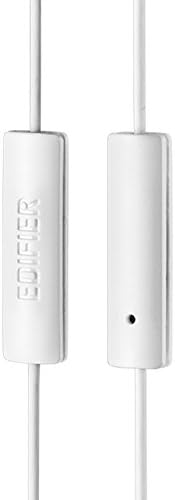
Figure 3: Inline microphone and control button.
- Přijímání / ukončování hovorů: Press the control button once to answer an incoming call. Press it again to end an active call.
- Přehrávání/pozastavení hudby: Press the control button once to play or pause audio playback.
- Přeskakování skladeb: Double-press the control button to skip to the next track. Triple-press to go to the previous track (functionality may vary by device and operating system).
- Hlasový asistent: Long-press the control button to activate your device's voice assistant (e.g., Siri, Google Assistant).
Video 1: Oficiální produkt skončilview of the Edifier P180 Classic Earbud Headsets, demonstrating features and usage.
6. Údržba
- Čištění: Jemně otřete sluchátka a kabel měkkým, suchým hadříkem. Nepoužívejte agresivní chemikálie ani abrazivní materiály.
- Skladování: When not in use, store the headset in a clean, dry place, away from extreme temperatures and direct sunlight. Avoid tangling the cable.
- Vyhněte se vlhkosti: Do not expose the headset to water or excessive moisture, as this can damage the internal components.
7. Řešení problémů
- Žádný zvuk:
- Ujistěte se, že je 3.5mm jack zcela zasunut do audio portu vašeho zařízení.
- Zkontrolujte nastavení hlasitosti vašeho zařízení.
- Vyzkoušejte sluchátka s jiným zařízením, abyste vyloučili problém specifický pro dané zařízení.
- Mikrofon nefunguje:
- Ujistěte se, že je 3.5mm jack zcela zasunutý.
- Zkontrolujte nastavení mikrofonního vstupu vašeho zařízení.
- Vyzkoušejte mikrofon s jiným zařízením nebo aplikací.
- Přerušovaný zvuk:
- Check the cable for any kinks or damage.
- Ujistěte se, že je audio jack čistý a bez nečistot.
8. Specifikace
| Funkce | Specifikace |
|---|---|
| Číslo modelu | P180 |
| Frekvenční odezva | 20 Hz - 20,000 XNUMX Hz |
| Jack pro sluchátka | Zásuvka 3.5 mm |
| Technologie připojení | Kabelové |
| Hmotnost položky | 1.76 unce (50 gramů) |
| Rozměry produktu | 2.01 x 5.59 x 0.91 palce |
| Materiál | Neodym |
| Typ ovládání | Inline Control Button |
| Impedance | 32 ohmů |
| Kontrola hluku | Zvuková izolace |
9. Záruka a podpora
The Edifier P180 headset is backed by a 1-letá záruka. For any support inquiries or warranty claims, please refer to the contact information provided with your purchase or visit the official Edifier webmísto.