
Supersonic IQ3710DJBT
Supersonic IQ Sound IQ-3710DJBT Portable DJ Speaker User Manual
Model: IQ-3710DJBT
Důležité bezpečnostní pokyny
Please read all instructions carefully before operating this device. Keep this manual for future reference.
- Nevystavujte toto zařízení dešti nebo vlhkosti.
- Neblokujte žádné ventilační otvory.
- Neinstalujte v blízkosti zdrojů tepla, jako jsou radiátory, tepelné regulátory, kamna nebo jiná zařízení (včetně amplifikátory), které produkují teplo.
- Chraňte napájecí kabel před šlapáním nebo přiskřípnutím, zejména u zástrček, zásuvek a v místě, kde vychází ze zařízení.
- Používejte pouze nástavce/příslušenství určené výrobcem.
- Odpojte tento spotřebič během bouřky s blesky nebo když jej nebudete delší dobu používat.
- Veškerý servis svěřte kvalifikovanému servisnímu personálu. Je -li zařízení jakýmkoli způsobem poškozeno, je nutná údržba.
Konec produktuview
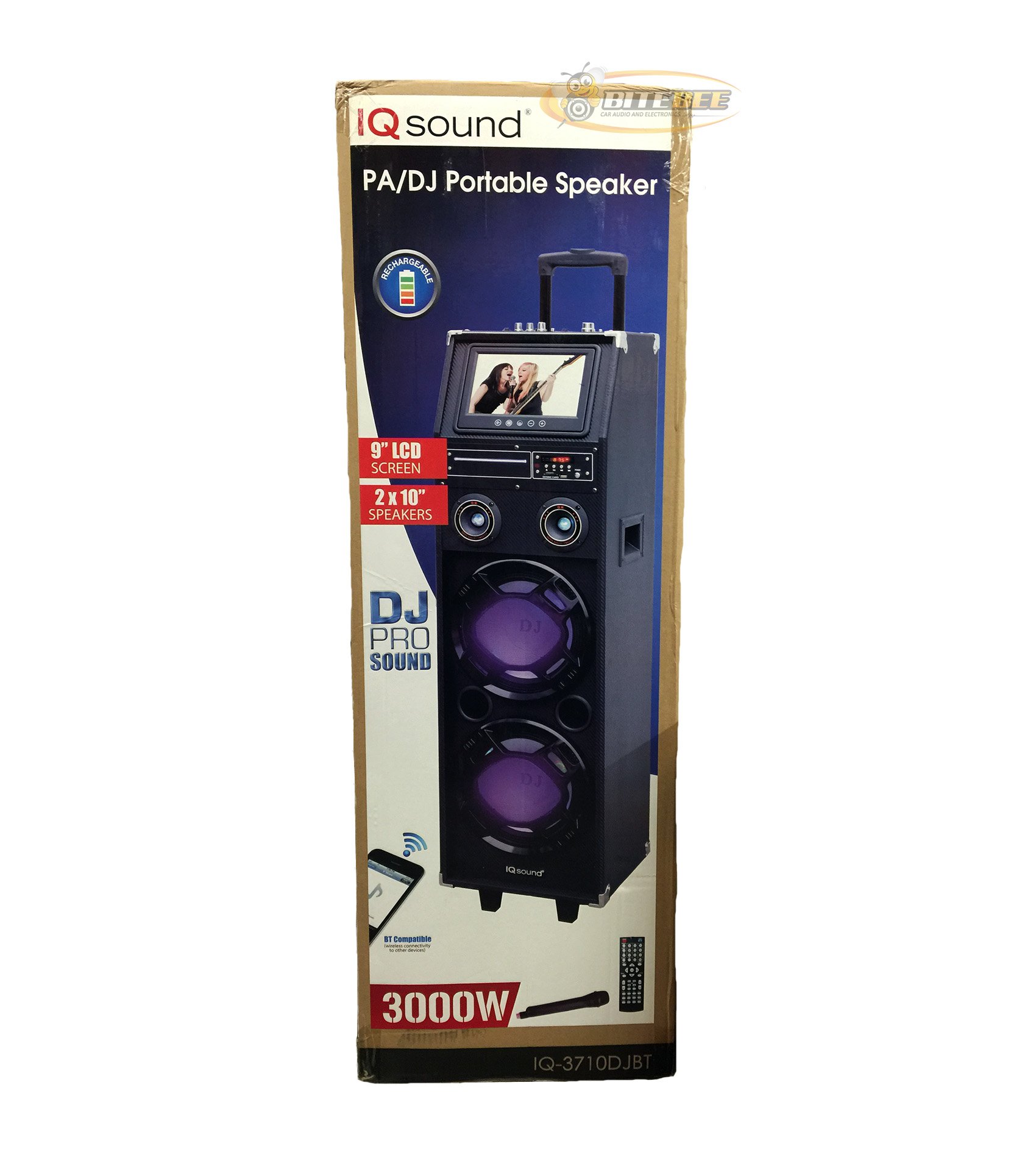
Obrázek: Přední strana view of the Supersonic IQ Sound IQ-3710DJBT Portable DJ Speaker, showcasing its dual speakers, 9-inch LCD screen, and control panel.
Vlastnosti
- Dual 10-inch Full Range Speakers
- Built-in Bluetooth for wireless audio streaming
- FM Radio tuner
- 5-Band Equalizer for audio customization
- 9-inch LCD Display for video and menu navigation
- Built-in Rechargeable Battery for portability
- Integrated LED Lights for visual effects
- Multimedia Compatible (supports various video and music formats)
- USB Input for external audio devices
- Slot pro SD kartu pro přehrávání médií
- 1 Kytarový vstup
- 1 Microphone Jack (includes 1 microphone)
- Včetně dálkového ovládání
- Built-in Handle and Wheels for easy transport
Obsah balení
- IQ-3710DJBT Portable DJ Speaker
- Napájecí adaptér
- Mikrofon
- Dálkové ovládání
- Uživatelská příručka (tento dokument)
Controls and Connections (General)
The main control panel is located on the top or rear of the speaker, featuring buttons for power, mode selection, playback controls (play/pause, skip), volume adjustment, EQ settings, and light controls. Input ports for USB, SD card, microphone, and guitar are also present. The 9-inch LCD display provides visual feedback for media playback, FM radio tuning, and menu navigation.
Nastavení
1. Nabíjení baterie
- Connect the included power adapter to the speaker's DC input port.
- Plug the power adapter into a standard wall outlet (AC 100-240V, 50/60Hz).
- The charging indicator light (if present) will illuminate. Allow approximately 6-8 hours for a full charge before first use.
- Reproduktor lze používat i během nabíjení.
2. Počáteční zapnutí
- Ensure the speaker is fully charged or connected to a power source.
- Locate the Power button (usually on the control panel) and press it to turn on the speaker.
- The LCD display will illuminate, and the speaker will enter the default mode.
3. Připojení periferií
Mikrofon: Insert the included microphone's cable into the Microphone Jack.
Kytara: Insert your guitar's cable into the Guitar Input.
Návod k obsluze
Výběr režimu
Stiskněte tlačítko MODE button on the control panel or remote control to switch between available modes: Bluetooth, FM Radio, USB, SD, and AUX (if applicable). The current mode will be displayed on the LCD screen.
Provoz Bluetooth
- Turn on the speaker and switch to Režim Bluetooth using the MODE button. The LCD will display "Bluetooth" or a similar indicator.
- Na zařízení s podporou Bluetooth (např. chytrý telefon, tablet) povolte Bluetooth a vyhledejte dostupná zařízení.
- Vyberte "IQ-3710DJBT" ze seznamu zařízení.
- Once paired, the speaker will emit a confirmation sound, and you can now play audio wirelessly from your device.
- Use your device or the speaker's controls for playback (play/pause, skip tracks, volume).
Provoz FM rádia
- Přepnout na Režim rádia FM pomocí tlačítka MODE.
- Stiskněte tlačítko PLAY/PAUSE button (or a dedicated scan button) to automatically scan and save available FM stations.
- Použijte PŘEDCHOZÍ DALŠÍ tlačítka pro navigaci mezi uloženými stanicemi.
- Adjust the volume using the main volume knob or remote control.
Přehrávání z USB/SD karty
- Vložte USB flash disk do USB port nebo SD kartu do slot pro SD kartu.
- The speaker should automatically switch to USB or SD mode and begin playing media. If not, press the MODE tlačítko pro výběr správného vstupu.
- Use the playback controls (play/pause, previous/next) on the speaker or remote to manage your media.
- The 9-inch LCD display will show file information and video playback (if applicable).
Nastavení ekvalizéru (EQ).
The 5-band EQ allows you to fine-tune the audio output. Locate the EQ controls on the speaker's panel. Adjust the sliders or knobs for different frequency bands (e.g., bass, mid-range, treble) to achieve your desired sound profile.
Microphone and Guitar Use
Once connected, adjust the individual volume controls for the microphone and guitar (if available) on the speaker's control panel. The main volume knob controls the overall output.
Ovládání LED světel
Stiskněte tlačítko SVĚTLA button (or similar) on the control panel or remote to cycle through different light modes or to turn the lights on/off.
LCD displej
The 9-inch LCD display shows current mode, track information, FM frequency, and can play video files from USB or SD card. Navigate menus using the dedicated navigation buttons or remote control.
Údržba
- Čištění: Use a soft, dry cloth to clean the exterior of the speaker. Do not use abrasive cleaners or solvents. For the LCD screen, use a screen-specific cleaning solution and a microfiber cloth.
- Péče o baterie: To prolong battery life, fully charge the speaker before first use and recharge it regularly, even if not in frequent use. Avoid completely draining the battery. Store in a cool, dry place.
- Skladování: When not in use for extended periods, store the speaker in a cool, dry environment, away from direct sunlight and extreme temperatures.
- Doprava: Utilize the built-in handle and wheels for easy and safe transport of the speaker.
Odstraňování problémů
| Problém | Možná příčina | Řešení |
|---|---|---|
| Reproduktor se nezapne. | Battery is drained or power adapter is not connected. | Connect the power adapter and charge the speaker. Ensure the power outlet is functional. |
| Žádný zvukový výstup. | Volume is too low, incorrect mode selected, or device not properly connected. | Increase volume. Verify correct mode (Bluetooth, USB, FM). Reconnect Bluetooth device or reinsert USB/SD card. Check microphone/guitar connections. |
| Párování Bluetooth selhalo. | Speaker not in Bluetooth mode, device too far, or interference. | Ensure speaker is in Bluetooth mode. Move device closer to speaker. Turn off and on Bluetooth on your device. Try pairing again. |
| Příjem FM rádia je špatný. | Slabý signál nebo rušení. | Relocate the speaker to an area with better reception. Perform an auto-scan again. |
| USB/SD media not playing. | Nepodporováno file format, corrupted media, or improper insertion. | Ensure media is inserted correctly. Check file formats (refer to specifications for supported types). Try a different USB drive or SD card. |
Specifikace
- Model: IQ-3710DJBT
- Značka: Nadzvukový
- Typ reproduktoru: Přenosný DJ reproduktor
- Řečníci: 2 x 10-inch Full Range
- Zobrazit: 9palcový LCD
- Konektivita: Bluetooth, USB
- Vstupy: USB, SD Card, Microphone (1), Guitar (1)
- Rádio: FM Tuner
- Ekvalizér: 5-pásmový EQ
- Zdroj napájení: Built-in Rechargeable Battery, AC Power Adapter
- Rozměry (D x Š x V): 15 x 14 x 45 palce (přibližně)
- Hmotnost: 54 liber (přibližně)
- Dodávané příslušenství: Microphone, Remote Control, Power Adapter
Záruka a podpora
This product comes with a standard manufacturer's warranty. For specific warranty terms and conditions, please refer to the warranty card included in your package or visit the official Supersonic webmísto.
For technical support, service inquiries, or to purchase replacement parts, please contact Supersonic customer service. Contact information can typically be found on the product packaging or the official brand webmísto.
Online podpora: www.supersonicinc.com (Toto je zástupný odkaz, ověřte si prosím skutečnou podporu) URL.)
Ask a question about this manual
Ask about setup, troubleshooting, compatibility, parts, safety, or missing instructions. Manuals+ will review the question and use this page’s manual context to help answer it.