
Logitech 920-007182
Uživatelská příručka k podsvícené klávesnici do obývacího pokoje Logitech K830
Model: 920-007182 | Značka: Logitech
Zavedení
The Logitech Illuminated Living-Room Keyboard K830 is designed to enhance your home entertainment experience. This keyboard combines a full keyboard layout with a built-in touchpad, offering seamless wireless control of your connected TV or computer, even in low-light conditions, thanks to its bright backlit keys.

Figure 1: Logitech K830 Illuminated Living-Room Keyboard, top view.
Obsah balení
Ujistěte se, že v balení jsou přítomny všechny položky:
- Logitech K830 Illuminated Living-Room Keyboard
- Přijímač Logitech Unifying
- USB nabíjecí kabel
- USB range extender
- User information (this manual)
Nastavení
1. Nabíjení klávesnice
Before first use, fully charge the keyboard. Connect the supplied USB recharge cable to the micro-USB port on the keyboard and the other end to a USB power source (e.g., computer USB port, USB wall adapter).
- The battery indicator light will glow green when charging and turn off when fully charged.
- A full charge typically provides several weeks of use.
2. Připojení klávesnice
The K830 keyboard offers two connection methods: Logitech Unifying receiver or Bluetooth Smart technology.
2.1. Using the Logitech Unifying Receiver (Recommended for PCs)
- Locate the Logitech Unifying receiver in the package.
- Plug the Unifying receiver into an available USB port on your computer or smart TV. For optimal range, use the included USB range extender if the receiver is obstructed or far from the keyboard.
- Turn on the keyboard by sliding the power switch located on the top edge of the keyboard to the ON position.
- The keyboard should automatically connect to the receiver. If not, use the Logitech Unifying Software (downloadable from Logitech's webwebu) pro spárování zařízení.

Figure 2: User operating the K830 keyboard from a comfortable distance.
2.2. Using Bluetooth Smart Technology (For compatible devices)
- Ensure your device (e.g., Android TV, tablet) has Bluetooth Smart (Bluetooth Low Energy) enabled.
- Zapněte klávesnici.
- Press and hold the Bluetooth pairing button (usually indicated by a Bluetooth icon) on the keyboard until the indicator light starts blinking rapidly, indicating it's in pairing mode.
- V zařízení přejděte do nastavení Bluetooth a v seznamu dostupných zařízení ke spárování vyberte „Logitech K830“.
- Dokončete proces párování podle pokynů na obrazovce.
Návod k obsluze
Keyboard Layout and Functions
The K830 features a compact layout optimized for living room use, including standard alphanumeric keys, function keys, and dedicated media controls.
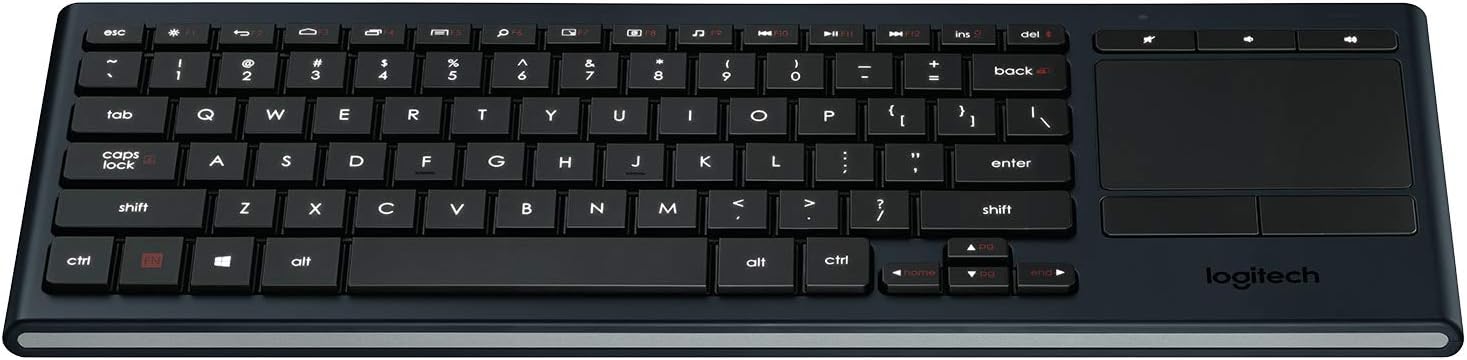
Obrázek 3: Přesview of the K830 keyboard layout.
Podsvícení
The keyboard features automatic backlighting that adjusts to ambient light conditions. A sensor detects the room's light level and automatically brightens or dims the key backlights for optimal visibility. The backlighting also activates when your hands approach the keyboard and turns off when not in use to conserve battery.
Integrovaný touchpad
The large, responsive touchpad provides precise cursor control and supports multi-touch gestures. The two physical buttons below the touchpad function as left-click and right-click.
- Klepnutí jedním prstem: Levé kliknutí.
- Klepnutí dvěma prsty: Klikněte pravým tlačítkem myši.
- Posouvání dvěma prsty: Pro svisle rolování táhněte dvěma prsty nahoru nebo dolů.
- Pinch Zoom: Pro přiblížení nebo oddálení dvěma prsty.

Obrázek 4: Strana view highlighting the integrated touchpad and power indicator.
Media Keys and Shortcut Keys
The top row of keys includes dedicated media controls and shortcut keys for quick access to common functions. These keys are optimized for Windows and Android operating systems.
- Ovládání hlasitosti: Ztlumit, Snížit hlasitost, Zvýšit hlasitost.
- Přehrávání médií: Přehrát/Pozastavit, Předchozí skladba, Další skladba.
- Windows/Android Shortcuts: Home, Back, Search, etc. (specific functions may vary by OS).
Chcete-li použít funkce F1–F12, stiskněte klávesy Fn klávesu současně s požadovanou funkční klávesou.
Údržba
Čištění klávesnice
To clean your K830 keyboard:
- Před čištěním klávesnici vypněte.
- Použijte měkký hadřík, který nepouští vlákna dampvodou nebo jemným čisticím roztokem.
- Nevystavujte klávesnici nadměrné vlhkosti a nestříkejte čisticí prostředky přímo na ni.
- For the touchpad, use a dry, soft cloth to remove fingerprints and smudges.
Péče o baterie
The K830 uses a built-in rechargeable Lithium Polymer battery. To maximize battery life:
- Charge the keyboard regularly, but avoid leaving it plugged in constantly after it's fully charged.
- If storing the keyboard for an extended period, charge it to about 50% before storage.
- Nevystavujte klávesnici extrémním teplotám.
Odstraňování problémů
| Problém | Možná příčina | Řešení |
|---|---|---|
| Klávesnice nereaguje | Low battery; Keyboard off; Receiver not plugged in; Out of range; Pairing issue. | Charge the keyboard. Ensure the keyboard is ON. Plug the Unifying receiver into a working USB port. Move closer to the receiver (within 10 meters/33 feet). Re-pair the keyboard using Logitech Unifying Software or Bluetooth pairing process. |
| Podsvícení nefunguje | Low battery; Ambient light too bright; Sensor obstruction. | Charge the keyboard. The backlighting automatically adjusts; it may not activate in bright environments. Ensure the light sensor (located near the top edge) is not covered. |
| Touchpad erratic or unresponsive | Dirty touchpad surface; Software issue; Interference. | Clean the touchpad surface with a dry, soft cloth. Restart your computer/device. Ensure no other wireless devices are causing interference. |
| Klávesy se nepíší správně | Software issue; Physical obstruction under key. | Restart your computer/device. Gently check for any debris under the affected key. |
Specifikace
| Funkce | Detail |
|---|---|
| Číslo modelu | 920-007182 |
| Konektivita | Logitech Unifying (2.4 GHz RF), Bluetooth Smart (Bluetooth Low Energy) |
| Bezdrátové Dosah | Až 10 metrů (33 stop) |
| Typ baterie | Dobíjecí lithiový polymer |
| Podsvícení | Automatic, single color |
| Integrovaný touchpad | Yes, with multi-touch gesture support |
| Kompatibilita operačního systému | Windows 7, Windows 8, Windows 10 or later; Android 5.0 or later; Chrome OS |
| Rozměry (DxŠxV) | 15.1 x 5.59 x 1.65 palce (38.35 x 14.2 x 4.19 cm) |
| Hmotnost | 1.09 libry (0.49 kg) |
Záruka a podpora
Informace o záruce, technickou podporu a další zdroje naleznete na oficiálních stránkách podpory Logitech. website or refer to the user guide PDF:
- Podpora Logitech Webmísto: www.logitech.com/support
- Uživatelská příručka (PDF): Stáhnout PDF
Uschovejte si prosím doklad o koupi pro uplatnění záruky.