
1. Úvod
The SainSmart MetaPhix M2 Graphing Calculator is a versatile tool designed for students, educators, and professionals in various fields including mathematics, science, and engineering. It supports a wide range of calculations from basic arithmetic to advanced graphing functions, making it suitable for courses such as Pre-Algebra, Algebra I & II, Geometry, Trigonometry, Calculus, AP Calculus, AP Statistics, Biology, Chemistry, Physics, Finance, and Business.
This manual provides detailed instructions for setting up, operating, and maintaining your MetaPhix M2 calculator, ensuring you can utilize its full potential. The calculator features a solid cover to protect its keys and screen during transport and storage.

Figure 1: SainSmart MetaPhix M2 Graphing Calculator
2. Nastavení
2.1. Instalace baterie
The MetaPhix M2 calculator requires batteries for operation (not included). To install or replace batteries:
- Vypněte kalkulačku.
- Najděte kryt přihrádky na baterie na zadní straně kalkulačky.
- Sejměte kryt.
- Vložte nové baterie a dbejte na správnou polaritu (+/-) vyznačenou uvnitř přihrádky.
- Nasaďte kryt prostoru pro baterie.

Figure 2: Back of the calculator with battery compartment
2.2. Zapnutí/vypnutí
- Chcete-li zapnout kalkulačku, stiskněte tlačítko ON tlačítko.
- Chcete-li kalkulačku vypnout, stiskněte POSUN pak VYPNUTO (usually located above the ON button).
- The calculator features an auto power-off function to conserve battery life after a period of inactivity.
3. Návod k obsluze
3.1. Keypad Layout
The MetaPhix M2 keypad is organized into several functional areas:
- Displej: Shows input, results, and graphs. Features a 64 x 32 pixel resolution LCD for incredible readability.
- Funkční klávesy: Keys like POSUN, ALFAa MODE to access secondary functions and change calculator modes.
- Navigační podložka: Arrow keys for moving the cursor on the display.
- Numerická klávesnice: Standard digits 0-9 and decimal point.
- Aritmetické operátory: Addition, subtraction, multiplication, division.
- Vědecké funkce: Trigonometric (sin, cos, tan), logarithmic (log, ln), exponential, power functions.
- Graphing Keys: Dedicated keys for drawing graphs and adjusting settings.
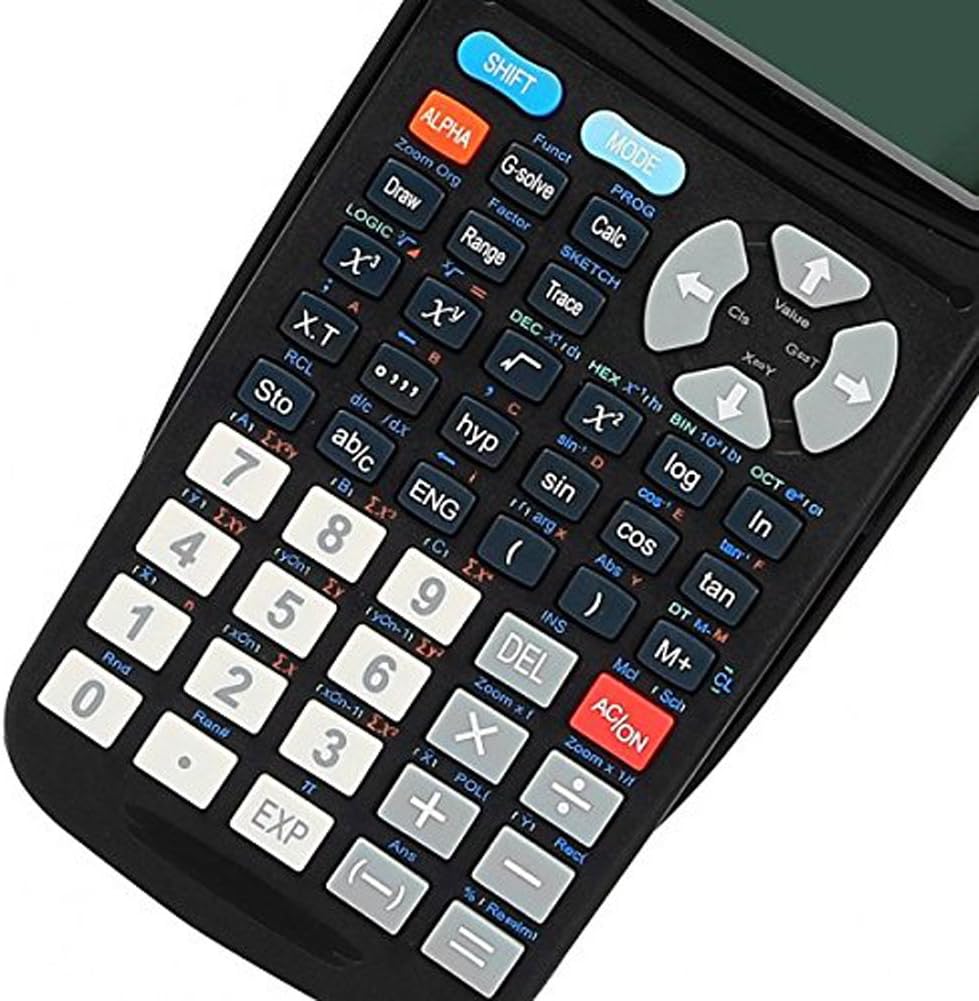
Obrázek 3: Detailní view of the calculator keypad
3.2. Základní výpočty
To perform basic arithmetic:
- Zadejte první číslo.
- Press the desired operator (+, -, ×, ÷).
- Zadejte druhé číslo.
- Stiskněte = pro zobrazení výsledku.
3.3. Pochopení indikátorů na displeji
The calculator's display shows various indicators to inform you about its current state or active functions:
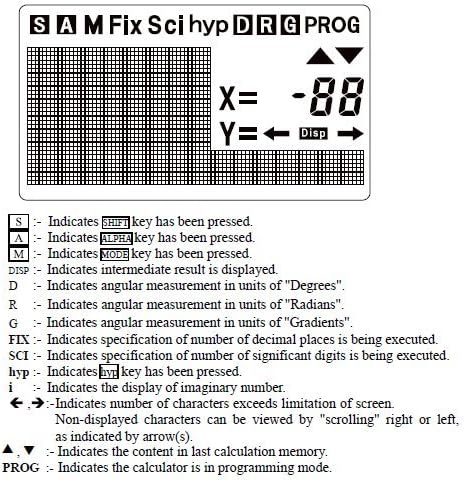
Obrázek 4: Indikátory na displeji
- S: Označuje POSUN bylo stisknuto tlačítko.
- A: Označuje ALFA bylo stisknuto tlačítko.
- M: Označuje MODE bylo stisknuto tlačítko.
- Disp: Indicates an intermediate result is displayed.
- D: Indicates angular measurement in units of "Degrees".
- R: Indicates angular measurement in units of "Radians".
- G: Indicates angular measurement in units of "Gradients".
- OPRAVIT: Indicates specification of number of decimal places is being executed.
- SCI: Indicates specification of number of significant digits is being executed.
- hyp: Označuje hyp bylo stisknuto tlačítko.
- i: Indicates the display of an imaginary number.
- ←, →: Indicates number of characters exceeds screen limitation; content can be viewed rolováním.
- ▲, ▼: Indicates the content in the last calculation memory.
- PROG: Indicates the calculator is in programming mode.
3.4. Graphing Functions
The MetaPhix M2 can generate various graphs. Ensure the calculator is in the appropriate mode (e.g., COMP mode for general calculations before graphing). The calculator features a great graphical user interface (GUI) for parametric graphing.
Example 1: Plotting a Sine Curve and y = 1/x Graph
To sketch a sine curve or a y = 1/x graph:
- Ensure the calculator is in COMP mode.
- Stiskněte [POSUN] pak [FUNC] to open the function menu.
- Select the desired function slot (e.g., "Y1").
- For a sine curve, enter "sin" (e.g., by pressing the hřích klíč).
- For y = 1/x, enter "x-1" (e.g., by pressing [POSUN] pak [x-1]).
- Stiskněte [DRAW] to sketch the graph.
Note: The variable "x" is often implied for built-in graph functions or when using specific function keys.
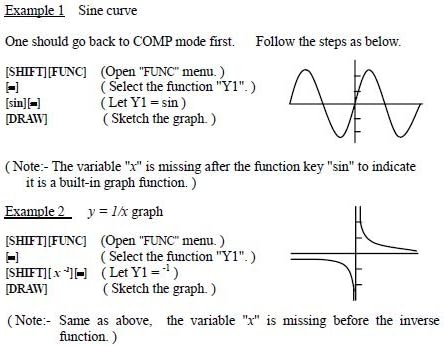
Figure 5: Sine curve and y=1/x graph examples
4. Pokročilé funkce
The MetaPhix M2 calculator offers a comprehensive suite of advanced functions, supporting a deeper understanding of mathematics:
- Generation of Parametric Graphs
- Complex, Continuous & Statistical Calculation
- Regression & Integration Capability
- Logarithmic & Exponential Functions
- Answer Storage
- Scientific Calculation
- Formula Storage in Memory
- Multistatement Input
- Zooming Functions for Graphs
- Replay & Trace Functions for Graphs
- Factor & Expand Algebraic Logic & Trigonometric Expressions
- Basic arithmetic operations using binary, octal, decimal, and hexadecimal values.
5. Údržba
- Čištění: Use a soft, dry cloth to clean the calculator's exterior. Do not use abrasive cleaners or solvents.
- Skladování: Store the calculator in a cool, dry place away from direct sunlight and extreme temperatures. Always use the protective cover when not in use.
- Výměna baterie: Replace batteries promptly when the low battery indicator appears or when the display becomes dim. Remove batteries if the calculator will not be used for an extended period to prevent leakage.
6. Řešení problémů
- Kalkulačka se nezapne:
- Ujistěte se, že jsou baterie správně vloženy se správnou polaritou.
- Vyměňte staré nebo vybité baterie za nové.
- Displej je tmavý nebo prázdný:
- Baterie mohou být vybité; vyměňte je.
- Adjust display contrast if available (refer to specific key combinations in the full manual).
- Nesprávné výsledky výpočtu:
- Check the current mode (e.g., Degree/Radian for trigonometric functions).
- Verify input values and formula syntax.
- Clear memory or reset the calculator if necessary (consult the full manual for reset procedures).
- Graphing issues:
- Ensure the calculator is in graphing mode.
- Check the function input for errors.
- Upravte viewing window settings (Xmin, Xmax, Ymin, Ymax) to ensure the graph is within visible range.
For more detailed troubleshooting or persistent issues, please refer to the comprehensive manual available online or contact SainSmart customer support.
7. Specifikace
- Značka: SainSmart
- Model: MetaPhix M2
- Typ kalkulačky: Business, Engineering/Scientific, Graphing
- Zdroj napájení: Napájení z baterie
- Typ displeje: LCD (64 x 32 pixel resolution)
- Paměť: Built-in memory for storage and analysis
- UPC: 811820022215
8. Záruka a podpora
The SainSmart MetaPhix M2 Graphing Calculator comes with a 1-letá záruka from the date of purchase. This warranty covers manufacturing defects and ensures technical support from SainSmart.
For technical assistance, warranty claims, or further inquiries, please contact SainSmart customer support through their official webwebu nebo kontaktních informací uvedených na obalu produktu.
A detailed instruction manual is also available for download from the manufacturer's website for in-depth guidance on all functions and features.