
1. Úvod
The Motorola Talkabout T465 Rechargeable Two-Way Radio Bundle is designed for clear and dependable communication, ideal for outdoor adventures, emergencies, and staying connected when cellular service is unavailable. This manual provides essential information for setting up, operating, and maintaining your T465 radios.
2. Bezpečnostní informace
Before using your Motorola Talkabout T465 radios, please read all safety instructions carefully. Failure to do so may result in injury or damage to the product.
- Bezpečnost baterie: Use only approved Motorola rechargeable batteries or 3 AA alkaline batteries. Do not mix battery types. Dispose of batteries properly.
- Návrh 65 Varování: Tento produkt může obsahovat chemikálie, o nichž je ve státě Kalifornie známo, že způsobují rakovinu a vrozené vady nebo jiné poškození reprodukce.
- Ochrana sluchu: Use the lowest volume necessary to hear clearly. Prolonged exposure to loud volumes may cause hearing damage.
- Rušení: Vypněte rádio v oblastech, kde je obousměrné rádio zakázáno, například v nemocnicích nebo letadlech.
3. Obsah balení
Your Motorola Talkabout T465 bundle includes:
- 2 x T465 Two-Way Radios
- 2 x Micro-USB Wall Charging Cables
- 2 x Rechargeable NiMH Battery Packs (or use 2 AA batteries per radio)
- 2x spona na opasek
- 2 x Earbuds with Push-to-Talk (PTT) Microphone
- 1 x přepravní pouzdro
- User Guide and Accessory Sheet (English and French)
4. Nastavení
4.1 Instalace baterie
Your T465 radios can be powered by either the included rechargeable NiMH battery packs or 3 AA alkaline batteries (not included). To install:
- Ujistěte se, že je rádio vypnuté.
- Sejměte kryt přihrádky na baterie na zadní straně rádia.
- Insert the NiMH battery pack or 3 AA batteries, observing the polarity markings.
- Replace the battery compartment cover, ensuring it clicks securely into place to maintain water resistance.
4.2 Nabíjení baterií
To charge the rechargeable NiMH battery packs:
- Connect the Micro-USB charging cable to the charging port on the side of the radio.
- Plug the other end of the cable into a standard USB wall adapter.
- The battery indicator on the radio display will show charging status. A full charge typically takes 8.5 hours.
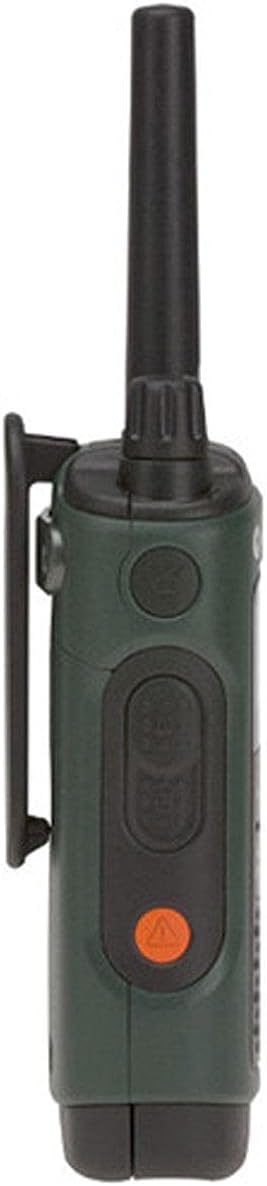
4.3 Připevnění spony na opasek
To attach the belt clip, align the clip with the slots on the back of the radio and slide it down until it locks into place.

5. Ovládání rádia
5.1 Zapnutí/vypnutí a hlasitost
- Zapnutí: Otáčejte knoflíkem Zap/Vyp/Hlasitost ve směru hodinových ručiček, dokud neuslyšíte cvaknutí a displej se nerozsvítí.
- Vypnout: Rotate the On/Off/Volume knob counter-clockwise until you hear a click and the display turns off.
- Upravit hlasitost: Otáčením knoflíku Zapnuto/Vypnuto/Hlasitost zvyšte nebo snižte hlasitost poslechu.
5.2 Výběr kanálu
Your T465 radio has 22 channels. To select a channel:
- Stiskněte tlačítko Menu tlačítko , dokud nezačne blikat číslo kanálu.
- Použijte Up or Dolů tlačítky vyberte požadovaný kanál.
- Stiskněte tlačítko Menu znovu tlačítko nebo PTT potvrďte svůj výběr.
5.3 kódů ochrany osobních údajů
Privacy codes help reduce interference by filtering out transmissions from other users on the same channel. Your T465 radios offer 121 privacy codes.
- Stiskněte tlačítko Menu dvakrát stiskněte tlačítko , dokud nezačne blikat číslo privátního kódu.
- Použijte Up or Dolů tlačítky vyberte požadovaný kód ochrany osobních údajů.
- Stiskněte tlačítko Menu znovu tlačítko nebo PTT tlačítko pro potvrzení. Note: Both radios must be on the same channel and privacy code to communicate.
5.4 Tlačítko PTT (Push-to-Talk)
The PTT button is located on the side of the radio. It has two power settings:
- Vysoký výkon: Press the upper part of the PTT button for maximum range. This consumes more battery.
- Nízký výkon: Press the lower part of the PTT button for shorter range, conserving battery life.
To transmit, press and hold the PTT button, speak clearly into the microphone, and release the button to listen.
5.5 Call/Page Tone
To send a call tone to alert other radios in your group, briefly press the Call button (often a musical note icon) on the front of the radio.
5.6 Zámek klávesnice
Abyste zabránili nechtěným změnám nastavení, stiskněte a podržte tlačítko Menu button until the lock icon appears on the display. Repeat to unlock.

6. Pokročilé funkce
6.1 NOAA Weather Radio and Alerts
Your T465 radio can receive NOAA Weather Radio broadcasts, providing real-time weather information and alerts.
- Stiskněte tlačítko Režim button until the weather channel icon appears.
- Použijte Up or Dolů buttons to select a weather channel.
- The radio can be set to automatically alert you to severe weather conditions. Consult the full user guide for detailed setup of weather alerts.
6.2 Emergency Alert Button
The T465 features an orange Emergency Alert button on the side. Pressing and holding this button will activate an audible alert on your radio and other compatible Motorola radios within range, set them to maximum volume, and enable hands-free transmission (VOX) for a period, allowing you to speak without holding the PTT button.
6.3 Vestavěná svítilna
The radio includes a built-in LED flashlight for convenience in low-light conditions. To activate, press the dedicated flashlight button (often located on the top or side). Press again to turn off.
6.4 VibraCall™ Alert
For discreet communication, the VibraCall™ feature provides a silent vibrating alert instead of an audible tone. This is useful in quiet environments or when you need to avoid startling game during hunting.
7. Údržba
Proper care ensures the longevity and performance of your T465 radios.
- Čištění: Použijte měkký, damp hadříkem k čištění vnější strany rádia. Nepoužívejte abrazivní čisticí prostředky ani rozpouštědla.
- Péče o baterie: Store batteries in a cool, dry place. If not using the radios for an extended period, remove alkaline batteries to prevent leakage. Recharge NiMH batteries periodically to maintain their capacity.
- Voděodolnost: The T465 is rated IP44 waterproof, meaning it is protected against splashing water from any direction. Ensure all ports and battery covers are securely closed to maintain water resistance. Do not submerge the radio.
8. Řešení problémů
If you encounter issues with your T465 radios, try the following:
- Bez napájení: Check battery installation and charge level. Replace alkaline batteries if depleted.
- Poor Range/Interference: Ensure both radios are on the same channel and privacy code. Move to an area with fewer obstructions (e.g., buildings, dense foliage). Range can be significantly reduced by terrain and conditions.
- Cannot Hear Other Radios: Verify volume is up. Check that privacy codes match. Ensure radios are within range.
- Rádio se nenabíjí: Check USB cable connection and wall adapter. Ensure battery pack is correctly inserted.
9. Specifikace
| Funkce | Detail |
|---|---|
| Značka | Řešení Motorola |
| Číslo modelu | T465 |
| Barva | Zelený |
| Počet kanálů | 22 |
| Protokol připojení | GMRS |
| Typ tuneru | UHF |
| Maximální dosah hovoru | 35 Miles (actual range varies by terrain and conditions) |
| Úroveň odolnosti proti vodě | Vodotěsný (IP44) |
| Zdroj napájení | Rechargeable NiMH Battery Pack (included) or 3 AA batteries (not included) |
| Průměrná životnost baterie | 8.5 hodiny |
| Rozměry produktu | 1.37"H x 2.26"Š x 7.54"V |
| Hmotnost položky | 1.9 libry |
10. Záruka a podpora
10.1 Informace o záruce
The Motorola Talkabout T465 Two-Way Radio Bundle comes with a 1letá omezená záruka from the date of purchase. This warranty covers defects in materials and workmanship under normal use. For full terms and conditions, please refer to the warranty card included in your package or visit the Motorola Solutions webmísto.
10.2 Zákaznická podpora
For technical assistance, troubleshooting not covered in this manual, or warranty claims, please contact Motorola Solutions customer support. Contact information can typically be found on the Motorola Solutions website or on the accessory sheet included with your product.
11. Produktová videa
Motorola Talkabout T465 Product Overview
Toto video poskytuje obecný přehledview of the Motorola Talkabout T465 Two-Way Radio Bundle, highlighting its rugged design, features for outdoor use, and various applications like hunting, camping, and emergencies. It showcases the IP54 weatherproofing, VibraCall™ alert, PTT power boost, dual power options, NOAA weather channels, emergency alert button, and built-in flashlight.
Motorola T4XX Series User Instructions - How To Guide
This instructional video demonstrates how to operate Motorola T4XX series radios, including powering on, adjusting volume, selecting channels, using privacy codes, and understanding the various buttons and features. It also covers battery installation and charging options, providing a practical guide for new users.