
1. Úvod
The HP 1820-48G is a managed Gigabit Ethernet Layer 2 switch designed to provide enhanced network performance and user experience for small to medium-sized organizations. This fixed-configuration switch features 48 10/100/1000 RJ-45 ports and SFP ports for fiber connectivity, offering basic yet intelligent management capabilities. It is engineered for simplicity and a lower total cost of ownership, making it suitable for various network deployments.
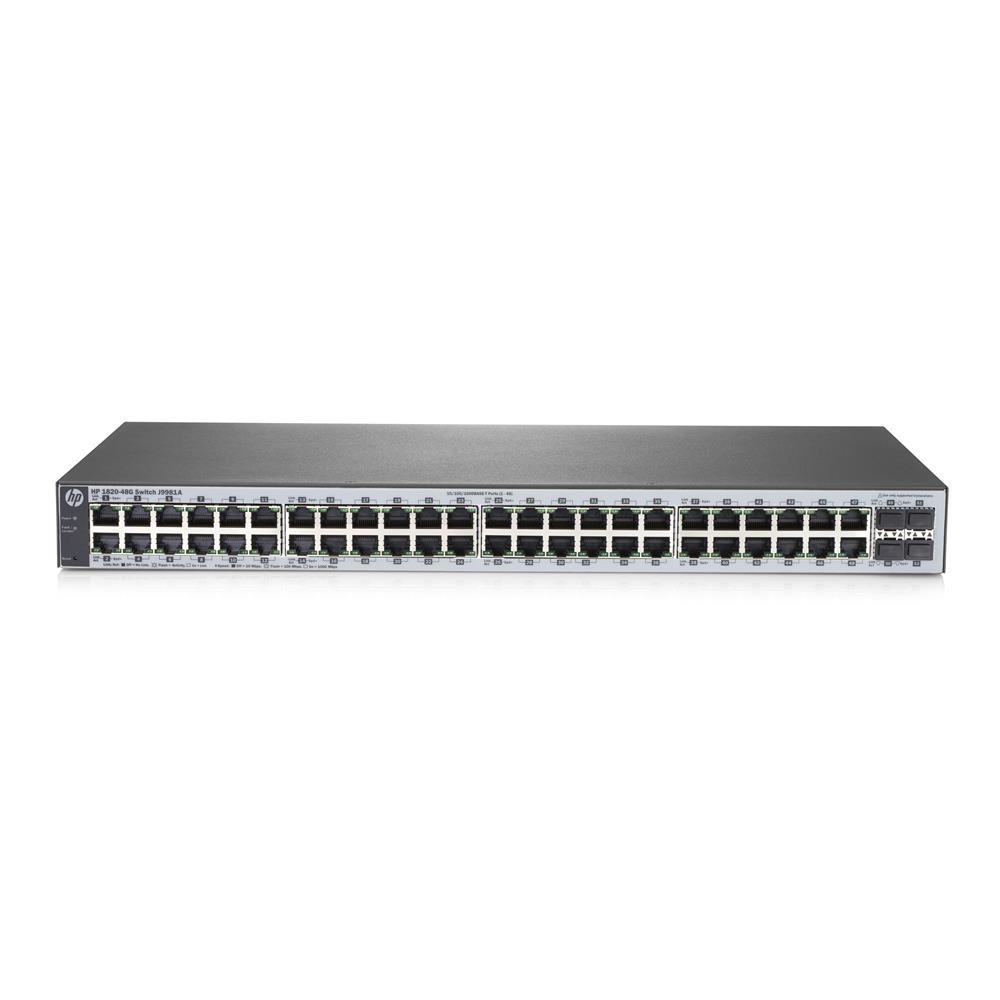
Obrázek 1: Přední strana view of the HP 1820-48G Managed 48-Port Gigabit Switch, showing 48 RJ-45 ports and SFP slots.
2. Nastavení a instalace
2.1 Obsah balení
Ověřte, zda váš balíček obsahuje následující položky:
- HP 1820-48G Switch
- Napájecí kabel
- Sada pro montáž do racku (pokud je k dispozici)
- Documentation CD/Leaflet
2.2 Fyzická instalace
The HP 1820-48G switch can be installed on a desktop or mounted in a standard 19-inch equipment rack.
- Montáž do racku: Attach the provided rack-mount brackets to the sides of the switch using the screws included in the kit. Secure the switch into the rack using appropriate rack screws. Ensure adequate airflow around the device.
- Umístění na počítači: Place the switch on a flat, stable surface. Ensure there is sufficient space for ventilation and cable management.
- Připojení napájení: Connect the power cord to the AC inlet on the rear panel of the switch and then to a grounded electrical outlet.
- Počáteční zapnutí: The switch will power on automatically once connected to power. Observe the system LED indicators for initial boot-up status.

Obrázek 2: Detail view of the RJ-45 ports on the HP 1820-48G switch, showing port numbering and status LEDs.
3. Ovládání přepínače
3.1 Připojení síťových zařízení
Connect your network devices (computers, servers, other switches) to the RJ-45 ports on the front panel of the HP 1820-48G switch using standard Ethernet cables. For fiber optic connections, use compatible SFP transceivers in the designated SFP slots.
- Ujistěte se, že jsou kabely pevně připojeny.
- Observe the port status LEDs; a solid green or amber light indicates a link, and blinking indicates activity.
3.2 Přístup k rozhraní pro správu
The HP 1820-48G is a managed switch, configurable via a web-based graphical user interface (GUI).
- Výchozí IP adresa: The switch typically has a default IP address (e.g., 192.168.1.1 or similar, check documentation for exact default).
- Připojte PC: Connect a computer directly to any RJ-45 port on the switch. Configure the PC's network adapter with a static IP address in the same subnet as the switch (e.g., if switch is 192.168.1.1, set PC to 192.168.1.10 with subnet mask 255.255.255.0).
- OTEVŘENO Web prohlížeč: Spustit a web browser and enter the switch's default IP address in the URL bar.
- Přihlášení: Enter the default username and password (refer to the included documentation for default credentials). It is highly recommended to change these default credentials immediately after initial login for security purposes.
- Konfigurace: Použijte web interface to configure VLANs, link aggregation, QoS, and other network settings as required.
4. Údržba
Regular maintenance ensures optimal performance and longevity of your HP 1820-48G switch.
- Čištění: Keep the switch free from dust and debris. Use a soft, dry cloth for external cleaning. Do not use liquid cleaners directly on the device. Ensure ventilation openings are clear.
- Aktualizace firmwaru: Pravidelně kontrolujte oficiální podporu HP website for firmware updates. Applying updates can improve performance, add new features, and address security vulnerabilities. Follow the instructions provided with the firmware update carefully.
- Podmínky prostředí: Ensure the switch operates within its specified temperature and humidity ranges. Avoid placing it near heat sources or in areas with excessive moisture.
- Správa kabelů: Organize network cables to prevent strain on ports and ensure proper airflow.
5. Řešení problémů
This section provides solutions to common issues you might encounter with your HP 1820-48G switch.
5.1 Bez napájení
- Zkontrolujte napájecí kabel: Ujistěte se, že je napájecí kabel bezpečně připojen k přepínači i k funkční elektrické zásuvce.
- Ověřte zdroj napájení: Otestujte elektrickou zásuvku pomocí jiného zařízení, abyste se ujistili, že dodává napájení.
- Napájení: If the power LED remains off, the internal power supply may be faulty. Contact HP support.
5.2 Žádné spojení na portu
- Zkontrolujte kabel: Ensure the Ethernet cable is properly connected at both ends. Try a different cable.
- Ověření zařízení: Confirm the connected device (PC, server) is powered on and its network adapter is functioning correctly.
- Stav portu: Check the port status LED on the switch. If it's off, there's no link. If it's amber, there might be a speed mismatch or a problem with the cable/device.
- Konfigurace: Přístup k web management interface to check port settings (e.g., speed, duplex) to ensure they match the connected device.
5.3 Nelze přistupovat Web Rozhraní pro správu
- IP adresa: Ensure your computer's IP address is in the same subnet as the switch.
- Výchozí IP: If the IP address was changed and forgotten, you may need to perform a factory reset (refer to advanced documentation for this procedure, as it will erase all configurations).
- Firewall: Temporarily disable any firewall on your computer to rule out interference.
- Problémy s prohlížečem: Zkuste něco jiného web prohlížeč nebo vymažte mezipaměť prohlížeče.
6. Specifikace
| Funkce | Popis |
|---|---|
| Značka | HP |
| Číslo modelu | J9981A |
| Počet portů | 48 (Gigabit Ethernet RJ-45) |
| Typ přepínače | Managed, Layer 2 |
| Rychlost přenosu dat | 104 gigabitů za sekundu (přepínací kapacita) |
| Velikost tabulky MAC adres | 16000 záznamů |
| Propustnost | 77.3 Mpps |
| Procesor | ARM Cortex-A9, 400 MHz |
| Vnitřní paměť | 128 MB |
| svtage | 240 Volts (AC Input: 50/60 Hz) |
| Maximální spotřeba energie | 39W |
| Hmotnost položky | 3.31 kg |
| Barva | Šedá |
| Materiál pouzdra | Plast |
7. Informace o záruce
This HP product is covered by a standard manufacturer's warranty. Specific warranty terms and conditions, including duration and coverage details, can be found in the warranty statement included with your product or on the official HP webstránky. Uschovejte si prosím doklad o koupi pro případ reklamace.
8. Technická podpora
For technical assistance, product information, or to download the latest drivers and firmware, please visit the official HP support webmísto:
When contacting support, please have your product model number (J9981A) and serial number readily available.