
1. Úvod
The SHARP SMD2470ASY Microwave Drawer Oven is designed for modern kitchens, offering flexible placement and a sleek, integrated appearance. This 24-inch, 1.2 cubic feet, 950-watt appliance features a concealed control panel and an automatic drawer system for convenient operation. Its design allows for installation below an island, peninsula, or standard cabinetry, or even below a wall oven, optimizing kitchen space and aesthetics.
Klíčové vlastnosti:
- Automatic Drawer System: Smoothly opens and enables hands-free closing for convenient operation.
- Convenient Kitchen Placement: Allows for easier cooking, saving prep and cleanup time with flexible positioning.
- Skrytý ovládací panel: Opens to an easy-to-read and operate 45-degree angle for seamless access.
- Spacious Cooking Capacity: Large enough for a 4-quart casserole dish or a 20-ounce beverage with 1.2 cubic feet interior.
2. Důležité bezpečnostní informace
Read all instructions carefully before using the appliance to reduce the risk of fire, electric shock, injury to persons, or exposure to excessive microwave energy.
Obecná bezpečnostní opatření:
- Nepokoušejte se tuto troubu provozovat s otevřenými dvířky nebo pokud jsou dvířka poškozená.
- Neohřívejte tekutiny ani jiné potraviny v uzavřených nádobách, protože by mohly explodovat.
- V tomto spotřebiči nepoužívejte korozivní chemikálie ani páry.
- Vždy dohlížejte na děti, když používají mikrovlnnou troubu.
- Ensure proper grounding to avoid electrical shock hazards.
3. Nastavení a instalace
The SMD2470ASY Microwave Drawer Oven is designed for built-in installation. Proper placement and ventilation are crucial for optimal performance and safety. Refer to the detailed installation manual for complete instructions.
Možnosti umístění:
- Below an island or peninsula.
- Below standard cabinetry.
- Below a wall oven.
Dimensions and Cutout Requirements:
Carefully measure your installation area to ensure proper fit and ventilation. Consult the provided diagrams for precise measurements.
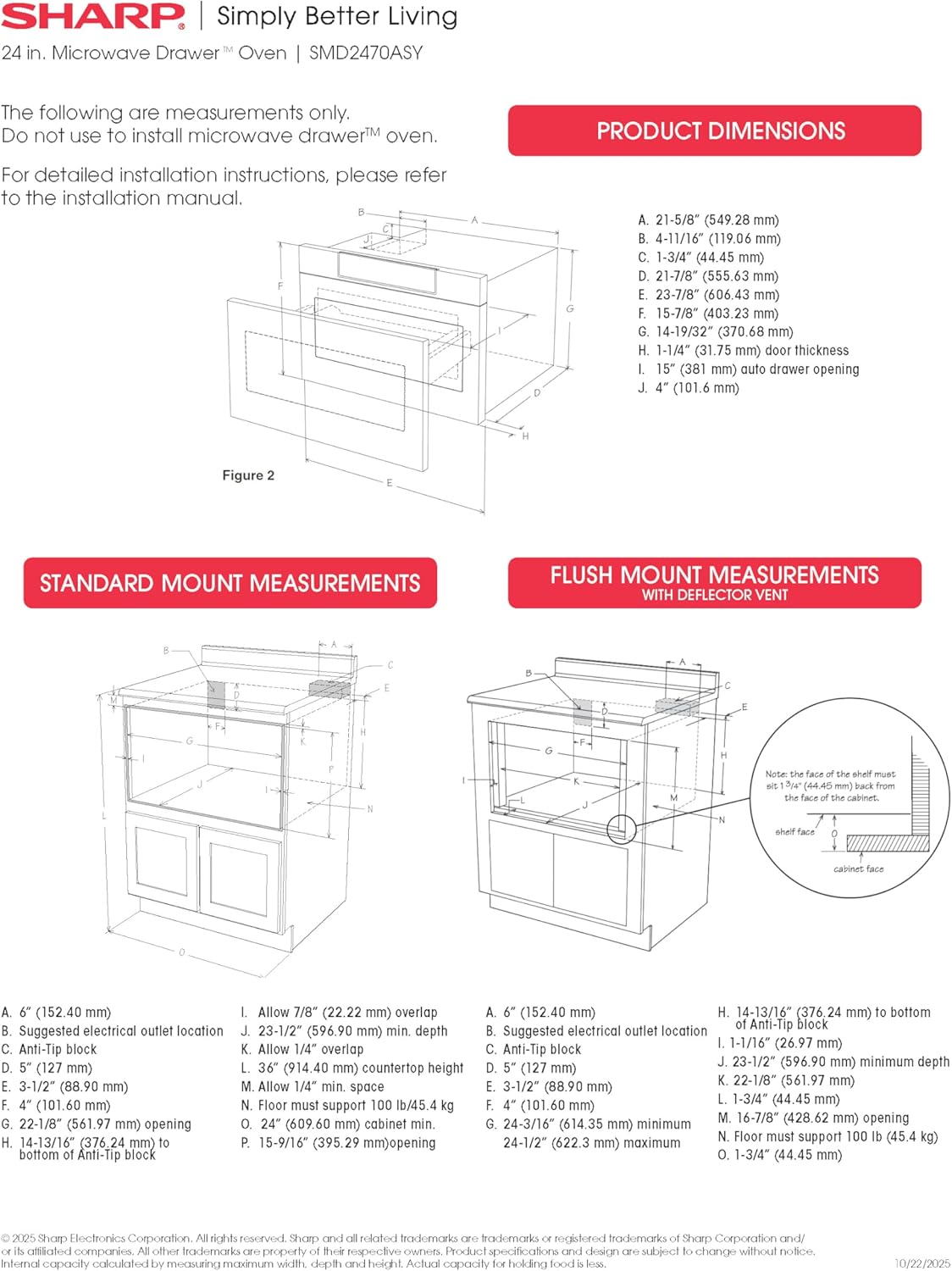
Figure 1: Standard and Flush Mount Installation Measurements. This diagram illustrates the necessary cutout dimensions for both standard and flush mounting options, ensuring proper fit within cabinetry.
- Interior Cavity Dimensions: 17-5/16" x 7-1/8" x 16-9/16" (W x H x D)
- Rozměry produktu: 23-7/8" x 15-7/8" x 23" (W x H x D)
- Standard Mount Cutout Dimensions: 22-1/8" x 15-9/16" x 23-1/2" (W x H x D)
- Flush Mount Cutout Dimensions: 24-3/16" x 16-7/8" x 23-1/2" (W x H x D)

Figure 2: Product Dimensions. This image provides a visual representation of the microwave drawer's external dimensions, including width, height, and depth.
4. Návod k obsluze
The SMD2470ASY features an intuitive control panel that is concealed when not in use, maintaining a clean kitchen aesthetic. The automatic drawer system ensures smooth and effortless access to the cooking cavity.
Ovládací panel:
The control panel is located at the top of the drawer and tilts out at a 45-degree angle for easy viewing and operation. It includes a digital LCD display and various function buttons.

Figure 3: Concealed Control Panel. This image shows the digital LCD display and touch controls, which are hidden until activated.
Základní provoz:
- Open the Drawer: Gently pull the control panel forward or press the 'OPEN' button on the control panel. The drawer will slide out automatically.
- Místo Jídlo: Place your food or beverage directly onto the ceramic tray inside the drawer.
- Close the Drawer: Press the 'CLOSE' button or gently push the drawer inward. It will close smoothly and automatically.
- Vyberte funkci vaření: Use the touch controls to select desired cooking time, power level, or a preset sensor cooking option.
- Začněte vařit: Stiskněte tlačítko „START“.

Figure 4: Easy Touch Automatic Drawer. A finger activates the 'OPEN' button, demonstrating the smooth, hands-free operation of the microwave drawer.
Senzorové vaření:
The oven features advanced Sensor Cook technology for precise defrost and cooking capabilities. Select from various sensor options such as Popcorn, Reheat, Beverage, Defrost, Potatoes, and Vegetables. The sensor automatically adjusts cooking time and power levels for optimal results.

Figure 5: Sensor Cook Technology. This image highlights the microwave's ability to precisely cook and defrost various food items, from roasted potatoes to raw meat patties, using its advanced sensor technology.
Speciální funkce:
- Roztavit/změkčit: Ideal for melting butter, chocolate, or softening cream cheese.
- Udržujte v teple: Udržuje jídlo po uvaření v teple.
- Help/Settings: Access additional settings and information.

Figure 6: Spacious Interior. A large casserole dish fits comfortably inside the microwave drawer, showcasing its generous 1.2 cubic feet capacity.
5. Péče a údržba
Pravidelné čištění a údržba zajistí dlouhou životnost a optimální výkon vaší mikrovlnné trouby.
Čištění interiéru:
- Otřete vnitřek měkkým, damp hadříkem a jemným mýdlem po každém použití.
- For stubborn stains, use a microwave-safe cleaner.
- Ensure the ceramic tray is clean and free of food debris.
Čištění exteriéru:
- Clean the stainless steel exterior with a soft cloth and a stainless steel cleaner.
- Vyhněte se abrazivním čisticím prostředkům nebo drátěnkám, které mohou poškrábat povrch.
- Ovládací panel jemně otřeteamp tkanina.
6. Řešení problémů
If you encounter any issues with your microwave drawer oven, refer to the following common troubleshooting tips before contacting customer support.
Běžné problémy:
- Oven Not Operating: Check if the appliance is properly plugged in. Ensure the circuit breaker has not tripped. Make sure the drawer is fully closed.
- Food Not Heating: Verify that the cooking time and power level are set correctly. Ensure the door is securely closed.
- Neobvyklé zvuky: Minor operational noises are normal. If loud or unusual noises occur, ensure no foreign objects are obstructing the drawer mechanism.
- Ovládací panel nereaguje: Zkuste spotřebič resetovat tak, že ho na několik minut odpojíte od zásuvky a poté jej znovu zapojíte.
For persistent issues, please contact Sharp customer support.
7. Specifikace
Detailed technical specifications for the SHARP SMD2470ASY Microwave Drawer Oven.
| Funkce | Specifikace |
|---|---|
| Název značky | Ostrý |
| Informace o modelu | SMD2470ASY |
| Hmotnost položky | 74 libry |
| Rozměry produktu | 23-7/8"D x 15-7/8"W x 23"H |
| Číslo modelu položky | SMD2470ASY |
| Spotřeba energie | 950 wattů |
| Kapacita | 1.2 kubických stop |
| Typ instalace | Vestavěný |
| Číslo dílu | SMD2470AS |
| Speciální funkce | Odmrazit |
| Režim pečení v troubě | Elektrický |
| Barva | Nerez |
| svtage | 120 voltů |
| Typ materiálu | Nerez |
| Typ vnitřního materiálu | Nerez |
| Zahrnuté komponenty | Mikrovlnná trouba |

Figure 7: Product Feature and Specification Sheet. This document provides a comprehensive overview of the microwave's features, control panel options, and additional specifications.
8. Záruka a podpora
Sharp provides a limited warranty for this product. Please refer to the warranty card included with your purchase for specific terms and conditions. For technical assistance, service, or to order replacement parts, please contact Sharp customer support through their official webwebu nebo kontaktních informací uvedených v dokumentaci k produktu.
Záruční doba: 1 Year (Home Limited) for parts and labor, 4 Years Additional (Parts Only) for Magnetron Tube.