
1. Úvod
This manual provides detailed instructions for the installation, operation, and maintenance of your Antec P50 Window R Mid-Tower PC Case. The Antec P50 Window R is designed for silent computing with optimized airflow and support for Micro ATX and Mini-ITX motherboards. It features a dual-chamber structure, liquid cooling support, and multiple drive bays for a versatile build.
Před zahájením instalace si prosím pečlivě přečtěte tuto příručku, abyste zajistili správné nastavení a maximalizovali výkon a životnost vašeho systému.
2. Nastavení a instalace
2.1 Vybalení a kontrola
Carefully remove the PC case from its packaging. Inspect the case for any signs of damage that may have occurred during shipping. Retain the packaging for future transport or warranty claims.
2.2 Demontáž bočních panelů
Locate and unscrew the thumbscrews on the rear of the case. Slide the side panels backward and lift them off to access the interior.

Obrázek: Úhlový view of the Antec P50 Window R PC Case, showing its compact mid-tower design and front panel.
2.3 Instalace základní desky
- Nainstalujte kryt I/O do zadního otvoru skříně.
- Ensure the motherboard standoffs are correctly aligned for your Micro ATX or Mini-ITX motherboard.
- Carefully place the motherboard onto the standoffs, aligning the screw holes.
- Zajistěte základní desku dodanými šrouby.

Obrázek: Interiér view of the Antec P50 Window R PC Case, highlighting the motherboard tray and cable routing options.
2.4 Instalace napájecího zdroje
The P50 Window R supports bottom-mount power supplies. Install your power supply into the designated compartment at the bottom rear of the case and secure it with screws.
2.5 Instalace měniče
The case features 6 drive bays:
- One 5.25" external drive bay (for optical drives).
- Three 3.5" HDD drive bays.
- Two 2.5" SSD drive bays.
Follow the case's internal guides for tool-less or screw-based installation of your storage devices.

Obrázek: Interiér view of the Antec P50 Window R PC Case, showing the rear of the motherboard tray with cable management space and drive bay locations.
2.6 Instalace rozšiřující karty
The case provides 4 expansion slots. Remove the slot covers as needed and install your graphics card or other expansion cards, securing them with screws.
2.7 Instalace ventilátoru a chladiče
The P50 Window R comes with pre-installed fans: two 120mm fans and one 80mm fan at the front, and one 80mm fan at the rear. It supports additional 80mm/120mm fan mounts and a 240mm radiator in the front or top for liquid cooling.
- For liquid cooling, install the 240mm radiator in the designated front or top mounting points.
- Ensure fans are oriented correctly for optimal airflow (intake at front, exhaust at rear/top).
2.8 Správa kabelů
Pro vedení kabelů využijte výřezy pro vedení kabelů a úchyty za přihrádkou základní desky. Zlepší se tím proudění vzduchu a estetika.
2.9 Připojení I/O na předním panelu
Připojte kabely předního panelu (USB 3.0, USB 2.0, HD Audio, vypínač, resetovací vypínač, LED dioda napájení, LED dioda HDD) k odpovídajícím konektorům na základní desce. Umístění konektorů naleznete v manuálu k základní desce.
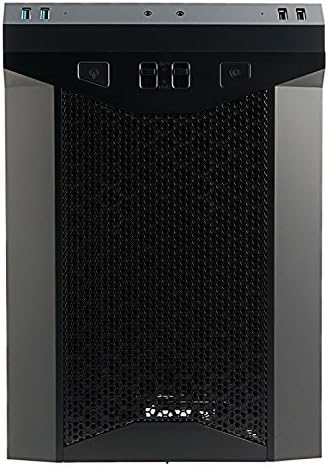
Obrázek: Přední strana view of the Antec P50 Window R PC Case, showing the mesh intake and front panel controls.
3. Provoz
3.1 Ovládací prvky a porty na předním panelu
Přední panel poskytuje pohodlný přístup k:
- Vypínač: Zapnutí nebo vypnutí systému.
- Resetovací tlačítko: Chcete-li restartovat systém.
- Porty USB 3.0 (x2): Pro vysokorychlostní přenos dat.
- Porty USB 2.0 (x2): Pro standardní USB zařízení.
- Audio konektory: Pro sluchátka a mikrofon.
- Ovládání ventilátoru: Two fan control switches are available to adjust fan speeds for optimal balance between cooling and noise.
3.2 Proudění vzduchu a chlazení
The P50 Window R features a dual-chamber structure designed for direct airflow, separating heat-generating components. The pre-installed fans and additional mounting options ensure efficient cooling for your system.
4. Údržba
4.1 Čištění prachových filtrů
Regularly clean the dust filters to maintain optimal airflow and prevent dust buildup inside the case. Dust filters are typically located at the front, top, and bottom (for the power supply intake). Gently remove them and clean with compressed air or rinse with water (ensure they are completely dry before reinstallation).
4.2 Obecné čištění
Použijte měkký, damp cloth to clean the exterior surfaces of the case. Avoid abrasive cleaners. For interior cleaning, use compressed air to remove dust from components and internal surfaces.
5. Řešení problémů
5.1 Systém se nezapíná
- Ensure all power cables (24-pin ATX, 8-pin CPU, GPU power) are securely connected to the motherboard and components.
- Ověřte, zda je vypínač napájení v poloze „ON“.
- Zkontrolujte, zda je kabel vypínače na předním panelu správně připojen ke konektoru základní desky.
5.2 Nadměrný hluk
- Check if any cables are obstructing fan blades.
- Ensure all fans are securely mounted.
- Utilize the front panel fan controls to adjust fan speeds.
5.3 Špatný chladicí výkon
- Clean all dust filters to ensure unrestricted airflow.
- Verify that fans are oriented correctly (intake/exhaust).
- Ensure proper cable management to avoid blocking airflow.
5.4 Front Panel USB/Audio Ports Not Working
- Confirm that the front panel USB and audio cables are correctly connected to the corresponding headers on your motherboard.
6. Specifikace
| Funkce | Detail |
|---|---|
| Název modelu | P50 WINDOW R |
| Typ pouzdra | Střední věž |
| Kompatibilita základní desky | Micro ATX, Mini-ITX |
| Rozměry (D x Š x V) | 355mm x 260mm x 355mm (13.98"D x 355"H) |
| Materiál | Polykarbonát (PC) |
| Drive Bays | 1 x 5.25" (external), 3 x 3.5" HDD, 2 x 2.5" SSD |
| Rozšiřující sloty | 4 |
| Přední I / O porty | 2 x USB 3.0, 2 x USB 2.0, Audio In/Out, 2 x Fan Controls |
| Předinstalované ventilátory | Front: 2 x 120mm, 1 x 80mm; Rear: 1 x 80mm |
| Podpora kapalného chlazení | 240mm radiator (front/top) |
| Max Video Card Size | 300 mm |
| Maximální výška chladiče CPU | 130 mm |
| Montáž napájecího zdroje | Spodní montáž |
| Hmotnost položky | 11.7 libry |
7. Informace o záruce
The Antec P50 Window R PC Case comes with a Limited Warranty period (parts): 1 year. Please retain your proof of purchase for warranty claims. For specific terms and conditions, refer to the official Antec webwebu nebo kontaktujte zákaznickou podporu.
8. Podpora
For further assistance, technical support, or to inquire about replacement parts, please visit the official Antec website or contact their customer service department. You can often find FAQs, driver downloads, and additional resources on the manufacturer's support pages.
Antec Official Webmísto: www.antec.com