
1. Nastavení
1.1 Vybalení a obsah
Opatrně vyjměte televizor a veškeré příslušenství z obalu. Ujistěte se, že jsou přítomny všechny součásti:
- Sharp LC-40LE653U 40-Inch Smart LED TV
- Dálkové ovládání
- 2 AA baterie
1.2 Instalace stojanu
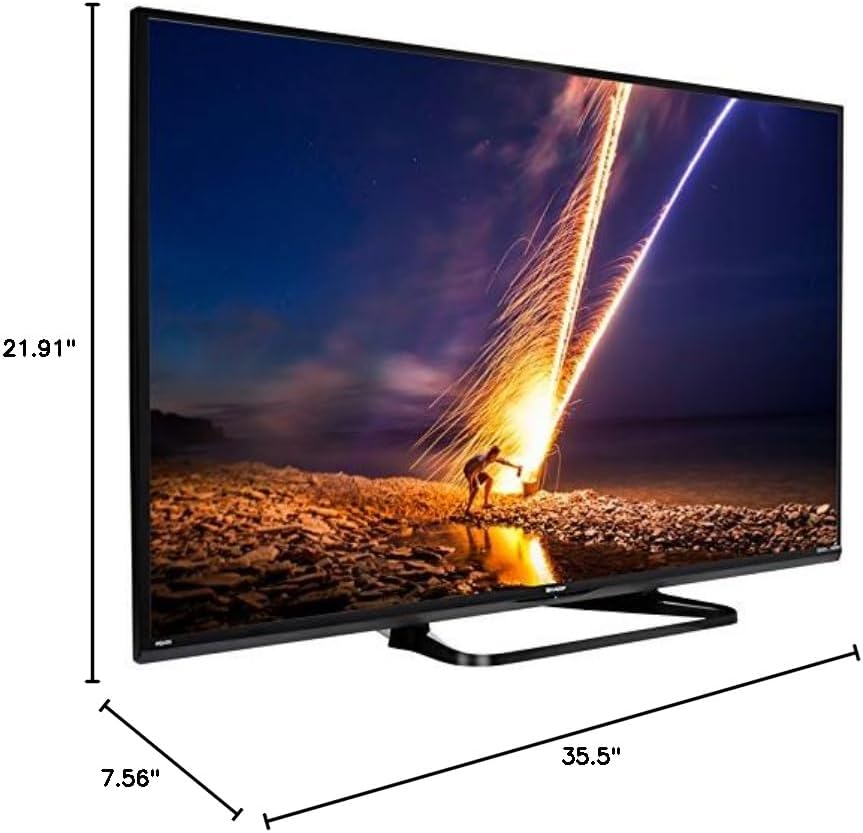
If placing the TV on a table, attach the included stand. Refer to the diagram below for proper assembly. Ensure all screws are securely fastened.
1.3 Připojení externích zařízení
Connect your external devices such as cable boxes, Blu-ray players, or gaming consoles to the TV's input ports. The TV features multiple connectivity options.


Dostupné porty zahrnují:
- HDMI: 2 ports for high-definition audio and video. One HDMI port supports MHL (Mobile High-Definition Link).
- USB: 1 port for media playback or connecting a USB device.
- Ethernet: Pro kabelové síťové připojení.
- Component/Video: For older video devices.
- DTV/TV (anténa): Pro připojení antény nebo kabelové televize.
- Audio výstup: Optical for digital audio, and RCA for analog audio.
1.4 Připojení napájení
After connecting all necessary devices, plug the TV's power cord into a wall outlet.
1.5 Počáteční nastavení
Upon first power-on, the TV will guide you through an initial setup process. This includes language selection, time zone, and network configuration. For Wi-Fi setup, select your network and enter the password.
2. Návod k obsluze
2.1 Funkce dálkového ovládání
The remote control allows you to access all TV functions. Insert the two AA batteries into the remote control, ensuring correct polarity.

- Napájení (červené tlačítko): Zapíná nebo vypíná televizor.
- Vstup: Selects the input source (HDMI, TV, USB, etc.).
- VOL +/-: Nastavuje úroveň hlasitosti.
- CH +/-: Mění televizní kanály.
- Navigační tlačítka (nahoru/dolů/vlevo/vpravo/Enter): Používá se k navigaci v nabídkách a výběru možností.
- CHYTRÝ: Accesses the Smart Central Apps menu.
- JÍDELNÍ LÍSTEK: Opens the main TV menu for settings adjustments.
- NETFLIX: Direct access button for the Netflix application.
2.2 Smart TV Features (Smart Central Apps)
The Sharp LC-40LE653U features Smart Central Apps, providing access to various online services and a web browser. Ensure your TV is connected to the internet via Wi-Fi or Ethernet.

- Přístup k aplikacím: Press the 'SMART' button on your remote to open the Smart Central Apps menu.
- Podporované služby: Includes Hulu Plus, Netflix, Pandora, Vudu, and YouTube.
- Web prohlížeč: Použijte vestavěný web browser for general internet browsing. Navigation is done via the remote control.
2.3 Wallpaper Mode
When the TV is turned off, Wallpaper Mode can display virtually any image. To use this feature, connect a USB drive containing your desired images to the TV's USB port. Navigate to the Wallpaper Mode settings in the TV menu to select and configure your images.
3. Údržba
3.1 Čištění televizoru
Obrazovku jemně otřete měkkým, suchým hadříkem, který nepouští vlákna. V případě odolných skvrn ji lehce otřete.ampen the cloth with water or a specialized screen cleaner. Avoid using harsh chemicals, abrasive cleaners, or direct spraying of liquids onto the screen or cabinet.
Clean the TV cabinet with a soft, dry cloth. Ensure the TV is unplugged before cleaning.
3.2 Aktualizace softwaru
Periodically check for software updates through the TV's settings menu to ensure optimal performance and access to the latest features. Updates can be performed via the internet connection.
4. Řešení problémů
If you encounter issues with your Sharp LC-40LE653U TV, refer to the following common solutions:
- Bez napájení: Ensure the power cord is securely plugged into both the TV and a working wall outlet. Check if the power indicator light on the TV is on.
- Žádný obraz/zvuk: Verify the correct input source is selected using the 'Input' button on the remote. Check all cable connections (HDMI, component, etc.) are secure.
- Špatná kvalita obrazu: Upravte nastavení obrazu (jas, kontrast, ostrost) v nabídce televizoru. Ujistěte se, že vstupní zdroj poskytuje vysoce kvalitní signál.
- Žádné internetové připojení: Check your Wi-Fi router or Ethernet cable connection. Re-enter your Wi-Fi password in the TV's network settings. Restarting your router may resolve connectivity issues.
- Dálkové ovládání nefunguje: Vyměňte baterie v dálkovém ovladači. Ujistěte se, že mezi dálkovým ovladačem a infračerveným senzorem televizoru nejsou žádné překážky.
For more detailed troubleshooting steps, consult the full online manual or contact customer support.
5. Specifikace
Key technical specifications for the Sharp LC-40LE653U 40-Inch Smart LED TV:
| Funkce | Specifikace |
|---|---|
| Číslo modelu | LC-40LE653U |
| Velikost obrazovky | 39.5 palce (třída 40 palců) |
| Technologie displeje | LCD |
| Rezoluce | 1080p (Full HD) |
| Obnovovací frekvence | 60 Hz |
| Poměr stran | 16:9 |
| Technologie připojení | Wi-Fi |
| Hardwarové rozhraní | Ethernet, HDMI, USB |
| Total Number of HDMI Ports | 2 (one with MHL support) |
| Celkový počet portů USB | 1 |
| Zvukový vstup | HDMI, Optical, USB |
| Maximální výstupní výkon reproduktoru | 20 wattů |
| Rozměry produktu (D x Š x V) | 7.56 cm x 35.5 cm x 21.91 cm |
| Hmotnost položky | 16.3 libry |
| Typ montáže | Stolní držák |
| Podporované internetové služby | Hulu Plus, Netflix, Pandora, Vudu, YouTube |
| Certifikace Energy Star | Ano |
6. Záruka a podpora
6.1 Záruka na produkt
This Sharp LC-40LE653U TV comes with a 1letá omezená zárukaPro případné reklamace si prosím uschovejte doklad o koupi. Záruka se vztahuje na výrobní vady za běžných podmínek používání.
6.2 Zákaznická podpora
For technical assistance, troubleshooting beyond this manual, or warranty service, please contact Sharp customer support. Refer to the official Sharp webNejnovější kontaktní informace naleznete na webových stránkách nebo na registrační kartě produktu.