
1. Úvod
The Aputure Amaran HR672S is a high-performance LED video light panel designed for professional photography and videography. Featuring a high Color Rendering Index (CRI) of 95+, it ensures accurate and vibrant color reproduction. This light panel operates at a fixed color temperature of 5500K, providing a daylight-balanced output. It includes a wireless remote control for convenient adjustments and can be powered by either an AC adapter or NP-F series batteries.
2. Bezpečnostní informace
- Do not operate the light panel with wet hands or in damp prostředí.
- Zajistěte napájení objtage matches the product's requirements (110-240V).
- Avoid direct eye exposure to the LED light, as it can cause discomfort or damage.
- Keep the light panel away from flammable materials.
- Nerozebírejte ani neupravujte výrobek. Servis svěřte kvalifikovanému personálu.
- Always use the provided power adapter and recommended batteries.
- Zajistěte řádné větrání během provozu, aby nedošlo k přehřátí.
3. Obsah balení
Ověřte, zda jsou v balení obsaženy všechny níže uvedené položky:
- 1 x Aputure Amaran HR672S LED Light Panel
- 1 x bezdrátové dálkové ovládání
- 1 x Power Adapter (AC 110-240V to DC 15V)
- 1 x Light Bracket with 1/4 to 3/8 Screw
- 1 x White Diffusion Filter
- 1 x Orange Diffusion Filter
- 1 x taška na přenášení
- 1 x Uživatelská příručka (anglicky)
- 2 x NP-F970 Batteries (if included in specific kit)
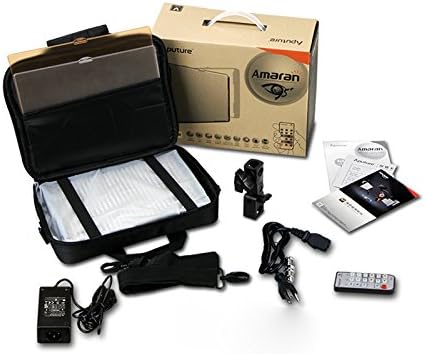
Image: All components included in the Aputure Amaran HR672S LED Video Light Panel package, neatly arranged.
4. Konec produktuview
4.1 Přední View
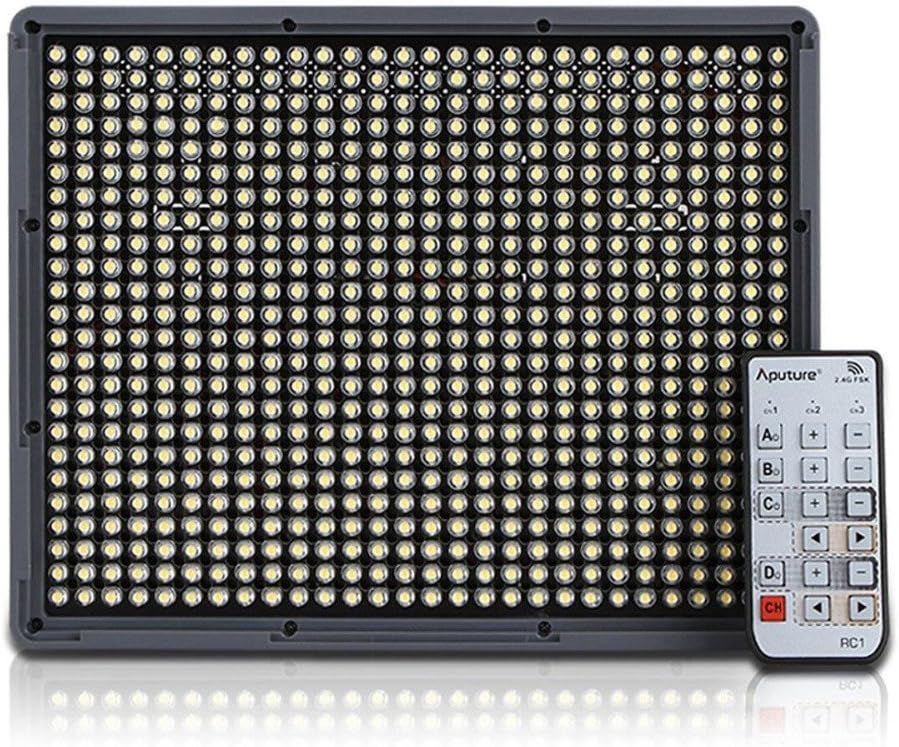
Image: The front face of the Aputure Amaran HR672S LED light panel, showing the array of 672 LED bulbs.
4.2 Back Panel Controls and Battery Slots

Image: The rear of the light panel, displaying the digital display, power switch, dimmer knob, channel/group buttons, and dual NP-F battery slots.
4.3 Diffusion Filter Installation

Image: A hand demonstrating the process of sliding a diffusion filter into the designated slot on the light panel.
5. Nastavení
5.1 Montáž světelného panelu
- Attach the provided light bracket to the 1/4-inch screw thread at the bottom of the HR672S light panel.
- Secure the light bracket onto a standard light stand or tripod using the 1/4-inch or 3/8-inch screw adapter. Tighten securely.
- Adjust the angle of the light panel using the tilt mechanism on the bracket.
5.2 Powering the Light Panel
The HR672S can be powered in two ways:
- Napájení střídavým proudem: Connect the DC 15V power adapter to the DC input port on the back of the light panel. Plug the adapter into a suitable wall outlet (110-240V).
- Napájení baterie: Insert two fully charged NP-F series batteries (e.g., NP-F970) into the battery slots on the back of the light panel. Ensure they click into place. The light will automatically draw power from the batteries when AC power is not connected or is interrupted.
5.3 Attaching Diffusion Filters
Slide either the white or orange diffusion filter into the grooves on the front of the light panel. The white filter provides softer light, while the orange filter can be used for color correction or creative effects.
6. Provoz
6.1 Zapnutí/vypnutí
Locate the power switch on the back of the light panel. Flip it to the 'ON' position to power on the device. Flip it to 'OFF' to power off.
6.2 Nastavení jasu
Rotate the dimmer knob on the back panel to adjust the light intensity. The brightness level will be displayed on the digital screen.
6.3 Používání bezdrátového dálkového ovladače
The HR672S comes with a 2.4GHz wireless remote control for convenient operation.
- Nastavení kanálů: Press the 'Channel' button on the light panel to cycle through available channels (1-3). Ensure the remote control is set to the same channel.
- Skupiny nastavení: Press the 'Group' button on the light panel to assign it to a group (A, B, C, D). The remote control can then control lights assigned to specific groups or all groups simultaneously.
- Dálkové ovládání: Use the corresponding buttons on the remote to power on/off, adjust brightness, and select channels/groups.
6.4 Teplota barev
The Aputure Amaran HR672S has a fixed color temperature of 5500K. No adjustment is needed or possible for color temperature on this model.
7. Údržba
- Čištění: K čištění světelného panelu používejte měkký, suchý hadřík. Nepoužívejte abrazivní čisticí prostředky ani rozpouštědla.
- Skladování: When not in use, store the light panel in its carrying bag in a cool, dry place, away from direct sunlight and moisture.
- Péče o baterie: If using batteries, remove them if the light will not be used for an extended period. Store batteries in a cool, dry place.
- Kontrola kabelů: Regularly inspect power cables and connections for any signs of damage. Replace damaged cables immediately.
8. Řešení problémů
| Problém | Možná příčina | Řešení |
|---|---|---|
| Světlo se nerozsvítí | No power supply; Batteries depleted; Power switch off | Check AC adapter connection; Replace/recharge batteries; Ensure power switch is 'ON' |
| Dálkové ovládání nefunguje | Incorrect channel/group; Remote battery depleted; Obstruction | Match channel/group on light and remote; Replace remote battery; Ensure clear line of sight |
| Světlo bliká | Unstable power; Faulty connection; Overheating | Ensure stable power source; Check all cable connections; Allow light to cool down |
| Light output is too harsh | No diffusion filter used | Attach the white diffusion filter to soften the light |
9. Specifikace
| Funkce | Detail |
|---|---|
| Model | Amaran HR672S |
| CRI | 95+ |
| Moc | 45W |
| Úhel paprsku | 25 stupňů |
| Teplota barev | 5500 tis |
| Vstup napájení | AC 110-240V |
| Napájení | DC 15V |
| Vzdálená frekvence | 2.4 GHz |
| Vzdálené kanály | 3 |
| Remote Groups | 4 (A/B/C/D) |
| Luminous Flux (0.5m) | 18800 luxů |
| Luminous Flux (1m) | 6040 luxů |
| Hmotnost položky | 4 libry (přibližně 1.81 kg) |
| Rozměry balení | 10.9 x 8.8 x 4.8 palců (přibližně 27.7 x 22.4 x 12.2 cm) |
| Jsou vyžadovány baterie | 2 Lithium Ion (NP-F series) |
10. Záruka a podpora
Aputure products are covered by a limited warranty. For specific warranty terms and conditions, please refer to the warranty card included with your product or visit the official Aputure website. For technical support, troubleshooting assistance, or service inquiries, please contact Aputure customer support through their official channels.
Online zdroje:
- Official Aputure Webmísto: www.aputure.com
- Product Support Page: Refer to the official webweb pro stránky podpory konkrétních produktů.