
Zavedení
The HIFIMAN RE400i V2 is an in-ear earphone specifically designed for use with iOS devices, featuring an integrated in-line control for convenient audio management and communication. This earphone incorporates an 8.5mm coated Titanium driver, engineered by HIFIMAN, to deliver detailed sound and an extended frequency response. The design prioritizes a superb fit and comfort, making it suitable for prolonged listening sessions.
Key features include Oxygen-Free Copper cabling for optimal signal transmission, an improved in-line control for enhanced reliability and durability, and advanced ergonomics for comfortable and extended listening. Its lightweight and stylish design complement its acoustic performance, providing a balanced sound profile.
Obsah balení
- HIFIMAN RE400i V2 Earphones
- Multiple sizes of silicone ear tips (various pairs)
- Spona na vedení kabelů
Nastavení
1. Choosing and Fitting Ear Tips
Selecting the correct ear tip size is crucial for optimal sound quality and comfort. Experiment with the included silicone ear tips to find the pair that creates a secure seal in your ear canal. A proper seal enhances bass response and passive noise isolation.
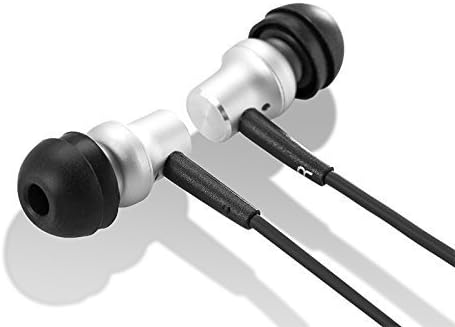
Obrázek: Detail view of the HIFIMAN RE400i V2 earphone earpieces, showing the silver housing and black silicone ear tips.
2. Připojení k vašemu zařízení
Insert the 3.5mm audio jack of the RE400i V2 earphones firmly into the headphone port of your compatible iOS device. Ensure the connection is secure to prevent audio interruptions.
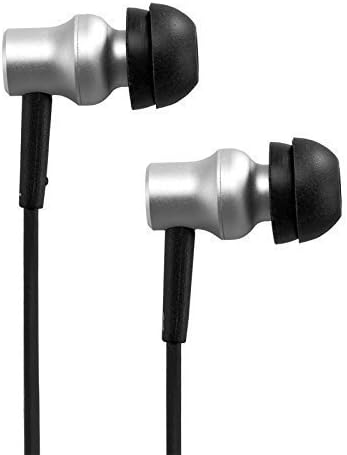
Obrázek: Boční view of the HIFIMAN RE400i V2 earphones, highlighting their compact and ergonomic design.
Návod k obsluze
Using the In-Line Control
The HIFIMAN RE400i V2 features an in-line control unit designed for seamless interaction with your iOS device. This unit allows you to manage audio playback and phone calls without needing to access your device directly.

Image: The HIFIMAN RE400i V2 earphones, showing the full cable length with the in-line control unit.
- Tlačítko pro zvýšení hlasitosti (+): Stisknutím zvýšíte hlasitost zvuku.
- Tlačítko pro snížení hlasitosti (-): Stisknutím snížíte hlasitost zvuku.
- Středové tlačítko (multifunkční):
- Jedno stisknutí: Play/Pause audio, Answer/End a phone call.
- Dvojitým stisknutím tlačítka: Přejít na další skladbu.
- Trojitý stisk: Přejít zpět na předchozí skladbu.
- Stiskněte a podržte: Activate Siri or other voice assistant (if configured on your iOS device).

Image: Detailed close-up of the in-line control unit on the HIFIMAN RE400i V2, showing the buttons.
Funkce mikrofonu
The in-line control unit also houses a microphone, enabling hands-free communication during phone calls. Position the microphone close to your mouth for clear voice transmission.
Údržba
Čištění sluchátek
- Regularly remove the silicone ear tips and clean them with a soft, damp hadříkem. Před opětovným připevněním je nechte zcela uschnout.
- Gently wipe the earphone housings and cable with a dry, soft cloth to remove dust and debris.
- Avoid using harsh chemicals or abrasive materials, as these can damage the earphones.
Péče o kabely
While the RE400i V2 features Oxygen-Free Copper cabling, proper care is essential for longevity. Avoid sharp bends, excessive pulling, or tangling of the cable. When storing, coil the cable loosely to prevent damage.
Odstraňování problémů
- Žádný zvuk nebo přerušovaný zvuk:
- Ujistěte se, že je 3.5mm jack zcela zasunut do zařízení.
- Check the volume level on both your device and using the in-line controls.
- Test the earphones with another audio source to rule out device issues.
- Poor Sound Quality (e.g., lack of bass, tinny sound):
- Verify that the ear tips are correctly sized and creating a proper seal in your ear canal.
- Check for any debris or earwax buildup in the earphone nozzles and clean if necessary.
- In-Line Control Not Responding:
- Ensure the earphones are fully connected to your iOS device.
- Restartujte zařízení iOS.
- Confirm that your device's software is up to date.
- Mikrofon nefunguje:
- Ujistěte se, že jsou sluchátka plně připojena.
- Check your device's privacy settings to ensure microphone access is granted to relevant applications.
Specifikace
| Funkce | Specifikace |
|---|---|
| Značka | HIFIMAN |
| Číslo modelu | RE400I |
| Form Factor | V uchu |
| Impedance | 32 ohmů |
| Jack pro sluchátka | Zásuvka 3.5 mm |
| Typ ovládání | Ovládání hlasitosti |
| Technologie připojení | Kabelové |
| Hmotnost položky | 13.61 g |
| Materiál pouzdra | Měď |
| Další funkce | Designed for iPhone/ iPad/ iPod, Perfect sound same as RE400 |
Záruka a podpora
For detailed warranty information, technical support, and service inquiries regarding your HIFIMAN RE400i V2 earphones, please refer to the official HIFIMAN website or contact your authorized retailer. It is recommended to retain your proof of purchase for any warranty claims.