
Zavedení
Děkuji za nákupasing the GPX 9-inch Portable DVD Player, Model PD901BDLP. This manual provides essential information for the safe and efficient operation of your device. Please read it thoroughly before use and retain it for future reference.
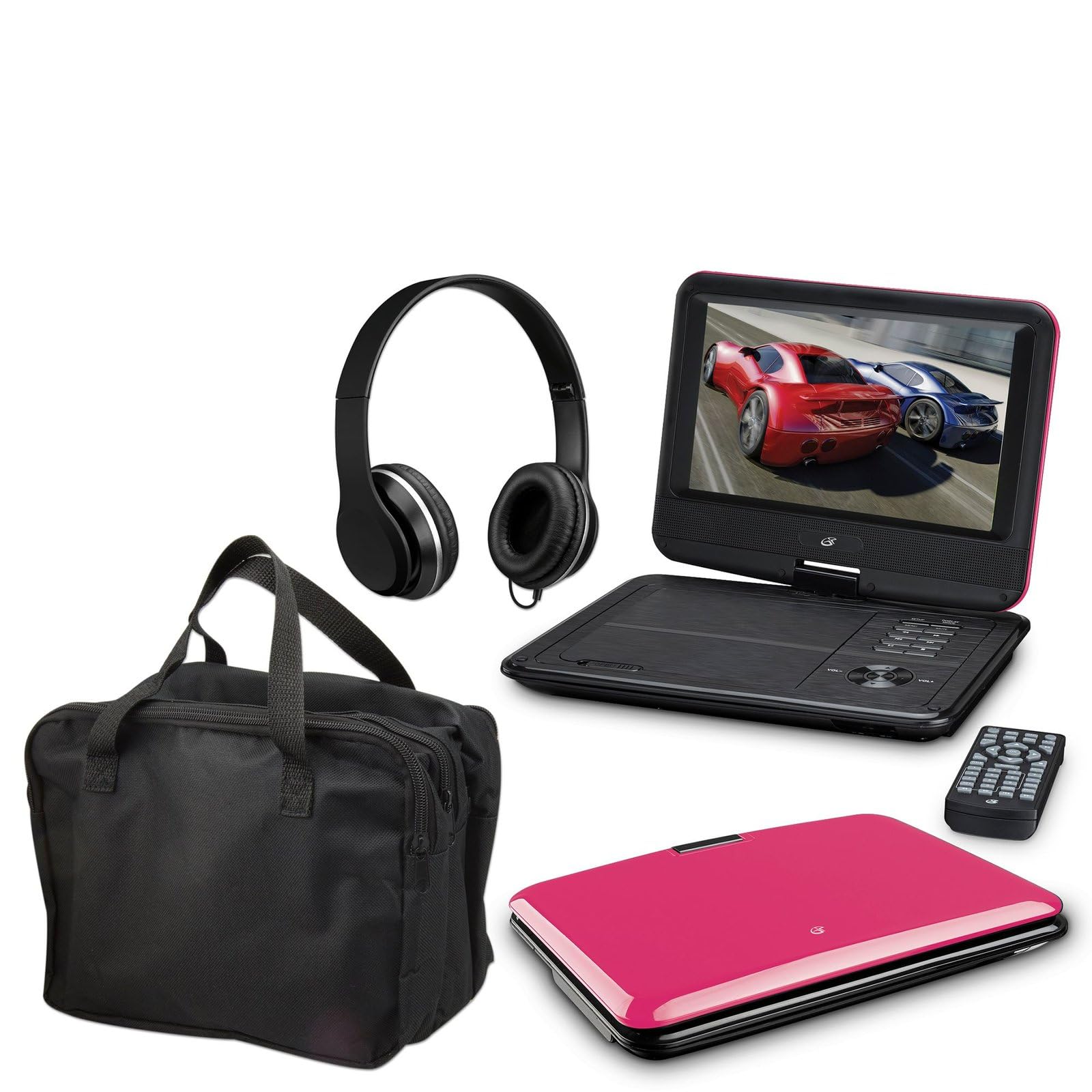
Image: The GPX 9-inch Portable DVD Player in its closed position, showcasing its vibrant pink top casing and sleek design.
Obsah balení
Ověřte, zda jsou v balení obsaženy všechny níže uvedené položky:
- GPX 9-inch Portable DVD Player (Model PD901BDLP)
- Dálkové ovládání (vyžaduje 2 baterie AAA, součástí balení)
- AC/DC napájecí adaptér
- 12V adaptér do auta
- Audio/video kabel 3.5 mm na RCA
- Přepravní pouzdro
- Sluchátka
- Návod k použití (tento dokument)
Vlastnosti produktu
- 9-inch 800x480 LCD screen
- Screen tilts and swivels for versatile viewing úhly
- Rechargeable lithium polymer battery with up to 2 hours of battery life
- Vestavěné stereo reproduktory
- Konektor pro sluchátka pro poslech v soukromí
- RCA output for connection to external displays
- Supports DVD, DVD-R/RW, DVD+R/RW, CD, CD-R/RW, JPEG, MP3 formats
Nastavení
1. Nabíjení baterie
Before first use, fully charge the internal lithium polymer battery. Connect the AC/DC power adapter to the DC IN port on the DVD player and plug the other end into a standard wall outlet. The charging indicator light will illuminate. Charging typically takes approximately 3-4 hours for a full charge, providing up to 2 hours of playback.
2. Instalace baterií dálkového ovládání
Open the battery compartment on the back of the remote control. Insert two (2) AAA batteries, ensuring correct polarity (+/-). Close the compartment securely.
3. Connecting to a Television (Optional)
Na view content on a larger screen, use the included 3.5mm-to-RCA audio/video cable. Connect the 3.5mm end to the AV OUT port on the DVD player. Connect the RCA (red, white, yellow) ends to the corresponding AV INPUT ports on your television. Select the correct AV input source on your TV.
4. Using the Car Adapter (Optional)
For in-car use, connect the 12V car adapter to the DC IN port on the DVD player and plug the other end into your vehicle's cigarette lighter socket.
Návod k obsluze
1. Zapnutí/vypnutí
Stiskněte a podržte MOC button on the player or remote control to turn the device on or off.
2. Vložení DVD
- Gently open the DVD player lid.
- Place a DVD disc onto the spindle with the label side facing up.
- Jemně zatlačte na střed disku, dokud nezacvakne na místo.
- Zavřete víko. Přehrávač automaticky začne číst disk.
3. Nastavení obrazovky
The LCD screen can be tilted and swiveled to achieve the optimal viewing angle. Carefully adjust the screen to your preferred position.
4. Základní ovládací prvky přehrávání
- PLAY/PAUSE: Press to start or pause playback.
- ZASTÁVKA: Stisknutím zastavíte přehrávání.
- SKIP (<< / >>): Press to skip to the previous or next chapter/track.
- FF/REW: Press and hold to fast forward or rewind.
- OBJEM (+/-): Adjust the audio volume.
5. Používání sluchátek
Zapojte přiložená sluchátka do SLUCHÁTKA jack for private listening. The built-in speakers will automatically mute when headphones are connected.
Údržba
- Čištění obrazovky: Use a soft, lint-free cloth to gently wipe the LCD screen. Do not use liquid cleaners or abrasive materials.
- Čištění diskové mechaniky: Udržujte diskovou přihrádku bez prachu a nečistot. V případě potřeby použijte měkký kartáč nebo stlačený vzduch.
- Péče o baterie: To prolong battery life, avoid fully discharging the battery frequently. If storing the player for an extended period, charge it periodically.
- Skladování: Store the DVD player in a cool, dry place away from direct sunlight and extreme temperatures. Use the included carrying case for protection during transport.
Odstraňování problémů
| Problém | Řešení |
|---|---|
| Přehrávač se nezapne. | Ensure the battery is charged or the AC/DC adapter is securely connected to a working power outlet. Check the power switch. |
| Nebyl zjištěn žádný disk. | Verify the disc is inserted correctly with the label side up and seated properly on the spindle. Ensure the disc is clean and free of scratches. Try a different disc. |
| Žádný zvuk. | Check the volume level. Ensure headphones are not plugged in if you intend to use the built-in speakers. If connected to a TV, check the TV's volume and input settings. |
| Dálkové ovládání nefunguje. | Check and replace the AAA batteries in the remote. Ensure there are no obstructions between the remote and the player's IR sensor. |
| Obraz je zkreslený nebo rozmazaný. | Clean the disc. Adjust the screen angle. If connected to a TV, check the AV cable connections. |
Specifikace
- Model: PD901BDLP
- Velikost obrazovky: 9 palců
- Typ displeje: LCD
- Nativní rozlišení: 800 x 480
- Typ média: DVD, DVD-R/RW, DVD+R/RW, CD, CD-R/RW, JPEG, MP3
- Baterie: Dobíjecí lithiový polymer
- Životnost baterie: Až 2 hodin
- Konektivita: 3.5mm AV Out, Headphone Jack, DC In
- Příkon: AC/DC Adapter, 12V Car Adapter
- Hmotnost: Přibližně 1.9 liber (0.86 kg)
- Barva: Růžový
- UPC: 047323179044
Záruka a podpora
This GPX Portable DVD Player is covered by a 90denní omezená záruka výrobce od data původního nákupu. Tato záruka se vztahuje na vady materiálu a zpracování při běžném používání.
For warranty service or technical support, please refer to the contact information provided with your product packaging or visit the official GPX webwebu. Uschovejte si účtenku jako doklad o koupi.
Pro více informací můžete navštívit GPX Store on Amazon.