
Zavedení
This manual provides instructions for the Goldmaster RCU 881 Universal Remote Control. This device is designed to control various television sets using infrared technology, offering a convenient replacement or alternative to multiple original remote controls.
Bezpečnostní informace
- Udržujte baterie mimo dosah dětí.
- Nekombinujte staré a nové baterie ani různé typy baterií.
- Do not expose the remote control to extreme temperatures, direct sunlight, or moisture.
- Použité baterie zlikvidujte v souladu s místními předpisy na ochranu životního prostředí.
- Avoid disassembling the remote control; this may void any warranty.
Obsah balení
- 1 x Goldmaster RCU 881 Universal Remote Control
- Note: Batteries are not included and must be purchased separately (2x AAA batteries required).
Konec produktuview
The Goldmaster RCU 881 is a universal infrared remote control featuring a sleek silver design and a comprehensive button layout for intuitive control of compatible devices, primarily televisions.
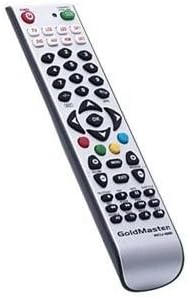
Obrázek: Přední strana view of the Goldmaster RCU 881 Universal Remote Control, showing its silver finish and button layout.

Image: The official Goldmaster brand logo.
Nastavení
1. Instalace baterie
- Najděte kryt prostoru pro baterie na zadní straně dálkového ovladače.
- Slide the cover off in the direction indicated by an arrow (if present).
- Insert two AAA batteries, ensuring correct polarity (+ and - symbols match the markings inside the compartment).
- Nasaďte kryt přihrádky na baterie zpět, dokud bezpečně nezacvakne.
2. Programování dálkového ovládání
The Goldmaster RCU 881 is a universal remote. Programming typically involves entering a code specific to your TV brand or using an automatic search function. Refer to the included code list (if available with your purchase) or follow these general steps:
- Turn on the device you wish to control (e.g., your television).
- Stiskněte a podržte SOUBOR button (or a similar button, if present) on the remote until the indicator light turns on and remains lit.
- Enter the 3 or 4-digit code for your TV brand using the number buttons. If the indicator light turns off, the code has been accepted.
- Otestujte dálkový ovladač stisknutím tlačítka MOC button or other function buttons. If the device responds, the programming is successful.
- If the code does not work, or if the indicator light flashes and turns off without controlling the device, repeat steps 2-4, trying other codes listed for your brand.
- If no code works, or if a code list is not provided, use the automatic search function:
- Stiskněte a podržte SOUBOR button until the indicator light turns on.
- Stiskněte tlačítko MOC button once. The indicator light will begin to flash slowly.
- Point the remote at your TV and repeatedly press the MOC tlačítko (resp CH+ button) slowly, allowing a few seconds between presses, until the TV turns off.
- Once the TV turns off, immediately press the SOUBOR tlačítko pro uložení kódu. Kontrolka zhasne.
- Test the remote. If it controls your TV, programming is complete. If not, repeat the automatic search process.
Note: Specific programming steps and available codes may vary. Consult the original packaging or manufacturer's website for a comprehensive code list or detailed instructions for your specific device model.
Návod k obsluze
Once programmed, the Goldmaster RCU 881 functions like your original remote control for the assigned device. Below are common button functions:
- Vypínač: Zapíná nebo vypíná zařízení.
- Channel Buttons (CH+/CH-): Přepíná kanály nahoru nebo dolů.
- Volume Buttons (VOL+/VOL-): Nastavuje hlasitost zvuku.
- Tlačítko ztlumení: Vypne nebo vypne zvuk.
- Číselná tlačítka (0-9): Used for direct channel input.
- Menu/Settings Buttons: Accesses device menus and settings.
- Navigační tlačítka (nahoru/dolů/vlevo/vpravo/OK): Prochází menu a potvrzuje výběr.
- Tlačítko Vstup/Zdroj: Changes the input source (e.g., HDMI 1, AV, Component).
Button layout and specific functionality may vary based on the programmed device and the universal code used.
Údržba
- Clean the remote control with a soft, dry cloth. Do not use liquid cleaners, abrasive materials, or chemical solvents.
- If the remote control will not be used for an extended period (e.g., one month or more), remove the batteries to prevent potential leakage and damage.
- Avoid dropping the remote control or exposing it to strong impacts, which can damage internal components.
- Dálkový ovladač skladujte na chladném a suchém místě mimo dosah přímého slunečního záření.
Odstraňování problémů
Dálkový ovladač nefunguje po naprogramování:
- Ensure batteries are inserted correctly with the correct polarity and are not depleted. Replace if necessary.
- Re-attempt the programming process, trying different codes for your device brand.
- Ujistěte se, že mezi dálkovým ovladačem a infračerveným přijímačem zařízení nejsou žádné překážky.
- The remote control may not be compatible with all functions of your specific device model.
Některá tlačítka nefungují:
- This can occur if the programmed code does not fully support all functions of your device. Try a different code.
- Ujistěte se, že tlačítka jsou čistá a bez nečistot.
Kontrolka se nerozsvítí:
- Check battery installation and ensure batteries have sufficient charge. Replace batteries if needed.
Specifikace
| Funkce | Detail |
|---|---|
| Značka | GoldMaster |
| Model | RCU-881 |
| Technologie připojení | Infračervený |
| Kompatibilní zařízení | Televize |
| Barva | Stříbro |
| Metoda zadávání | Tlačítko |
| Baterie jsou součástí dodávky | Žádný |
| Modelový rok | 2014 |
| ASIN | B00PUIXRRA |
Záruka a podpora
Specific warranty information for the Goldmaster RCU 881 Universal Remote Control is not provided in the product details. For warranty claims, technical support, or further assistance, please contact GoldMaster customer service directly or refer to the documentation included with your original purchase.
You can often find up-to-date support information and contact details on the official GoldMaster webmísto.