
AT&T CRL32102
AT&T CRL32102 DECT 6.0 Cordless Phone User Manual
Model: CRL32102
Vítejte
This manual provides instructions for the AT&T CRL32102 DECT 6.0 Expandable Cordless Phone with Answering System and Caller ID/Call Waiting. Please read this manual thoroughly before operating your new telephone to ensure proper use and to maximize its features.
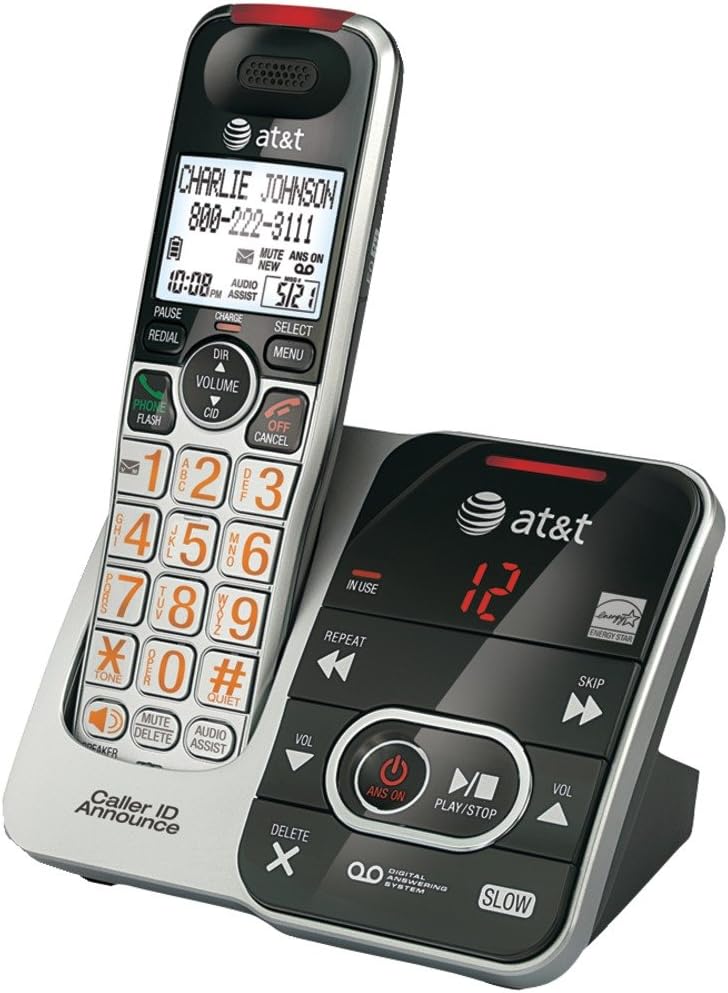
Image Description: A silver and black AT&T CRL32102 cordless phone handset is shown resting in its matching base unit. The handset features a large display, a numeric keypad with large orange characters, and various function buttons. The base unit includes controls for the digital answering system, such as play/stop, skip, repeat, and volume, along with an "IN USE" indicator and a message counter displaying "12". The AT&T logo is visible on both the handset and the base.
Počáteční nastavení
Instalace baterie
Install the supplied battery pack into the handset battery compartment. Ensure correct polarity by aligning the connectors. Close the battery compartment cover securely.
Nabíjení sluchátka
Place the handset in the telephone base or charger with the display facing up. The NABÍT light on the handset will illuminate, indicating proper placement. Allow 16 hours for the battery to fully charge before first use to ensure optimal battery performance.
Připojení telefonní základny
Connect the small end of the power adapter to the power jack on the back of the telephone base. Plug the large end into an electrical outlet that is not controlled by a wall switch.
Připojte jeden konec telefonního kabelu k TEL LINE jack on the back of the telephone base. Plug the other end into a telephone wall jack. If you have DSL internet service, a DSL filter (not included) may be required.
Obsluha telefonu
Uskutečnění hovoru
Stiskněte TELEFON / FLASH or any dial pad key. Enter the phone number using the numeric keypad. The call will connect automatically.
Přijetí hovoru
Když telefon zazvoní, stiskněte TELEFON / FLASH or any dial pad key to answer the incoming call.
Ukončení hovoru
Stiskněte VYP/ZRUŠIT or place the handset in the telephone base to end an active call.
Nastavení hlasitosti
Během hovoru stiskněte OBJEM ▲ (šipka nahoru) nebo ▼ (down arrow) on the handset to adjust the earpiece volume to your preferred level.
Funkce ztlumení
Během hovoru stiskněte ZTLUMIT to mute the microphone. This allows you to speak privately without the other party hearing you. Press ZTLUMIT again to unmute the microphone.
Redial
Stiskněte OPAKOVÁNÍ na view the last 10 dialed numbers. Use the DIR (directory) navigation keys to scroll through the list. Press TELEFON / FLASH pro vytočení zvoleného čísla.
Odpovídací systém
The digital answering system can record up to 15 minutes of messages, memos, and announcements.
- To turn the answering system ON/OFF, press ANS ON na telefonní základně.
- Chcete-li přehrávat zprávy, stiskněte PLAY/STOP na telefonní základně.
- To skip a message, press PŘESKOČIT během přehrávání zprávy.
- To repeat a message, press OPAKOVAT during message playback. Press twice to play the previous message.
- To delete a message, press VYMAZAT while the message is playing.
Údržba
Čištění
Clean the telephone and base with a soft, slightly damp cloth. Do not use cleaning sprays or liquid cleaners as they may damage the finish or internal components.
Péče o baterie
To maintain the life of the battery, periodically fully discharge the handset battery by leaving it off the charger until it runs out of power. Then, fully recharge it for 16 hours. This helps to recondition the battery and extend its lifespan.
Odstraňování problémů
If you experience difficulty with your telephone, please try the following suggestions. For more detailed troubleshooting, refer to the full user manual or AT&T support.
Žádný oznamovací tón
- Ensure the telephone line cord is securely plugged into the telephone base and the wall jack.
- Check if the power adapter is properly connected to the telephone base and a working electrical outlet.
- If you have multiple phones, try unplugging others to see if the issue is with a specific phone or line.
Sluchátko se nenabíjí
- Ensure the handset is correctly placed in the base. The NABÍT light on the handset should be on.
- Clean the charging contacts on the handset and base with a soft, dry cloth to remove any dust or debris.
- Verify that the power adapter for the base is securely plugged in.
Špatná kvalita zvuku
- Move the handset closer to the telephone base to improve signal strength.
- Avoid placing the phone near other electrical appliances, metal objects, or large electronic devices that may cause interference.
- Check for interference from other DECT 6.0 devices or Wi-Fi routers.
Specifikace produktu
| Funkce | Detail |
|---|---|
| ASIN | B00OZ55DTY |
| Značka | AT&T |
| Barva | Černá, Stříbrná |
| Typ telefonu | Bezdrátový |
| Zdroj napájení | Elektrický kabel |
| Typ vytáčení | Jedna klávesnice |
| Typ systému odpovědí | Digitální |
| Kompatibilní zařízení | AT&T cordless headset 2 |
| Kapacita záznamu | 15 minut |
| Možnost konferenčního hovoru | základní |
| Víceřádkový provoz | Provoz na jedné lince |
| Datum první dostupnosti | 3. května 2016 |
Zákaznická podpora
For further assistance, technical support, or warranty information, please visit the official AT&T support website or refer to the contact information provided with your product packaging. You can also find FAQs and additional resources online.
Ask a question about this manual
Ask about setup, troubleshooting, compatibility, parts, safety, or missing instructions. Manuals+ will review the question and use this page’s manual context to help answer it.