
1. Úvod
This manual provides essential information for the proper setup, operation, and maintenance of your Sony SLV-FT5 VHS Video Cassette Recorder (VCR). Please read these instructions thoroughly before using the unit to ensure optimal performance and safety.
2. Bezpečnostní informace
Při používání tohoto výrobku vždy dodržujte základní bezpečnostní opatření, abyste snížili riziko požáru, úrazu elektrickým proudem a zranění.
- Nevystavujte jednotku dešti nebo vlhkosti.
- Neotevírejte skříň. Servis svěřte pouze kvalifikovanému personálu.
- Zajistěte dostatečné větrání; neblokujte větrací otvory.
- Používejte pouze napájecí zdroj určený pro tuto jednotku.
- Udržujte jednotku mimo zdroje tepla a přímého slunečního světla.
3. Nastavení
3.1 Vybalení
Carefully remove the VCR and all accessories from the packaging. Verify that all components are present: the SLV-FT5 VCR unit, remote control, and necessary connection cables (e.g., RCA audio/video cables).
3.2 Připojení k televizi
To connect the VCR to your television, use the provided RCA audio/video cables. Match the colored plugs to the corresponding colored jacks on both the VCR and your TV (Yellow for Video, White for Left Audio, Red for Right Audio).

Obrázek 1: Rear panel of the Sony SLV-FT5 VCR. This image displays the various input and output ports, including RCA jacks for audio and video, and the power input. The product label with model number SLV-FT5 and power specifications (100V 18W 50/60Hz) is also visible.
3.3 Připojení napájení
Plug the VCR's power cord into a standard electrical outlet (AC 100V, 50/60Hz). Ensure the power outlet is easily accessible.
3.4 Nastavení dálkového ovládání
Open the battery compartment on the back of the remote control and insert two AA batteries, observing the correct polarity (+/-). Close the compartment securely.

Obrázek 2: The Sony RMT-V219 remote control, designed for the SLV-FT5 VCR. This image also shows the included RCA audio/video cables, which are typically used for connecting the VCR to a television.
4. Ovládání videorekordéru
4.1 Zapnutí/vypnutí
Stiskněte tlačítko MOC button on the VCR's front panel or the remote control to turn the unit on or off.
4.2 Loading and Unloading a VHS Tape
- Načítání: Insert a VHS cassette into the tape slot on the front of the VCR with the tape window facing forward. The VCR will automatically pull the tape in.
- Vykládka: Stiskněte tlačítko EJECT button on the VCR or remote control. The tape will be ejected.
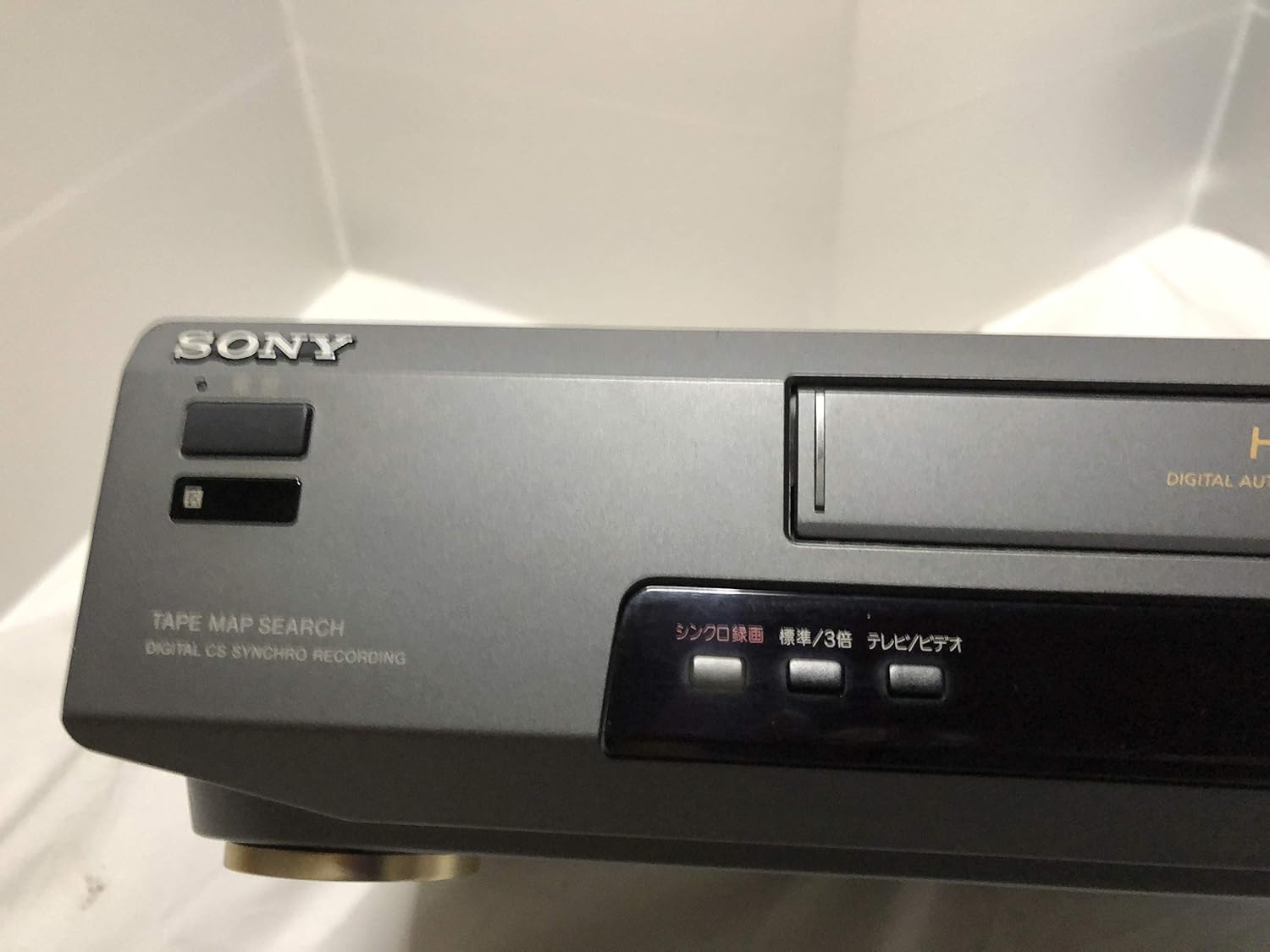
Obrázek 3: Front left section of the Sony SLV-FT5 VCR. This view highlights the tape loading slot and the 'TAPE MAP SEARCH' feature, which assists in navigating recorded content on a tape.
4.3 Přehrávání
After loading a tape, press the HRÁT button (►) on the VCR or remote control to begin playback. Use the PAUZA (∥), ZASTÁVKA (■), ZPĚT (◀◀), and RYCHLE VPŘED (►►) buttons to control playback.

Obrázek 4: Front right section of the Sony SLV-FT5 VCR. This image displays the main playback controls (Play, Stop, Rewind, Fast Forward, Pause) and additional buttons for 'Quick Timer' and 'Tracking' adjustments.
4.4 Nahrávání
To record, ensure a blank or recordable tape is inserted. Select the desired input source (e.g., TV channel). Press the REC (●) button on the VCR or remote control. Press ZASTÁVKA (■) pro ukončení nahrávání.
4.5 Tracking Adjustment
If the picture quality during playback is poor (e.g., horizontal lines or noise), use the SLEDOVÁNÍ buttons on the front panel or remote control to fine-tune the tape's alignment with the VCR's heads.
5. Údržba
5.1 Čištění jednotky
Wipe the exterior of the VCR with a soft, dry cloth. For stubborn stains, use a cloth lightly dampOmyjte jemným roztokem čisticího prostředku a poté otřete dosucha. Nepoužívejte abrazivní čisticí prostředky ani rozpouštědla.
5.2 Čištění hlavy
Over time, VCR heads can accumulate dirt, leading to poor picture and sound quality. Use a commercially available dry-type VHS head cleaning cassette according to its instructions. Avoid wet-type cleaners as they can damage the heads.
5.3 Skladování
When not in use for extended periods, disconnect the VCR from the power outlet. Store the unit in a cool, dry place, away from dust and direct sunlight.
6. Řešení problémů
If you encounter issues with your VCR, refer to the following common problems and solutions before seeking professional service.
| Problém | Možná příčina | Řešení |
|---|---|---|
| Žádná síla | Odpojený napájecí kabel; problém se zásuvkou | Zkontrolujte připojení napájecího kabelu; zkuste jinou zásuvku. |
| Žádný obraz/zvuk | Incorrect TV input; loose A/V cables | Select correct TV input (e.g., Video 1, AV); ensure A/V cables are securely connected. |
| Poor picture quality (snowy, lines) | Dirty VCR heads; tracking issue; old/damaged tape | Clean VCR heads; adjust tracking; try a different tape. |
| Páska se nevysouvá | Power issue; mechanical malfunction | Ensure power is on; try pressing EJECT multiple times. If issue persists, seek service. |
| Dálkové ovládání nefunguje | Dead batteries; obstructed sensor | Replace batteries; ensure no obstacles between remote and VCR sensor. |
7. Specifikace
| Funkce | Specifikace |
|---|---|
| Značka | Sony |
| Číslo modelu | SLV-FT5 |
| Typ média | VHS |
| Rezoluce | 720 x 480 pixelů |
| Hmotnost produktu | 4160 gramů |
| Režim zvukového výstupu | Stereo |
| Podporované zvukové formáty | Monaural, Stereo |
| Kódování videa | Analogový |
| Kompatibilní zařízení | Televize |
| Kompatibilita vstupního videa | NTSC |
| Požadavky na napájení | 100V, 18W, 50/60Hz |
8. Záruka a podpora
For warranty information and customer support, please refer to the documentation included with your purchase or visit the official Sony webUschovejte si doklad o koupi pro případ reklamace.