
Zavedení
Thank you for choosing the iBall Nightingale K9 Portable Bluetooth Speaker. This manual provides essential information for setting up, operating, and maintaining your speaker. Please read it carefully before use to ensure proper functionality and longevity of your product.
Důležité bezpečnostní pokyny
- Nevystavujte zařízení dešti, vlhkosti ani extrémním teplotám.
- Neotevírejte reproduktor casing. Veškerý servis svěřte kvalifikovanému personálu.
- Zajistěte dostatečné větrání kolem reproduktoru.
- Chraňte před přímým slunečním zářením a zdroji tepla.
- Používejte pouze nástavce/příslušenství specifikované výrobcem.
- Charge the speaker using a compatible power adapter.
Obsah balení
Ověřte, zda jsou v balení přítomny všechny položky:
- iBall Nightingale K9 Speaker Unit
- Dálkové ovládání
- Audio kabel (AUX)
- Nabíjecí kabel (USB)
- Uživatelská příručka (tento dokument)
Konec produktuview
The iBall Nightingale K9 is a versatile portable speaker featuring Bluetooth connectivity, USB and SD card playback, FM radio, and AUX input. It comes with a built-in rechargeable battery and can be controlled via the included remote.
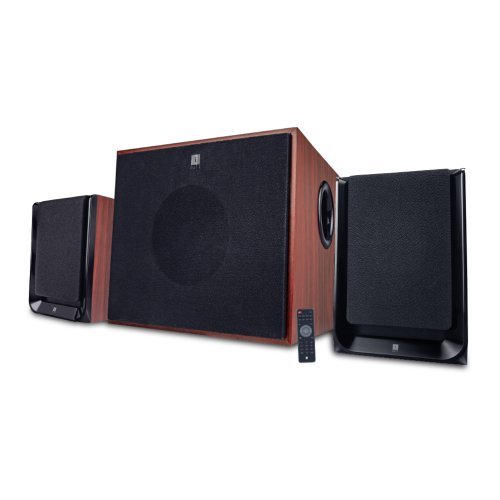
Obrázek: Přední strana view of the iBall Nightingale K9 Portable Speaker, showing the main unit with controls and display.
Pokyny pro nastavení
1. Nabíjení reproduktoru
- Before first use, fully charge the speaker. Connect the charging cable to the speaker's charging port and the other end to a USB power adapter (not included) or a computer's USB port.
- Indikátor nabíjení se během nabíjení rozsvítí a po úplném nabití zhasne nebo změní barvu.
2. Počáteční zapnutí
Press and hold the Power button on the speaker or the remote control to turn the speaker on. The LED display will illuminate.
3. Nastavení dálkového ovládání
Insert batteries into the remote control, ensuring correct polarity. The remote is ready for use immediately.
Návod k obsluze
1. Zapnutí/vypnutí
Press the Power button on the remote control or the main unit to turn the speaker on or off. The LED display will illuminate when the unit is powered on.
2. Výběr režimu
Press the "Mode" button on the remote control or the front panel to cycle through available input modes: AUX, USB, SD, FM, Bluetooth.
3. Ovládání hlasitosti
Use the Volume Up (+) and Volume Down (-) buttons on the remote control or the main unit to adjust the master volume.
4. Přehrávání z USB/SD karty
- Vložte USB flash disk nebo SD kartu s audio soubory ve formátu MP3 files into the respective port/slot on the speaker. The system will automatically switch to USB/SD mode and begin playing compatible audio files.
- Use the "Play/Pause", "Next Track", and "Previous Track" buttons on the remote control to manage playback.
- Direct track selection is available via the numeric keypad on the remote control.
5. Provoz rádia FM
- Switch to FM mode using the "Mode" button.
- Press and hold the "Play/Pause" button to initiate an automatic scan for FM stations. The system will save all found stations.
- Use the "Next Track" and "Previous Track" buttons to navigate between saved FM stations.
6. Párování Bluetooth
- Switch the speaker to Bluetooth mode. The LED display will show "BT" and a pairing indicator will flash.
- Na svém mobilním zařízení povolte Bluetooth a vyhledejte dostupná zařízení.
- Select "iBall Nightingale K9" from the list of devices.
- Once paired, the speaker will emit a confirmation tone, and the pairing indicator will stop flashing. You can now play audio wirelessly from your device.
7. Vstup AUX
Connect one end of the provided audio cable to the AUX input port on the speaker and the other end to the audio output (e.g., headphone jack) of your device. Switch the speaker to AUX mode.
8. Funkce dálkového ovládání
The remote control provides full functionality for the speaker. Ensure the remote control has working batteries and is pointed towards the speaker's IR sensor.
Obrázek: Přample of a remote control for the iBall Nightingale K9 Speaker, showing various function buttons.
Údržba
- Čištění: K čištění povrchů reproduktorů používejte měkký, suchý hadřík. Nepoužívejte tekuté čisticí prostředky ani abrazivní materiály.
- Skladování: If storing the speaker for an extended period, ensure it is fully charged and store it in a cool, dry place.
- Baterie do dálkového ovládání: Replace batteries in the remote control when its range decreases or it stops responding. Use the specified battery type.
Odstraňování problémů
| Problém | Možná příčina | Řešení |
|---|---|---|
| Žádná síla | Battery depleted; Power button not pressed | Charge the speaker. Press and hold the power button. |
| Žádný zvuk | Volume too low; Incorrect input mode; Audio cable loose/faulty; Source device muted | Increase volume. Select correct input mode. Check audio cable connections. Unmute source device. |
| Dálkové ovládání nefunguje | Batteries depleted/incorrectly inserted; Obstruction between remote and sensor | Replace remote control batteries. Ensure clear line of sight to the speaker's IR sensor. |
| Chyba párování Bluetooth | Reproduktor není v režimu párování; Zařízení je příliš daleko; Rušení | Ensure speaker is in Bluetooth pairing mode. Move device closer. Reduce interference from other wireless devices. |
| Špatný příjem FM | Weak signal; Speaker position | Adjust the position of the speaker for better reception. Perform an auto-scan again. |
Technické specifikace
- Model: Nightingale K9
- Značka: iBall
- Typ reproduktoru: Přenosný Bluetooth reproduktor
- Konektivita: Bluetooth, Auxiliary, USB, SD Card, FM Radio
- Režim výstupu zvuku: Surround
- Materiál pouzdra: Dřevo
- Způsob ovládání: Dálkové ovládání
- Maximální výstupní výkon reproduktoru: 3 W RMS
- Verze Bluetooth: V2.1
- Zdroj napájení: Vestavěná dobíjecí baterie
- Kompatibilní zařízení: Smartphone, tablet
- Hmotnost položky: Přibližně 8.22 liber
- Vlastnosti produktu: Wireless, Microphone, Voice Prompt Alerts
Záruka a podpora
For warranty information and customer support, please refer to the warranty card included with your product or visit the official iBall webmísto. Uschovejte si doklad o koupi pro případ záručních reklamací.
Právní prohlášení: PLEASE CHECK YOUR LOCAL LAWS BEFORE PURCHASINTENTO PRODUKT.
For further assistance, you may contact iBall customer service through their official channels. Details are typically available on the product packaging or their webmísto.