
AT&T MF923-W
ZTE Velocity MF923 Mobile Wifi Hotspot User Manual
Model: MF923-W | Brand: AT&T
1. Úvod
The ZTE Velocity MF923 is a portable 4G LTE mobile Wi-Fi hotspot designed to provide high-speed internet access for multiple devices on the go. This device allows you to create a secure wireless local area network (WLAN) anywhere there is cellular coverage, enabling seamless uploading, downloading, and streaming. With its long battery life, dual-band Wi-Fi, and intuitive touchscreen, the ZTE Velocity offers a reliable and convenient internet solution for personal and business use.

Figure 1.1: ZTE Velocity MF923 Mobile Hotspot
Tento obrázek ukazuje přední stranu view of the ZTE Velocity MF923 mobile hotspot. The device is white with a black screen displaying network information, including the Wi-Fi name (ATT-WIFI-2388), password, data usage, and battery level. Below the main display, there are touch icons for Wi-Fi, Messages, and Settings.
2. Obsah balení
Zaškrtněte prosím políčko u následujících položek:
- ZTE Velocity MF923 Mobile Wifi Hotspot
- Baterie 2,800 mAh
- Nástěnná nabíječka
- USB kabel
- Quick Start Guide (this manual provides more detailed information)
- Pre-installed SIM Card (Note: While a SIM card may be pre-installed, activation with your network provider is required.)

Figure 2.1: ZTE Velocity MF923 in Retail Packaging
This image displays the ZTE Velocity MF923 mobile hotspot inside its orange retail box. The device's screen is visible, showing the same network information as in Figure 1.1, confirming the product's appearance.
3. Vlastnosti produktu
The ZTE Velocity MF923 offers a range of features designed for optimal mobile connectivity:
- Připojení 4G LTE: Experience high-speed internet with download speeds up to 150Mbps.
- Hotspot Wi-Fi: Connect up to 10 Wi-Fi enabled devices simultaneously.
- Dvoupásmová Wi-Fi: Supports both 2.4GHz and 5GHz Wi-Fi frequencies for flexible connectivity and reduced interference.
- Dlouhá výdrž baterie: Equipped with a 2,800mAh battery, providing up to 10 hours of continuous usage and up to 240 hours of standby time.
- Easy-to-Use Touchscreen: Navigate settings, view data usage, and manage connections directly from the device's color touchscreen display (240 x 320 pixels).
- GSM Unlocked: Compatible with GSM carriers that use SIM cards for service, such as AT&T and T-Mobile. (Note: Will not work with CDMA carriers like Sprint, Verizon, Boost, or Virgin.)
- Karta MicroSD File Sdílení: Podíl files directly from a MicroSD card inserted into the device.
- Zabezpečená Wi-Fi: Features separate Guest Wi-Fi for enhanced security.
4. Průvodce nastavením
4.1. Instalace baterie a SIM karty
The ZTE Velocity MF923 uses a Micro SIM card. While a SIM card may be pre-installed, ensure it is properly seated and activated with your chosen GSM network provider.
- Vyhledejte kryt baterie na zadní straně zařízení.
- Opatrně sejměte kryt baterie.
- If not already installed, insert the Micro SIM card into the designated SIM card slot with the gold contacts facing down and the notched corner aligned correctly.
- Vložte baterii s kapacitou 2,800 mAh do jejího prostoru a ujistěte se, že kontakty jsou zarovnány.
- Nasaďte kryt baterie, dokud nezaklapne na místo.

Obrázek 4.1: Strana View of ZTE Velocity MF923
Tento obrázek ukazuje stranu view of the ZTE Velocity MF923, highlighting its compact design. This perspective is useful for identifying the location of ports or covers for battery and SIM card access.
4.2. Nabíjení zařízení
Před prvním použitím zařízení plně nabijte.
- Connect the small end of the USB cable to the charging port on the ZTE Velocity.
- Connect the large end of the USB cable to the wall charger.
- Zapojte nástěnnou nabíječku do elektrické zásuvky.
- Displej zařízení bude ukazovat stav nabíjení. Úplné nabití obvykle trvá několik hodin.
4.3. Zapnutí/vypnutí
- Zapnutí: Press and hold the Power button (usually located on the side or top) until the screen lights up.
- Vypnutí: Press and hold the Power button until the power-off options appear on the screen, then select "Power Off" or slide to power off.
5. Návod k obsluze
5.1. Připojení zařízení k Wi-Fi
Once the ZTE Velocity is powered on and has established a cellular connection, you can connect your Wi-Fi enabled devices.
- On the ZTE Velocity's touchscreen, note the Název Wi-Fi (SSID) a Heslo zobrazeno na hlavní obrazovce.
- On your device (laptop, smartphone, tablet, etc.), go to its Wi-Fi settings.
- Select the Wi-Fi Name (SSID) that matches your ZTE Velocity.
- Po zobrazení výzvy zadejte heslo k Wi-Fi.
- Your device should now be connected to the internet via the ZTE Velocity hotspot.
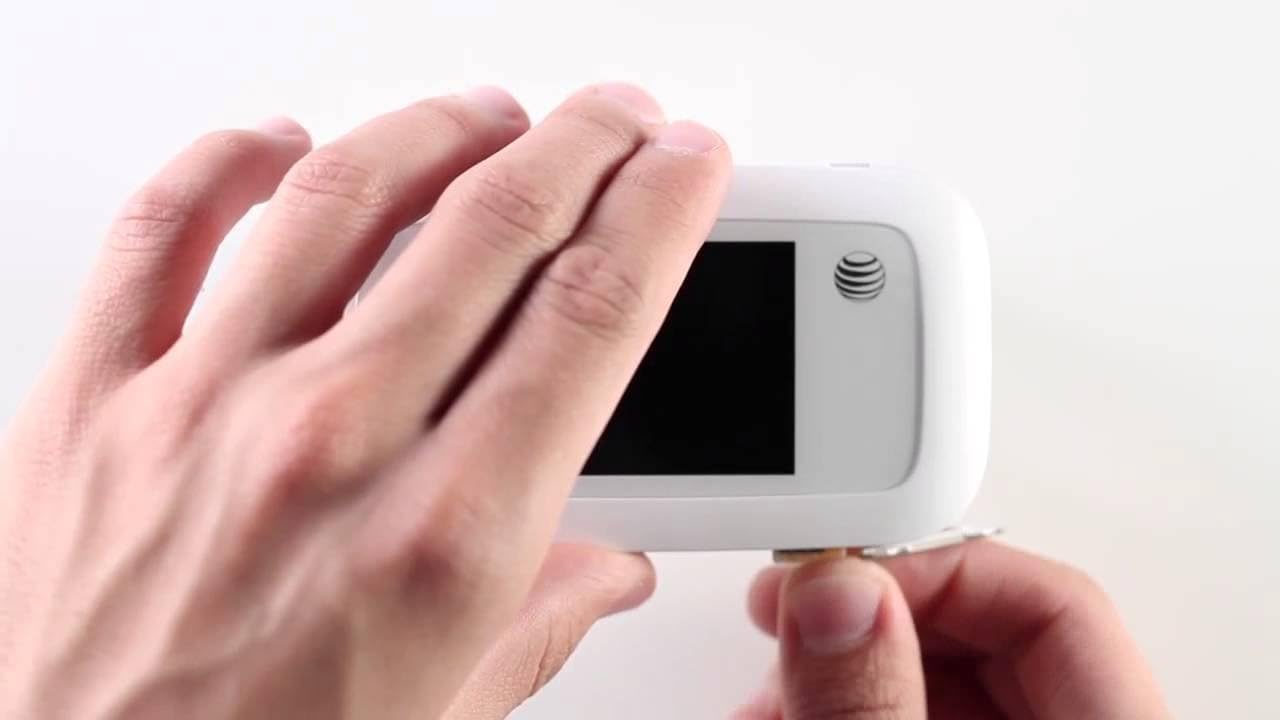
Figure 5.1: Using the ZTE Velocity for Mobile Connectivity
This image illustrates the convenience of using the ZTE Velocity mobile hotspot. A woman is shown working on a laptop in the back seat of a car, demonstrating how the device enables productivity and connectivity even when traveling.
5.2. Navigace na dotykové obrazovce
The ZTE Velocity features a responsive touchscreen for easy management.
- Úvodní obrazovka: Displays Wi-Fi name, password, data usage, signal strength, and battery level.
- Ikona Wi-Fi: Klepněte na view connected devices and manage Wi-Fi settings.
- Ikona zpráv: Access SMS messages (if supported by your carrier and plan).
- Ikona nastavení: Configure advanced settings such as network mode, Wi-Fi band (2.4GHz/5GHz), security, and device information.
- Swipe left or right to access additional screens or menus.
5.3. MicroSD karta File Sdílení
The device supports MicroSD cards for file sdílení.
- Insert a MicroSD card (up to 32GB, sold separately) into the dedicated slot.
- Přístup k zařízení web interface (usually 192.168.1.1 or similar, check manual or device screen for exact IP) from a connected device.
- Log in using the administrator password (default usually "admin" or found on device label).
- Přejděte na file sharing section to access and manage files na kartě MicroSD.
6. Řešení problémů
If you encounter issues with your ZTE Velocity MF923, try the following troubleshooting steps:
| Problém | Možné řešení |
|---|---|
| Žádné připojení k internetu |
|
| Pomalá rychlost internetu |
|
| Zařízení se nezapíná |
|
| Nelze se připojit k Wi-Fi |
|
7. Specifikace
| Funkce | Detail |
|---|---|
| Číslo modelu | MF923-W |
| Rozměry | 2.5 x 0.7 x 4.5 palce |
| Hmotnost položky | 4.6 unce |
| Baterie | 2,800 mAh lithium-iontová (součástí balení) |
| Doba použití | Up to 10 hours (4G LTE streaming) |
| Pohotovostní doba | Až 240 hodin |
| Procesor | Single-Core Qualcomm MDM9225 |
| BERAN | 256 MB |
| Zobrazit | Touchscreen, 240 x 320 pixels |
| Wi-Fi standard | Dual-Band (2.4 GHz & 5 GHz Radio Frequency) |
| Síťové frekvence | LTE bands 2/4/5/17/29; UMTS HSPA 850/1900/2100 |
| Maximální počet připojených zařízení | 10 |
| Typ SIM karty | Micro SIM |
| Podpora microSD karet | Yes (for file sdílení) |
| Barva | Bílý |
| Výrobce | ZTE |
8. Bezpečnostní informace
Please read the following safety information carefully to ensure proper and safe use of your ZTE Velocity MF923:
- Nevystavujte zařízení extrémním teplotám, přímému slunečnímu záření nebo vysoké vlhkosti.
- Avoid dropping, hitting, or bending the device.
- Používejte pouze schválené nabíječky a příslušenství.
- Nerozebírejte ani se nepokoušejte zařízení sami opravovat. Ztratíte tak záruku.
- Uchovávejte zařízení mimo dosah zdravotnických prostředků, mohlo by dojít k jejich narušení.
- Baterie a elektronické součástky zlikvidujte zodpovědně v souladu s místními předpisy.
- Nepoužívejte zařízení při řízení nebo obsluze těžkých strojů.
9. Záruka a podpora
For warranty information and technical support, please refer to the documentation provided by AT&T or visit the official AT&T support webUschovejte si doklad o koupi pro případ reklamace.
For further assistance, you may contact AT&T customer service directly.
Ask a question about this manual
Ask about setup, troubleshooting, compatibility, parts, safety, or missing instructions. Manuals+ will review the question and use this page’s manual context to help answer it.