
Zavedení
The Samson Concert 288 Handheld Wireless System is a high-performance UHF wireless solution designed for vocal performances, presentations, educational applications, and other scenarios requiring two users. This system offers easy setup, reliable operation, and premium sound quality.
Co je v krabici
Carefully unpack your Concert 288 system and ensure all components are present:
- Přijímač CR288
- (2) CH288 Handheld Transmitters (Q6 Dynamic Microphone capsules)
- 1/4" audio kabel
- AC adaptér
- Sada pro montáž do stojanu
Nastavení
Follow these steps to set up your Samson Concert 288 Wireless System:
- Umístění přijímače: Position the CR288 receiver in a location that provides a clear line of sight to the area where the handheld transmitters will be used. Avoid placing it near large metal objects or other wireless devices that could cause interference.
- Připojení antény: Attach the two antennas to the antenna connectors on the rear of the CR288 receiver. Ensure they are securely tightened and positioned for optimal reception.
- Připojení napájení: Connect the supplied AC adapter to the POWER DC IN jack on the rear of the receiver and plug it into an appropriate power outlet.
- Zvukový výstup: Connect the CR288 receiver to your mixer or amplifier using the appropriate audio cables. The receiver offers balanced XLR outputs (CH A OUT, CH B OUT) for individual channels and an unbalanced 1/4" MIX OUT for a combined signal.
- Instalace baterie vysílače: Open the battery compartment of each CH288 handheld transmitter and insert two fresh AA batteries, observing correct polarity.
- Zapnutí: Power on the receiver and then each handheld transmitter. The receiver's display should show the selected channel.
- Frekvenční párování: The system is designed for easy pairing. If necessary, use the IR sync function to match the transmitter frequencies with the receiver channels. Refer to the detailed instructions in the full manual for specific frequency selection and syncing procedures.
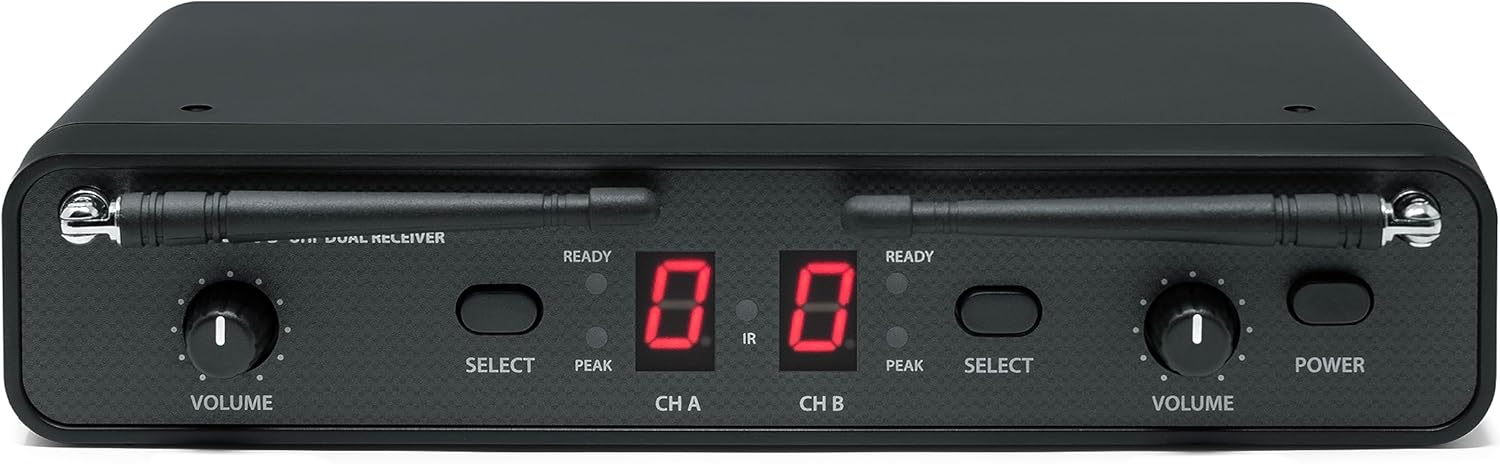
Přední view of the Samson CR288 Dual UHF Receiver, showing volume controls, channel displays, and power button.

Shora dolů view of the Samson CR288 Dual UHF Receiver with antennas extended, indicating optimal setup for signal reception.

Zadní view of the Samson CR288 Dual UHF Receiver, showing power input, balanced XLR outputs for channels A and B, and an unbalanced 1/4" mix output.
Provozní
Jakmile je systém nastaven, dodržujte tyto pokyny pro jeho provoz:
- Použití mikrofonu: Hold the CH288 handheld microphone approximately 2-6 inches from your mouth for optimal sound capture.
- Ovládání hlasitosti: Adjust the individual volume controls on the CR288 receiver for each channel (CH A and CH B) to achieve the desired audio level.
- Funkce ztlumení: Each handheld transmitter features a mute button. Press it to temporarily silence the microphone without powering it off.
- Sledování: Listen to the audio output through your sound system to ensure clear sound and proper levels.
- Rozsah: Maintain a reasonable distance between the transmitters and the receiver to ensure a stable wireless connection. The effective range can vary based on environmental conditions.

Two Samson CH288 handheld wireless microphones, featuring power/mute buttons and durable construction.
Údržba
Proper maintenance ensures the longevity and performance of your wireless system:
- Čištění: Use a soft, dry cloth to clean the exterior of the receiver and transmitters. Avoid using abrasive cleaners or solvents.
- Výměna baterie: Replace batteries in the handheld transmitters when the low battery indicator appears or when performance degrades. Always use fresh, high-quality AA batteries.
- Skladování: When not in use for extended periods, remove batteries from the transmitters and store the system in a cool, dry place away from direct sunlight and extreme temperatures.
- Péče o anténu: Handle antennas carefully to avoid bending or breaking. Ensure they are properly secured during operation and storage.
Odstraňování problémů
If you encounter issues with your Concert 288 system, refer to the following common solutions:
| Problém | Možná příčina | Řešení |
|---|---|---|
| Žádný zvuk z mikrofonu | Microphone muted, batteries dead, receiver not powered, incorrect channel selected, audio cable disconnected. | Check mute button, replace batteries, ensure receiver is powered, verify channel pairing, check audio cable connections. |
| Přerušovaný signál nebo výpadky | Out of range, interference from other devices, weak batteries, obstructed line of sight. | Reduce distance to receiver, identify and eliminate interference sources, replace batteries, ensure clear line of sight. |
| Syčivý nebo statický šum | Interference, gain levels too high, faulty cable. | Adjust receiver/mixer gain, check for interference, try a different audio cable. |
| Špatná kvalita zvuku | Incorrect microphone placement, low battery, interference. | Adjust microphone position, replace batteries, check for interference. |
For more detailed troubleshooting or persistent issues, consult the full product manual or contact Samson support.
Specifikace
| Funkce | Detail |
|---|---|
| Značka | SAMSON |
| Číslo modelu | SWC288HQ6-H (Concert 288 Handheld) |
| Technologie připojení | Bezdrátové (UHF) |
| Počet kanálů | 2 |
| Zvukový vstup | Wireless microphones (Q6 Dynamic Microphone capsule) |
| Zdroj napájení | Battery Powered (Transmitters), AC Adapter (Receiver) |
| Typ montáže | Tabletop (Rack mount kit included) |
| Rozměry položky (D x Š x V) | 13 x 4 x 14 palce |
| Hmotnost položky | 4 libry |
| Materiál pouzdra | Kov, Plast |
| UPC | 809164213178 |
Informace o záruce
The Samson Concert 288 Handheld Dual-Channel Wireless System is covered by a 1letá záruka na díly a práci od data nákupu. Uschovejte si doklad o koupi pro případné reklamace. Tato záruka se vztahuje na výrobní vady a poruchy při běžném používání. Nevztahuje se na škody způsobené nesprávným použitím, nehodami, neoprávněnými úpravami nebo nesprávnou instalací.
Podpora
For further assistance, technical support, or warranty inquiries, please visit the official Samson webnebo kontaktujte jejich oddělení zákaznických služeb. Více informací a zdrojů naleznete na Samson Store on Amazon.


