
1. Úvod
This manual provides essential information for the proper installation, operation, and maintenance of your IBM 20GB IDE 2.5 Hard Drive, model IC25N020ATCS04-0. This internal hard drive is designed for use in compatible laptop systems and other devices requiring a 2.5-inch IDE storage solution. Please read this manual thoroughly before proceeding with installation or use.
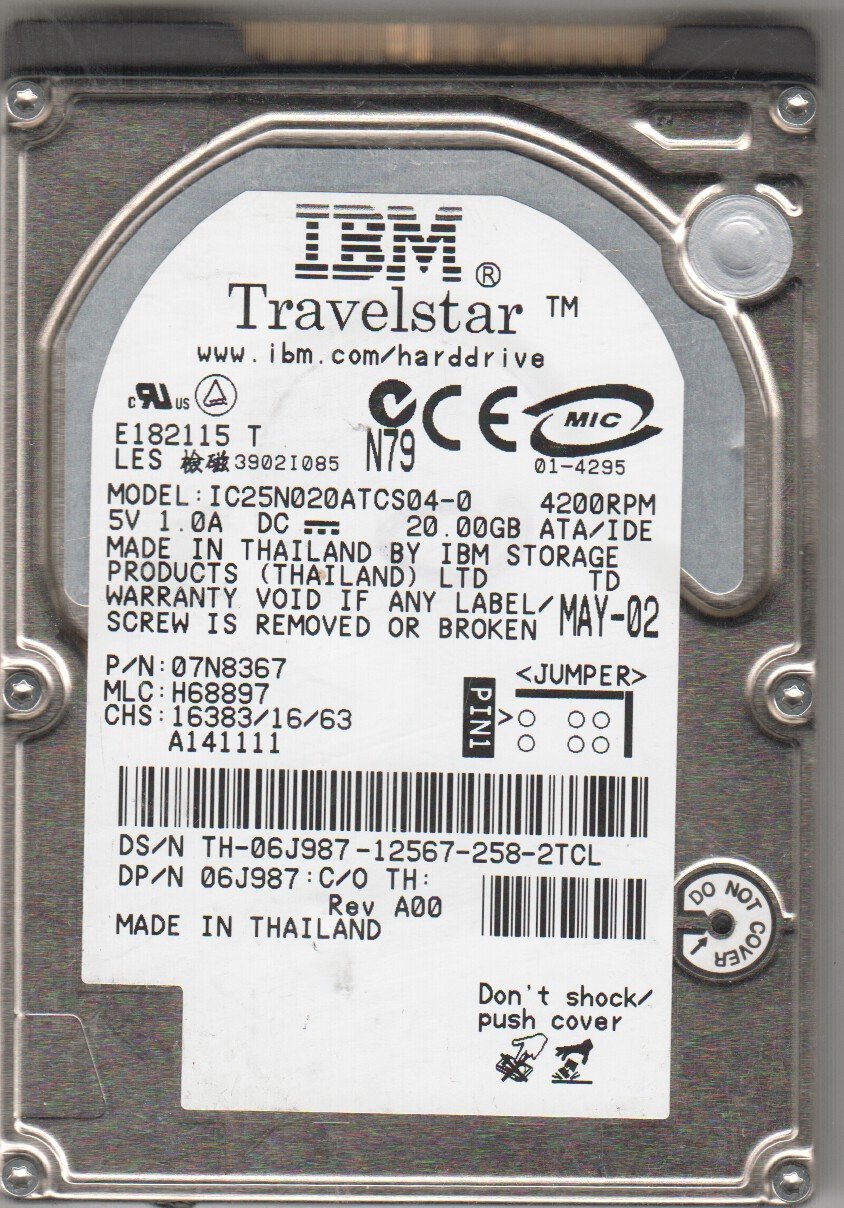
Figure 1: IBM 20GB IDE 2.5 Hard Drive (Model IC25N020ATCS04-0). This image displays the physical appearance of the hard drive, including its label with model and serial numbers, and the IDE connector interface.
2. Nastavení a instalace
Before beginning installation, ensure your computer is powered off and disconnected from all power sources. It is recommended to wear an anti-static wrist strap to prevent electrostatic discharge (ESD) damage to the drive or other components.
2.1 Fyzická instalace
- Připravte zařízení: Open your laptop or compatible device's hard drive bay. Refer to your device's specific service manual for instructions on accessing the hard drive bay.
- Remove Old Drive (if applicable): Carefully disconnect the existing hard drive from its IDE connector and power cable. Remove any mounting screws or brackets.
- Set Jumper (if necessary): For IDE drives, jumpers may need to be set for Master, Slave, or Cable Select. Consult your system's motherboard manual or the drive's label for the correct setting. For a single drive, "Master" or "Cable Select" is typically used.
- Instalace nového disku: Gently slide the IBM 20GB IDE 2.5 Hard Drive into the drive bay. Ensure the IDE connector pins align correctly with the receptacle. Do not force the connection.
- Secure the Drive: Secure the drive with any mounting screws or brackets removed earlier.
- Zavřít zařízení: Reassemble your laptop or device, ensuring all covers are properly secured.
2.2 Initial System Recognition
- Zapnutí: Připojte zařízení k napájení a zapněte ho.
- Kontrola BIOSu/UEFI: Access your system's BIOS/UEFI settings (usually by pressing F2, Del, or F10 during startup) to confirm the hard drive is detected.
- Operating System Installation/Configuration: If installing a new operating system, follow the OS installation instructions. If replacing a drive, you may need to restore from a backup or reinstall your operating system.
- Oddíl a formát: For a new drive, you will need to partition and format it before it can be used for data storage. This can be done through your operating system's disk management tools.
3. Obsluha pevného disku
Once installed and configured, the IBM 20GB IDE 2.5 Hard Drive functions as a primary or secondary storage device for your computer.
- Úložiště dat: Store operating system files, applications, documents, and other digital data.
- Výkon: The drive operates at standard IDE speeds. Actual performance may vary based on system configuration and workload.
- Řízení spotřeby: The drive's power consumption is managed by the host system. Ensure your system's power settings are configured for optimal performance and longevity.
4. Údržba a péče
Proper maintenance can extend the lifespan and reliability of your hard drive.
- Záloha dat: Regularly back up important data to an external storage device or cloud service. Hard drives can fail, and backups are crucial for data recovery.
- Vyhněte se fyzickému šoku: Hard drives are sensitive to physical impact. Avoid dropping or jarring the device in which the drive is installed, especially when it is operating.
- Ovládání teploty: Ensure your device has adequate ventilation to prevent overheating, which can degrade drive performance and lifespan.
- Správné vypnutí: Always shut down your computer properly. Avoid sudden power loss, which can lead to data corruption or drive damage.
- Disk Defragmentation (for older OS): If using an older operating system (e.g., Windows XP/Vista) that benefits from defragmentation, perform it periodically. Modern operating systems often manage this automatically.
- Kontrola chyb disku: Periodically run disk error checking utilities provided by your operating system to identify and repair minor file systémové chyby.
5. Řešení problémů
If you encounter issues with your hard drive, consider the following common troubleshooting steps:
- Disk nebyl detekován:
- Verify physical connections (IDE cable, power cable) are secure.
- Check BIOS/UEFI settings to ensure the drive is recognized.
- Confirm jumper settings (Master/Slave/Cable Select) are correct.
- Test the drive in another compatible system or with a different IDE cable if possible.
- Pomalý výkon:
- Zkontrolujte, zda je na disku dostatek volného místa.
- Run disk defragmentation (if applicable for your OS).
- Prohledejte systém, zda neobsahuje malware nebo viry.
- Ensure the system's cooling is adequate to prevent thermal throttling.
- Neobvyklé zvuky:
- Clicking, grinding, or repetitive beeping sounds often indicate a failing drive. Back up data immediately and consider replacing the drive.
- Poškození/chyby dat:
- Run your operating system's disk error checking utility (e.g.,
chkdskon Windows). - Ensure proper system shutdowns.
- Run your operating system's disk error checking utility (e.g.,
Pokud tyto kroky problém nevyřeší, může být nutná odborná pomoc.
6. Specifikace
Key technical specifications for the IBM 20GB IDE 2.5 Hard Drive (Model IC25N020ATCS04-0):
| Funkce | Detail |
|---|---|
| Číslo modelu | IC25N020ATCS04-0 |
| Číslo dílu (PN) | 07N8367 |
| MLC | H68997 |
| Digitální kapacita úložiště | 20 GB |
| Rozhraní pevného disku | IDE (Integrated Drive Electronics) |
| Pevný disk Form Factor | 2.5 palce |
| Kompatibilní zařízení | Přenosný počítač |
| Typ instalace | Interní pevný disk |
| Hmotnost položky | 3.19 unce |
| Rozměry balení | 3.8 x 3.6 x 1.7 palce |
| Výrobce | IBM |
Poznámka: Specifikace se mohou změnit bez předchozího upozornění.
7. Záruka a podpora
For information regarding the warranty period and terms for your IBM 20GB IDE 2.5 Hard Drive, please refer to the documentation provided at the time of purchase or contact the seller directly.
For technical support, it is recommended to consult the support resources available from IBM or the vendor from whom the product was acquired.