
EASYGUARD EC002-NS
EASYGUARD EC002-NS PKE Passive Keyless Entry Car Alarm System
Uživatelská příručka
Zavedení
The EASYGUARD EC002-NS is an advanced Passive Keyless Entry (PKE) car alarm system designed to enhance vehicle security and convenience. It integrates features such as remote engine start, push-button start/stop, touch password entry, and a shock sensor alarm. This manual provides detailed instructions for installation, operation, and maintenance of your EC002-NS system.
Klíčové vlastnosti
- Smart key RFID PKE Car Alarm system with PKE, touch password entry and shock sensor alarm.
- Remote engine start & keyless go system for easier and more convenient vehicle operation.
- Wonderful performance, stable quality, and powerful functions.
- Hopping code, latest RFID technology, and touch password entry backup to greatly improve vehicle safety.
- Compatible with most DC12V petrol cars on the market.
- Requires professional car alarm installer for installation.
- An extra bypass module (e.g., ASIN: B00MEHBVIC or B07NSLPBG7) is required if your factory OEM key fob has a chip immobilizer.
- Can be upgraded to smartphone app control & 4G LTE GPS tracking with an additional GPS002-AA 4G LTE module (ASIN: B0D95Y1XN3).
Obsah balení
The EASYGUARD EC002-NS system includes the following main components:
- Hlavní řídicí modul
- Two remote key fobs
- Push start/stop button
- Touch password entry keypad
- Snímač otřesů
- Antennas and wiring harnesses
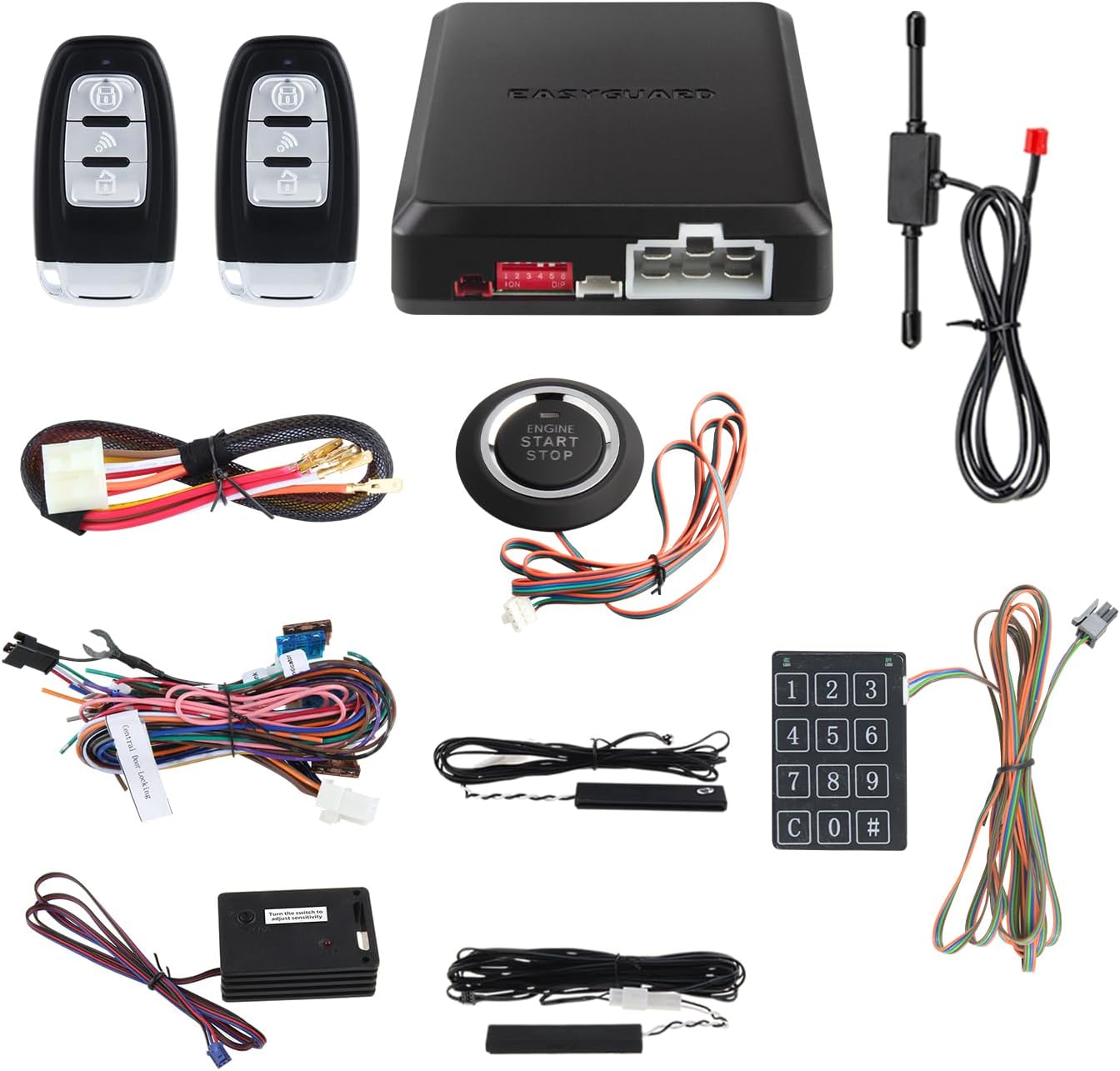
Image: All components included in the EASYGUARD EC002-NS PKE Car Alarm System package.
Komponenta Overview
Klíčenka na dálkové ovládání

Obrázek: Podrobný view of the remote key fob, highlighting the LED indicator, Arm/Panic mode button, Start button/Trunk release button, and Disarm button. A spare key blade place is also indicated.

Image: Dimensions of the remote key fob, showing a length of 75mm, width of 40mm, and thickness of 15mm.
Hlavní řídicí modul

Image: Dimensions of the main control module, showing a length of 113.5mm, width of 98mm, and height of 28.5mm.
Push Start/Stop Button

Image: The push start/stop button, illustrating its size (31mm inner diameter, 41mm outer diameter, 56mm total height) and color changes: blue when disarmed or ACC/ON is active, and green when the car is started.
Snímač otřesů

Image: The shock sensor component, featuring a switch to adjust sensitivity. This sensor triggers an alarm warning if the car is vibrated.
Nastavení a instalace
Installation of the EASYGUARD EC002-NS system requires professional expertise. It is highly recommended to have the system installed by a certified car alarm installer to ensure proper functionality and avoid damage to your vehicle.
- Bypass Module: An extra bypass module (such as ASIN: B00MEHBVIC or B07NSLPBG7) is required if your vehicle's factory OEM key fob contains a chip immobilizer.
- Zámek řízení: You must unlock, release, or remove the steering lock during the installation process.
- Diesel Cars: For diesel cars with an engine starting time over 3 seconds, you may need to turn on the ON dashboard first to pre-warm the spark plug before starting the car, or add an extra timer delay switch.

Image: Diagram illustrating the PKE (Passive Keyless Entry) function. The system automatically unlocks or locks the car when the key fob is within 2-3 meters of the vehicle, allowing for hands-free access.

Image: Comparison showing a traditional key ignition before installation and the push start/stop button after installation. This highlights the upgrade from standard key start to a convenient push-button system, along with the remote engine start capability for pre-cooling or pre-warming the car.
Návod k obsluze
Passive Keyless Entry (PKE)
The PKE feature allows for automatic locking and unlocking of your vehicle as you approach or walk away with the key fob. When the key fob is detected within 2-3 meters, the system will automatically unlock. When you walk away, it will automatically lock.
Remote Arm/Lock & Disarm/Unlock
Use the buttons on the remote key fob to manually arm/lock or disarm/unlock your vehicle. Refer to the 'Remote Key Fob Button Functions' image in the Component Overview section for button identification.
Tlačítko Start/Stop
With the key fob inside the vehicle, press the 'ENGINE START STOP' button to start or stop the engine. The button's color indicates its status: blue when disarmed or ACC/ON is active, and green when the car is started.
Remote Engine Start/Stop
Press and hold the designated button on the remote key fob to remotely start your vehicle. This feature is useful for pre-cooling the car in hot weather or pre-warming it in cold weather. Repeat the action to remotely stop the engine.
Dálkové uvolnění kufru
If your vehicle is equipped with a compatible trunk release solenoid kit (e.g., ASIN: B00N4RP8VM), you can open the trunk remotely using the key fob.
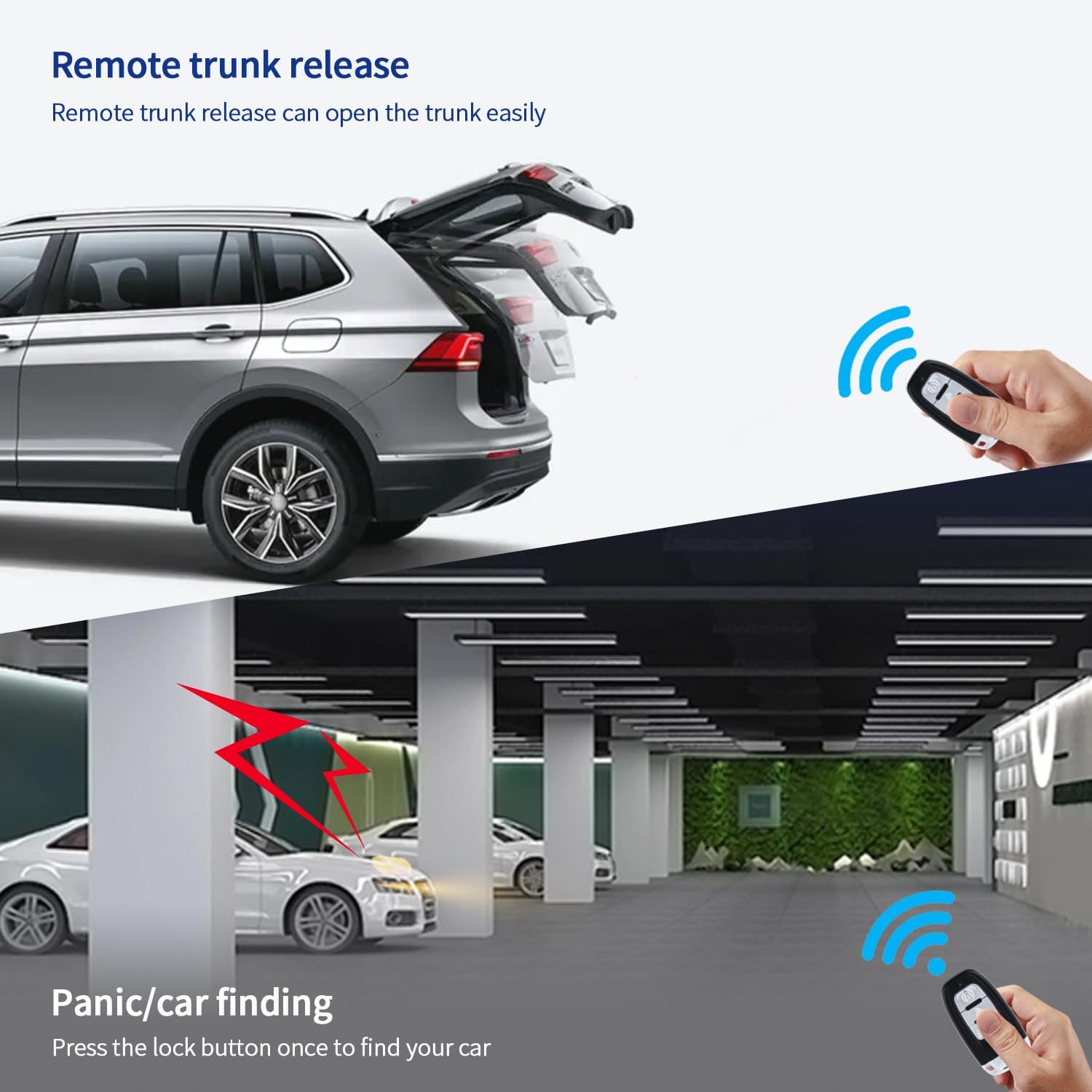
Image: Depicts the remote trunk release function, showing a car trunk opening via remote command. Also illustrates the panic/car finding function, where pressing the lock button helps locate the car in a parking lot.
Panický režim
Activate panic mode by pressing the designated button on the remote key fob. This will trigger the alarm and can be used to deter potential threats or locate your vehicle in a crowded area.
Režim obsluhy
Valet mode allows you to temporarily disable certain alarm functions, such as the PKE and shock sensor, when the vehicle is being serviced or parked by a valet. Consult the detailed wiring diagram or your installer for instructions on enabling/disabling valet mode.
Touch Password Entry
The system includes a touch password entry keypad for locking or unlocking the car. This provides a backup entry method without the key fob. You can set and revise your personal password.
Shock Sensor Alarm Warning
The integrated shock sensor detects vibrations and impacts to the vehicle. If triggered, the siren will sound to alert the owner. Sensitivity can be adjusted using the switch on the sensor module.
Automatic Window Closing (Optional)
This feature requires an additional window closer module (e.g., 4-door window closer ASIN: B00N3RKA8E). When installed, the system can automatically close your car windows upon arming.
Password Revise & Reset
The system allows you to revise and reset the touch password entry code. Refer to the detailed programming method in the full installation guide for specific steps.
Údržba
To ensure the longevity and optimal performance of your EASYGUARD EC002-NS system, follow these general maintenance guidelines:
- Keep the remote key fobs dry and away from extreme temperatures.
- Replace key fob batteries as needed (2 Lithium Metal batteries are included).
- Avoid exposing the main control module and other components to moisture or excessive dust.
- Pravidelně kontrolujte, zda nejsou kabelové spoje opotřebované nebo uvolněné.
Odstraňování problémů
If you encounter issues with your EASYGUARD EC002-NS system, consider the following:
- System not responding: Check key fob battery levels. Ensure the key fob is within range for PKE or remote functions.
- Engine not starting via push button: Verify the key fob is inside the vehicle. Ensure the vehicle's original immobilizer (if any) is properly bypassed. Check if the steering lock is disengaged.
- Falešné spouštění alarmů: Adjust the sensitivity of the shock sensor. Ensure all doors, hood, and trunk are fully closed.
- Remote start issues: Confirm the vehicle is in neutral (for manual transmission) or park (for automatic). Check if the handbrake is engaged if required by the installation.
For complex issues or if troubleshooting steps do not resolve the problem, it is recommended to contact a professional car alarm installer or EASYGUARD customer support.
Specifikace
| Specifikace | Hodnota |
|---|---|
| Číslo modelu | EC002-NS |
| Značka | EASYGUARD |
| Kompatibilní zařízení | Most DC12V petrol cars |
| Maximální dosah | 2 Meters (PKE) |
| Dálkové ovládání v ceně? | Ano |
| Baterie | Jsou vyžadovány 2 lithiové kovové baterie (součástí balení) |
| Hmotnost položky | 2.79 libry |
| Rozměry balení | 10.24 x 7.44 x 4.33 palce |
| Výrobce | Easyguard electronics ltd |
| Datum první dostupnosti | 1. srpna 2014 |
Záruka a podpora
For warranty information and technical support, please contact EASYGUARD directly. Professional installation is required, and your installer may also provide support for installation-related queries.
You can find more information and contact details on the official EASYGUARD webmísto:
For direct inquiries, you may also use the following contact information:
- Telefon: +86-760-2211-3597
- E-mail: sales@ieasyguard.com
Ask a question about this manual
Ask about setup, troubleshooting, compatibility, parts, safety, or missing instructions. Manuals+ will review the question and use this page’s manual context to help answer it.