
1. Úvod
Děkuji za nákupasing the Beyution BT513 Bluetooth Headphones. This manual provides instructions for the proper setup, operation, and maintenance of your headphones. Please read this manual thoroughly before use to ensure optimal performance and longevity of the product.
Bezpečnostní informace
- Nevystavujte sluchátka extrémním teplotám, vlhkosti ani korozivnímu prostředí.
- Zabraňte pádu sluchátek na zem nebo jejich vystavení silným nárazům.
- Sluchátka nerozebírejte ani neupravujte. Zrušíte tak platnost záruky.
- Sluchátka čistěte měkkým, suchým hadříkem. Nepoužívejte agresivní chemikálie.
- Delší poslech při vysoké hlasitosti může způsobit poškození sluchu.
2. Obsah balení
Ověřte, zda jsou v balení přítomny všechny položky:
- Beyution BT513 Bluetooth Headphone
- USB nabíjecí kabel
- 3.5mm audio kabel
- Pouzdro na přenášení
- Uživatelská příručka (tento dokument)

3. Konec produktuview
The Beyution BT513 headphones feature a foldable design for portability and comfortable ear cushions for extended wear. They offer both wireless Bluetooth V4.1 connectivity and a wired connection option via a 3.5mm audio jack.

Ovládací prvky a porty

- Power & Pair Button: Slouží k zapnutí/vypnutí sluchátek a zahájení párování Bluetooth.
- Port nabíječky: Micro USB port pro nabíjení interní baterie.
- Mikrofon: Pro handsfree volání.
- Volume Control / Previous & Next: Adjusts volume and navigates tracks.
- LED indikátor napájení/párování: Shows power status, charging status, and pairing mode.
- 3.5mm audio jack: Pro kabelové připojení k audio zdrojům.
4. Nastavení
4.1 Nabíjení sluchátek
Před prvním použitím sluchátka plně nabijte. Úplné nabití trvá přibližně 3 hodiny.
- Connect the small end of the USB charging cable to the Charger Port on the headphone.
- Connect the large end of the USB charging cable to a USB power source (e.g., computer USB port, USB wall adapter).
- LED indikátor se během nabíjení rozsvítí a po plném nabití změní barvu nebo zhasne.
4.2 Zapnutí/vypnutí
- Zapnutí: Press and hold the Power & Pair button until the LED indicator lights up.
- Vypnutí: Press and hold the Power & Pair button until the LED indicator turns off.
4.3 Párování Bluetooth
Spárujte sluchátka se zařízením s podporou Bluetooth (chytrý telefon, tablet, notebook).
- Ujistěte se, že jsou sluchátka vypnutá.
- Press and hold the Power & Pair button for approximately 5-7 seconds until the LED indicator flashes red and blue alternately. This indicates pairing mode.
- Na svém zařízení povolte Bluetooth a vyhledejte dostupná zařízení.
- V seznamu nalezených zařízení vyberte „BT513“.
- Once paired, the LED indicator will flash blue slowly, and you will hear an audible confirmation.

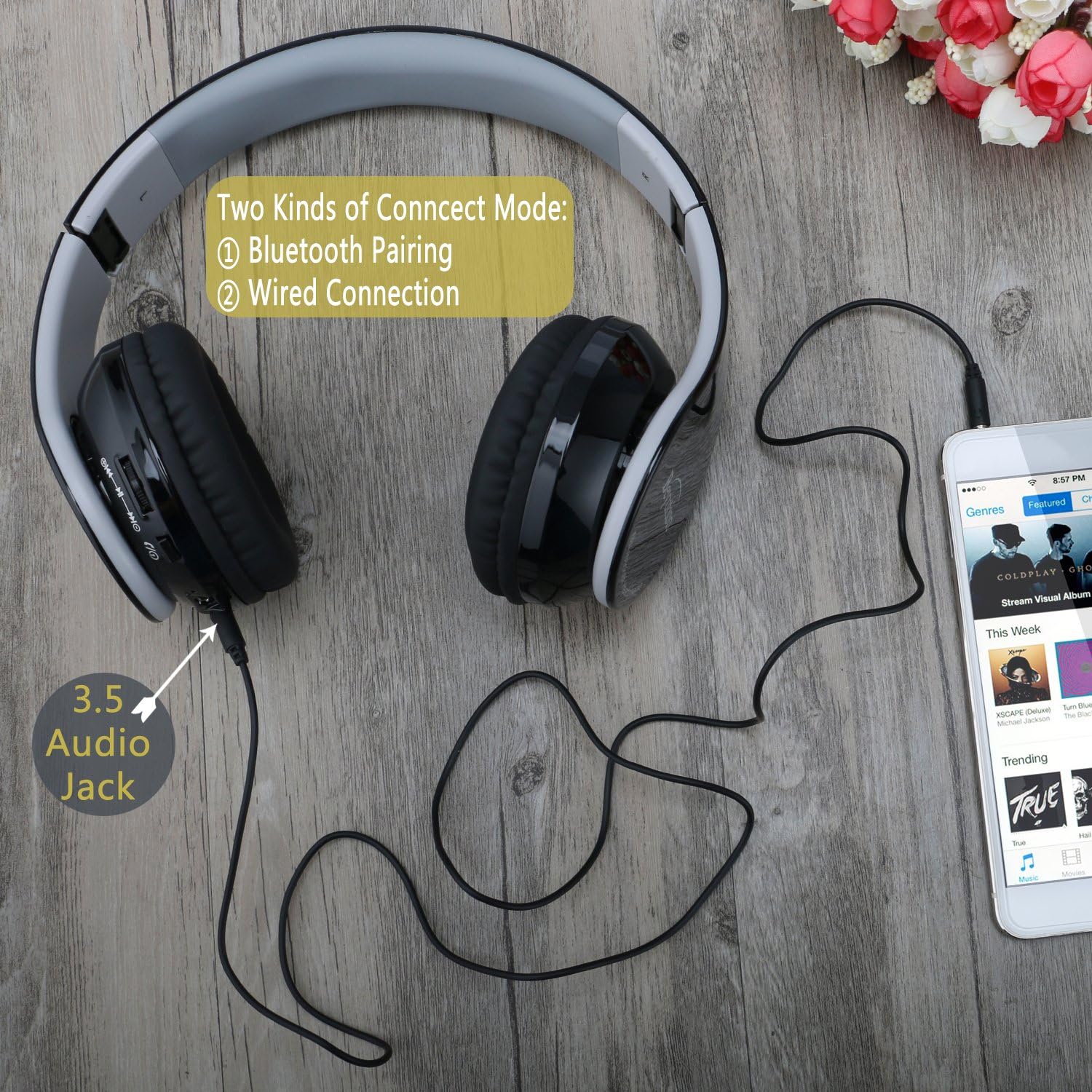
4.4 Kabelové připojení
You can use the headphones with a 3.5mm audio cable when Bluetooth is not available or the battery is depleted.
- Connect one end of the 3.5mm audio cable to the 3.5mm Audio Jack on the headphones.
- Připojte druhý konec 3.5mm audio kabelu k audio výstupnímu konektoru na vašem zařízení.
- The headphones will function as wired headphones.
5. Ovládání sluchátek
5.1 Přehrávání hudby
- Přehrát/pozastavit: Press the Power & Pair button once.
- Další skladba: Press the "Next" button (often combined with Volume Up).
- Předchozí skladba: Press the "Previous" button (often combined with Volume Down).
- Zvýšit hlasitost: Stiskněte a podržte tlačítko „Zvýšit hlasitost“.
- Snížit hlasitost: Stiskněte a podržte tlačítko „Snížit hlasitost“.
5.2 Telefonní hovory
When connected via Bluetooth, the headphones can be used for hands-free calling.
- Přijmout/ukončit hovor: Press the Power & Pair button once.
- Odmítnout hovor: Press and hold the Power & Pair button for 2 seconds.
- Znovu vytočit poslední číslo: Double-press the Power & Pair button.
6. Údržba
Čištění
- Sluchátka otřete měkkým, suchým hadříkem, který nepouští vlákna.
- Nepoužívejte tekuté čisticí prostředky, aerosoly ani rozpouštědla.
- Zabraňte vniknutí vlhkosti do jakýchkoli otvorů.
Skladování
- When not in use, store the headphones in the provided carry pouch to protect them from dust and scratches.
- Skladujte na chladném a suchém místě mimo dosah přímého slunečního záření a extrémních teplot.
7. Řešení problémů
| Problém | Řešení |
|---|---|
| Sluchátka se nezapínají. | Ensure the headphones are charged. Connect to a power source using the USB charging cable. |
| Nelze spárovat se zařízením. |
|
| Žádný zvuk nebo nízká hlasitost. |
|
| Kvalita zvuku je nízká. |
|
| Mikrofon nefunguje. |
|
8. Specifikace
| Funkce | Detail |
|---|---|
| Název modelu | BT513 |
| Verze Bluetooth | V4.1 |
| Dosah Bluetooth | Až 10 metrů (33 stop) |
| Battery Life (Talk/Audio) | 7-8 hodin |
| Pohotovostní doba | Až 300 hodin |
| Doba nabíjení | Přibližně 3 hodiny |
| Velikost zvukového ovladače | 40 mm |
| Frekvenční odezva | 20000 Hz |
| Citlivost | 119 dB |
| Impedance | 32 ohmů |
| Kontrola hluku | Pasivní potlačení hluku |
| Konektivita | Bluetooth, 3.5mm audio konektor |
| Mikrofon | Vestavěný |
| Hmotnost | 6.1 unce (0.38 libry) |
| Rozměry | 10 x 8 x 6 palce |
| Materiál | Plast |
9. Záruka a podpora
Beyution products are designed and manufactured to the highest quality standards. For warranty information or technical support, please refer to the contact details provided with your purchase documentation or visit the official Beyution webmísto.
Uschovejte si prosím doklad o koupi pro případné reklamace.