
NEC NER-Z28A(K)
NEC Air Conditioner Remote Control
Model: NER-Z28A(K) User Manual
Zavedení
This user manual provides comprehensive instructions for the operation and maintenance of your NEC Air Conditioner Remote Control, model NER-Z28A(K). Please read this manual thoroughly before using the remote control to ensure proper function and longevity of the device. Keep this manual for future reference.
Bezpečnostní informace
- Nevystavujte dálkový ovladač přímému slunečnímu záření, vysokým teplotám ani vysoké vlhkosti.
- Zabraňte pádu dálkového ovladače nebo jeho vystavování silným nárazům.
- Do not attempt to disassemble or modify the remote control. This may cause malfunction and void the warranty.
- Udržujte baterie mimo dosah dětí. Při požití okamžitě vyhledejte lékařskou pomoc.
- Použité baterie zlikvidujte v souladu s místními předpisy.
Identifikace dílů
Familiarize yourself with the various parts and buttons of your remote control.
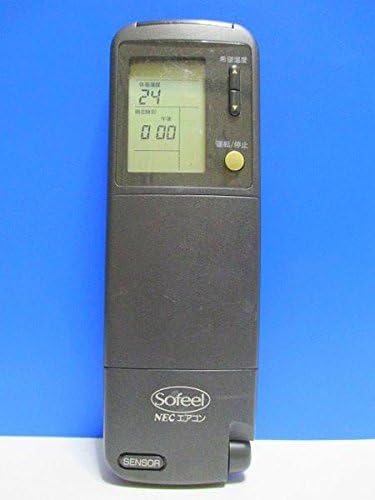
Obrázek 1: Přední strana View
This image displays the front of the remote control, featuring the LCD screen at the top which shows temperature and time, and a yellow power button below it. The brand "Sofeel NEC エアコン" is visible at the bottom.

Figure 2: Hidden Buttons
This image shows the remote control with its lower cover slid open, exposing a panel of additional buttons. These buttons control functions such as automatic operation, heating, cooling, dry mode, fan speed adjustment (strong, medium, weak), and various timer settings (on-timer, off-timer, combination timer, sleep timer).

Obrázek 3: Zpět View
The back of the remote control is shown, highlighting the battery compartment cover. Text on the back provides instructions regarding battery installation, replacement, and the location of the ACL button for resetting the remote after battery changes.
Funkce tlačítek:
- Tlačítko napájení (žluté): Turns the air conditioner ON/OFF.
- Tlačítka pro nastavení teploty: Upravuje požadovanou teplotu.
- Mode Selection (under cover): Selects operation modes (Auto, Heat, Cool, Dry).
- Fan Speed (under cover): Adjusts fan speed (Auto, Strong, Medium, Weak).
- Timer Buttons (under cover): Sets On/Off timers, Combination timer, and Sleep timer.
- Clock/Time Adjustment (under cover): Sets the current time and timer settings.
- Sleep Mode (under cover): Activates sleep operation.
- System Button (under cover): For system-specific functions.
Nastavení
Instalace baterie:
- Slide open the battery compartment cover on the back of the remote control (refer to Figure 3).
- Insert two AAA alkaline batteries, ensuring the correct polarity (+/-) as indicated inside the compartment.
- Bezpečně zavřete kryt bateriového prostoru.
- After installing new batteries, press the ACL button (usually a small recessed button requiring a pointed object like a pen tip) to reset the remote control. This ensures proper function.
Návod k obsluze
Základní provoz:
- Zapnutí/vypnutí: Point the remote control towards the air conditioner unit and press the yellow Power button.
- Nastavení teploty: Use the temperature adjustment buttons (usually up/down arrows) to set your desired temperature. The current setting will be displayed on the LCD screen.
Advanced Functions (under cover):
Slide down the front cover to access additional function buttons.
- Výběr režimu: Press the "冷暖切換" (Cool/Heat Switch) button or individual mode buttons (自動運転 - Auto, 暖房 - Heating, ドライ - Dry, 冷房 - Cooling) to select the desired operating mode.
- Nastavení rychlosti ventilátoru: Press the "風速切換" (Fan Speed Switch) button to cycle through fan speeds (自動 - Auto, 強 - Strong, 中 - Medium, 弱 - Weak).
- Nastavení časovače:
- 入時刻 (On-Timer): Sets the time for the air conditioner to turn on.
- 切時刻 (Off-Timer): Sets the time for the air conditioner to turn off.
- 組合せ (Combination Timer): Combines On and Off timers.
- スリープタイマー (Sleep Timer): Activates sleep mode, which adjusts temperature gradually for comfortable sleep.
- Nastavení hodin: Use the "時計" (Clock) and "時刻調整" (Time Adjustment) buttons to set the current time on the remote's display.
Údržba
Výměna baterie:
Replace batteries when the display becomes dim or the remote control's range decreases. Always replace both batteries at the same time with new ones of the same type (AAA alkaline).
- Otevřete kryt bateriového prostoru.
- Vyjměte staré baterie.
- Insert new AAA alkaline batteries, observing correct polarity.
- Zavřete kryt.
- Press the ACL button to reset the remote control.
Čištění:
Dálkový ovladač otírejte měkkým, suchým hadříkem. Nepoužívejte tekuté čisticí prostředky ani abrazivní materiály.
Odstraňování problémů
| Problém | Možná příčina | Řešení |
|---|---|---|
| Dálkové ovládání neovládá klimatizaci. | Batteries are dead or inserted incorrectly. Obstruction between remote and AC unit. Remote control is out of range. | Replace batteries, ensuring correct polarity. Remove any obstructions. Move closer to the air conditioner unit. |
| LCD displej je tmavý nebo prázdný. | Nízká kapacita baterie. | Vyměňte obě baterie za nové. |
| Remote control functions are erratic after battery replacement. | Remote control needs to be reset. | Press the ACL button on the back of the remote control. |
Specifikace
- Značka: NEC
- Model: NER-Z28A(K)
- Technologie připojení: Infračervený
- Typ ovladače: Ovládání tlačítkem
- Typ baterie: AAA Alkaline (not included)
- Hmotnost produktu: Přibližně 100 g
Záruka a podpora
For warranty information or technical support, please refer to the documentation provided with your air conditioner unit or contact NEC customer service directly. Keep your purchase receipt as proof of purchase.
Poznámka: This remote control is designed specifically for compatible NEC air conditioner models. Compatibility with other brands or models is not guaranteed.
Ask a question about this manual
Ask about setup, troubleshooting, compatibility, parts, safety, or missing instructions. Manuals+ will review the question and use this page’s manual context to help answer it.