
Zavedení
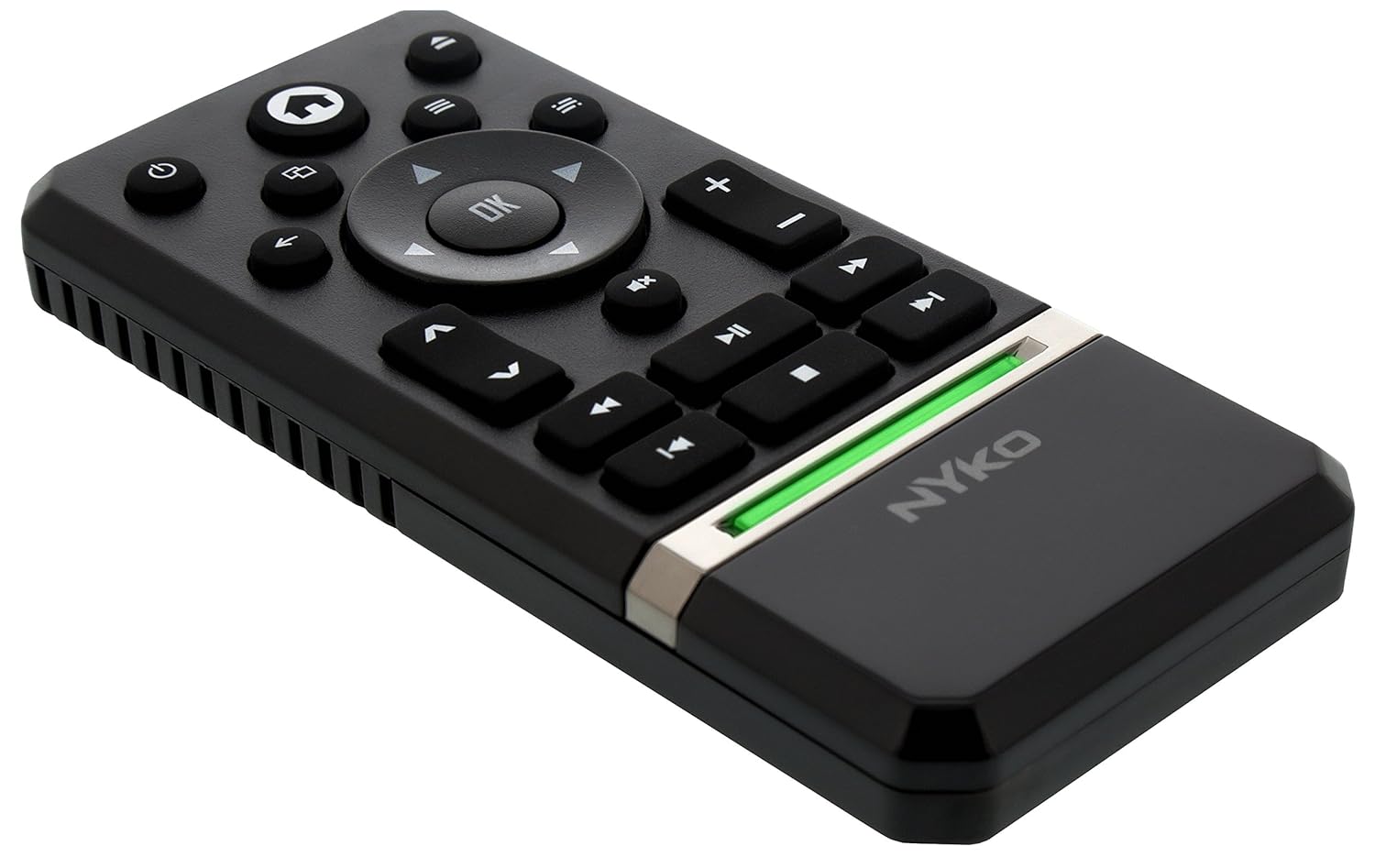
The Nyko Media Remote for Xbox One provides convenient control over your Xbox One console and various media applications. This remote simplifies navigation and playback of streaming content and physical media, offering dedicated buttons for common functions. It also features the ability to power your Xbox One on and off, and control basic functions of your television.

Image: Nyko Media Remote for Xbox One, front view.
Obsah balení
- Nyko Media Remote for Xbox One (Model: 86116)
- Poznámka: Baterie AAA nejsou součástí balení a je nutné je zakoupit samostatně.

Image: Nyko Media Remote for Xbox One in its retail packaging.
Nastavení
1. Instalace baterie
- Najděte přihrádku na baterie na zadní straně dálkového ovladače.
- Posuňte kryt baterie dolů pro otevření.
- Vložte dvě (2) baterie typu AAA a dbejte na správnou polaritu (+/-) vyznačenou uvnitř přihrádky.
- Nasaďte kryt baterie zpět tak, že jej posunete nahoru, dokud nezacvakne.
Obrázek: Zadní view of the remote with the battery cover removed, illustrating the AAA battery placement.
2. Počáteční připojení
The Nyko Media Remote uses infrared (IR) technology. No manual pairing is required for the Xbox One. Simply ensure a clear line of sight between the remote's IR emitter and the Xbox One's IR receiver.
For TV control functions (volume, channels, power), your TV must be configured to respond to the Xbox One's IR signals, typically through the Xbox One's OneGuide settings. The remote sends commands to the Xbox One, which then relays them to your TV via its IR blaster (if configured) or Kinect sensor.
Návod k obsluze
The Nyko Media Remote provides comprehensive control for your Xbox One and various media applications. Refer to the diagram below for button identification and their primary functions.

Obrázek: Přední strana view of the Nyko Media Remote, displaying all control buttons.
Funkce tlačítek:
| Tlačítko | Funkce |
|---|---|
| Tlačítko napájení (⏻) | Powers the Xbox One console on or off. |
| Tlačítko Domů (⌂) | Returns to the Xbox One Home screen. |
| View Tlačítko (🗀) | Accesses additional information or options within an app or game. |
| Tlačítko Menu (☰) | Otevírá kontextové nabídky nebo možnosti. |
| Směrová podložka (D-Pad) | Prochází menu a obsahem. |
| Tlačítko OK | Confirms selections. Can also function as Play/Pause in some apps. |
| Tlačítko Zpět (←) | Návrat na předchozí obrazovku nebo do nabídky. |
| OneGuide Button (📱) | Launches the Xbox OneGuide for live TV and media. |
| Zvýšení/snížení hlasitosti (⏸ / ⏷) | Adjusts the television volume (requires TV setup via Xbox One). |
| Tlačítko ztlumení (🔇) | Mutes or unmutes television audio. |
| Kanál nahoru/dolů (▲ / ▼) | Changes television channels (requires TV setup via Xbox One). |
| Rychlé převíjení vzad (⏪) | Přetočí přehrávání médií zpět. |
| Přehrát/Pozastavit (⏯) | Přehraje nebo pozastaví přehrávání médií. |
| Rychle vpřed (⏩) | Rychlé přehrávání médií vpřed. |
| Předchozí stopa (⏮) | Přeskočí na začátek aktuální nebo předchozí skladby. |
| Zastávka (⏹) | Zastaví přehrávání médií. |
| Další stopa (⏭) | Přeskočí na další skladbu nebo kapitolu. |
Media and App Control:
The remote is designed for seamless control of various Xbox One applications, including:
- OneGuide
- Netflix
- Hulu Plus
- Okamžité video Amazon
- Other streaming services and Blu-ray/DVD playback
Dedicated playback buttons (Play, Pause, Fast Forward, Rewind, Stop, Skip) provide intuitive control for movies, music, and other media.
Údržba
Výměna baterie:
When the remote's performance diminishes or it stops responding, it is likely time to replace the batteries. Follow the "Battery Installation" steps in the Setup section to replace the two AAA batteries.
Čištění:
To clean the remote, gently wipe it with a soft, dry cloth. Avoid using harsh chemicals, abrasive cleaners, or excessive moisture, as these can damage the remote's finish or internal components.
Odstraňování problémů
- Dálkové ovládání nereaguje:
- Ujistěte se, že jsou správně vloženy nové baterie AAA.
- Verify there is a clear line of sight between the remote and the Xbox One console. Obstructions can block the infrared signal.
- Move closer to the Xbox One console. The remote has a maximum effective range of approximately 9 meters (25 feet).
- TV Control (Volume, Channel, Power) Not Working:
- Confirm that your Xbox One's OneGuide settings are properly configured for your television. The remote sends commands to the Xbox One, which then controls the TV.
- Ensure any necessary IR blasters or Kinect sensors are correctly set up and positioned.
- Přerušovaná odezva:
- This can sometimes occur due to weak batteries or environmental interference. Replace batteries and ensure a clear line of sight.
Specifikace
| Funkce | Detail |
|---|---|
| Značka | Nyko |
| Název modelu | Media Remote |
| Číslo modelu | 86116 |
| Technologie připojení | Infračervený (IR) |
| Kompatibilní zařízení | Xbox One, Television (via Xbox One IR blaster/Kinect) |
| Typ baterie | 2 x AAA baterie (nejsou součástí balení) |
| Maximální dosah | Až 9 metrů (25 stop) |
| Hmotnost položky | 0.1 libry (přibližně 45 gramů) |
| Barva | Tmavě šedá |
| Další funkce | Ergonomic design, dedicated media playback controls. |
Záruka a podpora
Nyko products are designed for quality and reliability. For specific warranty details, please refer to the documentation included with your purchase or visit the official Nyko website. The product includes warranty information in multiple languages.
Zákaznická podpora:
- E-mail: customer.support@nyko.com
- Telefon: +1-888-400-6956
- Online registrace: www.nyko.com
- Další informace: http://uqr.me/nykotechnologies/qr/83215

Obrázek: Zadní view of the product packaging, detailing features and customer support contact information.