
Zavedení
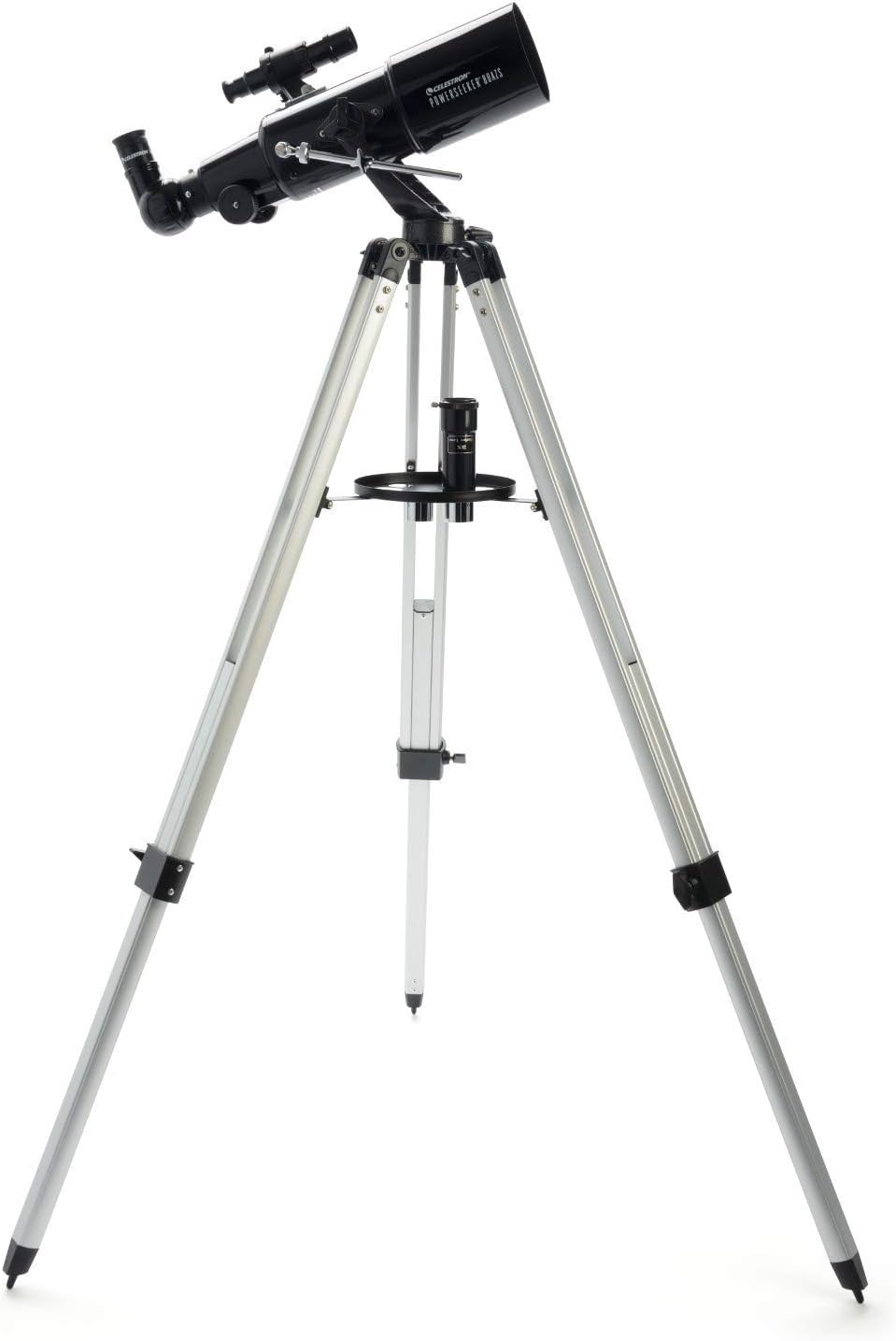
The Celestron PowerSeeker 80AZS is a powerful and user-friendly refractor telescope designed for amateur astronomers and beginners. This manual provides essential information for assembling, operating, and maintaining your telescope to ensure optimal viewing experiences of celestial objects like the Moon, planets, and distant galaxies, as well as terrestrial observations.
The PowerSeeker series combines quality, value, and user-friendly features, making it an excellent choice for exploring the night sky.
Co je v krabici
- Celestron PowerSeeker 80AZS Telescope Optical Tube
- Full-Height Aluminum Tripod with Accessory Tray
- 20mm okulár
- 4mm okulár
- 3x Barlowův objektiv
- Postavte diagonální obrázek
- Rozsah Finderu
- BONUS Starry Night Basic Edition Astronomy Software (downloadable)
Nastavení
Assembling your Celestron PowerSeeker 80AZS telescope is straightforward. Follow these steps to get started:
- Sestavte stativ: Extend the tripod legs to your desired height and secure them. Attach the accessory tray to the center brace of the tripod.
- Připojení optické trubice: Place the telescope optical tube onto the alt-azimuth mount on the tripod. Secure it using the provided screws.
- Instalace vyhledávacího dalekohledu: Attach the finder scope to the optical tube using the small screws on the side. This low-powered scope helps in locating objects before viewprohlížení hlavním dalekohledem.
- Vložte diagonálu vzpřímeného obrazu: Insert the erect image diagonal into the focuser of the telescope. This accessory ensures that images appear correctly oriented, which is useful for terrestrial viewIng.
- Vložení okuláru: Choose either the 20mm or 4mm eyepiece and insert it into the diagonal. The 20mm eyepiece provides a wider field of view, while the 4mm eyepiece offers higher magnification. For even greater magnification, you can insert the 3x Barlow lens between the diagonal and the eyepiece.


Nastavení Video průvodce
Video 1: Official Celestron guide to setting up PowerSeeker AZ Telescopes, demonstrating assembly and key features.
Obsluha dalekohledu
Once assembled, your PowerSeeker 80AZS is ready for observation. Here’s how to operate it:
- Align the Finder Scope: Before observing, align the finder scope with the main telescope. Point the main telescope at a distant, easily identifiable object (e.g., a tree during the day). Look through the finder scope and adjust its screws until the object is centered in its crosshairs.
- Vyhledat objekt: Use the finder scope to locate the celestial or terrestrial object you wish to observe. Center the object in the finder scope's crosshairs.
- Observe through the Eyepiece: Look through the main telescope's eyepiece. Use the focuser knobs to bring the image into sharp focus.
- Upravit zvětšení: Experiment with different eyepieces (20mm for wide views, 4mm for high magnification) and the 3x Barlow lens to achieve your desired level of detail.
- Sledování objektů: The manual alt-azimuth mount allows for smooth movement up/down and left/right. Use the slow-motion altitude rod to make fine adjustments and track objects as they move across the sky.

Provozní videonávod
Video 2: A complete guide to the Celestron PowerSeeker AZS, including setup and operational tips for optimal viewIng.
Údržba
Proper maintenance will extend the life and performance of your telescope:
- Čištění optiky: Use a soft, lint-free cloth or a specialized optical cleaning solution to clean lenses. Avoid touching optical surfaces with bare hands.
- Ochrana proti prachu: Always keep dust caps on the telescope when not in use.
- Skladování: Store the telescope in a dry, dust-free environment. If disassembling for storage, ensure all components are clean and protected.
- Mechanické díly: Pravidelně kontrolujte utažení všech šroubů a knoflíků. Nepřetahujte je.
Odstraňování problémů
If you encounter issues with your telescope, consider these common solutions:
- Rozmazané obrázky: Ujistěte se, že je ostření správně nastaveno. Zkontrolujte, zda je okulár bezpečně usazen. Atmosférické podmínky mohou také ovlivnit čistotu obrazu.
- Obtížnost s lokalizací objektů: Verify that the finder scope is correctly aligned with the main telescope. Start with the lowest magnification eyepiece (20mm) for a wider field of view.
- Nestabilní View: Ensure the tripod legs are fully extended and locked, and the accessory tray is securely in place to provide stability. Avoid observing on windy days.
- Bez obrázku: Check that all lens caps (front of the telescope, eyepiece, diagonal) are removed.
Specifikace
| Funkce | Detail |
|---|---|
| Značka | Celestron |
| Název modelu | Dalekohled PowerSeeker 80AZS |
| Délka optické trubice | 41 palce |
| Průměr objektivu | 80 milimetrů |
| Popis montáže dalekohledu | Altazimuth Mount |
| Rozměry produktu | 40"H x 19"Š x 55"V |
| Typ zaměření | Manuální ostření |
| Finderscope | Reflex |
| Povlak | Plně potažené |
| Popis ohniskové vzdálenosti | 15.748 palců |
| Hmotnost položky | 10 libry |
Záruka a podpora
Your Celestron PowerSeeker 80AZS Telescope comes with a 2-Year US Warranty, ensuring peace of mind for your purchase. Celestron, a leading telescope brand since 1960, also provides unlimited access to technical support from their team of US-based experts.
For any questions or assistance, please refer to the contact information provided in your product documentation or visit the official Celestron webmísto.