
Důležité bezpečnostní informace
VAROVÁNÍ: This product contains chemicals known to the State of California to cause cancer and reproductive harm. For more information, please visit www.P65Warnings.ca.gov. It is the responsibility of the seller to provide this information to any online or other retailer, and to require them to provide the internet warning as set forth above.
Konec produktuview
The QFX PBX-61120BT is a portable Bluetooth speaker designed for versatile audio playback. It features a 12-inch woofer, multiple input options, and a rechargeable battery for extended use.
Klíčové vlastnosti:
- FM radio, USB/SD player, and remote control for diverse playback options.
- 12-inch woofer with two 1/4 inch TRS Microphone inputs for vocal or instrument connection.
- Integrated 36mm pole mount socket for stand mounting (requires a large footprint tripod stand).
- Durable metal grill-covered speaker, handlebar, and wheels for easy transport.
- Rechargeable battery providing approximately 6 hours of playback at half volume.
Součásti reproduktorů:
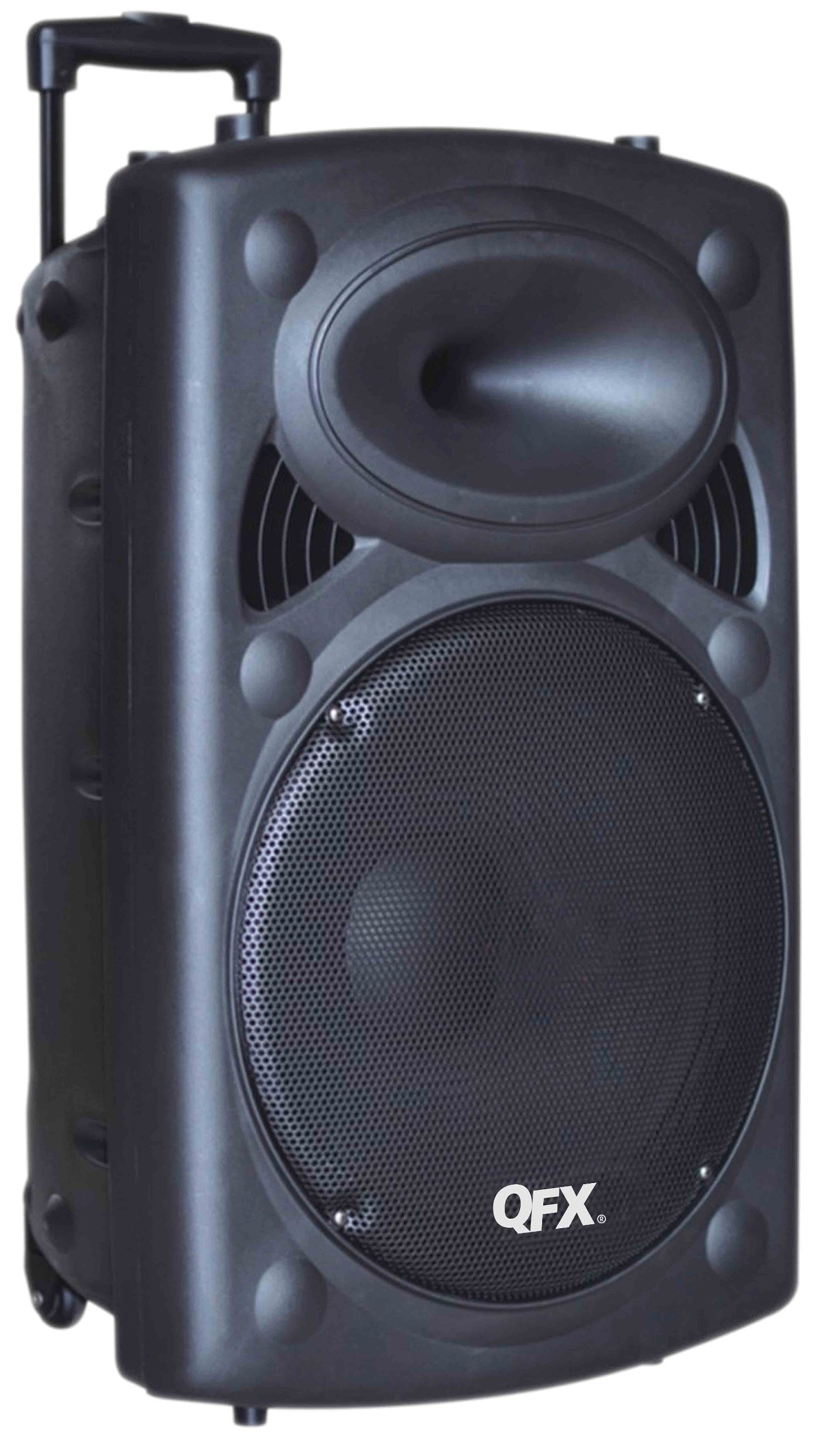
Obrázek 1: Přední view of the QFX PBX-61120BT Portable Bluetooth Speaker. This image displays the main 12-inch woofer behind a protective metal grill, the control panel typically located on the top or side, and the integrated wheels and extendable handle for portability.
The speaker unit includes a main control panel, typically located on the top or rear, which houses buttons for power, mode selection, volume control, and input ports. The rear or side features an extendable handle and wheels for convenient transportation.
Nastavení
- Rozbalení: Opatrně vyjměte reproduktor z obalu. Veškerý obalový materiál si uschovejte pro budoucí přepravu nebo skladování.
- Počáteční nabíjení: Before first use, fully charge the speaker's internal battery. Connect the provided AC power cable to the speaker's power input and then to a standard electrical outlet. The charging indicator light (if present) will typically change color or turn off when fully charged.
- Umístění: Place the speaker on a stable, flat surface. For optimal sound projection, ensure no obstructions are directly in front of the speaker. If using a pole mount, ensure the tripod stand is rated for the speaker's weight (approximately 27 pounds) and has a sufficiently large footprint for stability.
- Zapnutí: Press and hold the Power button (usually located on the control panel) to turn on the speaker.
Návod k obsluze
1. Připojení Bluetooth
- Enable Bluetooth Mode: Turn on the speaker. Press the "Mode" button on the control panel until "Bluetooth" or "BT" appears on the display (if available), or a voice prompt indicates Bluetooth mode. The speaker will enter pairing mode, indicated by a flashing Bluetooth indicator light.
- Spárovat se zařízením: On your mobile device (smartphone, tablet, etc.), go to the Bluetooth settings and enable Bluetooth. Hledat available devices. You should see "PBX-61120BT" or a similar name in the list. Select it to pair.
- Potvrzení: Once successfully paired, the speaker will usually emit a confirmation sound, and the Bluetooth indicator light will stop flashing and remain solid.
- Přehrávání: Start playing audio from your device. Adjust volume using both your device's volume controls and the speaker's master volume knob.
Note: A faint hissing sound may be audible when Bluetooth is connected but no music is playing. This is normal and typically disappears once audio playback begins.
2. Přehrávání z USB/SD karty
- Vložit médium: Vložte USB flash disk nebo SD kartu (s kompatibilním audio files) into the respective port on the speaker's control panel.
- Vyberte režim: Press the "Mode" button until "USB" or "SD" is selected. The speaker should automatically begin playing audio filez vloženého média.
- Ovládání: Use the playback controls (Play/Pause, Next/Previous Track) on the speaker or the remote control to manage your music.
3. Provoz rádia FM
- Vyberte režim FM: Press the "Mode" button until "FM" is selected.
- Automatické skenování: Press and hold the Play/Pause button to initiate an automatic scan for available FM radio stations. The speaker will scan and save stations with strong signals.
- Nalaďte si stanice: Pro navigaci mezi uloženými FM stanicemi použijte tlačítka Další/Předchozí skladba.
Note: FM tuning can sometimes be challenging. Ensure the speaker is in an area with good signal reception for best results.
4. Microphone Inputs
- Připojení mikrofonu: Plug a 1/4 inch TRS microphone into one of the two microphone input jacks on the control panel.
- Upravit hlasitost: Use the dedicated microphone volume knob (if available) to adjust the microphone's output level. Ensure the master volume is also set appropriately.
Údržba
- Čištění: Use a soft, dry cloth to clean the exterior of the speaker. Do not use abrasive cleaners, waxes, or solvents. Avoid getting moisture into any openings.
- Péče o baterie: To prolong battery life, avoid fully discharging the battery frequently. Recharge the speaker regularly, especially if it will be stored for an extended period. Store in a cool, dry place.
- Skladování: When not in use, store the speaker in a dry environment, away from extreme temperatures and direct sunlight.
- Doprava: Utilize the integrated handlebar and wheels for moving the speaker to prevent damage.
Odstraňování problémů
| Problém | Možná příčina | Řešení |
|---|---|---|
| Žádná síla | Battery discharged; AC cable not connected or faulty. | Connect to AC power and charge the battery. Check AC cable connection. |
| Žádný zvuk | Volume too low; incorrect input mode selected; device not paired (Bluetooth); media not recognized (USB/SD). | Increase master volume and device volume. Select correct input mode. Re-pair Bluetooth device. Ensure USB/SD media is formatted correctly and contains compatible files. |
| Bluetooth se nepřipojuje | Speaker not in pairing mode; device Bluetooth off; too far from speaker; interference. | Ensure speaker is in Bluetooth pairing mode. Turn device Bluetooth off/on. Move device closer to speaker. Avoid sources of interference. |
| Špatný příjem FM rádia | Slabý signál; rušení z prostředí. | Relocate the speaker to an area with better signal reception. Perform an auto-scan again. |
| Přerušovaný zvuk nebo světla | Loose internal connection or faulty component. | If issues persist after basic troubleshooting, contact customer support. |
Specifikace
| Funkce | Detail |
|---|---|
| Značka | QFX |
| Číslo modelu | PBX-61120BT |
| Technologie připojení | Bluetooth, USB |
| Kompatibilní zařízení | All devices that connect with Bluetooth or AUX in / USB |
| Typ montáže | Freestanding, Pole Mount |
| Zdroj napájení | AC, Battery (Rechargeable) |
| Impedance | 3 ohmů |
| Výstupní Wattage | 150 wattů |
| Rozměry položky (D x Š x V) | 15.5 x 14.8 x 24.4 palce |
| Hmotnost položky | 27 libry |
| Materiál pouzdra | Metal (Grill), Plastic (Cabinet) |
| Životnost baterie (přibližně) | 6 hodin při poloviční hlasitosti |
Záruka a podpora
For warranty information and customer support, please refer to the documentation included with your purchase or visit the official QFX webUschovejte si účtenku jako doklad o koupi pro případné reklamace.
If you experience issues not covered in the troubleshooting section, please contact QFX customer service for assistance.