
InFocus IN126x
InFocus Projector User Manual
Model: IN126x (F321717)
Zavedení
This manual provides comprehensive instructions for the setup, operation, and maintenance of your InFocus IN126x WXGA Network Projector. Designed for both business presentations and home cinema, this projector delivers 4200 lumens and excellent image quality with high contrast and BrilliantColor technology. Its compact and lightweight design ensures portability while maintaining powerful performance.

Figure 1: InFocus IN126x Projector Front View
This image displays the InFocus IN126x projector from a front-right angle, highlighting its main lens and the sleek black casing. The top panel features control buttons and the InFocus logo.
Důležité bezpečnostní informace
Please read all safety instructions carefully before operating the projector. Failure to follow these instructions may result in fire, electric shock, or other injuries.
- Zdroj napájení: Používejte pouze napájecí adaptér dodaný s projektorem. Ujistěte se, že síťová zásuvka odpovídá napětí.tage požadavky.
- Větrání: Neblokujte větrací otvory. Dostatečné proudění vzduchu je nezbytné k zabránění přehřátí.
- Teplo: Projektor lamp and surrounding areas can become very hot during operation. Avoid touching these areas.
- Lamp Varování: Jáamp contains mercury. Dispose of lamps according to local regulations. Do not open the lamp compartment until the projector has cooled down.
- Expozice tekutin: Nevystavujte projektor dešti, vlhkosti ani žádným kapalinám.
- Servis: Nepokoušejte se tento výrobek opravit sami. Veškerý servis svěřte kvalifikovanému servisnímu personálu.

Figure 2: Projector Bottom Panel with Warning Labels
This image shows the underside of the InFocus IN126x projector, displaying various regulatory and safety labels. Notable warnings include information about mercury in the lamp and instructions for lamp replacement, emphasizing the need to allow the unit to cool down before servicing.
Průvodce nastavením
1. Vybalení a umístění
Carefully remove the projector and all accessories from the packaging. Place the projector on a stable, flat surface or mount it securely. Ensure there is adequate space around the projector for proper ventilation.

Obrázek 3: Rozměry projektoru
This image illustrates the physical dimensions of the InFocus IN126x projector. The measurements are approximately 29.2 cm (length), 22.1 cm (width), and 9.8 cm (height), providing a clear understanding of its compact size for placement considerations.
2. Připojení napájení
Connect the power cord to the projector's power inlet and then plug the other end into a grounded electrical outlet.
3. Připojení vstupních zdrojů
The InFocus IN126x projector supports various input sources. Connect your device (e.g., laptop, Blu-ray player) to the appropriate port on the projector's rear panel.
- HDMI: Pro digitální video a audio ve vysokém rozlišení.
- VGA (Computer 1/2): For analog computer video input.
- S-Video/Video: Pro video ve standardním rozlišení.
- Audio In (Audio 1/2): Pro analogový audio vstup.
- USB-A/USB-B: For service or specific data transfer.
- LAN: Pro síťové připojení.
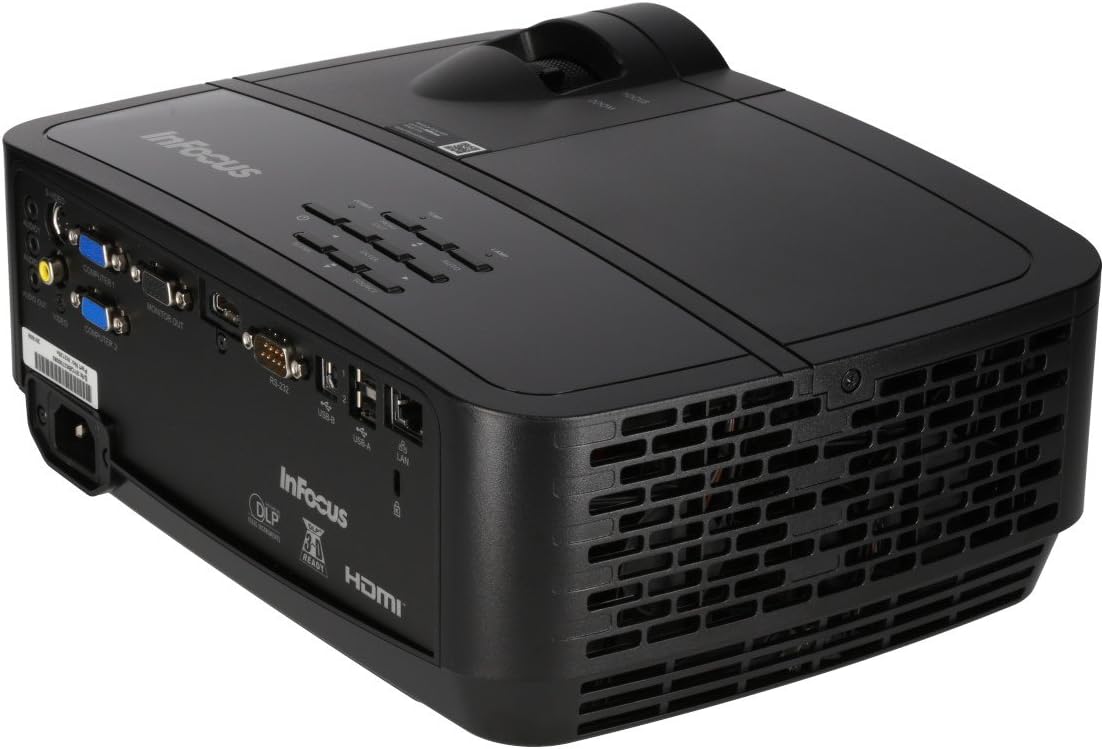
Figure 4: Projector Rear Panel Connectivity
Tento obrázek poskytuje detailní view of the rear panel of the InFocus IN126x projector, clearly showing all available input and output ports. These include HDMI, VGA (Computer 1 and 2), S-Video, Video, Audio In (Audio 1 and 2), Monitor Out, RS-232, USB-B, USB-A, and LAN ports, facilitating diverse connectivity options.
4. Počáteční zapnutí a nastavení
Press the power button on the projector or remote control. The projector will power on and display the input source. Use the focus and zoom rings on the lens to adjust the image clarity and size to your desired projection area.

Figure 5: Projector Top Panel Controls
This image shows the top surface of the InFocus IN126x projector, highlighting the control panel with various buttons for navigation and settings adjustment. The focus and zoom rings on the lens are also visible, used for fine-tuning the projected image.
Návod k obsluze
Základní ovládací prvky
The projector can be operated using the control panel on the top of the unit or the included remote control.
- Vypínač: Slouží k zapnutí nebo vypnutí projektoru.
- Tlačítko zdroje: Cycles through available input sources (HDMI, VGA, etc.).
- Tlačítko nabídky: Otevře nabídku na obrazovce (OSD).
- Navigační tlačítka: Používá se k navigaci v možnostech nabídky a úpravě nastavení.
- Tlačítko Enter: Potvrzuje výběry v nabídce.
Navigace v nabídce a nastavení
Press the Menu button to access the OSD. Use the navigation buttons to select categories such as Picture, Display, Setup, and Advanced. Within each category, you can adjust settings like:
- Jas a kontrast: Optimalizujte viditelnost obrazu.
- Color & Tint: Fine-tune color accuracy.
- Poměr stran: Select between 4:3, 16:9, or other ratios to match your content.
- Korekce lichoběžníkového zkreslení: Adjust image shape if the projector is not perfectly perpendicular to the screen.
- BrilliantColor Technology: Enhance color vibrancy and detail.
Pokročilé funkce
The IN126x supports a superior viewing experience, including 3D home cinema (3D Glasses sold separately). For enhanced connectivity, the projector can easily connect to your phone or iPad with a LightCast Key (sold separately).
Údržba
Lamp Nahrazení
Projektor lamp has a lifespan of over 5,000 hours. When the lamp reaches the end of its life, a warning message may appear, or the lamp indicator light may illuminate. Always allow the projector to cool down completely (at least 60 minutes) before attempting to replace the lamp. Refer to the safety information on the bottom of the projector for specific warnings regarding mercury content and replacement procedures.
Čištění
- Čočka: Používejte měkký hadřík bez žmolků, speciálně určený pro optické čočky. Nepoužívejte abrazivní čisticí prostředky.
- Projektor Casing: Otřete měkkým, damp tkanina. Vyhněte se agresivním chemikáliím.
- Větrací otvory: Regularly check and clean the air vents to ensure proper airflow and prevent overheating. Use a soft brush or compressed air to remove dust.

Figure 6: Projector Side Ventilation
This image displays the side of the InFocus IN126x projector, prominently featuring the ventilation grilles. These grilles are crucial for dissipating heat generated during operation, and keeping them clear of obstructions is vital for the projector's longevity and performance.
Odstraňování problémů
| Problém | Možná příčina | Řešení |
|---|---|---|
| Na obrazovce není žádný obraz |
|
|
| Obraz je tmavý nebo nekvalitní |
|
|
| Žádný zvuk |
|
|
Specifikace
| Funkce | Detail |
|---|---|
| Značka | InFocus |
| Číslo modelu | F321717 (IN126x) |
| Rozměry produktu | 18.58 x 20.67 x 7.44 palce |
| Hmotnost položky | 5.5 libry |
| Rozlišení displeje | 1280 x 800 (WXGA) |
| Technologie připojení | HDMI, VGA, S-Video, USB, LAN |
| Lamp Život | Více než 5,000 XNUMX hodin |
| Speciální funkce | Přenosný |
| První dostupný termín | 7. srpna 2016 |
Informace o záruce
The InFocus IN126x Projector comes with a 2-letá záruka. InFocus stands behind its products and provides customer service for any issues you may encounter. Please retain your proof of purchase for warranty claims.
Zákaznická podpora
For technical assistance, troubleshooting beyond this manual, or warranty inquiries, please contact InFocus customer support. Visit the official InFocus webweb s nejaktuálnějšími kontaktními informacemi, včetně telefonních čísel a online zdrojů podpory.
You can also refer to the official InFocus webstránky s dalšími zdroji a častými dotazy: www.infocus.com
Ask a question about this manual
Ask about setup, troubleshooting, compatibility, parts, safety, or missing instructions. Manuals+ will review the question and use this page’s manual context to help answer it.