
ACTi B61
Uživatelská příručka videokamery ACTi B řady B61
Model: B61
1. Úvod
This manual provides comprehensive instructions for the installation, operation, and maintenance of the ACTi B Series B61 Video Camera. Please read this manual thoroughly before using the product to ensure proper and safe operation.
The ACTi B61 is a 5MP Indoor Zoom Dome camera designed for surveillance applications. It features a 3x zoom lens, adaptive IR illumination, and supports H.264 video compression at 1080p/30fps. Key features include:
- 5MP Indoor Zoom Dome with Day/Night functionality
- Adaptive IR for enhanced low-light performance
- Basic Wide Dynamic Range (WDR)
- 3x Zoom Lens (3-9mm / F1.2-2.1) with DC Iris Auto Focus
- 30 frames per second at 1920 x 1080 resolution
- Digitální redukce šumu (DNR)
- Audio vstup/výstup
- Micro SD HC/Micro SDXC card slot for local storage
- Power over Ethernet (PoE) or DC12V power input
- IK09 vandal resistance rating
- Digital Input/Output (DI/DO)
2. Obsah balení
Po otevření balíku si prosím ověřte, zda jsou všechny položky přítomny a v dobrém stavu. Pokud některé položky chybí nebo jsou poškozeny, ihned kontaktujte svého prodejce.
- ACTi B Series B61 Video Camera
- Mounting Template/Hardware (screws, anchors)
- Rychlý průvodce
- CD se softwarem (pokud je k dispozici)

Obrázek 1: Přední strana view of the ACTi B Series B61 Video Camera. The camera is a white dome-shaped unit with a dark lens assembly visible through the clear dome cover.
3. Camera Components and Connections
Familiarize yourself with the various components and connection ports of the ACTi B61 camera.
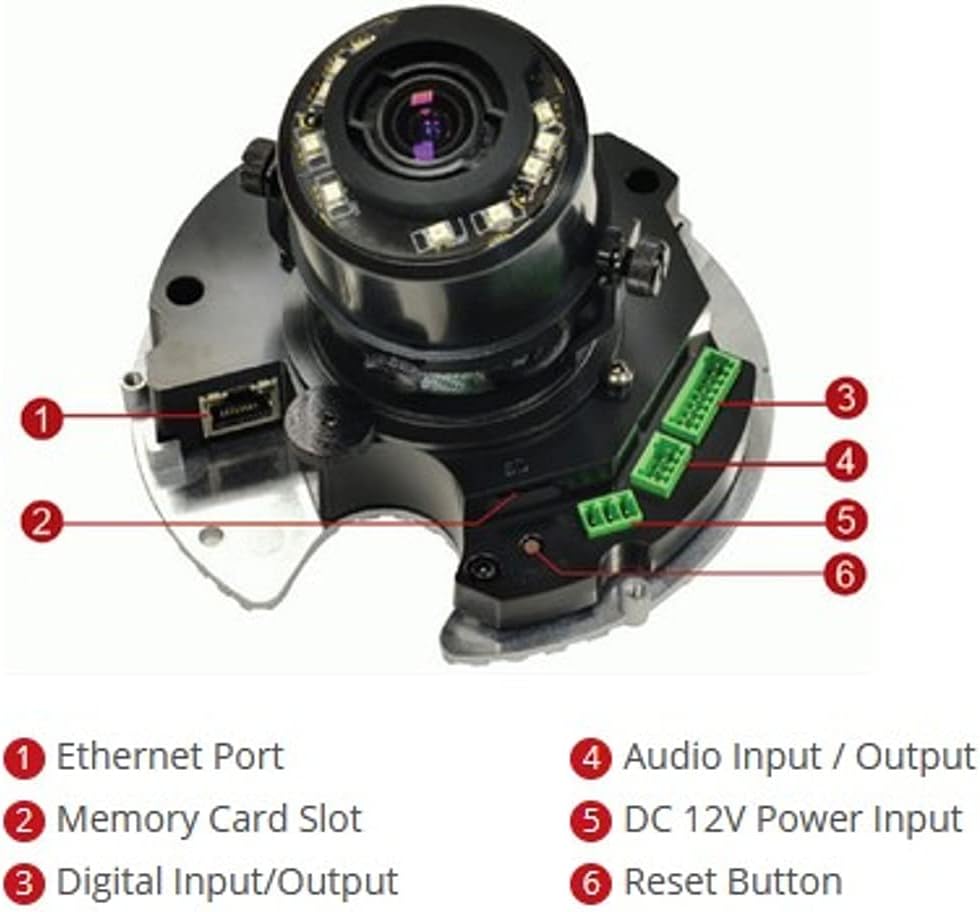
Obrázek 2: Vnitřní view of the ACTi B61 camera with key components labeled.
- 1. Ethernetový port: Pro síťové připojení a napájení přes Ethernet (PoE).
- 2. Memory Card Slot: For inserting a Micro SD HC/Micro SDXC card for local storage.
- 3. Digital Input/Output: For connecting external sensors or alarms.
- 4. Audio Input / Output: For connecting an external microphone and speaker.
- 5. DC 12V Power Input: Alternativní napájecí vstup, pokud se nepoužívá PoE.
- 6. Tlačítko Reset: Používá se k obnovení továrního nastavení.
4. Nastavení a instalace
4.1 Montáž fotoaparátu
The ACTi B61 is designed for indoor ceiling mount installation. Ensure the mounting surface is strong enough to support the camera's weight (approximately 1.58 pounds).
- Choose a suitable location on the ceiling for optimal surveillance coverage.
- Use the provided mounting template to mark the drill holes on the ceiling.
- Vyvrtejte pilotní otvory a v případě potřeby vložte do nich nástěnné hmoždinky.
- Secure the camera's mounting base to the ceiling using the provided screws.
- Connect necessary cables (Ethernet, power, audio, DI/DO) before fully securing the camera body.
- Adjust the camera's lens angle and zoom as needed.
4.2 Napájení kamery
The camera can be powered via Power over Ethernet (PoE) or a 12V DC power adapter.
- POE: Connect an Ethernet cable from a PoE-enabled switch or injector to the camera's Ethernet port (1).
- DC 12V: Connect a 12V DC power adapter (not included) to the DC 12V Power Input port (5).
Note: Do not connect both PoE and DC 12V power simultaneously.
4.3 Síťové připojení
Connect the camera to your network using an Ethernet cable plugged into the Ethernet Port (1). The camera will obtain an IP address automatically via DHCP by default. For initial setup, it is recommended to connect the camera to a network segment where a DHCP server is active.
While the specifications mention Wi-Fi, the primary connection method for this type of surveillance camera is typically wired Ethernet for stability and power (PoE). Refer to the camera's software manual for detailed Wi-Fi configuration if applicable.
4.4 Počáteční přístup a konfigurace
After connecting the camera to the network and powering it on, you can access its web rozhraní pro konfiguraci.
- Use the ACTi IP Utility software (typically found on the included CD or ACTi's webwebu) pro zjištění IP adresy kamery ve vaší síti.
- Otevřete a web prohlížeč (např. Chrome, Firefox) a zadejte IP adresu kamery do adresního řádku.
- Log in using the default username and password (refer to the Quick Start Guide or ACTi documentation for default credentials).
- Z bezpečnostních důvodů okamžitě změňte výchozí heslo.
- Configure network settings, video streaming parameters, recording options, and other features through the web rozhraní.
5. Ovládání fotoaparátu
5.1 Živě View a Nahrávání
Po konfiguraci můžete view the live video feed and manage recordings through the camera's web interface or compatible Network Video Recorder (NVR) software.
- Žít View: Access the "Live View" section in the web interface to see the real-time video feed.
- Záznam: Configure recording schedules, motion detection triggers, and storage locations (Micro SD card, NVR, NAS) via the "Recording" or "Event" settings.
5.2 Nastavení videa
Adjust video quality, resolution, frame rate, and image settings to suit your surveillance needs.
- Rezoluce: Supports up to 5MP effective still resolution and 1080p video capture resolution at 30 fps.
- Přiblížení a zaostření: Utilize the 3x optical zoom and auto-focus features to capture detailed images. These settings are typically adjusted via the web rozhraní.
- Režim Den/Noc: The camera automatically switches between day (color) and night (black and white with IR illumination) modes based on ambient light.
5.3 Audio and I/O
If external audio devices or sensors are connected, configure their settings in the camera's web rozhraní.
- Zvuk: Enable audio input for listening and audio output for two-way communication if supported by external devices.
- Digitální I / O: Configure digital inputs to trigger events (e.g., recording, alarm notification) from external sensors, and digital outputs to control external devices.
6. Údržba
6.1 Čištění
Pravidelné čištění pomáhá udržovat optimální kvalitu obrazu a prodlužuje životnost fotoaparátu.
- Gently wipe the camera's dome cover with a soft, damp hadříkem. Nepoužívejte abrazivní čisticí prostředky ani rozpouštědla.
- For stubborn dirt, use a mild soap solution. Ensure no liquid enters the camera body.
- Clean the lens with a lens cleaning cloth and solution designed for optical surfaces.
6.2 aktualizací firmwaru
Periodically check the ACTi official website for firmware updates. Firmware updates can provide new features, improve performance, and address security vulnerabilities.
- Download the latest firmware for your B61 model from the ACTi support webmísto.
- Follow the instructions provided with the firmware update package for a safe upgrade process.
- Warning: Do not power off the camera during a firmware update.
7. Řešení problémů
This section addresses common issues you might encounter with your ACTi B61 camera.
| Problém | Možná příčina | Řešení |
|---|---|---|
| Žádný kanál videa |
|
|
| Špatná kvalita obrazu |
|
|
| Nelze se přihlásit k web rozhraní |
|
|
For more detailed troubleshooting, refer to the comprehensive user manual available on the ACTi support website or contact ACTi technical support.
8. Specifikace
| Funkce | Popis |
|---|---|
| Model | B61 |
| Efektivní rozlišení | 5 MP |
| Rozlišení záznamu videa | 1080p |
| Snímková frekvence | 30 snímků za sekundu |
| Čočka | 3x Zoom Lens (3-9mm / F1.2-2.1), DC Iris Auto Focus |
| Typ zoomu | Optický zoom |
| Technologie nízkého osvětlení | Night Color, Adaptive IR |
| Technologie připojení | Bezdrátové (Wi-Fi), Kabelové (Ethernet) |
| Zdroj napájení | Corded Electric (PoE/DC12V) |
| Form Factor | Kupole |
| Typ montáže | Stropní držák |
| Vnitřní/venkovní použití | Krytý |
| Hodnocení mezinárodní ochrany | IK09 (Vandal Resistance), IP54 |
| Rozměry (D x Š x V) | 5.7 x 2 x 4.2 palce |
| Hmotnost položky | 1.58 libry |
| Typ paměti Flash | Micro SD HC/Micro SDXC |
| Formát záznamu videa | H.264, MPEG-4 |
| Výrobce | ACTi CORPORATION INC. |
| Barva | Bílý |
| UPC | 187441266124, 888034003507 |
9. Záruka a podpora
For detailed warranty information, technical support, and additional resources, please visit the official ACTi webnebo kontaktujte jejich oddělení zákaznických služeb.
ACTi Official Webmísto: www.acti.com
Please have your product model (B61) and serial number ready when contacting support.
Ask a question about this manual
Ask about setup, troubleshooting, compatibility, parts, safety, or missing instructions. Manuals+ will review the question and use this page’s manual context to help answer it.