
Zavedení
This manual provides detailed instructions for the URMET 1202/90 Intercom System Module. It is designed to assist users with the proper installation, configuration, operation, and maintenance of the module to ensure optimal performance and longevity. Please read this manual thoroughly before proceeding with any installation or operation.
Konec produktuview
The URMET 1202/90 is a critical component within an URMET intercom system, designed for reliable communication and system integration. This module facilitates connections and ensures the proper functioning of various intercom features.
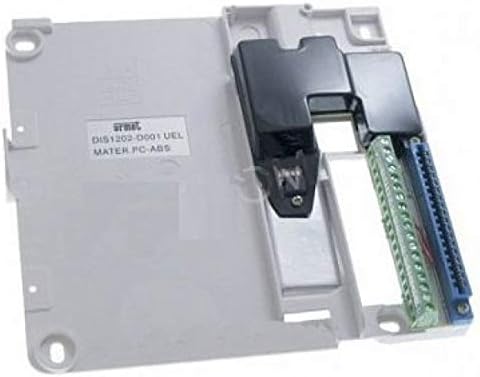
Obrázek 1: URMET 1202/90 Intercom System Module. This image displays the URMET 1202/90 module, a light grey rectangular unit. On the left side, there's a label with "URMET DIS1202-0001 UEL MATER PC-ABS". The right side features two sets of terminal blocks: one green and one blue, indicating connection points for wiring. A black plastic cover partially conceals some internal components and wiring paths. Mounting holes are visible in the corners of the module.
Nastavení a instalace
Proper installation is crucial for the correct operation of the URMET 1202/90 module. Always ensure power is disconnected from the main intercom system before beginning installation.
- Montáž: Secure the URMET 1202/90 module in a suitable, dry, and protected location using appropriate fasteners through the designated mounting holes. Ensure it is easily accessible for wiring and future maintenance.
- Připojení kabeláže:
- Identify the terminal blocks on the module (refer to Figure 1). These are typically color-coded (e.g., green for signal, blue for power/data).
- Connect the system's main bus wires to the appropriate terminals as indicated in your overall URMET intercom system diagram.
- Ensure all connections are secure and correctly polarized. Loose connections can lead to intermittent operation or system failure.
- Use appropriate wire gauges as specified by the overall system requirements.
- Integrace systému: Once wired, integrate the module into the existing intercom system. This may involve connecting it to a central control unit or other modules.
- Zapnutí: After all connections are verified, restore power to the intercom system. Observe the module for any indicator lights that confirm proper power supply and communication.
Poznámka: For specific wiring diagrams and system configurations, refer to the main URMET intercom system installation manual.
Operating the Module
The URMET 1202/90 module operates as an integral part of your URMET intercom system. It does not have direct user controls but performs its functions automatically once correctly installed and powered.
- Automatická funkčnost: The module processes signals and data within the intercom network, enabling communication between various system components (e.g., outdoor station, indoor monitors, door release mechanisms).
- Stav systému: Monitor the overall intercom system for proper operation. If the system experiences issues, the 1202/90 module may be a contributing factor, requiring troubleshooting.
Údržba
The URMET 1202/90 module is designed for minimal maintenance. However, periodic checks can help ensure its continued reliability.
- Čištění: If the module is installed in an environment prone to dust, gently clean the exterior with a soft, dry cloth. Do not use liquid cleaners or abrasive materials.
- Kontrola připojení: Periodically inspect wiring connections to ensure they remain secure and free from corrosion. This should only be done with power disconnected.
- Podmínky prostředí: Ensure the module remains within its specified operating temperature and humidity ranges. Protect it from direct moisture and extreme temperatures.
Odstraňování problémů
If you encounter issues with your URMET intercom system, consider the following troubleshooting steps related to the 1202/90 module:
- No System Power:
- Verify that the main power supply to the intercom system is active.
- Check all power connections to the 1202/90 module for security and correct polarity.
- Přerušovaná komunikace:
- Inspect all wiring connections to and from the 1202/90 module. Loose or corroded wires can cause intermittent issues.
- Ensure proper shielding for signal cables if specified by the system design.
- Modul nereaguje:
- Confirm that the module is receiving power.
- Check for any visible damage to the module or its components.
- If the issue persists, consult a qualified technician or URMET support.
Varování: Do not attempt to open or repair the module yourself. Refer all servicing to qualified personnel.
Specifikace
| Značka | URMET |
| Model | 1202/90 |
| Typ | Intercom System Module |
| Materiál | PC-ABS (as per product label) |
| ASIN | B00IPR10C2 |
| Availability Date on Amazon.com.be | 25. srpna 2022 |
Podpora a záruka
Information regarding specific warranty terms and direct support contacts for the URMET 1202/90 module is not provided in this document. For warranty claims or technical assistance, please refer to the documentation supplied with your complete URMET intercom system or contact your authorized URMET dealer or installer.