
1. Úvod
Welcome to the user manual for your new Salora SM508 mobile phone. This guide provides essential information to help you set up, operate, maintain, and troubleshoot your device. Please read this manual carefully to ensure proper use and to maximize the performance and longevity of your phone.
2. Konec produktuview
The Salora SM508 is a compact and reliable basic mobile phone designed for essential communication. It features a color display, a comfortable keypad, and dual SIM support.
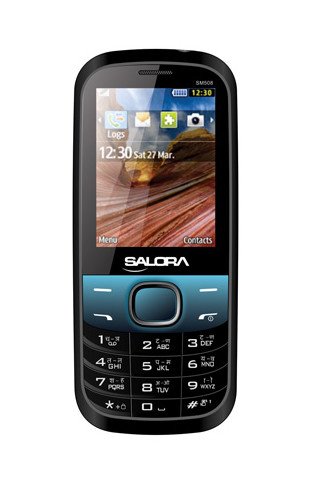
Tento obrázek zobrazuje přední část view of the Salora SM508 mobile phone. It features a color display at the top, a central navigation button, and a standard alphanumeric keypad below. The phone has a black body with blue accents around the navigation cluster.
3. Nastavení
3.1 Vložení SIM karty (kart)
- Turn off the phone and remove the back cover.
- Opatrně vyjměte baterii.
- Locate the SIM card slots. The Salora SM508 supports dual SIM cards.
- Insert your SIM card(s) into the designated slot(s) with the gold contacts facing down. Ensure they are securely seated.
3.2 Inserting Battery
- Zarovnejte kontakty baterie s kontakty v přihrádce na baterii telefonu.
- Gently press the 1800 mAh Li-Ion battery into place until it clicks.
- Nasaďte zpět zadní kryt a ujistěte se, že je bezpečně upevněn.
3.3 Inserting Memory Card (Optional)
- With the back cover and battery removed, locate the memory card slot.
- Insert a microSD card (up to 8GB) into the slot with the gold contacts facing down.
- Vyměňte baterii a zadní kryt.
3.4 Nabíjení zařízení
- Připojte nabíječku k nabíjecímu portu na telefonu.
- Zapojte nabíječku do elektrické zásuvky.
- The battery indicator on the screen will show the charging status. Charge the phone fully before first use.
3.5 Počáteční zapnutí/vypnutí
- Zapnutí: Stiskněte a podržte tlačítko Napájení/Ukončení hovoru, dokud se obrazovka nerozsvítí.
- Vypnutí: Press and hold the Power/End Call button until the power-off options appear, then select 'Power off'.
4. Návod k obsluze
4.1 Základní navigace
- Use the navigation keys (up, down, left, right) to move through menus and options.
- Press the central 'OK' or 'Select' button to confirm a selection.
- Pro návrat na předchozí obrazovku nebo pro smazání znaků použijte tlačítko „Zpět“ nebo „Vymazat“.
4.2 Uskutečňování a přijímání hovorů
- Chcete-li zavolat: Zadejte telefonní číslo pomocí klávesnice a stiskněte zelené tlačítko pro volání.
- Chcete-li přijmout hovor: Když telefon zvoní, stiskněte zelené tlačítko pro přijetí hovoru.
- Ukončení hovoru: Stiskněte červené tlačítko pro ukončení hovoru.
4.3 Odesílání a přijímání SMS zpráv
- Přejděte do nabídky „Zprávy“.
- Select 'Write Message' or 'New SMS'.
- Zadejte zprávu pomocí klávesnice.
- Přidejte číslo příjemce nebo jej vyberte z kontaktů.
- Stiskněte tlačítko „Odeslat“.
4.4 Použití kamery
- Přístup k aplikaci fotoaparátu z hlavní nabídky.
- The phone features a 1.3 MP primary (rear) camera.
- Komponujte snímek pomocí displeje.
- Stiskněte tlačítko „OK“ nebo „Vyfotit“ pro pořízení fotografie.
4.5 Multimédia a konektivita
- Audio jack: The phone includes a 3.5 mm audio jack for connecting headphones or external speakers.
- Bluetooth: Enable Bluetooth from the settings menu to connect to compatible devices for file transfer or hands-free communication.
- GPRS: The phone supports GPRS for basic internet connectivity. Consult your network provider for data plan details.
5. Údržba
5.1 Čištění vašeho zařízení
- K čištění obrazovky a těla telefonu použijte měkký, suchý hadřík, který nepouští vlákna.
- Vyhněte se používání agresivních chemikálií, čisticích rozpouštědel nebo silných čisticích prostředků.
- Do not allow water or liquids to enter the phone.
5.2 Péče o baterii
- Nevystavujte baterii extrémním teplotám (horkým nebo nízkým).
- Baterii nepropichujte, nerozebírejte ani nezkratujte.
- If the battery is damaged or swollen, discontinue use immediately and replace it with an authorized Salora battery.
5.3 Skladování
- Telefon skladujte na chladném a suchém místě mimo dosah přímého slunečního záření a vlhkosti.
- If storing for an extended period, ensure the battery is partially charged (around 50%) to preserve its lifespan.
6. Řešení problémů
If you encounter issues with your Salora SM508, please refer to the following common solutions:
- Telefon se nezapíná:
Ujistěte se, že je baterie nabitá. Připojte nabíječku a před zapnutím počkejte několik minut. Zkontrolujte, zda je baterie správně vložena. - Žádný síťový signál:
Check if your SIM card is correctly inserted. Ensure you are in an area with network coverage. Try restarting the phone. - Nelze uskutečňovat/přijímat hovory:
Verify that your SIM card is active and has sufficient balance/plan. Check network signal strength. Ensure call barring or flight mode is not enabled. - Problémy s nabíjením:
Ensure the charger is properly connected to both the phone and the power outlet. Try using a different compatible charger. Check the charging port for any debris. - Klávesnice nereaguje:
Restart the phone. If the issue persists, ensure no physical damage to the keypad.
If the problem persists after trying these steps, please contact Salora customer support.
7. Specifikace
Below are the detailed technical specifications for the Salora SM508 mobile phone:
| Funkce | Specifikace |
|---|---|
| Značka | Salora |
| Model | SM508 |
| Operační systém | Android 5.1, Android v5 1 OS (Note: This specification appears to be an error in the source data for a basic phone with a keypad interface. The phone operates on a proprietary feature phone OS.) |
| Velikost obrazovky | 6.1 Centimetres (2.4" TFT Screen) |
| Rezoluce | 320 x 240 pixelů |
| Primární kamera | 1.3 MP (Rear) |
| Baterie | 1800 mAh, Li-Ion |
| Kapacita paměti | Rozšiřitelný až na 8 GB |
| Podpora SIM | Duální SIM |
| Technologie připojení | Bluetooth, GPRS |
| Audio Jack | 3.5 mm |
| Rozhraní zařízení – primární | Klávesnice |
| Form Factor | Bar |
| Barva | Černá, Modrá |
| Hmotnost položky | 140 g |
| Rozměry balení | 14 x 9.4 x 6.2 cm |
| Datum první dostupnosti | 18. února 2014 |
8. Záruka a podpora
8.1 Informace o záruce
The Salora SM508 comes with a 1letá záruka výrobce pro zařízení od data zakoupení. Na příslušenství dodávané v krabici, včetně baterií, se vztahuje záruka Záruka výrobce 6 měsíců od data nákupu. Tato záruka se vztahuje na výrobní vady a problémy vzniklé běžným používáním.
Uschovejte si prosím účtenku jako doklad o koupi pro případ reklamace.
8.2 Zákaznická podpora
For any technical assistance, warranty claims, or further inquiries regarding your Salora SM508 mobile phone, please contact Salora customer support directly. Refer to the packaging or the official Salora webstránky s nejaktuálnějšími kontaktními informacemi.