
1. Úvod
This manual provides essential information for the safe and effective installation and use of your AOLIKES 750mAh LiPo Battery Replacement. This battery is designed to replace the original battery in various JBL wireless headphones, including models such as JBL Tune 500, 510, 560 BT, Lifestyle E75, E65 BTNC, and Tune 600BTNC.
The package includes one 750 mAh LiPo battery. Please read this manual thoroughly before proceeding with installation.

Figure 1: The AOLIKES 750mAh LiPo Battery, showing the main battery pack and its red and black connecting wires with a white connector.
2. Bezpečnostní informace
WARNING: Lithium Polymer batteries can be dangerous if not handled correctly. Please follow all instructions carefully to prevent injury or damage.
- Do not puncture, disassemble, short-circuit, or expose the battery to high temperatures (above 60°C / 140°F) or direct sunlight.
- Nevhazujte baterii do ohně nebo vody.
- Udržujte baterii mimo dosah dětí a domácích zvířat.
- Pokud baterie vykazuje známky nabobtnání, úniku nebo poškození, okamžitě ji přestaňte používat a řádně ji zlikvidujte.
- Always ensure correct polarity when connecting the battery. The red wire connects to the positive (+) terminal, and the black wire connects to the negative (-) terminal. Reversing polarity can cause damage to the battery and the device.
- Only use this battery for its intended purpose as a replacement for compatible JBL headphone models.
3. Instalační příručka
Replacing the battery in your JBL headphones requires careful attention to detail. Some headphone models may require soldering. If you are not comfortable with electronic repairs, it is recommended to seek professional assistance.
3.1 Potřebné nástroje (není součástí balení)
- Malý křížový šroubovák
- Prying tool (plastic spudger recommended to avoid scratches)
- Soldering iron and solder (if your headphone model requires soldering)
- Wire cutters/strippers (if soldering is required)
- Heat shrink tubing or electrical tape (if soldering is required)
3.2 Postup instalace
Prepare Your Headphones: Ensure your headphones are powered off and disconnected from any charging source. Locate the ear cup that houses the battery. This is typically the side with the charging port or control buttons.

Figure 2: Carefully opening the ear cup of the headphone to access the internal battery compartment.
Open the Ear Cup: Carefully pry open the ear cup cover. This may involve removing small screws or gently prying along the seam with a plastic tool. Be gentle to avoid damaging the plastic housing or internal wires.
Locate the Old Battery: Once opened, identify the existing battery. Note its size, shape, and how it is connected to the circuit board.

Figure 3: The new AOLIKES battery positioned within the headphone's ear cup, demonstrating the connection points on the circuit board.
Disconnect the Old Battery:
- If it has a connector: Gently unplug the old battery's connector from the circuit board.
- If it is soldered: Carefully desolder the red and black wires of the old battery from the circuit board. Note which pad each wire was connected to (positive '+' and negative '-').
Prepare the New Battery: The AOLIKES battery comes with a connector.
- If your headphones use a connector: Compare the connector on the new battery with the port on your headphone's circuit board. If they match, proceed to step 6. If the connectors do not match, you will need to cut off the connector from the new battery and solder the wires directly.
- If soldering is required: Cut off the white connector from the new AOLIKES battery. Strip a small amount of insulation from the red and black wires.
Connect the New Battery:
- Using a connector: Plug the new battery's connector into the appropriate port on the circuit board.
- Pájení: Solder the red wire of the new battery to the positive (+) pad on the circuit board and the black wire to the negative (-) pad. Crucially, ensure correct polarity. If the original battery had a different wire configuration (e.g., 3 wires), you may need to adapt. Some users have successfully used the red and black wires by connecting them to the corresponding positive and negative terminals on the original battery's connector or directly to the board.
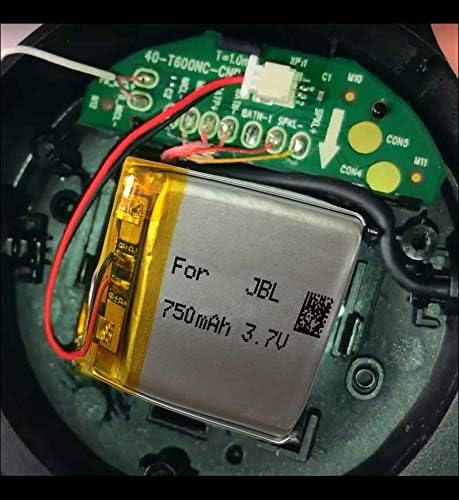
Obrázek 4: Podrobný view of the AOLIKES battery's connection to the headphone's circuit board, highlighting the red and black wire connections.
Zajistěte baterii: Place the new battery securely within the ear cup, ensuring it does not interfere with any moving parts or wires. You may use double-sided adhesive if needed to prevent movement.
Reassemble the Headphones: Carefully close the ear cup cover, ensuring all clips or screws are properly re-secured. Test the headphones by powering them on and attempting to charge them.
Important Note on Polarity: Before replacing, always compare the old battery's wiring and check the polarity. The red wire connects to the positive power supply "+", and the black wire connects to the negative pole "-". If the polarity appears reversed compared to your original setup, you may need to interchange the wire positions on the board or connector to match the original configuration.
4. Operating and Charging
Once the new battery is installed, your headphones should function as expected. The 750mAh capacity is approximately 23% higher than a typical 610mAh original battery, potentially extending usage time.
- Počáteční poplatek: It is recommended to fully charge the battery before the first use after installation.
- Nabíjení: Use the original charging cable and adapter provided with your JBL headphones. The battery pack has a built-in protection module to prevent overcharge, over-discharge, and short circuits.
- Indikátor baterie: The battery level indicator on your headphones or connected device should now accurately reflect the charge status. Note that some users have reported that the headset may not report reaching 100% state of charge immediately after replacement, but this typically does not affect performance.
5. Údržba
Proper maintenance can prolong the life of your LiPo battery:
- Skladování: If storing the headphones for an extended period, ensure the battery is charged to about 50-60% capacity. Store in a cool, dry place away from direct sunlight.
- Teplota: Nevystavujte baterii extrémním teplotám (velmi vysokým nebo velmi nízkým), protože to může snížit její výkon a životnost.
- Pravidelné používání: For optimal battery health, use and charge your headphones regularly.
- Čištění: Keep the headphone's charging port clean and free of debris to ensure proper charging contact.
6. Řešení problémů
| Problém | Možná příčina | Řešení |
|---|---|---|
| Headphones do not power on after battery replacement. | Incorrect battery connection (polarity reversed), loose connection, or faulty installation. |
|
| Battery does not charge or charges slowly. | Loose charging port, faulty charging cable/adapter, or internal battery protection engaged. |
|
| Headphones still have short battery life. | Battery not fully charged, high volume usage, or other internal component issues. |
|
| Battery indicator shows incorrect percentage (e.g., stuck at 70%). | Calibration issue or specific headphone model behavior. |
|
7. Specifikace
| Funkce | Detail |
|---|---|
| Značka | AOLIKES |
| Číslo modelu | Tune 600 BTNC Battery Replacement |
| Typ baterie | Lithium Polymer (LiPo) |
| Kapacita | 750 XNUMX mAh |
| Jmenovitý svtage | 3.7V |
| Plně nabitý svtage | 4.2V |
| Moc | 2.77 Wh |
| Ochrana | Built-in module for overcharge, over-discharge, short circuit protection |
| Kompatibilní modely | JBL Tune 600BTNC, JBL E55, E65, E75, JBL Tune 450BT, 500BT, 510BT, 560BT, and more. |
| Rozměry balení | 2.1 x 1.6 x 0.2 palce |
| Hmotnost položky | 0.564 unce |
| Země původu | Čína |
8. Záruka a podpora
For any questions regarding installation, compatibility, or product performance, please contact AOLIKES-US, the seller of this product. Refer to your purchase documentation for specific warranty terms and contact information.
You can often find support information through the platform where you purchased the product, typically under your order details or the seller's store page.