
Zavedení
This manual provides essential instructions for the safe and effective use of your Sony H400 Digital Camera. Please read this manual thoroughly before operating the camera and retain it for future reference.
Co je v krabici
Ověřte, zda jsou v balení přítomny všechny položky:
- Digitální fotoaparát Sony Cyber-shot DSC-H400
- Sony NP-BX1 Rechargeable Lithium Ion Battery
- AC Adaptor AC-UB10C
- Multi USB kabel
- Ramenní popruh
- Krytka objektivu
- Návod k použití (tento dokument)
- Informace o záruce
Nastavení
1. Připevnění ramenního popruhu
Attach the provided shoulder strap to the camera's strap lugs. Ensure it is securely fastened to prevent accidental drops.
2. Vložení baterie
- Otevřete kryt baterie/paměťové karty, který se nachází na spodní straně fotoaparátu.
- Insert the NP-BX1 rechargeable battery with the correct orientation, ensuring the terminal matches the camera's battery compartment. Push until it clicks into place.
- Bezpečně zavřete kryt baterie/paměťové karty.
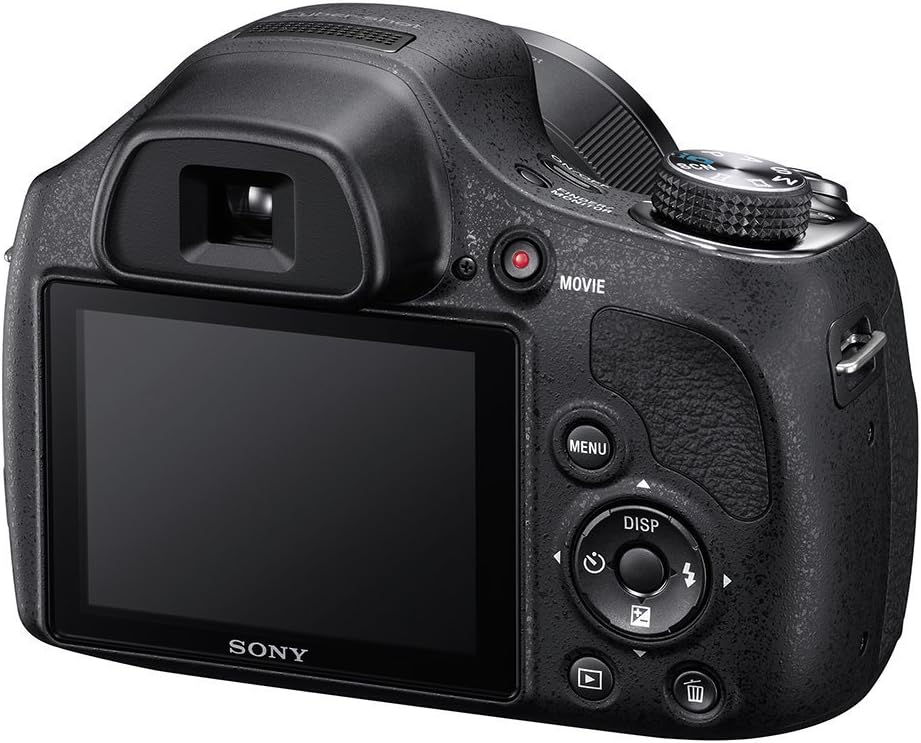
Obrázek: Zadní view of the camera, illustrating the battery/memory card compartment location (bottom, not visible in this specific image but implied by general camera design) and main controls.
3. Vložení paměťové karty
The camera supports SD, SDHC, SDXC, Memory Stick PRO Duo, and Memory Stick PRO-HG Duo cards.
- Otevřete kryt baterie/paměťové karty.
- Insert the memory card into the slot with the correct orientation until it clicks.
- Bezpečně zavřete kryt baterie/paměťové karty.
4. Nabíjení baterie
Use the supplied AC Adaptor AC-UB10C and Multi USB Cable to charge the NP-BX1 battery while it is in the camera.
- Connect the Multi USB Cable to the camera's USB port.
- Připojte druhý konec kabelu USB k síťovému adaptéru.
- Plug the AC Adaptor into a wall outlet. The charge lamp se rozsvítí.
- Nabíjení je dokončeno, když se nabíjecíamp vypne.
Obsluha fotoaparátu
Zapnutí/vypnutí
Stiskněte tlačítko ON/OFF button to power the camera on or off.
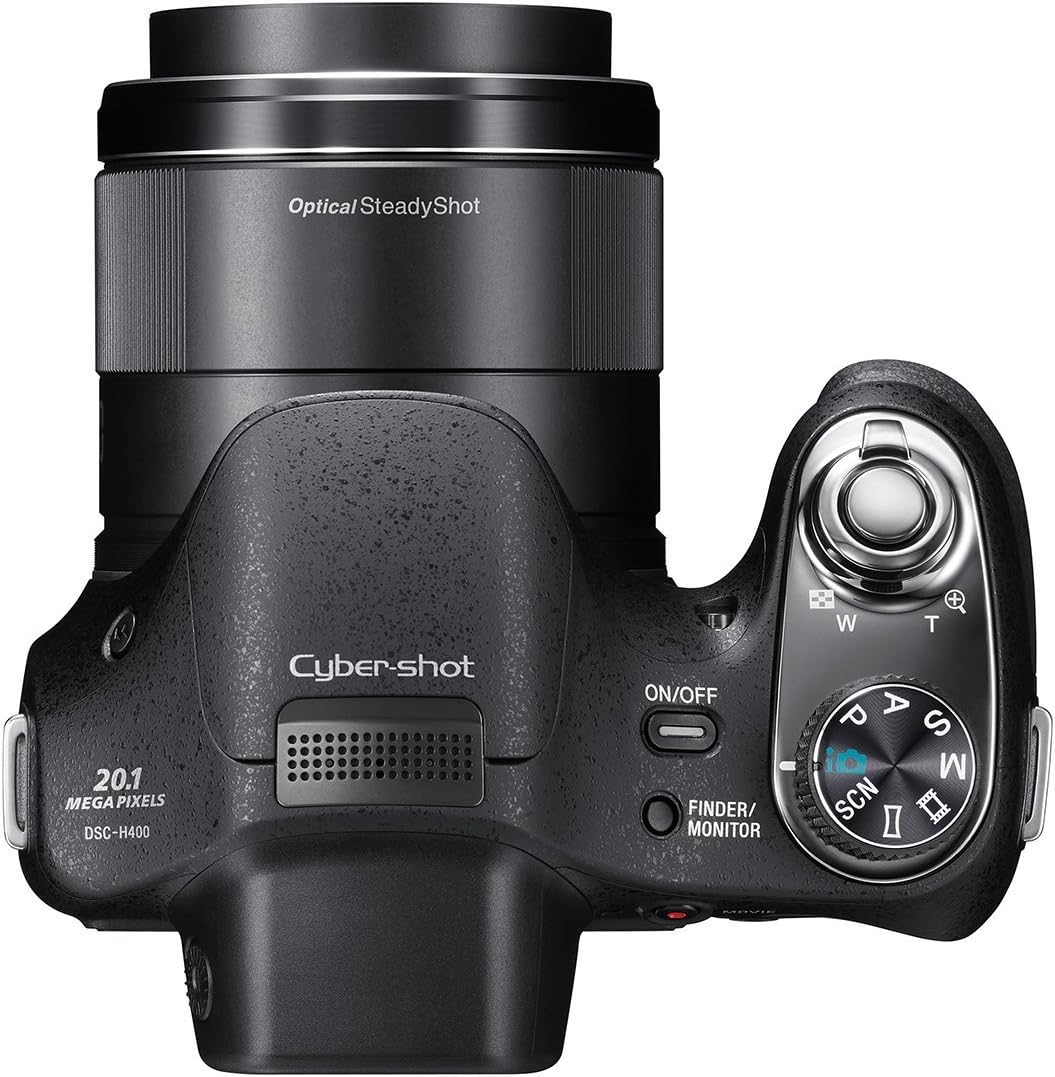
Obrázek: Nahoře view of the camera, highlighting the ON/OFF button, shutter button with zoom lever, and mode dial.
Fotografování statických snímků
- Vyberte režim snímání: Rotate the mode dial to select your desired shooting mode (e.g., Intelligent Auto, Program Auto, Manual, Scene Selection).
- Zarámujte svůj záběr: Use the LCD monitor or electronic viewhledáček pro komponování snímku.
- Lupa: Páčkou zoomu kolem tlačítka spouště upravte 63násobný optický zoom.
- Soustředit: Press the shutter button halfway down to autofocus. The camera will confirm focus.
- Zachytit: Stiskněte tlačítko spouště až na doraz pro pořízení snímku.

Obrázek: Přední strana view kamery, showcasing the lens with "63x Optical Zoom" text.
Nahrávání filmů
The camera can record movies in HD 720p resolution.
- Stiskněte tlačítko FILM tlačítko pro zahájení nahrávání.
- Stiskněte tlačítko FILM dalším tlačítkem nahrávání zastavíte.
Obrázek: Zadní view of the camera, indicating the location of the dedicated MOVIE record button.
Používání blesku
The built-in flash operates in automatic mode. The camera will determine if flash is needed based on lighting conditions.
Přehrávání
Stiskněte tlačítko Přehrávání tlačítko (obvykle označené ikonou trojúhelníku) k view your captured images and videos.
Připojení k počítači
Use the Multi USB Cable to connect the camera to your computer for transferring photos and videos.
- Připojte fotoaparát k počítači pomocí kabelu USB.
- Fotoaparát se v počítači zobrazí jako vyměnitelný disk.
- Drag and drop files je převést.
Údržba
Čištění fotoaparátu
- Tělo fotoaparátu: Otřete měkkým, suchým hadříkem. Na odolnou špínu použijte hadřík lehceampopláchněte vodou a poté otřete dosucha.
- Čočka: K odstranění prachu použijte kartáč na objektivy a poté jemně otřete hadříkem na čištění objektivů. Nedotýkejte se povrchu objektivu prsty.
- LCD obrazovka: Jemně otřete měkkým, suchým hadříkem.
Péče o baterie
- Pokud baterii nepoužíváte, uchovávejte ji na chladném a suchém místě.
- Nevystavujte baterii extrémním teplotám.
- Charge the battery fully before extended storage and periodically during storage to maintain its life.
Skladování
When storing the camera for an extended period, remove the battery and memory card. Store the camera in a dry, dust-free environment, preferably in a camera bag or case.
Odstraňování problémů
Fotoaparát se nezapne
- Ujistěte se, že je baterie správně vložena a plně nabitá.
- Zkontrolujte, zda jsou svorky baterie čisté.
Obrázky jsou rozmazané
- Ujistěte se, že čočka je čistá a bez šmouh.
- Před úplným stisknutím tlačítka spouště stiskněte do poloviny, aby fotoaparát mohl zaostřit.
- Use Optical SteadyShot image stabilization, especially when zooming or in low light.
- Check your shooting mode; some modes may have different focusing characteristics.
Shutter Lag
- In some shooting conditions, there might be a slight delay. Try anticipating the moment you want to capture.
- Ensure sufficient lighting for faster autofocus.
LCD Screen Too Bright/Dim
- Adjust the brightness settings in the camera's menu.
- Použijte elektronické viewfinder in bright outdoor conditions if the LCD is difficult to see.
Nelze převést Files do počítače
- Ujistěte se, že je kabel USB bezpečně připojen k fotoaparátu i k počítači.
- Zkuste jiný port USB na počítači.
- Restartujte fotoaparát i počítač.
Specifikace
| Značka | Sony |
| Název modelu | Sony H400 |
| Číslo modelu | DSCH400/B |
| Rozlišení foto snímače | 20 MP |
| Optický zoom | 63x |
| Stabilizace obrazu | Optický |
| Velikost obrazovky | 3 palce |
| Rozlišení videa | HD 720p |
| Technologie připojení | USB |
| Podporováno File Formát | JPEG (Stills), MPEG-4, H.264 (Video) |
| Compatible Flash Memory Type | SD/SDHC/SDXC/Memory Stick PRO Duo/Pro-HG Duo |
| Hmotnost položky | 1.4 libry |
| Viewnálezce | Elektronický |
| Maximální ohnisková vzdálenost | 1550 milimetrů |
| Minimální ohnisková vzdálenost | 25 milimetrů |
| Maximální clona | 3.4 f |
Informace o záruce
Na tento produkt se vztahuje a 90-day Limited Hardware Warranty. Please refer to the provided warranty document for full terms and conditions.
Podpora
For further assistance, please visit the official Sony support website or contact their customer service. Keep your model number (DSCH400/B) and serial number ready when seeking support.