
Zavedení
This manual provides detailed instructions for the safe and efficient operation of your Ozeri 360 Oscillation Micro-Blade Noise Reduction Technology Tower Fan, Model OZF5. Please read all instructions carefully before use and retain this manual for future reference.
Bezpečnostní informace
Abyste snížili riziko požáru, úrazu elektrickým proudem nebo zranění, vždy dodržujte tato základní bezpečnostní opatření:
- Ujistěte se, že ventilátor je umístěn na stabilním a rovném povrchu, aby se zabránilo jeho převrácení.
- Nevkládejte prsty ani cizí předměty do žádných otvorů ventilátoru.
- Keep the fan away from water or moist areas.
- Před čištěním nebo prováděním jakékoli údržby odpojte ventilátor ze zásuvky.
- Neprovozujte ventilátor s poškozeným kabelem nebo zástrčkou.
- Tento spotřebič je určen pouze pro vnitřní použití.
Obsah balení
Ověřte, zda jsou přítomny všechny komponenty:
- Ozeri 360 Oscillation Tower Fan Unit
- Fan Base (2 halves)
- Dálkové ovládání
- Screws for Base Assembly (3 pieces)
- Uživatelská příručka
Nastavení
Follow these steps to assemble your Ozeri Tower Fan:
- Carefully remove all packaging materials from the fan unit and its components.
- Connect the two halves of the fan base. Ensure they fit together securely.
- Zarovnejte sestavenou základnu se spodní částí ventilátorové jednotky.
- Secure the base to the fan unit using the 3 provided screws. Hand assembly is sufficient; no special tools are required.
- Umístěte ventilátor na pevný, rovný povrch.
- Zapojte napájecí kabel do standardní elektrické zásuvky.
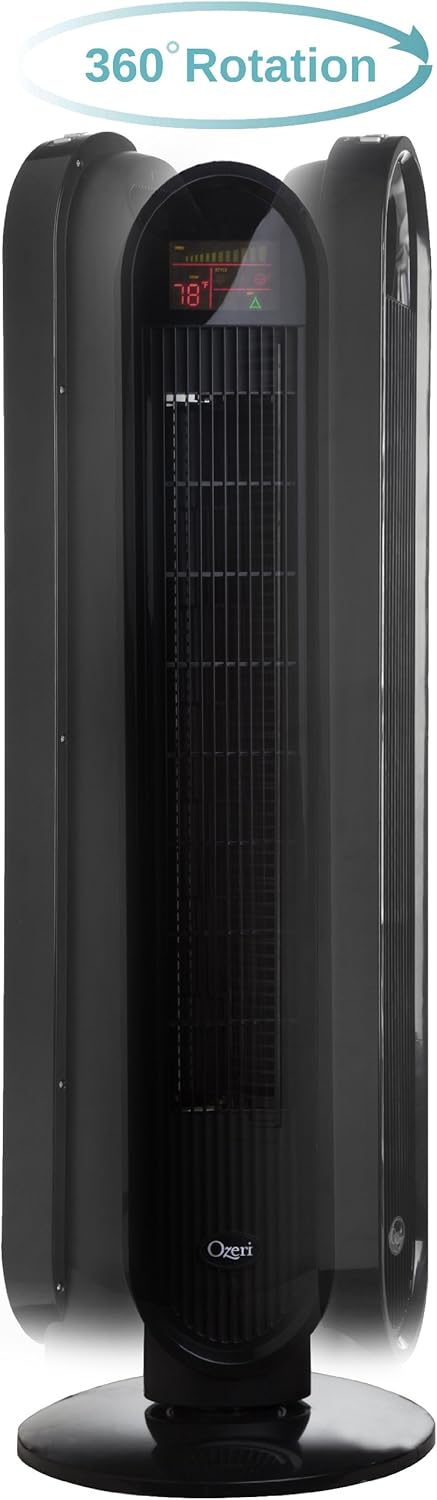
Návod k obsluze
Your Ozeri Tower Fan can be operated using the control panel on top of the unit or the included remote control.
Funkce ovládacího panelu:

- Vypínač: Zapíná nebo vypíná ventilátor.
- Tlačítko rychlosti: Cycles through 3 whisper-quiet speed settings. The LCD display will show the current speed level.
- Tlačítko režimu: Selects between 3 preprogrammed airflow patterns (e.g., normal, natural, sleep).
- Oscillation (OSC) Button: Activates or deactivates the oscillation feature. You can select oscillation angles of 60, 90, 120, or 360 degrees for partial to complete air circulation.
- Tlačítko časovače: Sets the 8-hour programmable timer in 30-minute increments.
- Tlačítko Auto: Engages the auto mode, which adjusts fan speed based on room temperature.
LCD displej:

The multi-colored LCD displays all active fan functions and the current room temperature, allowing for easy monitoring and control.
Dálkové ovládání:
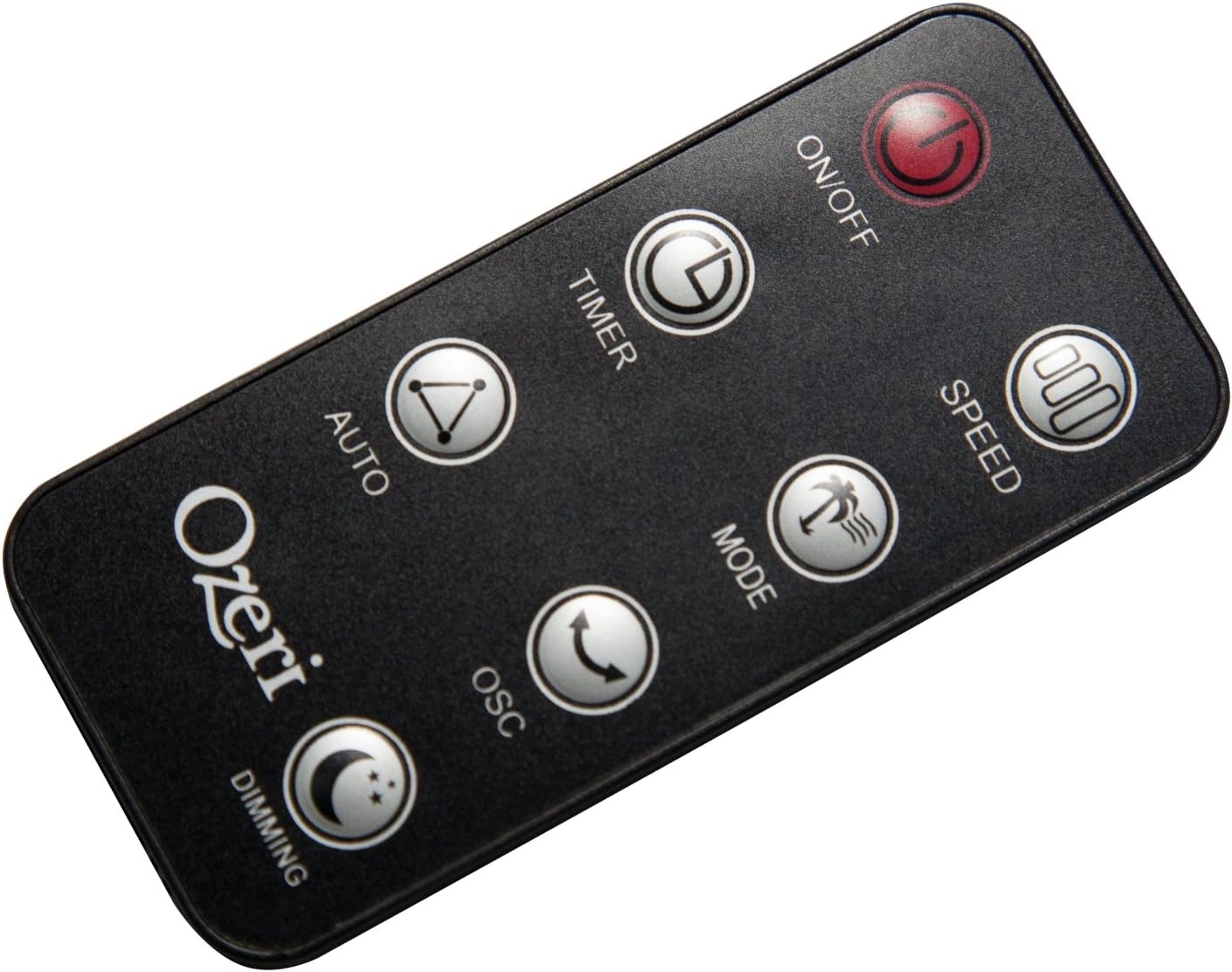
The extended-range remote control provides convenient access to all fan features from a distance. It includes buttons for On/Off, Speed, Timer, Mode, Auto, Oscillation, and Dimming (for the LCD display). The remote can be stored in a dedicated slot on the fan unit.

Oficiální video produktu:
Video: This official product video demonstrates the Ozeri 360 Oscillation Tower Fan, highlighting its micro-blade noise reduction technology and various features.
Údržba
Pravidelné čištění zajišťuje optimální výkon a dlouhou životnost vašeho ventilátoru:
- Před čištěním vždy odpojte ventilátor.
- Použijte měkký, damp hadříkem k otření vnějších povrchů. Nepoužívejte abrazivní čisticí prostředky ani rozpouštědla.
- Pomocí vysavače s kartáčovým nástavcem jemně odstraňte prach z mřížek sání a výfuku vzduchu.
- Neponořujte ventilátor do vody a nedovolte, aby voda kapala do krytu motoru.
- Pokud ventilátor nepoužíváte, skladujte jej na chladném a suchém místě.
Odstraňování problémů
Pokud narazíte na problémy s ventilátorem, podívejte se na následující běžné problémy a jejich řešení:
- Ventilátor se nezapne: Ensure the power cord is securely plugged into a working outlet. Check if the power button on the fan or remote has been pressed.
- Slabé proudění vzduchu: Check the fan speed setting and increase it if necessary. Ensure the air intake and exhaust grilles are not obstructed by dust or other objects.
- Fan makes unusual noise: Turn off and unplug the fan. Inspect for any foreign objects caught in the grilles or internal components. If the noise persists after clearing any obstructions, contact customer support.
- Dálkové ovládání nefunguje: Ensure the remote control batteries are correctly installed and not depleted. Point the remote directly at the fan's receiver.
Specifikace
| Funkce | Detail |
|---|---|
| Značka | Ozeri |
| Číslo modelu | OZF5 |
| Barva | Černý |
| Design elektrického ventilátoru | podlaha Fan |
| Zdroj napájení | Elektrický kabel |
| Speciální funkce | Oscillating (60, 90, 120, 360 degrees) |
| Počet rychlostí | 3 |
| Wattage | 60 wattů |
| Proud vzduchu | 5000 kubických stop za minutu |
| svtage | 127 voltů |
| Kontrolní metoda | Remote Control, Electronic Touch Controls |
| Materiál | Plast |
| Hmotnost položky | 9 libry |
Záruka a podpora
This Ozeri Tower Fan comes with a 1-year no questions asked warranty. For warranty claims, technical support, or any inquiries, please refer to the contact information provided on the Ozeri official webwebu nebo v dokumentaci k nákupu.