
Zavedení
This manual provides essential information for the safe and efficient operation of your InFocus IN124a XGA Wireless-Ready Projector. Please read this manual thoroughly before using the projector and retain it for future reference. This projector is designed for displaying content with XGA (1024 x 768) native resolution, offering 3500 lumens of brightness and a 15000:1 contrast ratio.
Bezpečnostní informace
- Elektrická bezpečnost: Always connect the projector to a grounded power outlet. Do not use damaged power cords. Disconnect power before cleaning or servicing.
- Teplo a větrání: Ensure adequate ventilation around the projector. Do not block ventilation openings. Avoid placing the projector near heat sources.
- Lamp Bezpečnost: Projektor lamp operates at high temperatures and pressures. Allow the projector to cool down before moving or replacing the lamp. Do not look directly into the lens when the lamp je zapnuto.
- Zacházení: S projektorem zacházejte opatrně. Zabraňte jeho pádu nebo silným nárazům.
- vlhkost: Nevystavujte projektor dešti, vlhkosti ani nadměrné vlhkosti.
Obsah balení
Ověřte, zda jsou v balení přítomny všechny položky:
- InFocus IN124a Projector
- HDMI kabel
- VGA kabel
- Napájecí kabel
- Dálkové ovládání (není výslovně uvedeno, ale je standardní)
- Optional USB adapter for wireless connectivity (if purchased separately)
Konec produktuview
Familiarize yourself with the physical components and connections of your InFocus IN124a projector.

This image displays the rear panel of the InFocus IN124a projector, highlighting various connectivity options including HDMI, VGA (Computer 1 and 2), Monitor Out, S-Video, Video, Audio In (1 and 2), Audio Out, RS-232, USB-B, USB Mini-B, and USB-A ports. The power input is located on the lower left.

The top panel of the InFocus IN124a projector is shown, featuring the control buttons for power, menu navigation (up, down, left, right, enter), source selection, blank screen function, and indicators for temperature and lamp status. The focus and zoom adjustment rings are also visible.

Přední strana view of the InFocus IN124a projector, showing the main projection lens and the power indicator light. The focus and zoom rings are visible near the lens.

Tento obrázek představuje stranu view of the InFocus IN124a projector, emphasizing the ventilation grilles designed for heat dissipation, crucial for maintaining optimal operating temperature.
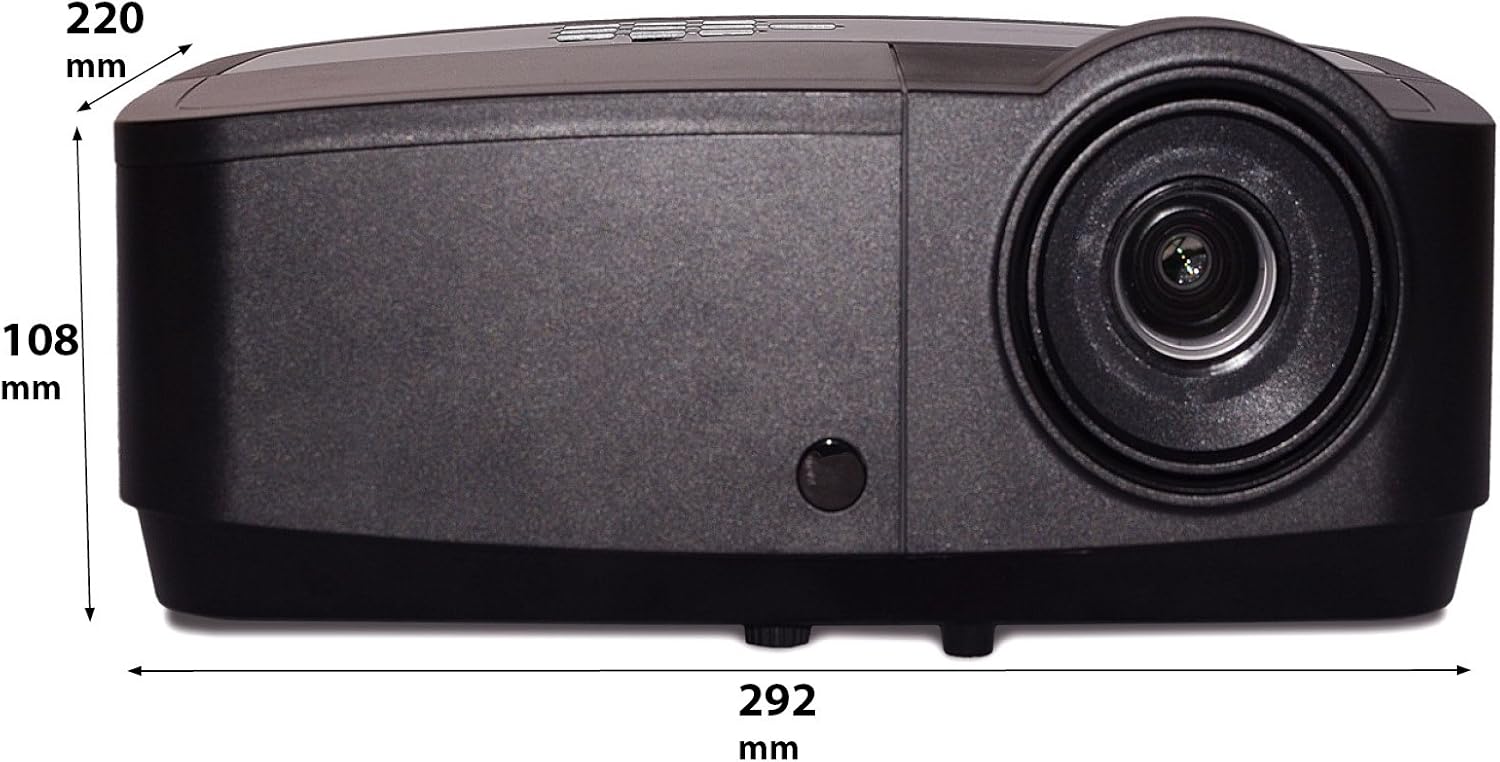
Tento obrázek ukazuje boční profesionálfile of the InFocus IN124a projector, illustrating its physical dimensions: approximately 292 mm in length, 108 mm in height, and 220 mm in width.
Nastavení
1. Umístění
Position the projector on a stable, flat surface or mount it securely. Ensure the projector is at an appropriate distance from the screen to achieve the desired image size. Avoid direct sunlight or strong ambient light on the screen for optimal viewIng.
2. Připojení napájení
- Připojte napájecí kabel k napájecí zásuvce projektoru.
- Zapojte druhý konec napájecího kabelu do uzemněné elektrické zásuvky.
3. Připojení zdrojů videa
The IN124a offers multiple connectivity options:
- HDMI: Připojte kabel HDMI ze zdrojového zařízení (např. notebooku, přehrávače Blu-ray) k portu HDMI na projektoru.
- VGA (Computer 1/2): Use a VGA cable to connect your computer to either the 'COMPUTER 1' or 'COMPUTER 2' port.
- S-Video/Video: For older devices, connect S-Video or composite video cables to the respective ports.
- USB: The USB-A port can be used for displaying content directly from a USB drive. The USB-B port supports USB display functionality.
- Zvuk: Connect external audio sources to 'AUDIO 1' or 'AUDIO 2' inputs, and use 'AUDIO OUT' for external speakers if needed.
4. Wireless Setup (Optional)
For wireless connectivity, an optional USB adapter is required. Insert the wireless USB adapter into the designated USB port on the projector. Refer to the adapter's specific instructions for software installation and connection procedures on your source device.
Provozní
1. Zapnutí/vypnutí
- Zapnutí: Press the 'Power' button on the projector's control panel or remote control. The power indicator light will turn steady blue.
- Vypnout: Press the 'Power' button again. A confirmation message may appear. Press 'Power' a second time to confirm shutdown. The fan will continue to run briefly to cool the lamp before shutting down completely.
2. Úprava obrazu
- Soustředit: Rotate the focus ring around the lens until the image appears sharp and clear.
- Lupa: Rotate the zoom ring around the lens to adjust the image size without moving the projector.
- Korekce lichoběžníkového zkreslení: Pokud má obraz lichoběžníkový tvar, použijte funkci korekce lichoběžníkového zkreslení v nabídce projektoru k jeho vyrovnání.
3. Výběr zdroje
Press the 'Source' button on the control panel or remote control repeatedly to cycle through available input sources (HDMI, Computer 1, Computer 2, S-Video, Video, USB). The projector will automatically detect an active signal.
4. Navigace v menu
Press the 'Menu' button to access the On-Screen Display (OSD) menu. Use the arrow buttons to navigate through options and 'Enter' to select. Press 'Menu' or 'Exit' to close the OSD.
5. Režim 3D
The InFocus IN124a is 3D-Ready. To utilize 3D functionality, you will need compatible 3D content, a 3D-capable source device, and active 3D glasses. Refer to your 3D source device's manual for specific setup instructions. The projector will automatically detect a 3D signal when available.
Údržba
1. Lamp Nahrazení
Projektor lamp has a lifespan of up to 7,000 hours. When the lamp life is nearing its end, a warning message may appear, or the lamp indicator light will illuminate. Only replace the lamp with an authorized InFocus replacement lamp. Always allow the projector to cool completely before attempting lamp nahrazení.
2. Čištění
- Projektor Casing: Použijte měkký hadřík, který nepouští vlákna dampened with a mild, non-abrasive cleaner. Do not use harsh chemicals.
- Čočka: Gently wipe the lens with a lens cleaning cloth or lens tissue. Avoid touching the lens surface with your fingers.
- Větrací otvory: Periodically check and clean the air vents to prevent dust buildup, which can lead to overheating. Use a soft brush or compressed air to clear obstructions.
Odstraňování problémů
Pokud se s projektorem setkáte s problémy, podívejte se na následující běžné problémy a jejich řešení:
| Problém | Možná příčina | Řešení |
|---|---|---|
| Není zobrazen žádný obrázek | Power not connected; Incorrect input source; Source device not active. | Check power connection; Select correct input source; Ensure source device is on and outputting signal. |
| Obraz je rozmazaný nebo nezaostřený | Lens focus not adjusted; Projector too close/far from screen. | Adjust the focus ring on the lens; Adjust projector distance or use zoom ring. |
| Dálkové ovládání nefunguje | Batteries depleted; Obstruction between remote and projector; Remote sensor blocked. | Replace batteries; Remove obstructions; Ensure remote sensor on projector is clear. |
| Projektor se přehřívá a vypíná | Blocked ventilation; Dusty air filter. | Ensure vents are clear; Clean air filter (if applicable) and vents. |
Specifikace
| Funkce | Specifikace |
|---|---|
| Nativní rozlišení | XGA (1024 x 768) |
| Jas | 3500 XNUMX lumenů |
| Kontrastní poměr | 15000:1 |
| Lamp Život | Až 7,000 XNUMX hodin (Eko režim) |
| Technologie připojení | Wireless (with optional adapter), HDMI, USB video |
| Speciální funkce | 3D-Ready |
| Rozměry produktu | 14.25 x 12 x 7.75 palce (36.2 x 30.5 x 19.7 cm) |
| Hmotnost položky | 5.4 libry (2.45 kg) |
| Doporučená použití | Vnitřní/venkovní |
Záruka a podpora
Informace o záruce a technickou podporu naleznete v záručním listu dodaném s vaším produktem nebo na oficiálních webových stránkách InFocus. webUschovejte si účtenku jako doklad o koupi pro případ reklamace.