
InFocus IN122A
InFocus IN122a SVGA Wireless-Ready Projector User Manual
Model: IN122A | Brand: InFocus
Zavedení
This manual provides comprehensive instructions for the setup, operation, and maintenance of your InFocus IN122a SVGA Wireless-Ready Projector. The InFocus IN122a is designed for ease of use and offers multiple ways to display content, including from mobile devices. Its high brightness and contrast ratio ensure outstanding image quality, and its lightweight design facilitates easy portability or installation.
Klíčové vlastnosti
- SVGA (800 x 600) native resolution for clear image projection.
- 3500 lumens of brightness, suitable for various lighting conditions.
- Dlouhá životnost lamp of up to 7,000 hours, contributing to long-term savings.
- High 15000:1 contrast ratio and BrilliantColor technology for vibrant and detailed images.
- Wireless connectivity with an optional USB adapter for flexible content sharing.
Průvodce nastavením
Follow these steps to set up your InFocus IN122a projector:
- Rozbalení: Opatrně vyjměte projektor a veškeré příslušenství z obalu.
- Umístění: Position the projector on a stable, flat surface or mount it securely. Ensure adequate ventilation around the unit.
- Připojení napájení: Connect the power cord to the projector's power input and then to a grounded electrical outlet.
- Připojení zdroje: Connect your video source (e.g., laptop, DVD player) to the appropriate input port on the projector (HDMI, VGA, USB).
- Zapnutí: Stisknutím tlačítka napájení na projektoru nebo dálkovém ovladači zapněte jednotku.
- Zaostření a zoom: Adjust the focus and zoom rings on the lens to achieve a clear and appropriately sized image on your screen or wall.
- Korekce lichoběžníkového zkreslení: If the image appears trapezoidal, use the keystone correction feature to square the image.

InFocus IN122a Projector in operation, displaying a bright light from its lens. This image illustrates the projector's appearance during use.
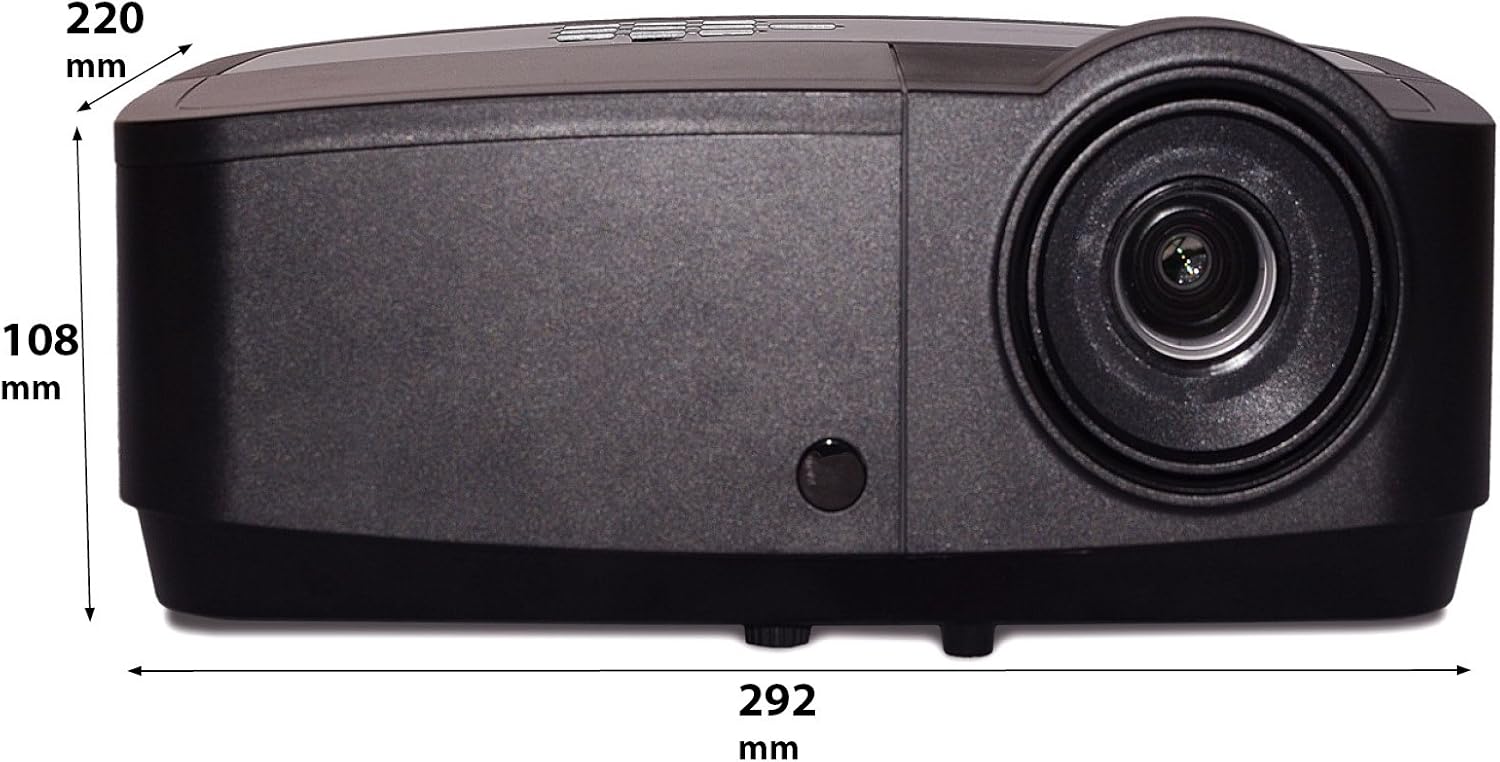
Diagram showing the dimensions of the InFocus IN122a Projector, with measurements in millimeters. This provides physical specifications for installation planning.
Návod k obsluze
- Zapnutí/vypnutí: Press the power button once to turn on. Press twice to turn off, confirming the shutdown.
- Výběr zdroje vstupu: Use the "Source" button on the projector or remote to cycle through available input sources (HDMI, VGA, USB).
- Navigace v nabídce: Use the directional arrows and "Enter" button on the control panel or remote to navigate the on-screen display (OSD) menu.
- Úpravy obrázku: Within the OSD menu, you can adjust settings such as brightness, contrast, color, aspect ratio, and picture mode to optimize your viewzkušenosti.
- Zvuk: If your source provides audio through HDMI, the projector's internal speaker will play it. External speakers can be connected via the audio output port.
Údržba
- Lamp Nahrazení: Projektor lamp has a lifespan of up to 7,000 hours. When the lamp indicator light illuminates or the image becomes dim, it's time to replace the lamp. Refer to the full user manual for detailed lamp postupy výměny. Před pokusem o výměnu nechte projektor vždy zcela vychladnout.amp nahrazení.
- Čištění objektivu: K jemnému otření čočky projektoru použijte měkký hadřík bez žmolků, speciálně určený pro optické čočky. Nepoužívejte abrazivní čisticí prostředky ani nadměrný tlak.
- Čištění těla projektoru: Vnější povrch projektoru otřete měkkým, suchým hadříkem. Nepoužívejte tekuté čisticí prostředky ani rozpouštědla.
- Čištění vzduchového filtru: Regularly check and clean the air filter to ensure proper ventilation and prevent overheating. A clogged filter can reduce lamp život a výkon.
Odstraňování problémů
Pokud se s projektorem setkáte s problémy, podívejte se na následující běžné problémy a jejich řešení:
| Problém | Možná příčina | Řešení |
|---|---|---|
| Na obrazovce není žádný obraz | Napájecí kabel odpojen, nesprávný vstupní zdroj, zdrojové zařízení vypnuté. | Check power connections. Select correct input source. Ensure source device is powered on and sending a signal. |
| Obraz je tmavý nebo vybledlý | Lamp nearing end of life, Eco mode enabled, dirty lens. | Vyměňte lamp if necessary. Disable Eco mode. Clean the projector lens. |
| Obraz je rozmazaný | Neostré, nesprávná projekční vzdálenost. | Adjust the focus ring on the lens. Ensure projector is within recommended projection distance. |
| Projektor se přehřívá a vypíná | Zablokované větrání, znečištěný vzduchový filtr. | Ensure clear airflow around the projector. Clean or replace the air filter. |
Specifikace
| Funkce | Detail |
|---|---|
| Rozměry produktu | 14.25 x 12 x 7.75 palce |
| Hmotnost položky | 7.1 libry |
| Číslo modelu položky | IN122A |
| Značka | InFocus |
| Doporučená použití pro produkt | Vnitřní/venkovní |
| Speciální funkce | 3D-Ready |
| Technologie připojení | HDMI, USB, Wireless |
| Rozlišení displeje | 800 x 600 (SVGA) |
| Jas | 3500 XNUMX lumenů |
| Kontrastní poměr | 15000:1 |
| Lamp Život | Až 7,000 hodin |
Záruka a podpora
For detailed warranty information, please refer to the warranty card included with your product or visit the official InFocus website. If you require technical support, have questions about product operation, or need assistance with troubleshooting beyond what is covered in this manual, please contact InFocus customer service. Contact details can typically be found on the manufacturer's webmístě nebo na obalu produktu.
Uschovejte si prosím doklad o koupi pro uplatnění záruky.
Ask a question about this manual
Ask about setup, troubleshooting, compatibility, parts, safety, or missing instructions. Manuals+ will review the question and use this page’s manual context to help answer it.