
NUUO NE-4160-US
Uživatelská příručka pro síťový videorekordér NUUO NVRmini2 NE-4160
Model: NE-4160-US
1. Úvod
This manual provides comprehensive instructions for the installation, operation, maintenance, and troubleshooting of the NUUO NVRmini2 NE-4160 Network Video Recorder. The NE-4160 is a 16-channel NVR designed for robust surveillance systems, featuring 4 drive bays and a 4TB storage capacity, compatible with various IP cameras.
Před použitím zařízení si prosím pečlivě přečtěte tento návod k obsluze, abyste zajistili správné nastavení a optimální výkon.
2. Bezpečnostní opatření
- Ujistěte se, že je zařízení umístěno na stabilním a rovném povrchu, aby nedošlo k náhodnému pádu.
- Do not expose the NVR to water or excessive humidity.
- Používejte pouze napájecí adaptér dodaný se zařízením.
- Neblokujte ventilační otvory, aby nedošlo k přehřátí.
- Před prováděním jakékoli údržby nebo instalace odpojte napájení.
- Veškeré opravy svěřte kvalifikovanému servisnímu personálu.
3. Obsah balení
Ověřte, zda jsou v balení přítomny všechny položky:
- NUUO NVRmini2 NE-4160 Unit
- Napájecí adaptér
- Ethernetový kabel
- Průvodce rychlou instalací
- CD se softwarem (pokud je k dispozici)
- Šrouby pro instalaci HDD
4. Konec produktuview
The NUUO NVRmini2 NE-4160 is a robust network video recorder designed for professional surveillance applications. It supports up to 16 IP camera channels and features four hot-swappable drive bays for extensive storage, pre-installed with 4TB capacity.
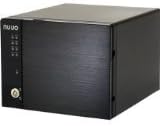
Obrázek 4.1: Přední strana view of the NUUO NVRmini2 NE-4160 NVR unit. This image shows the compact black chassis with the NUUO logo on the left side, status indicator lights, and a lockable front panel for drive bay access.
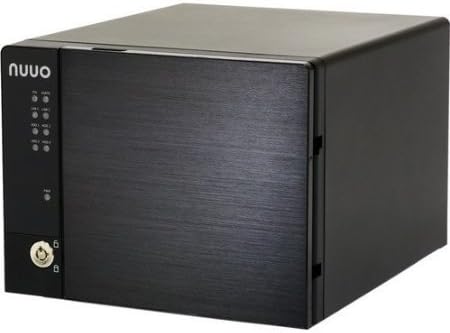
Obrázek 4.2: Úhlové view of the NUUO NVRmini2 NE-4160 NVR unit. This perspective highlights the sleek design and the textured finish of the front panel, providing a better sense of the unit's dimensions.
Indikátory na předním panelu:
- LED napájení: Indikuje stav napájení.
- HDD LEDs: Indicate hard drive activity for each bay.
- LED sítě: Označuje připojení k síti.
- LED alarmu: Indikuje systémové alarmy nebo chyby.
5. Nastavení a instalace
5.1 Instalace hardwaru
- Rozbalení: Carefully remove the NVR from its packaging.
- Instalace pevného disku (pokud není předinstalován):
- Unlock the front panel and open the drive bay door.
- Slide the hard drive trays out.
- Secure 3.5-inch SATA hard drives into the trays using the provided screws.
- Slide the trays back into the bays until they click into place.
- Zavřete a uzamkněte přední panel.
- Internetové připojení: Connect one end of the Ethernet cable to the NVR's LAN port and the other end to your network router or switch.
- Připojení napájení: Připojte napájecí adaptér k napájecímu vstupu NVR a poté jej zapojte do elektrické zásuvky. NVR se automaticky zapne.
5.2 Počáteční konfigurace softwaru
Upon first boot, the NVR will acquire an IP address via DHCP (if available). You can access the NVR's web interface using its IP address or by using the NUUO Finder utility.
- Discovering the NVR:
- Install the NUUO Finder utility from the provided CD or NUUO webweb na počítači připojeném ke stejné síti.
- Run NUUO Finder to scan for the NVRmini2 NE-4160 on your network.
- Note down the NVR's IP address.
- Přístup Web Rozhraní:
- Otevřete a web browser (e.g., Chrome, Firefox) and enter the NVR's IP address in the address bar.
- Log in using the default username (e.g., "admin") and password (e.g., "admin"). It is highly recommended to change the default password immediately after the first login.
- Inicializace systému: Follow the on-screen wizard for initial setup, which typically includes:
- Nastavení data a času
- Network Settings (Static IP configuration, if desired)
- Hard Drive Formatting (if required)
- Přidání IP kamer
6. Obsluha NVR
6.1 Živě View
The Live View interface allows you to monitor all connected cameras in real-time. You can customize the layout, view multiple cameras simultaneously, and access various controls.
- Layout Selection: Choose from various grid layouts (e.g., 1x1, 2x2, 3x3, 4x4) to display cameras.
- Ovládání PTZ: If your cameras support Pan/Tilt/Zoom, use the on-screen controls to adjust camera angles and zoom levels.
- Okamžité přehrávání: Rychle review recent recordings from the live view.
6.2 Správa záznamů
The NVRmini2 NE-4160 supports various recording modes:
- Nepřetržité nahrávání: Záznamy 24/7.
- Záznam detekce pohybu: Nahrává pouze tehdy, když kamera detekuje pohyb.
- Plán nahrávání: Záznamy na základě předem definovaného plánu.
- Záznam poplachu: Zaznamenává, když je spuštěn externí alarmový vstup.
Configure recording settings for each camera in the "Recording" section of the web rozhraní.
6.3 Playback and Export
Na review zaznamenané footage:
- Navigate to the "Playback" section.
- Vyberte požadovanou kameru (kamery) a rozsah data/času.
- Pro navigaci v nahrávkách použijte časovou osu.
- Chcete-li exportovat footage, select the desired segment and choose the export format (e.g., AVI, MP4).
7. Údržba
7.1 Pravidelné kontroly
- Stav systému: Periodically check the NVR's system status via the web interface to ensure all components are functioning correctly.
- Stav pevného disku: Monitor hard drive health and capacity. Replace drives showing signs of failure promptly.
- Aktualizace firmwaru: Check the NUUO website regularly for firmware updates. Applying updates can improve performance, add features, and fix bugs.
- Fyzické čištění: Udržujte NVR jednotku čistou a bez prachu. Používejte měkký, suchý hadřík. Nepoužívejte tekuté čisticí prostředky.
7.2 Zálohování dat
While the NVR records continuously, it is advisable to back up critical footage regularly to external storage or a network location.
8. Řešení problémů
| Problém | Možná příčina | Řešení |
|---|---|---|
| NVR not powering on | Žádné napájení, vadný napájecí adaptér | Check power cable connection; try a different power outlet; test power adapter. |
| Nelze získat přístup web rozhraní | Incorrect IP address, network issue, firewall | Verify NVR's IP address using NUUO Finder; check network cable; temporarily disable firewall on PC. |
| No video from cameras | Camera not connected, incorrect camera settings, network issue | Ensure cameras are powered and connected; verify camera IP addresses and credentials in NVR settings; check network connectivity. |
| Pevný disk nebyl detekován | Improper installation, faulty drive, incorrect format | Re-seat the hard drive; try a different drive bay; ensure drive is compatible and formatted correctly. |
If the problem persists after attempting the above solutions, please contact NUUO technical support.
9. Specifikace
| Funkce | Detail |
|---|---|
| Číslo modelu | NE-4160-US |
| Značka | NUUO |
| Podporované kanály | 16 |
| Drive Bays | 4 |
| Pre-installed Storage | 4 TB (4000 GB) |
| Konektivita | Ethernet |
| Kompatibilní zařízení | IP kamery |
| První dostupný termín | 9. prosince 2013 |
10. Informace o záruce
NUUO products typically come with a limited manufacturer's warranty. Please refer to the warranty card included with your product or visit the official NUUO website for detailed warranty terms and conditions specific to the NE-4160-US model. Keep your proof of purchase for warranty claims.
11. Technická podpora
For technical assistance, software updates, or further inquiries, please contact NUUO technical support through their official channels:
- Webmísto: Visit the official NUUO website for support resources, FAQs, and downloads.
- E-mail: Refer to the NUUO website for regional support email addresses.
- Telefon: Refer to the NUUO webweb s regionálními telefonními čísly podpory.
When contacting support, please have your product model number (NE-4160-US) and serial number ready.
Ask a question about this manual
Ask about setup, troubleshooting, compatibility, parts, safety, or missing instructions. Manuals+ will review the question and use this page’s manual context to help answer it.