
1. Úvod
Thank you for choosing the SCHWAIGER DCR600HD Full HD Cable TV Receiver. This manual provides essential information for the safe and efficient use of your device. Please read these instructions carefully before installation and operation, and keep them for future reference.
2. Bezpečnostní pokyny
- Napájení: Only use the power adapter supplied with the device. Ensure the voltage odpovídá místnímu napájení.
- Větrání: Do not block ventilation openings. Ensure adequate space around the receiver for proper airflow to prevent overheating.
- vlhkost: Keep the device away from water, moisture, and high humidity. Do not expose it to rain or splashes.
- Čištění: Před čištěním odpojte napájení. Použijte měkký, suchý hadřík. Nepoužívejte tekuté ani aerosolové čisticí prostředky.
- Umístění: Place the receiver on a stable, flat surface. Avoid direct sunlight, heat sources, and strong magnetic fields.
- Servis: Nepokoušejte se zařízení otevírat ani opravovat sami. Veškerý servis svěřte kvalifikovanému personálu.
3. Obsah balení
Zkontrolujte prosím balení, zda neobsahuje následující položky:
- SCHWAIGER DCR600HD Cable TV Receiver
- Dálkové ovládání
- Power Cable (integrated or separate adapter)
- Uživatelská příručka (tento dokument)
4. Konec produktuview
4.1 Přední panel
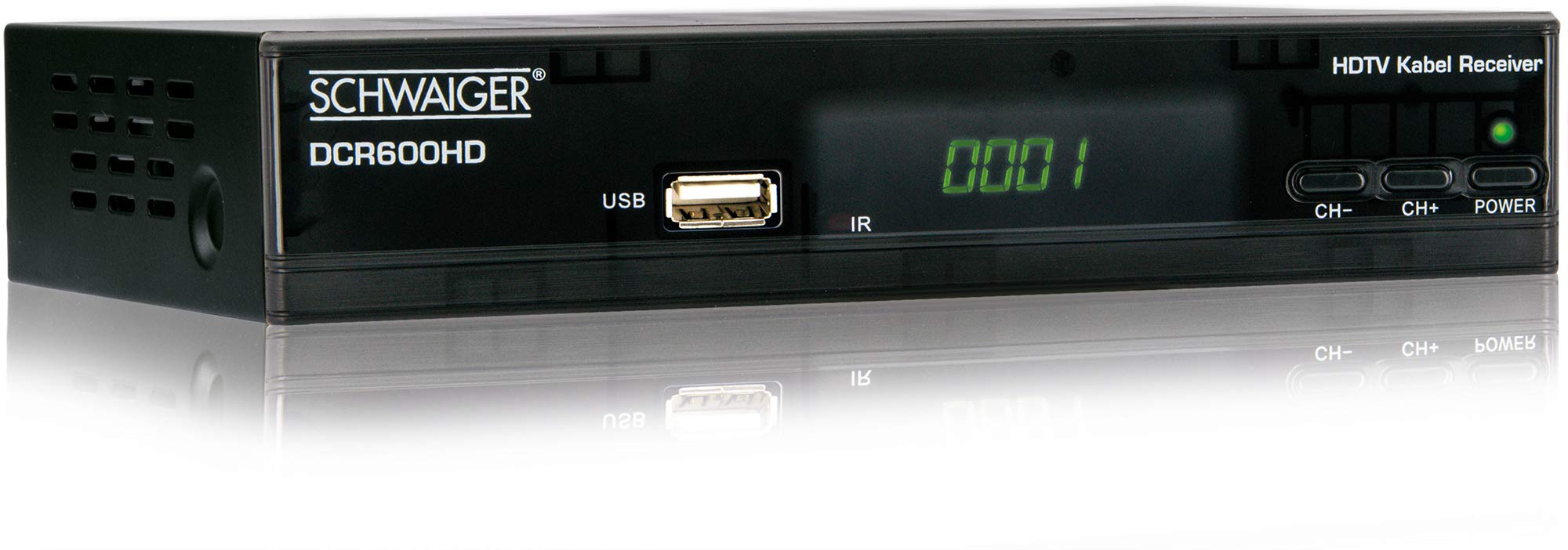
Obraz: Přední view of the SCHWAIGER DCR600HD receiver, showing the display, USB port, IR receiver, and control buttons.
- Zobrazit: Zobrazuje číslo kanálu nebo čas.
- USB port: Pro připojení paměťových zařízení USB pro přehrávání médií.
- IR: Infračervený přijímač pro dálkové ovládání.
- CH- / CH+: Buttons for changing channels.
- MOC: Button to turn the receiver on or off (standby).
4.2 Zadní panel

Obraz: Zadní view of the SCHWAIGER DCR600HD receiver, displaying various input and output ports.
- RF IN: Input for connecting to your cable TV network.
- ETHERNET / LAN: For network connection (if supported for updates or specific services).
- HDMI: Výstup pro multimediální rozhraní s vysokým rozlišením pro připojení k HD televizoru.
- TV SCART (CVBS): SCART output for connecting to older TVs or other devices.
- ~220-240V 50/60Hz: Napájecí vstup pro přijímač.
4.3 Dálkové ovládání

Obraz: Layout of the SCHWAIGER DCR600HD remote control, showing various function buttons.
The remote control allows you to operate all functions of your receiver. Familiarize yourself with the button layout for easy navigation.
5. Nastavení
5.1 Připojení přijímače
- Connect to Cable Network: Connect your cable TV antenna cable to the RF IN port na zadním panelu přijímače.
- Připojení k televizi:
- For High Definition (HD) picture quality, connect an HDMI cable from the HDMI portu na receiveru ke vstupu HDMI na vašem televizoru.
- For standard definition (SD) or older TVs, connect a SCART cable from the TV SCART (CVBS) portu SCART na přijímači ke vstupu SCART na vašem televizoru.
- Připojte napájení: Plug the power cable into the receiver's power input and then into a wall outlet.
- Zapněte televizi: Switch on your television and select the correct input source (HDMI or SCART) corresponding to your connection.
5.2 První instalace
Upon first power-on, the receiver will typically guide you through an initial setup process:
- Výběr jazyka: Pomocí dálkového ovladače vyberte preferovaný jazyk pro nabídky na obrazovce.
- Výběr země: Select your country. This helps configure regional settings and channel frequencies.
- Skenování kanálu: The receiver will prompt you to perform an automatic channel scan. Confirm to start scanning for available cable TV channels. This process may take several minutes.
- Uložit nastavení: Once the scan is complete, save the found channels. Your receiver is now ready for use.
6. Návod k obsluze
6.1 Základní obsluha
- Zapnutí/vypnutí: Stiskněte tlačítko MOC button on the remote control or front panel to switch the receiver on or to standby mode.
- Výběr kanálu: Použijte CH+ / CH- buttons on the remote or front panel to change channels sequentially. Alternatively, use the number buttons to directly enter a channel number.
- Nastavení hlasitosti: Použijte VOL+ / VOL- buttons on the remote control to adjust the audio volume.
- Ztlumit: Stiskněte tlačítko ZTLUMIT button to temporarily turn off the sound. Press again to restore.
6.2 Elektronický programový průvodce (EPG)
The EPG provides a schedule of current and upcoming TV programs.
- Stiskněte tlačítko EPG button on the remote control to access the Electronic Program Guide.
- Procházejte kanály a časy programů pomocí tlačítek se šipkami.
- Stiskněte OK na view podrobné informace o vybraném programu.
6.3 Přehrávání médií přes USB
Můžete přehrávat multimédia files (AVI, MKV, MP3) from a USB storage device.
- Insert a USB flash drive or external hard drive into the USB port na předním panelu.
- The receiver should detect the USB device and prompt you to open the media player, or you can access it via the main menu.
- Procházejte svým files and folders using the arrow buttons and press OK to select and play a file.
- Use the media control buttons (Play, Pause, Stop, Fast Forward, Rewind) on the remote control for playback.
6.4 Teletext
Access teletext services provided by broadcasters.
- Stiskněte tlačítko TTX button on the remote control to activate teletext.
- Use the number buttons to enter page numbers or the arrow buttons to navigate.
- Stiskněte TTX again to exit teletext.
7. Údržba
- Čištění: Regularly wipe the receiver with a soft, dry, lint-free cloth. Do not use abrasive cleaners, waxes, or solvents.
- Větrání: Ensure that the ventilation slots are not obstructed by dust or other objects.
- Aktualizace softwaru: Pravidelně kontrolujte informace od výrobce website for any available software updates for your model. Follow the instructions provided with the update carefully.
8. Řešení problémů
If you encounter problems with your receiver, refer to the following common issues and solutions:
| Problém | Možná příčina / řešení |
|---|---|
| Žádný obraz ani zvuk |
|
| Dálkové ovládání nefunguje |
|
| Během skenování nebyly nalezeny žádné kanály |
|
| USB média se nepřehrávají |
|
9. Specifikace
| Funkce | Popis |
|---|---|
| Název modelu | DCR600HD |
| Typ produktu | Digital DVB TV Tuner / Digital Player |
| Barva | Černý |
| Rozměry (Š x H x V) | 17 cm x 4.5 cm x 10 cm |
| Hmotnost | 380 g |
| Technologie připojení | HDMI, USB, SCART, RF |
| Kompatibilní zařízení | Televize |
| Kódování videa | H.264 |
| Podporovaná rozlišení | 576i, 576p, 720p, 1080i, 1080p |
| Poměr stran | 4:3, 16:9 |
| Režim zvukového výstupu | Stereo |
| Podporované zvukové formáty | MP3 |
| Podporované typy médií | AVI, MKV, MP3 |
| Celkový počet portů USB | 1 (USB 4-pin Type A) |
| Celkový počet portů HDMI | 1 |
| Spotřeba energie | 3.8 W |
| svtage | 240 voltů |
| Speciální funkce | Electronic Program Guide (EPG), Teletext, Built-in Bluetooth (Note: Bluetooth functionality may vary by region/firmware) |
| Dálkové ovládání | V ceně |
10. Záruka a podpora
For warranty information and technical support, please refer to the documentation included with your product packaging or visit the official SCHWAIGER webUschovejte si účtenku jako doklad o koupi pro případ reklamace.