
Zavedení
This manual provides comprehensive instructions for the proper use and maintenance of your Takstar PCM-5550 Condenser KTV Microphone. Please read this manual thoroughly before operating the microphone to ensure optimal performance and longevity.
Klíčové vlastnosti
- Excellent audio processing circuitry for natural and smooth sound reproduction.
- High sensitivity and low output impedance for clear recording performance.
- Integrated windscreen to minimize plosives and wind noise.
- Operates on 1.5V AA batteries, providing extended playtime.
- Stylish ivory design.
- Suitable for internet karaoke and PC recording applications.
Obsah balení
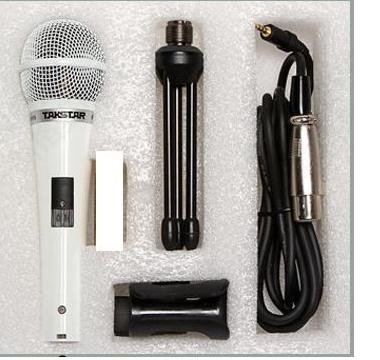
Po vybalení se prosím ujistěte, že jsou v balení všechny následující položky:
- Takstar PCM-5550 Condenser Microphone
- Microphone Stand (mini tripod)
- Kabel mikrofonu
- Microphone Clip/Holder
Pokyny pro nastavení
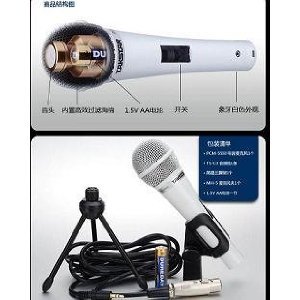
- Nainstalujte baterii: Locate the battery compartment on the microphone handle. Insert one 1.5V AA battery, ensuring correct polarity (+/-).
- Připevnění klipu pro mikrofon: Secure the microphone clip to the included mini tripod stand or a compatible microphone stand.
- Držák mikrofonu: Carefully place the Takstar PCM-5550 microphone into the clip.
- Připojovací kabel: Plug one end of the microphone cable into the microphone's output port (usually at the bottom). Connect the other end to your audio interface, mixer, or computer's microphone input.
Návod k obsluze
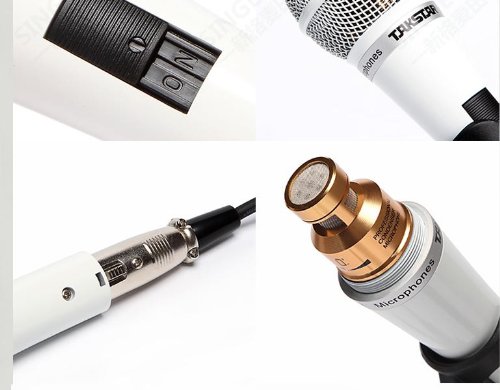
- Zapnutí: Locate the ON/OFF switch on the microphone handle and slide it to the "ON" position.
- Umístění: For optimal sound quality, position the microphone approximately 5-15 cm (2-6 inches) from the sound source (e.g., your mouth for vocals).
- Upravit úrovně: Adjust the input gain on your connected audio device (mixer, computer) to achieve a clear signal without distortion. Avoid setting the gain too high, which can lead to clipping.
- Vypnout: When not in use, slide the ON/OFF switch to the "OFF" position to conserve battery life.

Údržba
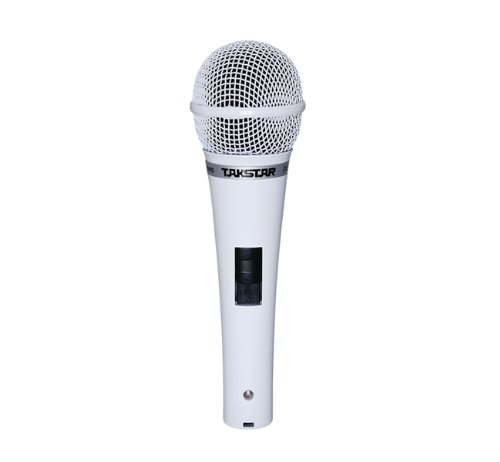
- Čištění: K otření těla mikrofonu použijte měkký, suchý hadřík. Nepoužívejte tekuté čisticí prostředky ani rozpouštědla, protože by mohly poškodit povrchovou úpravu nebo vnitřní součásti.
- Skladování: Store the microphone in a dry, cool place, away from direct sunlight and extreme temperatures. If storing for an extended period, remove the AA battery to prevent leakage.
- Zacházení: Avoid dropping the microphone or subjecting it to strong impacts, which can damage the sensitive condenser capsule.
Odstraňování problémů
| Problém | Možná příčina | Řešení |
|---|---|---|
| Žádný zvukový výstup |
|
|
| Nízký nebo zkreslený zvuk |
|
|
| Nadměrný hluk na pozadí |
|
|
Specifikace
| Model | PCM-5550 |
| Typ | Kondenzátorový mikrofon |
| Polární vzor | Všesměrový |
| Frekvenční odezva | 30Hz-20kHz |
| Citlivost | -38 ± 3dB |
| Výstupní impedance | 350Ω±30% |
| Impedance zátěže | > 1000Ω |
| Požadavky na napájení | 1.5V baterie AA |
| Čistá hmotnost | 300 g |
| Barva | Bílý |
| Kompatibilní zařízení | Karaoke Machine, Personal Computer |
Záruka a podpora
For warranty information and technical support, please refer to the official Takstar webnebo se obraťte na místního distributora. Uschovejte si účtenku jako doklad o koupi pro případné reklamace.
Pro další pomoc můžete navštívit Takstar Store on Amazon.