
Zavedení
This manual provides detailed instructions for the installation and operation of the TooQ TQDS-802B Dual Bay SATA Docking Station. This device allows for easy connection of 2.5-inch and 3.5-inch SATA I/II/III hard drives or solid-state drives (SSDs) to your computer via USB 3.0, and features an offline cloning function for direct drive duplication without a PC.
Obsah balení
- TooQ TQDS-802B Dual Bay SATA Docking Station
- Napájecí adaptér (DC 12V)
- USB 3.0 Type-A to Type-B Cable
- Uživatelská příručka
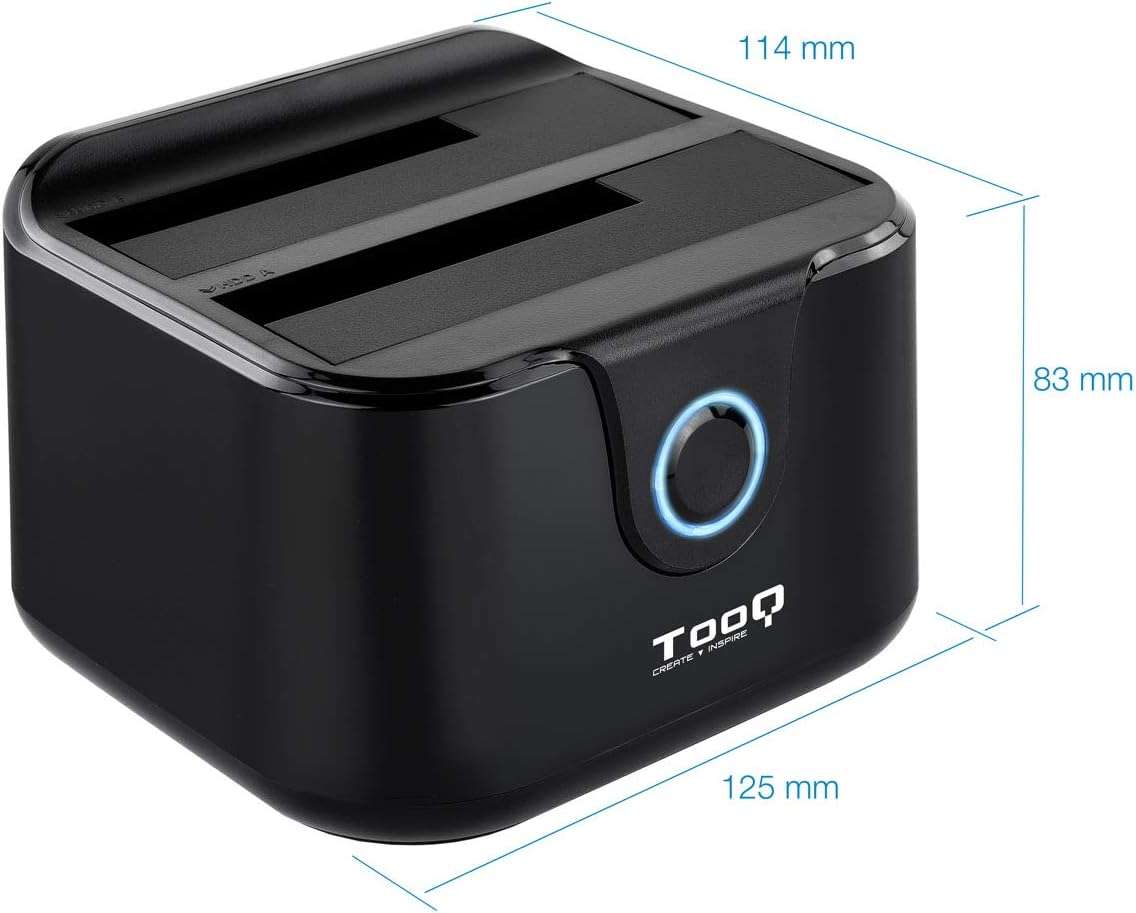
Image: Package contents including the docking station, power adapter, and USB 3.0 cable.
Konec produktuview
Přední panel

Obrázek: Přední strana view of the docking station. The central button serves as the Clone button, surrounded by an LED indicator.
- LED indikátor: Illuminates to indicate power and activity.
- Tlačítko Klonovat: Initiates the offline disk cloning process.
Zadní panel

Obrázek: Zadní view of the docking station, detailing the power switch, DC 12V power input, and USB-B port for computer connection.
- Přepínač ON/OFF: Powers the docking station on or off.
- DC 12V Jack: Připojuje se k přiloženému napájecímu adaptéru.
- Port USB-B: Connects the docking station to your computer via the USB 3.0 cable.
Nahoru View (Drive Bays)

Obrázek: Nahoře view showing two drive bays, labeled A and B, designed to accommodate both 2.5-inch and 3.5-inch SATA HDDs/SSDs.
- Drive Bay A: For inserting the source drive during cloning, or a primary drive for data access. Compatible with 2.5" and 3.5" SATA drives.
- Drive Bay B: For inserting the target drive during cloning, or a secondary drive for data access. Compatible with 2.5" and 3.5" SATA drives.
Nastavení
- Připojte napájení: Connect the included power adapter to the DC 12V jack on the rear of the docking station, then plug the adapter into a power outlet. Do not power on the device yet.
- Connect to Computer (Optional for Data Transfer): If you intend to use the docking station for data transfer with a computer, connect the USB 3.0 cable from the USB-B port on the docking station to an available USB 3.0 port on your computer.
- Vložte disky: Gently insert your 2.5-inch or 3.5-inch SATA hard drives or SSDs into the drive bays (A and/or B) until they are firmly seated. Ensure the SATA connectors align correctly.
- Zapnutí: Flip the ON/OFF switch on the rear panel to the 'ON' position. The LED indicator will illuminate.
Návod k obsluze
A. Data Transfer (Connected to PC)
When connected to a computer via USB, the docking station functions as an external drive enclosure. Insert one or two SATA drives into the bays. Your operating system should automatically detect the drives. You can then access, read, and write data to them as you would with any other external storage device.
- Ensure the docking station is powered on and connected to your computer.
- Insert the SATA drive(s) into the bays.
- The drives will appear as removable storage in your computer's file badatel.
- For safe removal, always eject the drives through your operating system before powering off the docking station or disconnecting the USB cable.
B. Funkce offline klonování
The offline clone function allows you to duplicate a source drive to a target drive without needing a computer connection. The target drive must be equal to or larger in capacity than the source drive.
- Příprava disků: Ensure both the source drive (the drive you want to copy FROM) and the target drive (the drive you want to copy TO) are free of errors. All data on the target drive will be erased during the cloning process.
- Vložte disky:
- Vložte Zdrojový disk do Bay A.
- Vložte Cílová jednotka do Zátoka B.
- Odpojení od počítače: Ensure the USB cable is disconnected from the computer. The docking station must be operating independently for offline cloning.
- Zapnutí: Turn on the docking station using the ON/OFF switch.
- Zahájit klonování: Stiskněte a podržte Tlačítko klonování for approximately 3-5 seconds until the LED indicator begins to flash. Release the button.
- Sledovat průběh: The LED indicator will show the cloning progress. It will typically flash or change color to indicate different stages (e.g., 25%, 50%, 75%, 100%).
- Dokončení: Once the cloning process is complete, the LED indicator will stop flashing and remain solid. You can then power off the docking station and remove the drives.
Important: Do not interrupt the cloning process by powering off the device or removing drives, as this may lead to data corruption on both drives.
Údržba
- Dokovací stanici uchovávejte v čistém a suchém prostředí, mimo dosah přímého slunečního záření a extrémních teplot.
- Zabraňte pádu zařízení nebo jeho vystavení silným nárazům.
- Vnější povrch čistěte měkkým, suchým hadříkem. Nepoužívejte tekuté čisticí prostředky ani rozpouštědla.
- Během provozu zajistěte dostatečné větrání v okolí zařízení.
Odstraňování problémů
Drive Not Detected by Computer
- Ensure the docking station is powered on and the USB cable is securely connected to both the docking station and the computer.
- Zkuste se připojit k jinému portu USB na počítači.
- Verify that the hard drive is properly seated in the bay.
- Zkontrolujte Správu disků (Windows) nebo Diskovou utilitu (macOS), zda je disk rozpoznán, ale není naformátovaný nebo nepřidělený.
- Test the drive directly in a computer or with another enclosure to rule out drive failure.
Offline klonování selže nebo se nespustí
- Ensure the USB cable is disconnected from the computer. Offline cloning requires the device to be standalone.
- Verify that the source drive is in Bay A and the target drive is in Bay B.
- Confirm that the target drive's capacity is equal to or greater than the source drive's capacity.
- Ensure both drives are properly inserted and seated.
- Press and hold the Clone button for the specified duration (3-5 seconds) until the LED indicator responds.
- Check for any errors on the source drive before attempting to clone.
Specifikace
| Číslo modelu | TQDS-802B |
| Značka | TOOQ |
| Kompatibilní disky | 2.5" and 3.5" SATA I/II/III HDDs/SSDs |
| Drive Bays | 2 (Dual Bay) |
| Rozhraní k PC | USB 3.0 (zpětně kompatibilní s USB 2.0) |
| Rychlost přenosu dat | Až 5.0 Gb/s (USB 3.0) |
| Offline Clone Function | Supported (PC-independent) |
| Maximální kapacita disku | Up to 2.0 TB (32-bit/64-bit systems) and 3.0 TB or more (64-bit systems) |
| Podporovaný OS | Windows, macOS, Linux (for USB connection) |
| Napájení | Napájecí adaptér DC 12V |
| Rozměry | Přibližně 125 mm x 114 mm x 83 mm |
| Hmotnost | 350 gramů |

Image: Dimensions of the TooQ TQDS-802B Dual Bay SATA Docking Station.
Záruka a podpora
TOOQ products are designed for reliability and performance. For warranty information, please refer to the warranty card included with your product or visit the official TOOQ website. For technical support or further assistance, please contact TOOQ customer service through their official channels.
Manufacturer: Tooq & Nanocable Spain