
Zavedení
The Nyko Smart Clip is designed to securely attach your smartphone to a PlayStation DUALSHOCK 4 controller. This accessory allows for an integrated second-screen experience, enabling you to use your phone for PlayStation App features, game streaming, or viewing guides and videos while gaming.
This manual provides instructions for setup, operation, maintenance, and troubleshooting to ensure optimal use of your Smart Clip.
Obsah balení
- Nyko Smart Clip
- Rubber attachment straps (main set and spare set)
Pokyny pro nastavení
- Attaching the Smart Clip to the DUALSHOCK 4 Controller:
Align the Smart Clip with the top of your DUALSHOCK 4 controller. The clip is designed to fit snugly over the controller's body without obstructing buttons or ports. Use the provided rubber straps to secure the clip firmly to the controller's handles. Ensure the straps are taut to prevent movement during use. Spare rubber straps are included for replacement if needed.
- Vložení smartphonu:
Gently pull apart the adjustable arms of the Smart Clip to expand the phone holder. Carefully place your smartphone between the arms. The clip can accommodate devices up to 6 inches tall. Ensure your phone is centered and held securely by the rubberized grips. The clip supports both horizontal and vertical phone orientations.
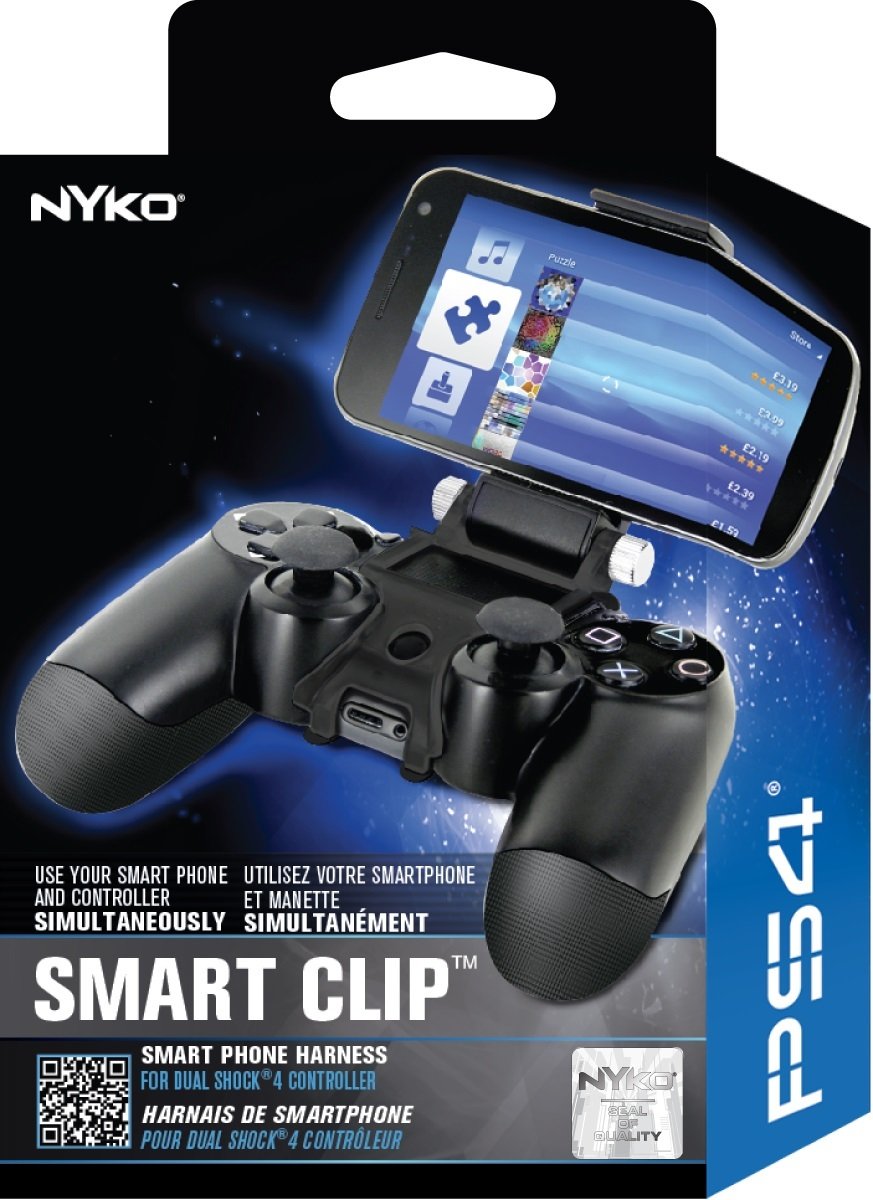
Image: The Nyko Smart Clip securely attached to a DUALSHOCK 4 controller, holding a smartphone in place. This illustrates the proper assembly for use.
- Úprava Viewúhel:
The Smart Clip features an adjustable hinge. Loosen the side screws slightly, adjust your phone to the desired viewing angle, and then tighten the screws to lock the position. This allows for personalized comfort and visibility.
Návod k obsluze
- Using with PlayStation App: Once your smartphone is mounted, launch the PlayStation App. You can use your phone as a second screen for compatible games, access game information, or manage your PlayStation account.
- Vzdálená hra: For PlayStation 4 Remote Play, ensure your compatible Xperia phone (or other supported device) is connected to your PS4 console via Wi-Fi. Launch the PS4 Remote Play application on your phone. The DUALSHOCK 4 controller will function as your primary input device while the phone displays the game.
- Access to Controller Functions: The Smart Clip is designed to not interfere with the ergonomics of the DUALSHOCK 4 controller. All buttons, ports, and features remain fully accessible while the clip is attached.
- Média Viewing: The adjustable angle makes the Smart Clip suitable for viewing game guides, walkthroughs, or streaming videos from your phone while using the controller.
Údržba
- Čištění: Wipe the Smart Clip with a soft, dry cloth. Avoid using abrasive cleaners or solvents, as these may damage the plastic or rubber components.
- Rubber Straps: Periodically inspect the rubber attachment straps for signs of wear or damage. Replace them with the spare set if necessary to maintain a secure connection to the controller.
- Skladování: When not in use, store the Smart Clip in a cool, dry place away from direct sunlight to prolong its lifespan.
Odstraňování problémů
| Problém | Řešení |
|---|---|
| Smartphone is not held securely. | Ensure the adjustable arms are fully gripping the phone and that the phone is centered. Check the rubberized pads on the grips for any damage. |
| Controller buttons are obstructed or accidentally pressed. | Adjust the position of your smartphone within the clip. The clip is designed to avoid button interference, but slight repositioning may be needed for certain phone models or cases. |
| Clip feels loose on the controller. | Verify that the rubber attachment straps are correctly installed and taut. If the straps are worn or broken, replace them with the spare set provided. |
| Viewing angle does not stay fixed. | Ensure the side screws on the adjustable hinge are tightened sufficiently after setting your desired angle. |
Specifikace
- Číslo modelu: 83201
- Compatible Controller: PlayStation DUALSHOCK 4
- Kompatibilní velikost telefonu: Up to 6 inches tall (expandable clip)
- Rozměry produktu: Přibližně 2.5 x 4.8 x 6.8 palce (6.35 x 12.19 x 17.27 cm)
- Hmotnost položky: Přibližně 3.6 uncí (102 gramů)
- Výrobce: Nyko
Informace o záruce
For detailed warranty information regarding your Nyko Smart Clip, please refer to the warranty card included with your product or visit the official Nyko webZáruční podmínky se mohou lišit v závislosti na regionu a prodejci.
Zákaznická podpora
If you encounter any issues or have questions not covered in this manual, please contact Nyko customer support. Contact details can typically be found on the official Nyko webmístě nebo na obalu produktu.