
Gioteck E5SUNI-11-MU
Uživatelská příručka k univerzálnímu stereofonnímu sluchátku s vysokým rozlišením Gioteck EX-05S
Model: EX-05S
1. Konec produktuview
The Gioteck EX-05S High Definition Headset is designed to deliver superior stereo game sound and crystal-clear voice communication. It is compatible with multiple platforms including PS4, PS3, Xbox 360, PC, and Mac. This headset features 40mm high-quality stereo drivers, a noise-isolating microphone, and breathable micro-fibre ear cups for extended comfort.
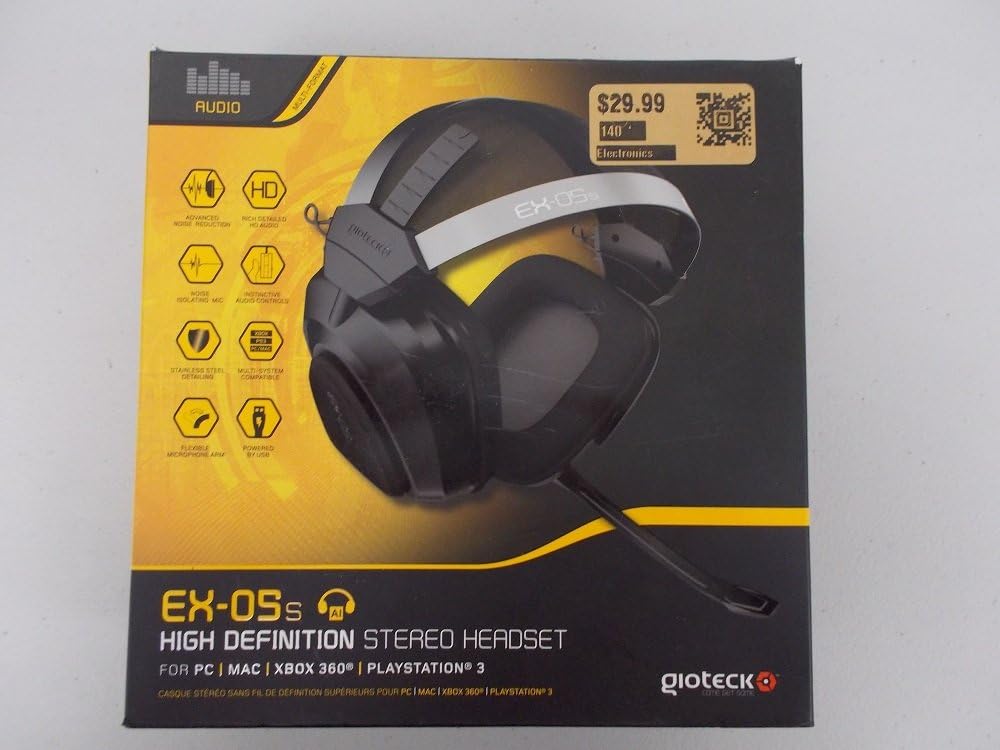
Figure 1.1: Gioteck EX-05S Headset packaging, highlighting key features and compatibility.

Obrázek 1.2: Strana view of the Gioteck EX-05S Headset, showing the ear cup and microphone arm.
2. Vlastnosti
- 40mm High Quality Stereo Drivers: Delivering rich, detailed audio for an immersive gaming experience.
- Noise Isolating Microphone: Designed to eliminate echo and external noise for clear communication.
- Breathable Micro-Fibre Ear Cups: Ensures comfort during long gaming sessions.
- Pokročilá redukce šumu: Minimizes game sound interference from external speakers.
- Flexible and 180-Degree Rotating Microphone Arm: Allows for optimal microphone positioning.
- Instinctive and Accessible Controls: Conveniently located controls for voice and game sound adjustments.
- Stainless Steel Detailing: Provides durability and a premium finish.
- Kompatibilita s více platformami: Works with PS4, PS3, Xbox 360, PC, and Mac.
3. Obsah balení
Ujistěte se prosím, že máte v balení všechny následující položky:
- Gioteck EX-05S Universal High Definition Stereo Headset
4. Průvodce nastavením
4.1 Connecting to Gaming Consoles (PS4, PS3, Xbox 360)
- Locate the 3.5mm audio jack on your gaming controller or console.
- Insert the 3.5mm connector from the EX-05S headset firmly into the audio jack.
- Ensure your console's audio settings are configured to output game audio and chat through the connected headset. Refer to your console's system settings for specific audio output configurations.
4.2 Připojení k PC/Mac
- For PCs with separate audio and microphone jacks, you may need a PC splitter cable (not included) to connect the single 3.5mm headset jack to your computer's audio output and microphone input ports.
- For devices with a combined 3.5mm audio/microphone jack, simply plug the headset's 3.5mm connector directly into the port.
- Adjust your computer's sound settings to select the EX-05S headset as the default playback and recording device.
5. Návod k obsluze
5.1 Ovládání hlasitosti
The EX-05S headset features an inline control box on the cable. Use the volume dial to adjust the overall audio level of your game and chat sound.
5.2 Ztlumení mikrofonu
A switch or button on the inline control box allows you to quickly mute or unmute your microphone. Ensure the microphone is unmuted when you wish to communicate.
5.3 Umístění mikrofonu
The flexible microphone arm can be rotated 180 degrees. Position the microphone approximately 1-2 inches from your mouth for optimal voice clarity and to minimize background noise.
6. Údržba a péče
- Čištění: K čištění sluchátek s mikrofonem používejte měkký, suchý hadřík. U náušníků použijte mírněamp Lze použít hadřík, ale dbejte na to, aby se do mřížek reproduktoru nedostala vlhkost. Nepoužívejte agresivní chemikálie ani abrazivní čisticí prostředky.
- Skladování: Sluchátka skladujte na chladném a suchém místě mimo dosah přímého slunečního záření a extrémních teplot. Zabraňte zamotání kabelu.
- Zacházení: Always grasp the plug when disconnecting the cable, rather than pulling on the cable itself, to prevent damage to the wiring.
- Náušníky: The breathable micro-fibre ear cups can be gently wiped clean. Avoid excessive pressure or stretching.
7. Řešení problémů
7.1 Z headsetu nejde zvuk
- Ujistěte se, že je 3.5mm jack zcela zasunut do audio portu.
- Zkontrolujte integrované ovládání hlasitosti na kabelu sluchátek a ujistěte se, že je nastaveno na maximum.
- Verify your device's (console, PC, Mac) audio output settings are configured to send sound to the headset.
- Vyzkoušejte sluchátka s mikrofonem na jiném zařízení, abyste vyloučili problém s konkrétním zařízením.
7.2 Mikrofon nefunguje
- Check the microphone mute switch on the inline control box and ensure it is unmuted.
- Verify your device's (console, PC, Mac) microphone input settings are configured to receive input from the headset.
- Ensure the microphone arm is positioned correctly and not obstructed.
- Test the microphone on another device or application to confirm functionality.
7.3 Static or Distorted Audio
- Ujistěte se, že je spojení bezpečné a bez nečistot.
- Try adjusting the volume levels on both the headset and the connected device.
- Move away from potential sources of electromagnetic interference (e.g., Wi-Fi routers, cordless phones).
- Vyzkoušejte s jiným zdrojem zvuku nebo zařízením.
8. Specifikace
| Funkce | Detail |
|---|---|
| Název modelu | E5SUNI-11-MU |
| Technologie připojení | Kabelové |
| Zahrnuté komponenty | Sluchátka |
| Věkové rozmezí (popis) | Dospělý |
| Materiál | Nerez |
| Specifické použití pro produkt | Hraní |
| Kompatibilní zařízení | Gaming Consoles, Computers |
| Typ ovládání | Ovládání hlasitosti |
| Funkce kabelu | Stahovací |
| Hmotnost položky | 669 gramů (1.47 libry) |
| Kontrolní metoda | Hlas |
| Typ zvukového ovladače | Dynamický ovladač |
| Tvar sluchátka | Přes ucho |
| Jack pro sluchátka | Zásuvka 3.5 mm |
| Rozměry produktu | 8.46 x 7.87 x 3.94 palce |
9. Záruka a podpora
Gioteck products are manufactured to high standards and undergo rigorous testing. For information regarding warranty coverage, technical support, or service, please refer to the official Gioteck webwebové stránky nebo se obraťte přímo na jejich zákaznickou podporu. Uschovejte si doklad o koupi pro případné reklamace.
Nejnovější informace o podpoře naleznete na adrese: www.gioteck.com/support
Ask a question about this manual
Ask about setup, troubleshooting, compatibility, parts, safety, or missing instructions. Manuals+ will review the question and use this page’s manual context to help answer it.