
Unico SQ4802
UNICO SQ4802 UV/VIS Spectrophotometer User Manual
Model: SQ4802 | Brand: Unico
1. Úvod
The UNICO SQ-4802 is a sophisticated double beam, scanning UV/VIS Spectrophotometer designed for precise analytical measurements. This stand-alone unit features a fixed bandwidth of 1.8nm and incorporates two detectors that simultaneously measure both the test sample cell and reference sample cell, ensuring optimized measurement accuracy and stability. It delivers excellent performance across a wavelength range of 190nm to 1100nm, making it suitable for a wide array of applications including pharmaceutical, biochemical, clinical laboratory analyses, as well as routine tasks such as quantitative analyses, kinetics, spectrum scanning, multiple component analysis, and DNA/Protein quantification.
The instrument is equipped with a USB port, parallel port, and built-in software that supports various functions including Transmittance/Absorbance/Concentration (T/A/Conc), standard curve generation, kinetics studies, multi-wavelength analysis, scanning, and DNA/Ratio measurements. Optional PC download software and PC Windows application software further enhance its versatility.

Obrázek 1: Přední strana view of the UNICO SQ4802 UV/VIS Spectrophotometer, showing the LCD screen and control panel.
2. Nastavení a instalace
2.1 Vybalení a kontrola
Carefully unpack the spectrophotometer and all accessories from the shipping carton. Inspect all components for any signs of damage that may have occurred during transit. If any damage is found, contact your supplier immediately.
Verify that all items listed in the "What's in the Box" section are present:
- Spectrophotometer unit
- Napájecí kabel
- 4 Optical Glass Cuvettes
- 2 Quartz Cuvettes
- Uživatelská příručka
- Prachový kryt
2.2 Umístění
Place the spectrophotometer on a stable, level surface away from direct sunlight, strong magnetic fields, and sources of vibration. Ensure adequate ventilation around the unit.
2.3 Připojení napájení
The UNICO SQ4802 is designed to operate on both 110V and 220V, 50/60Hz power supplies. The unit is factory-set at 110V. Before connecting the power cable, ensure the voltage selector switch (if present, typically on the rear panel) matches your local power supply. Connect the provided mains lead to the power input on the rear of the instrument and then to a grounded electrical outlet.
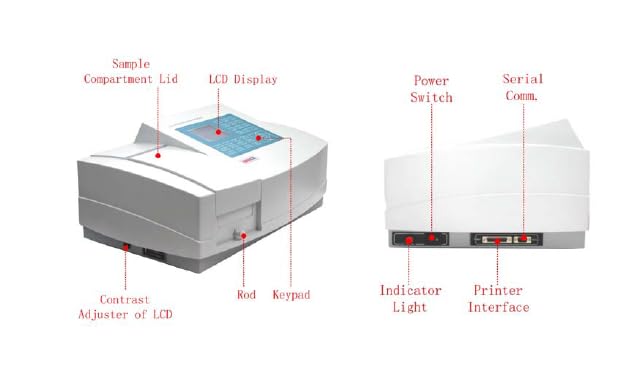
Obrázek 2: Zadní a boční strana view of the spectrophotometer, highlighting the Power Switch, Indicator Light, and Printer Interface.
2.4 Identifikace součásti
Familiarize yourself with the main components of the spectrophotometer:
- LCD displej: Shows measurement data, menus, and instrument status.
- Klávesnice: Numeric keys, function keys (F1-F4), and control keys for navigation and input.
- Sample Compartment: Area for placing cuvettes with samples.
- Sample Compartment Lid: Covers the sample compartment during measurements.
- Vypínač: Zapíná/vypíná nástroj.
- USB port: For data transfer and PC connection.
- Paralelní port: For printer connection.
- Contrast Adjuster of LCD: Upravuje kontrast displeje.
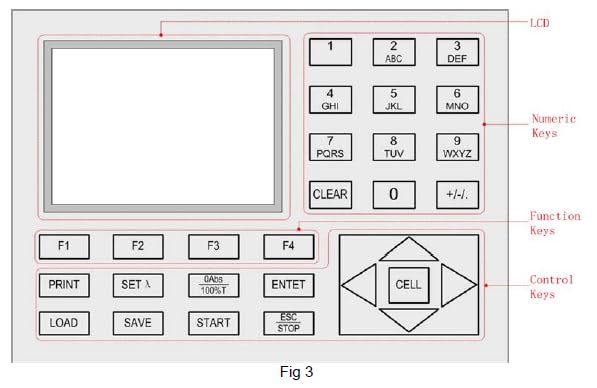
Obrázek 3: Detailní view of the LCD and Keypad, showing Numeric Keys, Function Keys (F1-F4), and Control Keys.
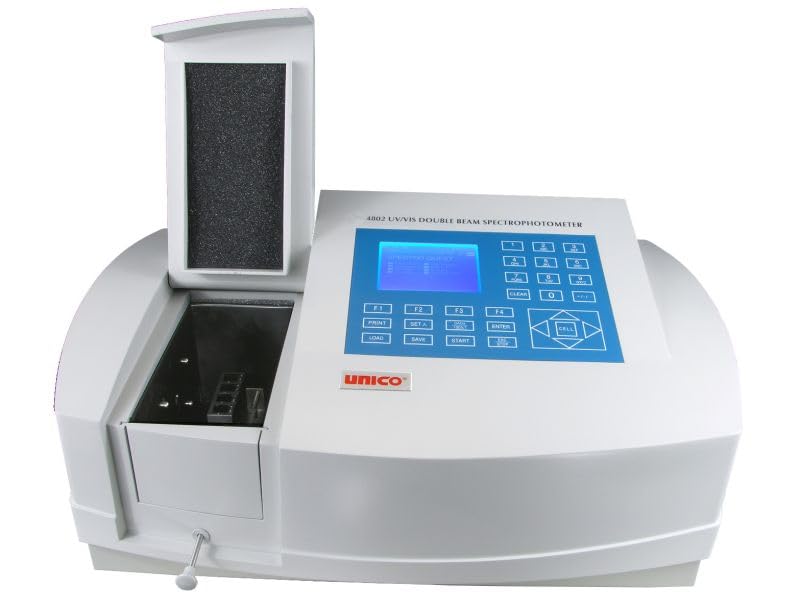
Figure 4: The spectrophotometer with its sample compartment lid open, revealing the cuvette holder.
3. Návod k obsluze
3.1 Zapnutí a inicializace
Press the power switch located on the rear of the instrument. The spectrophotometer will perform a self-test and initialization sequence. Wait for the instrument to complete this process and display the main menu or default measurement screen.
3.2 Základní režimy měření
The SQ4802 offers several built-in measurement modes:
- T/A/Conc: For basic Transmittance, Absorbance, and Concentration measurements at a single wavelength.
- Standard Curve: Allows creation of a calibration curve using known standards for quantitative analysis.
- Kinetika: Measures absorbance changes over time to study reaction rates.
- Multi-Wavelength: Measures absorbance at multiple user-defined wavelengths.
- Snímání: Performs a full spectrum scan across a specified wavelength range.
- DNA/Protein: Specialized mode for DNA and protein concentration determination.
Navigate through the modes using the control keys and select the desired function. Refer to the on-screen prompts and the detailed user manual for specific steps within each mode.
3.3 Sample Preparation and Cuvette Usage
Zajistěte samples are clear and free of particulates. Use appropriate cuvettes (glass for visible range, quartz for UV range). Handle cuvettes by the frosted sides to avoid fingerprints on the optical path. Fill cuvettes to the recommended volume and wipe external surfaces clean before placing them in the samppřihrádka.
For double beam operation, ensure both the reference cuvette and sample cuvette are correctly positioned in their respective holders.
3.4 Data Analysis and Software
The instrument's built-in software allows for data processing, including various curve fitting options for standard curves (linear, square, cubic, linear through zero fit). Results can be viewed on the LCD and saved internally.
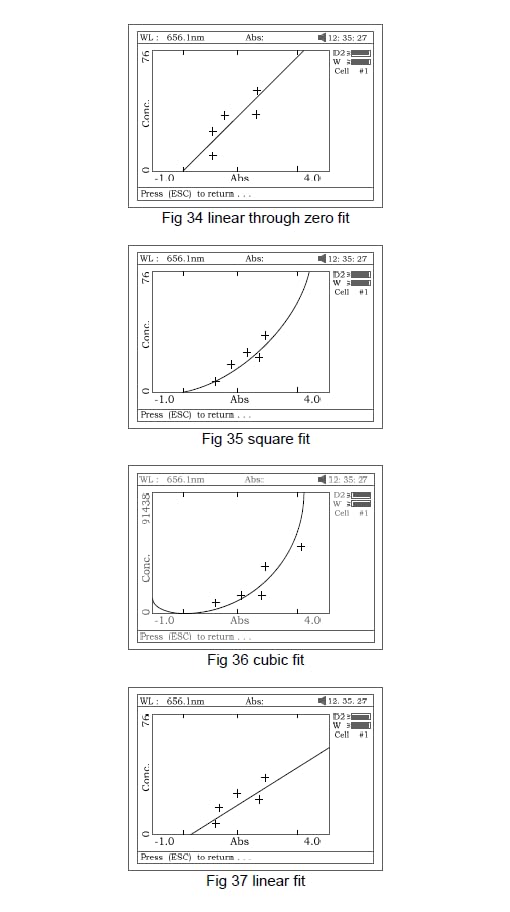
Obrázek 5: Přamples of standard curve fitting options (linear, square, cubic, linear through zero fit) as displayed on the spectrophotometer screen.
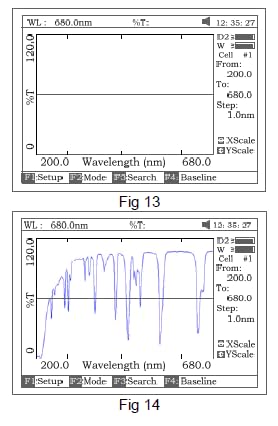
Obrázek 6: Přamples of spectrum scanning results displayed on the spectrophotometer screen, showing both a flat baseline and a sample spektrum.
For advanced data management and analysis, optional PC download software and PC Windows application software are available. Connect the spectrophotometer to a computer via the USB port to utilize these features.
4. Údržba
4.1 Čištění
Keep the exterior of the instrument clean by wiping it with a soft, damp cloth. Do not use abrasive cleaners or solvents. For the optical components, use only lens paper or a soft, lint-free cloth specifically designed for optics, and avoid touching the optical surfaces directly.
4.2 Cuvette Care
Thoroughly clean cuvettes immediately after use to prevent residue buildup. Rinse with distilled water and dry them completely. Store cuvettes in a clean, dust-free environment. Avoid scratching the optical surfaces of the cuvettes.
4.3 Prachový kryt
Always place the provided dust cover over the spectrophotometer when it is not in use to protect it from dust and environmental contaminants.
5. Řešení problémů
This section provides solutions to common issues. For problems not listed here or if issues persist, contact technical support.
| Problém | Možná příčina | Řešení |
|---|---|---|
| Přístroj se nezapne. | Power cable not connected; power outlet faulty; voltagNesprávný přepínač. | Check power cable connection; test power outlet; verify voltagnastavení přepínače e. |
| Nestabilní hodnoty. | Dirty cuvettes; air bubbles in sample; instrument not warmed up; external vibrations. | Clean cuvettes; remove air bubbles; allow instrument to warm up (15-30 min); ensure stable environment. |
| Chybová zpráva na displeji. | Specifický chybový stav. | Refer to the full user manual for error code definitions and solutions. Try restarting the instrument. |
| Nelze se připojit k počítači. | Incorrect cable; driver not installed; software not running. | Ensure correct USB cable is used; install necessary drivers; launch PC application software. |
6. Specifikace
- Model: SQ4802
- Pásmová propust: 1.8nm (Fixed)
- Rozsah vlnových délek: 190nm ~ 1100nm
- Design: Double Beam, Scanning
- Detektory: Two (simultaneous test and reference cell measurement)
- Konektivita: USB Port, Parallel Port
- Built-in Software Functions: T/A/Conc, Standard Curve, Kinetics, Multi-Wavelength, Scanning, DNA/Ratio
- Napájení: 110/220V, 50/60Hz (Switchable, factory set at 110V)
- certifikace: CE Certified, ISO9001:2000 Registered
- Rozměry produktu: 16 x 22 x 30 palce
- První k dispozici: 14. srpna 2013
- Výrobce: Unico
7. Záruka a podpora
For warranty information, technical support, or service inquiries, please contact your authorized Unico distributor or the seller from whom the product was purchased. Keep your purchase receipt and product serial number readily available when contacting support.
The product is CE Certified and ISO9001:2000 Registered, ensuring adherence to international quality and safety standards.
Ask a question about this manual
Ask about setup, troubleshooting, compatibility, parts, safety, or missing instructions. Manuals+ will review the question and use this page’s manual context to help answer it.