
Zavedení
The HUION 420 OSU Tablet is a compact and responsive graphics tablet designed for digital art, design, animation, and various other applications. Its portable design and user-friendly features make it suitable for beginners and experienced users alike. This manual provides essential information for setting up, operating, maintaining, and troubleshooting your device.
Co je v krabici

Image: The HUION 420 package contents, showing the tablet, wireless pen, USB cable, replacement pen nibs, and user manuals.
- HUION 420 Graphics Tablet
- Wireless Pen (requires 1 AAA battery, not included)
- USB Cable for the Tablet
- Hroty pera x 4
- Nástroj pro odstranění
- Uživatelská příručka
Nastavení
1. Instalace ovladače
To ensure proper functionality, install the necessary drivers for your operating system. A driver CD is included in the package. Alternatively, you can download the latest drivers from the official HUION website. Separate user manuals are provided for Windows and Mac operating systems.
2. Připojení tabletu

Image: The Mini USB port on the HUION 420 tablet, where the USB cable connects.
Connect the HUION 420 tablet to your computer using the provided USB cable. The smaller end of the cable plugs into the Mini USB port on the tablet, and the standard USB-A end plugs into an available USB port on your computer.
3. Pen Setup

Image: The digital stylus with an ON/OFF indicator and a note that it requires one AAA battery.
The wireless pen requires one AAA battery to operate. Insert the battery into the pen. The pen features an ON/OFF switch and two customizable buttons. Ensure the pen is powered on before use.
Návod k obsluze
1. Základní použití
The tablet functions by hovering the pen tip over the active area to move the cursor, and touching the pad to perform a left-click action. The two customizable buttons on the pen can be programmed for different mouse actions, such as a right-click.
2. Active Area

Image: A diagram illustrating the active area of the HUION 420 tablet, which is 4 x 2.23 inches.
The HUION 420 has an active area of 4 x 2.23 inches (101.6mm x 56.64mm). This compact size is ideal for limited desktop space and portability.
3. Kompatibilita softwaru

Image: The HUION 420 tablet is shown being used with Microsoft Word, PDF software, Adobe Photoshop, and Microsoft Excel.
The HUION 420 is compatible with Windows 7 or later and Mac OS 10.12 or later. It is not compatible with iOS or Android systems. It supports most drawing software, including Adobe Photoshop, Paint Tool SAI, Illustrator, Corel Draw, Corel Painter, Sketchbook, Manga Studio, and Clip Studio Paint. The tablet can also be used for playing OSU games, signing documents, and taking notes.

Image: The HUION 420 tablet in use for playing the OSU game on a laptop.
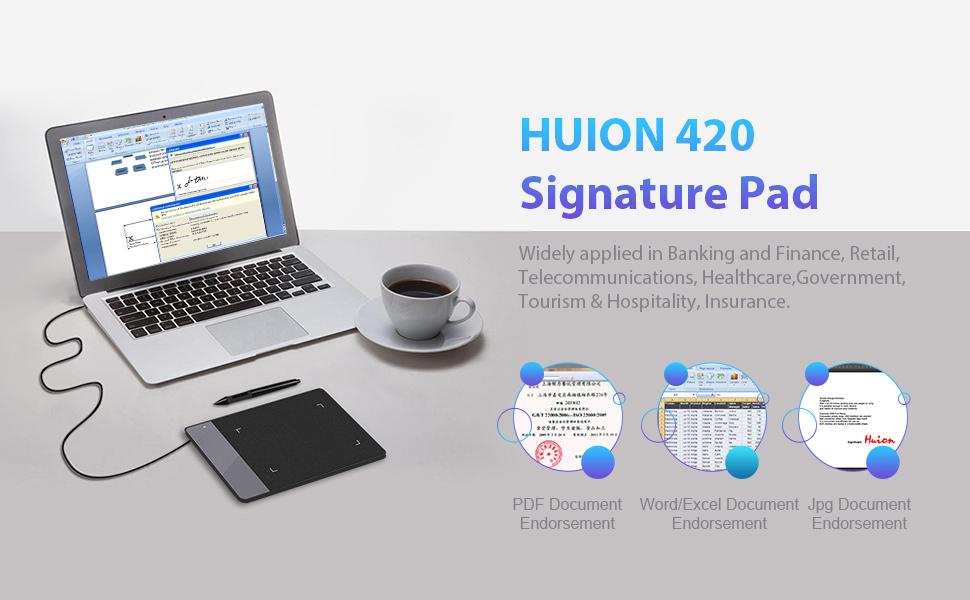
Image: The HUION 420 tablet used for digital document signing.
Údržba
1. Pen Nib Replacement
The pen nibs may wear down over time with regular use. Replace worn nibs using the provided removal tool. Gently pull out the old nib and insert a new one until it is secure.
2. Obecná péče
Keep the tablet and pen clean and free from dust. Avoid exposing the device to extreme temperatures or moisture. Store the tablet in a safe place to prevent scratches or damage.
Odstraňování problémů
1. Tablet Not Working
- Verify your computer runs Windows 7 or later, or macOS 10.12 or later.
- Odpojte a znovu připojte kabel USB.
- Try connecting the tablet to a different USB port or another computer to rule out port or computer issues.
- Eliminate potential electromagnetic interference from other electronic devices.
- If issues persist, the tablet may be faulty. Contact HUION support for assistance.
2. Driver Issues
If you experience driver malfunctions, try reinstalling the drivers from the provided CD or the official HUION website. Ensure any previous tablet drivers are completely uninstalled before installing new ones.
3. Windows 10 Specific Issues
Users on Windows 10 may encounter difficulties with Microsoft's built-in tablet program interfering with the HUION driver. Solutions to disable the Microsoft program are available online and may require some troubleshooting.
Specifikace
| Rozměry produktu | 6.97 x 0.31 x 4.41 palce |
| Hmotnost položky | 4.4 unce |
| Číslo modelu položky | Huion 420 |
| Baterie | 1 AAA batteries required (for pen) |
| Technologie připojení | USB |
| Citlivost na tlak | 2048 úrovní |
| Operační systém | Mac OS 10.12 or later, Windows 7 & above |
| Speciální funkce | Extra-Slim |
Záruka a podpora
HUION is dedicated to providing high-quality products and customer satisfaction. If you encounter any issues or require assistance with your HUION 420 tablet, please do not hesitate to contact HUION customer support. Refer to the 'Thank You' card included in your package for contact details or visit the official HUION webmísto pro zdroje podpory.