
Zavedení
This manual provides detailed instructions for the operation and maintenance of your Calypso K5609/3 Digital Quartz Watch. Please read this manual thoroughly before using your watch to ensure proper function and longevity. Keep this manual for future reference.
Bezpečnostní informace
- Nevystavujte hodinky extrémním teplotám (horkým nebo nízkým) po delší dobu.
- Do not attempt to open the watch case or replace the battery yourself, as this may void the warranty and compromise water resistance. Contact a qualified technician.
- Clean the watch with a soft, dry cloth. Avoid using chemical cleaners.
- While the watch is water-resistant up to 100 meters, avoid operating buttons underwater to prevent water ingress.
Obsah balení
- Calypso K5609/3 Digital Quartz Watch
- Uživatelská příručka (tento dokument)
Hlídatview
Your Calypso K5609/3 watch features a digital display with various functions. Familiarize yourself with the buttons and display layout.
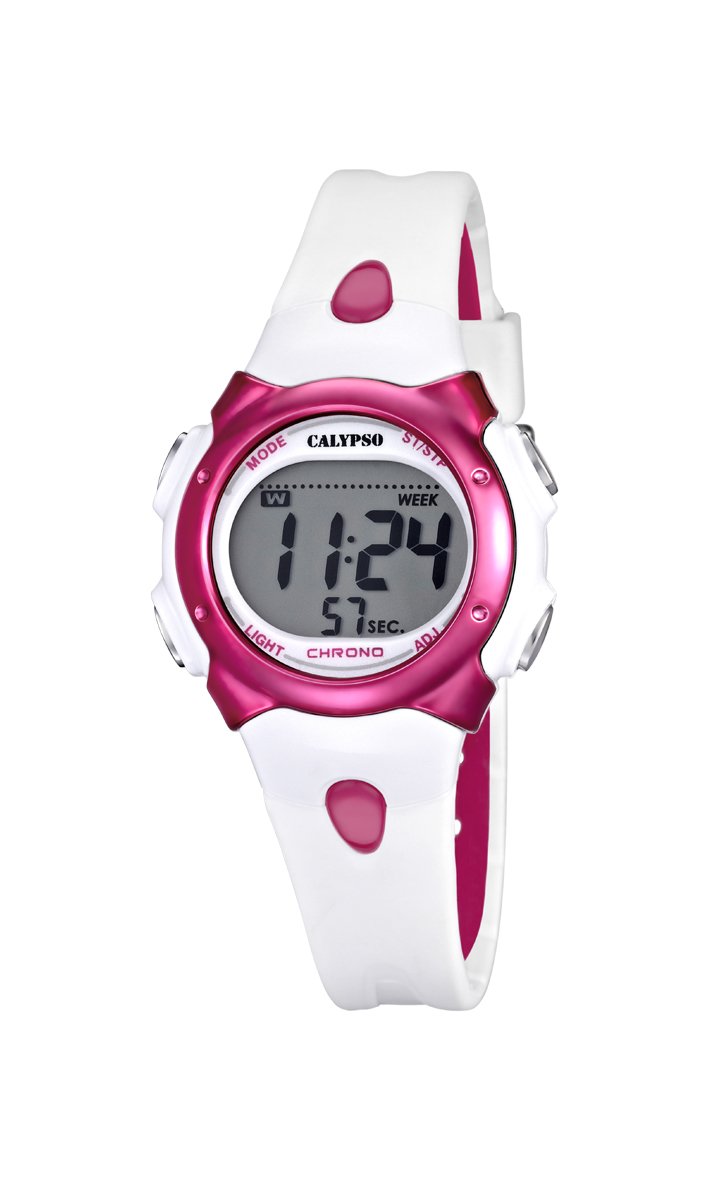
Obrázek 1: Přední view of the Calypso K5609/3 Digital Quartz Watch. This image shows the watch face with its digital display and the overall design of the watch, including the white plastic strap.

Obrázek 2: Úhlové view of the Calypso K5609/3 Digital Quartz Watch. This image provides a different perspective of the watch, highlighting its round case shape and the texture of the plastic strap.
Button Functions (Typical Digital Watch Layout)
While specific button labels may vary, most digital watches follow a similar pattern:
- Tlačítko MODE: Cykluje mezi různými režimy (Čas, Budík, Chronograf).
- Tlačítko NASTAVIT/UPRAVIT: Používá se pro vstup do režimu nastavení a potvrzení výběru.
- Tlačítko START/STOP: Used to start/stop chronograph, adjust values upwards.
- Tlačítko SVĚTLO: Aktivuje podsvícení pro osvětlení.
Refer to the markings on your specific watch for exact button identification.
Nastavení
Nastavení času a data
- Stiskněte tlačítko MODE button repeatedly until the time display starts flashing or you enter the time setting mode.
- Stiskněte tlačítko NASTAVIT/UPRAVIT vyberte číslici, kterou chcete změnit (např. hodiny, minuty, rok, měsíc, den).
- Použijte START/STOP Stisknutím tlačítka zvýšíte vybranou hodnotu. Podržením tlačítka jej upravíte rychleji.
- Pokračujte v stisknutí NASTAVIT/UPRAVIT a START/STOP dokud nebude správné nastavení času a data.
- Stiskněte tlačítko MODE tlačítko pro ukončení režimu nastavení a návrat k normálnímu zobrazení času.
Nastavení alarmu
- Stiskněte tlačítko MODE button until you reach the Alarm mode (often indicated by "AL" or a bell icon).
- Stiskněte tlačítko NASTAVIT/UPRAVIT button to select the alarm hour.
- Použijte START/STOP tlačítko pro nastavení požadované hodiny buzení.
- Stiskněte NASTAVIT/UPRAVIT again to select the alarm minute.
- Použijte START/STOP tlačítko pro nastavení požadované minuty budíku.
- Stiskněte MODE pro ukončení režimu nastavení budíku.
- Pro aktivaci/deaktivaci alarmu obvykle stiskněte START/STOP tlačítko v režimu alarmu. Na displeji se zobrazí/zmizí ikona alarmu.
Provozní
Používání chronografu (stopek)
- Stiskněte tlačítko MODE button until you reach the Chronograph mode (often indicated by "ST" or "CH"). The display should show "00:00:00".
- Stiskněte tlačítko START/STOP button to start the chronograph.
- Stiskněte tlačítko START/STOP button again to stop the chronograph.
- Chcete-li resetovat chronograf, stiskněte tlačítko NASTAVIT/UPRAVIT button while the chronograph is stopped.
- Stiskněte MODE pro ukončení režimu chronografu.
Funkce podsvícení
Pro podsvícení displeje za špatných světelných podmínek stiskněte SVĚTLO button. The backlight will typically stay on for a few seconds.
Voděodolnost
Your Calypso K5609/3 watch is water-resistant up to 100 meters (10 ATM). This means it is suitable for swimming and snorkeling. However, it is not recommended for scuba diving. Do not operate any buttons while the watch is submerged in water, as this can compromise the water seal.
Údržba
Čištění hodinek
Regularly clean your watch to maintain its appearance and function. Use a soft, slightly damp cloth to wipe the case and strap. For the plastic strap, mild soap and water can be used, but ensure no soap residue remains. Avoid harsh chemicals or abrasive materials.
Výměna baterie
The watch is powered by a quartz battery. When the display becomes dim or the watch stops functioning, the battery may need replacement. Battery life varies depending on usage, especially backlight and alarm functions. It is recommended to have the battery replaced by a qualified watch technician to ensure the water resistance seal is properly maintained.
Odstraňování problémů
| Problém | Možná příčina | Řešení |
|---|---|---|
| Displej hodinek je prázdný nebo tmavý. | Slabá nebo vybitá baterie. | Vyměňte baterii (doporučeno odborníkem). |
| Čas je nesprávný. | Čas nebyl správně nastaven nebo byl upraven neúmyslně. | Pro resetování času se podívejte do části „Nastavení času a data“. |
| Alarm se nespustí. | Budík není aktivovaný nebo je nesprávně nastavený. | Ensure alarm is activated and set to the correct time. |
| Voda uvnitř hodinek. | Buttons operated underwater or seal compromised. | Hodinky ihned odneste k odborníkovi na kontrolu a opravu, abyste předešli dalšímu poškození. |
Specifikace
- Model: K5609/3
- Značka: Calypso
- Typ displeje: Digitální
- Hnutí: Křemen
- Materiál pouzdra: Plast
- Průměr pouzdra: 33 mm
- Tloušťka pouzdra: 8 mm
- Materiál pásku: Plast
- Šířka pásma: 14 mm
- Typ spony: Pin Buckle (Boucle Ardillon)
- Materiál okénka ciferníku: Akryl
- Voděodolnost: 100 metrů (10 bankomatů)
- Speciální vlastnosti: Alarm, Chronograph, Day-Date-Month Calendar
- Zdroj napájení: Napájení z baterie
- Rozměry produktu: 20 x 20 x 20 cm; 50 grams (packaging dimensions, watch itself is smaller)
Záruka a podpora
For warranty information and customer support, please refer to the official Calypso webnebo se obraťte na autorizovaného prodejce. Uschovejte si účtenku jako doklad o koupi pro případ reklamace.
Další pomoc naleznete na adrese: www.calypsowatches.com