
Zavedení
The Arctic-Pro Tower Fan with Remote Control is designed to provide wide-range air distribution for your home or office. Standing 42 inches high, its modern design and minimal footprint ensure it fits seamlessly into most environments without occupying excessive space. Engineered for efficient airflow with reduced noise, this fan features 80-degree oscillation to circulate air effectively. It includes a convenient remote control and a digital screen for easy operation.

Figure 1: Arctic-Pro Digital Screen Oscillating Tower Fan with visible airflow and remote control.
Bezpečnostní pokyny
- Always unplug the fan from the power outlet before cleaning, servicing, or moving.
- Do not operate the fan with a damaged cord or plug. If the cord or plug is damaged, contact customer support.
- Keep fingers, hair, and loose clothing away from the fan blades and openings during operation.
- Neponořujte ventilátor do vody nebo jiných kapalin.
- Ujistěte se, že ventilátor je umístěn na stabilním a rovném povrchu, aby se zabránilo jeho převrácení.
- Nepoužívejte ventilátor ve vlhkém nebo damp místech, jako jsou koupelny nebo prádelny.
- Tento spotřebič není určen pro použití osobami (včetně dětí) se sníženými fyzickými, smyslovými nebo duševními schopnostmi nebo nedostatečnými zkušenostmi a znalostmi, pokud na ně nedohlíží osoba odpovědná za jejich bezpečnost nebo jim nebyla poskytnuta instrukce ohledně používání spotřebiče.
Obsah balení
Please ensure all parts are present before assembly. Open both ends of the box to locate all components.
- Tower Fan Unit
- Pedestal (for 42-inch configuration)
- Base (2 halves)
- Dálkové ovládání
- Screws for Base Assembly
- Napájecí kabel
Nastavení a montáž
Assembly typically takes 6-9 minutes.
- Opatrně vybalte všechny součásti z krabice.
- Assemble the two halves of the base by aligning them and pressing firmly until they snap together.
- Choose your desired height configuration:
- 42-Inch Configuration: Attach the pedestal to the assembled base, then secure the tower fan unit onto the pedestal.
- 32-Inch Configuration: Attach the tower fan unit directly to the assembled base.
- Secure the fan unit to the base/pedestal using the provided screws.
- Zapojte napájecí kabel do standardní elektrické zásuvky.

Figure 2: The Arctic-Pro Tower Fan can be configured at two different heights.
Návod k obsluze
The Arctic-Pro Tower Fan can be operated using the control panel on the unit or the included remote control.
Control Panel & Remote Functions
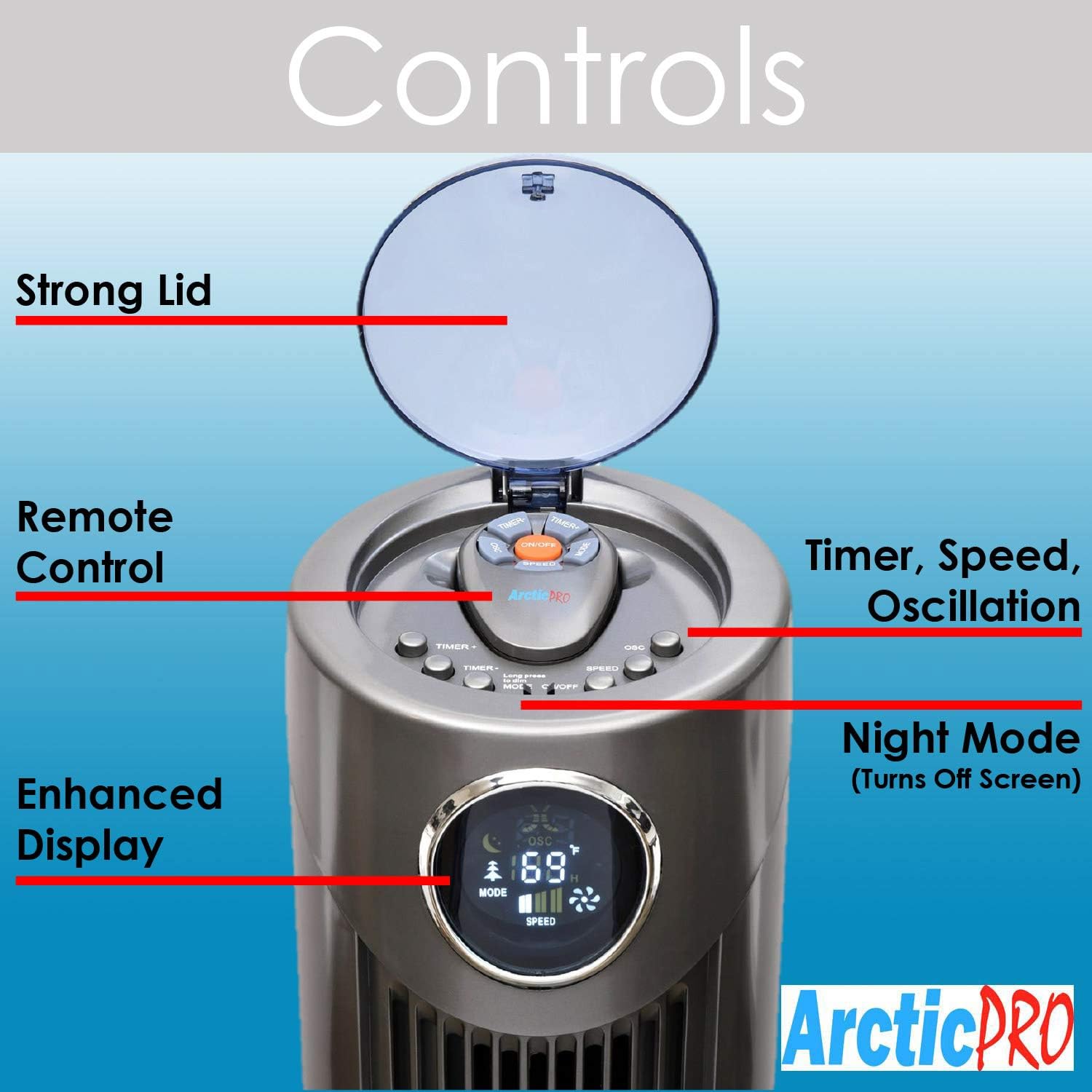
Obrázek 3: Detailní view of the fan's control panel.
- Zapnutí/vypnutí: Stisknutím tlačítka napájení na ovládacím panelu nebo dálkovém ovladači zapnete nebo vypnete ventilátor.
- Nastavení rychlosti: The fan features 3 speed settings. Press the Speed button to cycle through Low, Medium, and High.
- Režimy: The fan offers Sleep, Nature Wind, and Normal Wind modes. Press the Mode button to switch between these settings.
- Kmitání: Press the Oscillation button to activate or deactivate the 80-degree oscillation feature, circulating air throughout the room.
- Noční režim: To turn off the digital screen for sensitive sleepers, hold down the Mode button for 5 seconds. To illuminate the screen again, press the Mode button once.
- Funkce časovače: Activate the timer function to automatically shut off the fan after a set period, up to 12 hours. Press the Timer button to cycle through available time increments.
Dálkové ovládání
The convenient remote control allows you to operate all fan functions from a distance. It can be stored on top of the fan for easy access.

Figure 4: The fan's remote control and integrated handle.
Údržba
Pravidelné čištění zajišťuje optimální výkon a dlouhou životnost vašeho ventilátoru.
- Čištění exteriéru: Wipe down the exterior surfaces of the fan with a soft, damp tkanina. Nepoužívejte abrazivní čisticí prostředky nebo rozpouštědla.
- Čištění interiéru: For deeper cleaning, there is a screw on the back that holds the back plate. Remove the screw, take off the back plate, and gently clean the internal components with a soft brush or vacuum cleaner attachment to remove dust buildup. Ensure the fan is completely dry before reassembling and operating.
- Před čištěním nebo údržbou vždy odpojte ventilátor.
Odstraňování problémů
- Ventilátor se nezapíná:
- Ujistěte se, že je napájecí kabel bezpečně zapojený do funkční elektrické zásuvky.
- Zkontrolujte, zda je zásuvka pod napětím, zapojením jiného zařízení.
- Verify that the power button on the unit or remote has been pressed.
- Slabé proudění vzduchu:
- Zvyšte nastavení otáček ventilátoru.
- Clean the fan's air intake and exhaust vents to remove any dust or obstructions.
- Neobvyklý hluk:
- Ensure the fan is placed on a stable, flat surface.
- Check for any foreign objects that may have fallen into the fan's vents.
- Perform interior cleaning to remove dust buildup that might cause rattling.
- Dálkové ovládání nefunguje:
- Replace the batteries (requires 2 AAA batteries).
- Ensure there are no obstructions between the remote and the fan's sensor.
Specifikace
| Funkce | Detail |
|---|---|
| Značka | Arctic-Pro |
| Název modelu | 2103 |
| Barva | Šedá |
| Rozměry produktu | 12"H x 12"Š x 42"V |
| Hmotnost položky | 9.85 libry |
| Zdroj napájení | Elektrický kabel |
| Počet úrovní výkonu | 3 |
| Kmitání | 80 stupňů |
| Speciální funkce | Adjustable Height, Lightweight, Oscillating, Remote Controlled, Timer |
| Zahrnuté komponenty | Vzdálený |
| Jsou vyžadovány baterie | 2 baterie AAA (do dálkového ovladače) |

Figure 5: Dimensions of the Arctic-Pro Tower Fan.
Záruka a podpora
This Arctic-Pro fan comes with a Limited Warranty of 120 Days from the date of purchase.
For any questions or support needs, please contact the manufacturer at: popshopcs@gmail.com
Další zdroje
Product Review Video
Video 1: Upřímná zprávaview of the Arctic-Pro Digital Screen Oscillating Fan, provided by a seller. This video demonstrates various features and user experience.