
Zavedení
This manual provides comprehensive instructions for the Beyution Replacement TV Remote Control, model URMT34JHG001. This remote is designed to function as a direct replacement for a wide range of Philips television models, eliminating the need for complex programming. Please read this manual thoroughly to ensure proper use and to maximize your remote control's functionality.
Konec produktuview
The Beyution URMT34JHG001 is an infrared (IR) replacement remote control for Philips TVs. It features a standard button layout for intuitive operation and is constructed from durable ABS material. The remote offers a control range of up to 33 feet (10 meters) and is designed for multi-angle control within a 0-30 degree range.
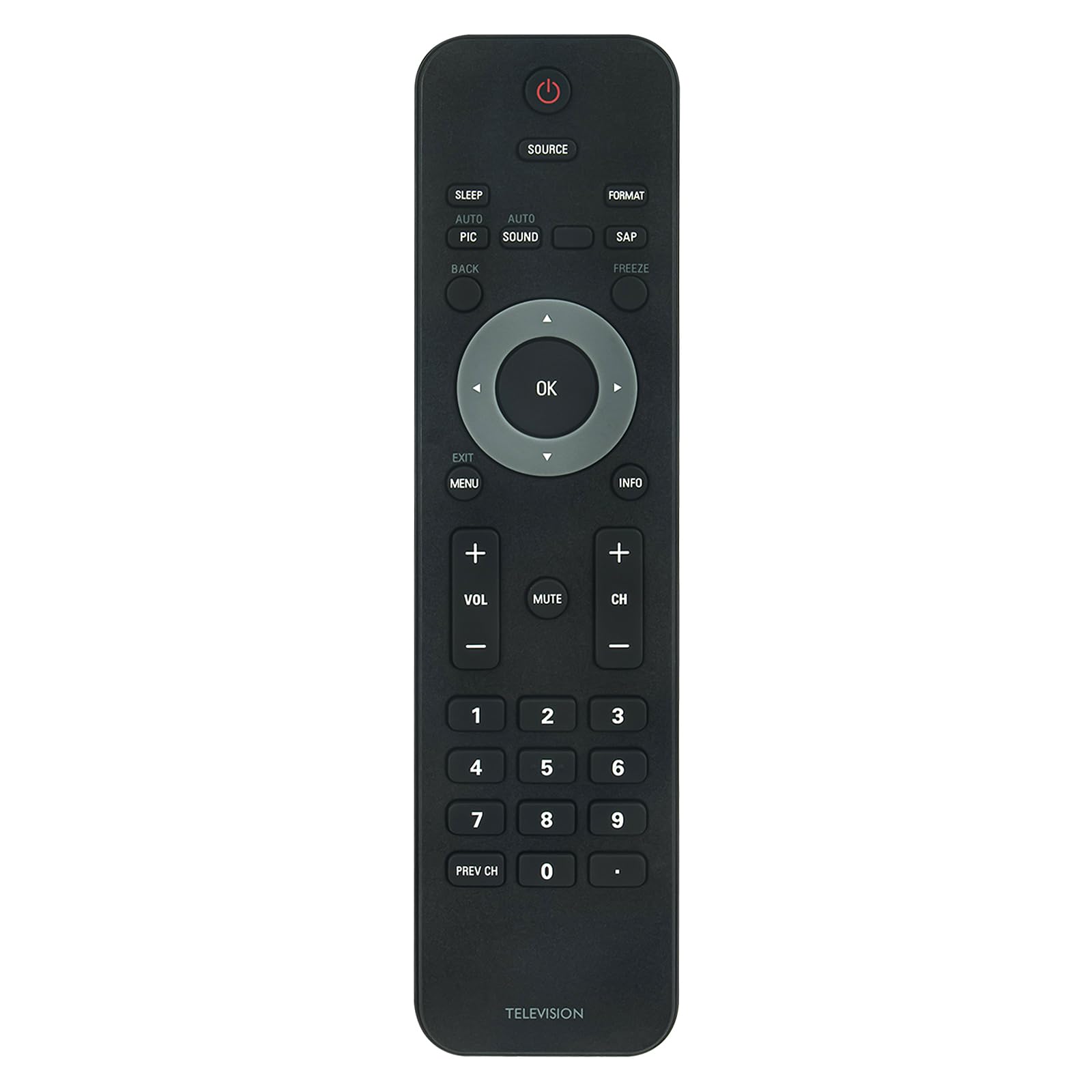
Obrázek: Přední strana view of the Beyution Replacement TV Remote Control.
This remote is compatible with numerous Philips TV models, including but not limited to: 32PFL3504D/F7, 19PFL3504D, 32PFL3514D, 22PFL3504, 42PFL3704D/F7, 42PFL7603, and 47PFL7603.
Nastavení
Instalace baterie
The remote control requires two AAA alkaline batteries (not included) for operation. No programming or code setup is required; simply insert the batteries, and the remote will be ready to use with compatible Philips TVs.
- Najděte přihrádku na baterie na zadní straně dálkového ovladače.
- Stiskněte jazýček a posuňte kryt baterie dolů, abyste jej otevřeli.
- Vložte dvě baterie typu AAA a ujistěte se, že kladný (+) a záporný (-) pól správně shodují s označením uvnitř přihrádky.
- Zasuňte kryt baterie zpět na místo, dokud bezpečně nezapadne.

Obrázek: Zadní view dálkového ovladače s otevřeným prostorem pro baterie, který ukazuje, kam vložit baterie AAA.
Návod k obsluze
Once batteries are installed, the remote control is ready for immediate use. Point the remote directly at your Philips TV and press the desired function button.

Image: The remote control displaying its button layout, highlighting its advanced IR technology with a 30-foot range and multi-angle control.
Klíčové funkce:
- Napájení (červené tlačítko): Zapíná nebo vypíná televizor.
- Zdroj: Selects input sources (e.g., HDMI, AV).
- OK (Center Button): Potvrzuje výběry v nabídkách.
- Směrové šipky: Prochází nabídkami a možnostmi.
- VOL +/-: Nastavuje úroveň hlasitosti.
- CH +/-: Mění televizní kanály.
- Ztlumit: Ztlumí nebo zruší ztlumení zvuku televizoru.
- Menu: Přístup k hlavní nabídce televizoru.
- Výstup: Opustí aktuální nabídku nebo obrazovku.
- Info: Zobrazuje informace o aktuálním programu nebo vstupu.
- Číselná tlačítka (0-9): Přímý výběr kanálů.
- Prev CH: Vrátí se k předchozímu viewed kanál.
- Spát: Nastaví časovač vypnutí pro televizor.
- Auto Pic / Auto Sound: Adjusts picture or sound settings automatically.
- MÍZA: Selects Secondary Audio Program (if available).
- Zmrazit: Pozastaví aktuální obraz na obrazovce.
- Formát: Changes the screen aspect ratio or display format.
- Zadní: Returns to the previous step or screen.
Údržba
Abyste zajistili dlouhou životnost a optimální výkon vašeho dálkového ovladače, dodržujte tyto pokyny pro údržbu:
- Čištění: Dálkový ovladač otírejte měkkým, suchým hadříkem. Nepoužívejte tekuté čisticí prostředky, abrazivní houbičky ani chemická rozpouštědla, protože by mohla poškodit povrch nebo vnitřní součásti.
- Výměna baterie: Replace batteries when the remote's response becomes sluggish or stops working. Always replace both batteries at the same time with new AAA alkaline batteries. Do not mix old and new batteries, or different types of batteries.
- Skladování: If the remote will not be used for an extended period, remove the batteries to prevent leakage, which can cause damage. Store the remote in a cool, dry place away from direct sunlight and extreme temperatures.
- Vyhněte se kapkám: Chraňte dálkový ovladač před fyzickými nárazy, protože pády mohou poškodit vnitřní obvody.
Odstraňování problémů
Pokud máte problémy s dálkovým ovladačem, podívejte se na následující běžné problémy a jejich řešení:
- Dálkové ovládání nefunguje:
- Zkontrolujte, zda jsou baterie vloženy správně se správnou polaritou (+/-).
- Vyměňte staré baterie za nové alkalické baterie typu AAA.
- Ujistěte se, že mezi dálkovým ovladačem a infračerveným senzorem televizoru nejsou žádné překážky.
- Ujistěte se, že se nacházíte v efektivním provozním dosahu (až 33 metrů) a míříte dálkovým ovladačem přímo na televizor.
- Some buttons are not responding:
- This remote is a direct replacement and should function without programming. However, compatibility can vary slightly between specific TV models. Verify your TV model is listed as compatible.
- Clean the remote control buttons and surface to ensure no debris is interfering with button presses.
- TV is not responding consistently:
- Interference from strong light sources (like direct sunlight or fluorescent lights) can affect IR signal transmission. Try operating the remote in a different lighting condition.
- Ensure the TV's IR receiver is not blocked or dirty.
Specifikace

Image: The remote control with its dimensions (7.28 inches length, 1.97 inches width) and material properties (ABS material, soft touch, anti-dusted).
| Značka | Beyution |
| Název modelu | URMT34JHG001 |
| Kompatibilní zařízení | Televizory Philips |
| Technologie připojení | Infračervený (IR) |
| Maximální dosah | 33 10 stop (XNUMX XNUMX metrů) |
| Počet tlačítek | 20 |
| Typ baterie | 2 x alkalické baterie AAA (nejsou součástí balení) |
| Rozměry položky (D x Š x V) | 7.28 cm x 1.97 cm x 0.5 cm (přibližně) |
| Materiál | ABS |
Záruka a podpora
Informace o záruce
This Beyution remote control comes with a 1-year limited warranty from the date of purchase. This warranty covers manufacturing defects under normal use. It does not cover damage caused by misuse, accidents, unauthorized modifications, or battery leakage.
Zákaznická podpora
For technical assistance or warranty claims, please refer to the contact information provided with your purchase or visit the Beyution official support channels. Please have your product model number (URMT34JHG001) and proof of purchase ready when contacting support.